[Fixed] Snapchat locked, How to Unlock Snapchat Account on iPhone?
Summary
If your Snapchat account is locked, you can find answers to your questions on this page, including why your account was locked, how long it will be temporarily locked, and how to unlock it on an iPhone. Just read on to get a guide to fix the issue and unlock your Snapchat account.
Overview of Snapchat locked issue
Snapchat's popularity among iPhone users has led to a growing issue of locked accounts, with many users seeking help online. Common queries include "Snapchat temporarily locked, how to fix", "Why Snapchat locked my account", "How long will my Snapchat be temporarily locked", "How to unlock Snapchat account on iPhone", and "Snapchat won't unlock my account". This response aims to address these concerns and provide guidance on how to unlock a Snapchat account on an iPhone.
| Workable Solutions | Step-by-step Troubleshooting |
|---|---|
| 1. Uninstall third-party apps | If your Snapchat is locked due to the installation of third-party apps...Full steps |
| 2. Go to Snapchat website | If your account is unlocked temporarily, you can go to this website to...Full steps |
| 3. Click Unlock button | Snapchat will be most likely to unlock your account and send you a fresh...Full steps |
| 4. Reconnect the internet | If the solutions mentioned above don't work, then you can try to reconnect...Full steps |
| More Solutions | Perform a hard rest on the iPhone > Reinstall Snapchat from your iPhone...Full steps |
Common questions and answers of Snapchat locked issue
Question 1. Why Snapchat locked my account?
Reason 1. Your Snapchat account may be locked due to using third-party apps, plugins, or tweaks like Phantom, 6snap, etc. which are often illegal or not supported by Snapchat.
Reason 2. Your Snapchat account may be locked if the app detects that you're sending spam, unsolicited snaps or messages, or engaging in other abusive behavior.
Reason 3. Snapchat will lock your account when adding too many friends without verifying your email or phone number.
Reason 4. When Snapchat releases app updates, many accounts may get affected and locked due to the frequent changes.
Question 2. How long will my Snapchat be temporarily locked?
If Snapchat blocks or locks your account, the duration of the lock depends on the reason behind it. Minor issues usually result in a temporary lock, which can take several hours to days to resolve. However, if the Snapchat team deems the issue serious, your account may be permanently locked, resulting in a permanent ban on Snapchat services, with no possibility of unlocking your account.
Question 3. How to unlock Snapchat account on iPhone?
If you've received a message saying your Snapchat account has been temporarily locked, you can try waiting a day and then logging in again to unlock your account. If the lock persists, a guide is available to help you regain access to your Snapchat account.
Note: To unlock a Snapchat account, first ensure that any third-party apps, plug-ins, or tweaks are disabled or uninstalled, as these can interfere with the account recovery process.
Way 1. Uninstall third-party Snapchat apps or plugins
If your Snapchat account is locked due to third-party app installation, try uninstalling the app or plugin from your iPhone and log in again. If that doesn't work, update your iOS system to the latest version and then remove third-party apps.
If your Snapchat account is unlocked temporarily, you can visit the given website to unlock it again in a few hours.
You can unlock your iPhone by clicking the yellow Unlock button on the screen. This process may take a couple of hours to complete.
Snapchat will likely unlock your account and send a new password. If you try to log in before Snapchat is ready, you'll get an "Error To Unlock" message. If that happens, you can email Snapchat about the issue or tweet about it, tagging @SnapchatSupport.
Way 4. Reconnect your internet
If the solutions mentioned above don't work, then you can try to reconnect your internet by putting your phone into airplane mode and turning it back on.
Way 5. Perform a hard rest on the iPhone
To fix the "Snapchat locked" issue, you can try the following: go to your phone's settings, then click on "accounts" or "accounts & sync", and look for the Snapchat option. Select it and click on "sync now" to update your account information. If that doesn't work, try restarting your phone or uninstalling and reinstalling the Snapchat app.
For iPhone 8 and later, quickly press and release the Volume Down button, then quickly press and release the Volume Up button, followed by holding the Sleep/Wake button until the Slide to Power Off slider appears, which can then be moved from left to right to shut down the device.
For older iPhones, hold and press the Home and Sleep/Wake buttons simultaneously until the Slide to Power Off slider appears, then release the buttons and slide to power off. To force restart, continue holding the buttons until the Apple logo appears.
Way 6. Reinstall Snapchat from your iPhone
If Snapchat is not working properly, you can try reinstalling it from your iPhone, which may resolve the issue.
Question 4. How to unlock a permanently locked Snapchat account
If you're permanently locked out of Snapchat, don't worry - you can still get back into your account. To do so, follow these steps. (Note: the actual steps are not provided in the original text)
Step 1. Head to Snapchat Support > Select "Contact Us" > Choose "I have a login issue" > "I can't log in to Snapchat."
Step 2. If you're having trouble accessing your account, try resetting your password or reaching out to support for assistance. You can also contact the platform's support team for help with account-related issues. They can guide you through the process of recovering your account or provide further assistance if needed.
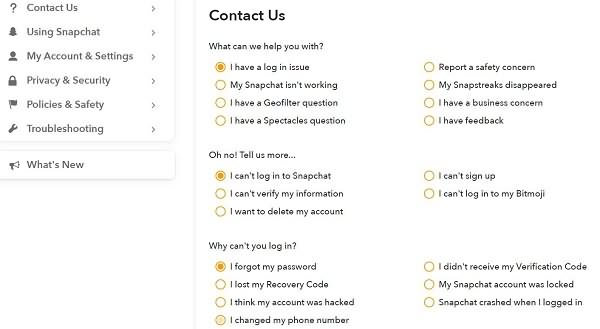
Step 3. Choose "YES" for "Still Need Help" at the bottom.
Step 4. Then, you will need to submit a form about your account information. You can write your case to let Snapchat expert know your situation.
Step 5. After you've been locked out of your Snapchat account, you can wait for Snapchat to unlock your account.
How to recover Snapchat messages & chats with Snapchat recovery tool
If you've lost access to your Snapchat account, a tutorial can help you unlock it. However, if you've accidentally deleted or lost your Snapchat messages, photos, videos, or chat history, you can use Qiling MobiSaver, a Snapchat recovery tool, to retrieve them.
For a detailed guide, please refer to how to recover Snapchat messages on iPhone.
Step 1. Connect iPhone to Your PC
Launch Qiling MobiSaver, click "Recover from iOS device" on the left, and click "Start".
Step 2.Scan for Lost iPhone Data
Qiling MobiSaver will automatically scan your iPhone/iPad/iPod, finding both existing and potentially lost data, and you just need to wait for the scan to finish.
Step 3.Click the "Recover" Button
You can select the lost data you want to recover, such as photos, videos, contacts, SMS, notes, voice mails, and other files, and save them to a new location.
The bottom Line
If the solutions above didn't work for you, or if you have other ideas to share, feel free to contact us. If you experience data loss while trying to unlock Snapchat, you can use Qiling MobiSaver to recover your lost data.
Related Articles
- 3 Ways to Retrieve Deleted Messages on iPhone 8
- Recover Deleted Files on iPhone with/Without Backup
- How to Recover Deleted/Lost Voice Memos with/without Backup
- WhatsApp Not Receiving Messages: 8 Solutions
- Fix 'Card Cannot Be Accessed' Error in Canon Without Losing Data
The SD card in a Cannon camera is reporting an error, stating that the card cannot be accessed. The error message suggests reinserting or changing the card, or formatting the card with the camera. - Here is How to Fix DllRegisterServer Was Not Found
If you're encountering the DllRegisterServer Was Not Found error when trying to register a DLL on Windows, use this guide.
Products
Articles & Tutorials
- Data Recovery
- Data Backup
- File Recovery
- File Backup
- System Backup and Restore
- Disk and Partition Clone
- Technical articles
- Mobile articles
- Disk Master Help
- Windows Data Recovery Tutorials
- Windows Secure Delete Tutorials
- Windows Partition Management Tutorials
- Windows File Backup and Restore Tutorials
- Windows System Backup and Restore Tutorials
- Windows Disk Backup and Restore Tutorials
- Windows Clone Tutorials