FIX Error: Acronis True Image For Crucial Not Working
Pre-checks When Acronis True Image for Crucial Not Working
Acronis True Image for Crucial is a software that clones, backs up your device, operating system, files, data, and settings. However, it requires specific system specifications to function properly, failing to meet which can result in errors.
- Crucial BX-series or MX-series SSD
Acronis True Image for Crucial requires a Crucial BX-series or MX-series SSD to clone or backup data from a device or disk connected via SATA or laptop adapter.
- Requires an update
To run other programs like backing up, syncing, and viewing a dashboard, an update is needed from the current Acronis version to an unrestricted version.
- Registration key
Older software versions require a registration key, whereas newer versions only need a Crucial BX-series or MX-series SSD.
- Source Drive should be Error-free
Acronis True Image for Crucial requires a source image that is error-free, meaning the original drive must be in good condition and free from errors for the cloning process to be successful, ensuring the transfer of data, settings, and the operating system is accurate.
Common Issues of Acronis True Image for Crucial
Acronis True Image for Crucial is a user-friendly software that can clone data, back up, and make OS migration easy, but it has some bugs and errors that are frequently reported and observed, resulting in it not working properly. Some common issues include.
- 1. SSD does not detect Acronis
If your SSD is not a Crucial BX-series or MX-series SSD, it might not be detected by Acronis.
* Related reading: How to fix SSD not showing or detected
- 2. New external USB drive not recognized by Acronis
Acronis may not recognize external USB drives and display error messages, and sometimes attempting to run a program manually may cause the PC to shut down.
- 3. Crucial SSD is not appearing in the destination disk
Crucial SSD may not appear on the destination disk due to low power or incorrect SSD connection.
- 4. Clone failed upon 99%
Cloning stops at 99% and results in error messages, which are caused by existing errors on the receiver disk.
How to Fix Acronis True Image for Crucial Not Working?
To clone your Crucial SSD using Acronis True Image, ensure you meet the necessary requirements, including keeping your software up-to-date, using a Crucial BX-series or MX-series SSD, and verifying that your drive is error-free.
The project aims to develop a comprehensive framework for evaluating the effectiveness of interventions in reducing mental health stigma. The framework will be designed to be adaptable to different cultural contexts and will take into account the diverse perspectives of stakeholders, including individuals who have experienced mental health issues, service providers, and policymakers.
- Cables are connected correctly
- Try new cables to avoid the faulty cables
- Make sure your drive is working properly
- Acronis in Windows requires bootable media to avoid other media conflicts.
- If Acronis failed to initialize your drive, try manually initializing it as part of the cloning process.
100% Working Solution to Acronis True Image for Crucial Not Working
For users who still experience issues with Acronis True Image on Crucial SSDs, an alternative cloning software can be considered. Qiling Disk Copy is a sound option that fully supports Crucial products.
There are lots of benefits to using, some of them are following:
- Offers everything you can find in Acronis
Qiling Disk Copy provides all the features of Acronis, such as cloning, backing up, and syncing data from a drive.
- Better disk cloning user experience
It is very user-You can clone your hard drive at home using a cloning software like Qiling Disk Master, and then install the new drive in your computer. This way, you can keep your current drive as a backup and upgrade to a better one without losing any data.
- Less disk cloning issues happen
There are very few reports about issues or errors in cloning disks, and any SSD can be used for cloning.
- More professional tech support for 24 hours
The interface is very user-"Want to clone your disk? No worries! It's just a few clicks away.
To clone a HDD/SSD to a new SSD using Qiling Disk Copy, follow these steps: First, download and install Qiling Disk Copy on your computer. Next, connect the new SSD to your computer and ensure it's detected by the operating system.
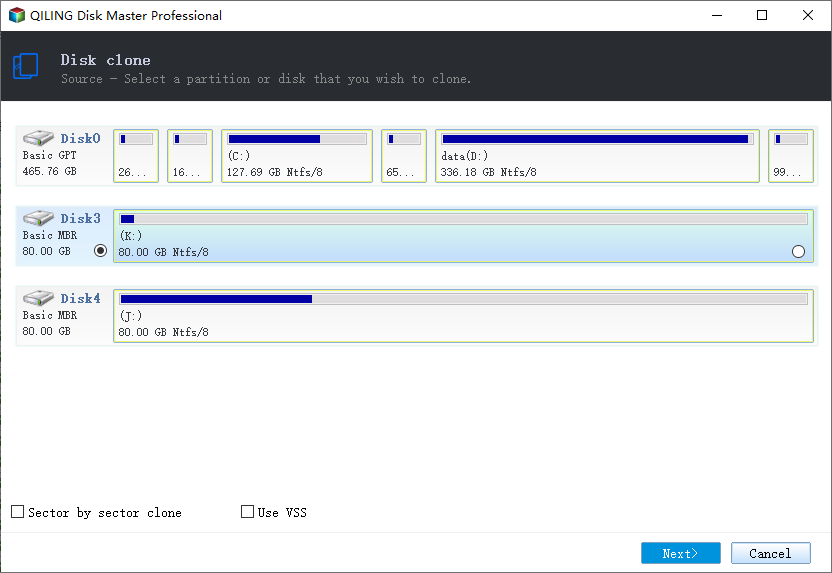
Step 1: To clone a hard drive, click the "Disk clone" button in the tools page, then select the HDD that you want to clone.
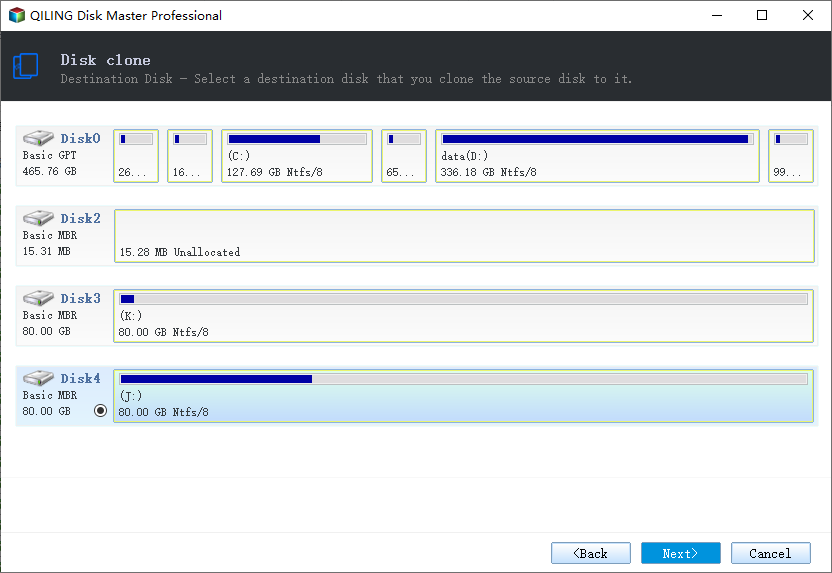
Step 2: Select the SSD as your destination.
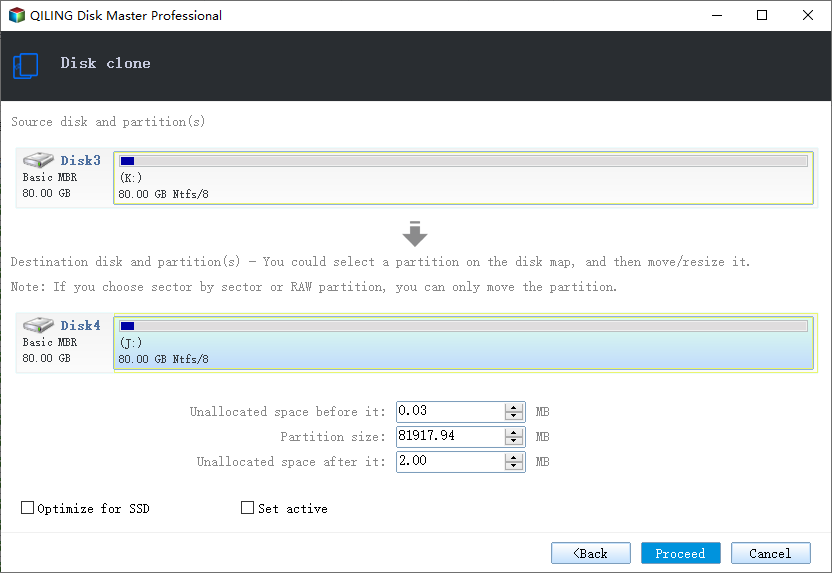
Step 3: Edit the disk layout and then click "Proceed" to continue.
You should select the "Check the option if the target is SSD" box as the destination is an SSD.
A warning message informs you that the data on the SSD will be erased. If you don't have important data on the destination disk, click "OK" to proceed.
Step 4: Wait for the process to complete.
Conclusion
Acronis True Image for Crucial is not reliable for cloning, but Qiling Disk Copy is a user-friendly alternative that supports Windows 11 and can be used for cloning and backups.
It is time and money-Qiling Disk Copy software is a simple and safe way to clone your hard drive, allowing you to easily transfer your operating system and data to a new disk, regardless of whether you're using a Crucial BX-series or MX-series SSD, or any other type of storage device.
Qiling Disk Copy allows you to migrate data from a larger data disk to a smaller one, making it easy to exchange a hard drive for a solid-state drive (SSD), which can boost work performance and smooth out functions. This software offers a convenient solution, potentially outperforming Acronis in this regard.
Related Articles
- [Tried and True] Ignore Bad Sectors During Copying
- How to Clone Failing Hard Drive to External Hard Drive in Windows 10/8/7
- (2022) Windows XP Cloning Software
- How to Clone Windows OS from HDD/SSD to M.2 SSD
- Super Easy | How to Clone Hard Drive Before Replacing
Cloning your hard drive before replacing it can help keep your new drive with the same data as your old one, and this post will guide you through the process using Qiling Disk Copy. - How to Clone Windows OS from HDD/SSD to M.2 SSD
To clone your HDD to an M.2 SSD, follow the steps outlined in this tutorial, which utilizes Qiling Disk Copy to transfer data from your existing HDD or SSD to a new M.2 SSD or NVMe M.2 SSD.
Products
Articles & Tutorials
- Data Recovery
- Data Backup
- File Recovery
- File Backup
- System Backup and Restore
- Disk and Partition Clone
- Technical articles
- Mobile articles
- Disk Master Help
- Windows Data Recovery Tutorials
- Windows Secure Delete Tutorials
- Windows Partition Management Tutorials
- Windows File Backup and Restore Tutorials
- Windows System Backup and Restore Tutorials
- Windows Disk Backup and Restore Tutorials
- Windows Clone Tutorials