Thin-Provisioned Volume Runs Out of Space
Quick Navigation:
- Why Free Space Is Misleading
- Measure the Real Capacity
- Stop the Growth
- Move Data Safely
- Frequently Asked Questions
A thin-provisioned volume reports the size you created, not the space that exists behind it. That is the whole point of thin provisioning, and it is also why a volume can show terabytes free while the pool underneath is one write away from refusing service. Once the pool is exhausted, writes fail without warning and the volume itself can drop out of service.
1 Why Free Space Is Misleading
A thin volume is a promise. Blocks are allocated only when something writes to them, so the reported size is a ceiling and the pool is a shared budget that several volumes draw from at the same time.
The file system inside the volume reports its own free space, and nothing in File Explorer or in a mapped drive view reflects the state of the pool. A volume with 3 TB free inside can sit on a pool with 20 GB left, and both numbers are true.
The gap closes faster than expected because snapshots, checkpoints, and deleted-but-still-referenced blocks keep space allocated. When the pool finally reaches zero, applications receive write errors rather than a clean warning, and the volume may go offline with unflushed data still in flight.
2 Measure the Real Capacity
Open the storage pool console and read three figures: total pool capacity, allocated space, and available space. Then add up the committed size of every virtual disk in the pool and compare that total with the physical capacity; the difference is the over-subscription you are running on.
Check what else consumes pool space besides the volume you are watching. Snapshots, differencing disks, and volumes that were expanded but never filled all count against the same budget, and a single forgotten snapshot can account for the entire shortfall.
Finally, compare available space with the growth rate rather than with the current value. A pool losing a hundred gigabytes a week has a problem that will return long before the next maintenance window.
3 Stop the Growth
Stop the workload that grows fastest. Backups writing into the volume, verbose logs, temporary files, and shadow copies are the usual leaders, and pausing them buys the hours needed to move data properly.
Do not expand the virtual disk as a first response. Raising the maximum allocates nothing, hides the shortfall from monitoring, and lets applications believe that space exists when it does not.
If the pool is already at zero available, take writes off the volume deliberately rather than waiting for them to fail mid-transaction. A controlled pause and a copy are always cheaper than a volume that drops offline under load.
4 Move Data Safely
Copy the data to a fixed-size volume or to a disk outside the pool, then delete it from the thin volume once the copy is checked; Qiling Disk Master performs a copy, not a move, so the source stays intact until you decide otherwise. Choose the destination by real free space, not by the size advertised by the thin volume, because a destination that is itself thin-provisioned from the same pool moves the problem rather than solving it.
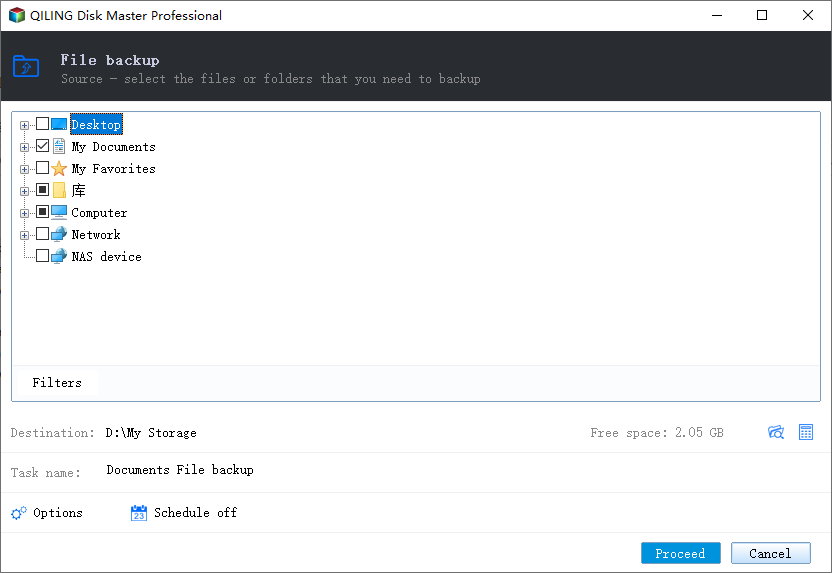
Step 1. Select the Files to Copy
Open the program, go to Backup and Recovery, and choose File Backup. Expand the thin-provisioned volume in the source tree and tick the folders to relocate, starting with the largest and least active ones.
Step 2. Choose a Destination and Start
Point the destination at a volume with fixed capacity on a different physical disk, confirm the free space, and start the task. Compare a sample of the copied files before you remove anything from the source.
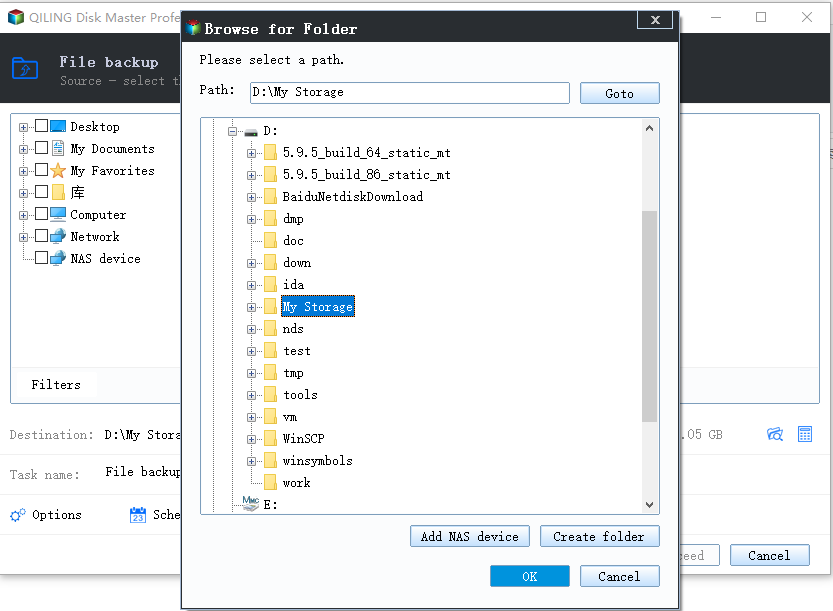
Deleting the source only after the check returns pool space without risking the data, and the volume stops growing from that point on.
5 Frequently Asked Questions
Does deleting files inside the volume free pool space?
Only after the file system releases the blocks and any snapshot that still references them is removed. Until then the space stays allocated to the volume.
Can I shrink a thin volume to reclaim space?
Lowering the maximum does not return allocated blocks. Space comes back when data is deleted and the pool trims the blocks it no longer needs.
What happens to writes when the pool is full?
They fail. Applications report I/O errors, and the volume can go offline, so stop writes and copy the data out before attempting anything else.
Related Articles
- Storage Spaces Reduce Resiliency Warning
- Storage Spaces Disk Missing and Cannot Be Removed
- Back Up Windows Server 2025 Storage Spaces
- Recover Deleted Files From a Storage Spaces Volume
- How to Check NVMe SSD for Health, Help
Products
Articles & Tutorials
- Data Recovery
- Data Backup
- File Recovery
- File Backup
- System Backup and Restore
- Disk and Partition Clone
- Technical articles
- Mobile articles
- Disk Master Help
- Windows Data Recovery Tutorials
- Windows Secure Delete Tutorials
- Windows Partition Management Tutorials
- Windows File Backup and Restore Tutorials
- Windows System Backup and Restore Tutorials
- Windows Disk Backup and Restore Tutorials
- Windows Clone Tutorials