Great Discover Virus | Here Is Everything You Should Know
PAGE CONTENT:
This article provides a guide on how to identify and remove the Great Discover virus, a computer threat that can harm your system. It explains what the Great Discover virus is and offers various methods to eliminate it, helping you protect your computer from its dangers.
What Is Great Discover Virus and Its Symptom
The Great Discover virus is a type of malware that functions as a Trojan horse, posing a significant threat to computer systems. It can cause issues like system lag and resource waste, similar to other malicious programs.

The Great Discover virus can use an infected computer's system resources to mine cryptocurrencies, such as BitCoin, Dask, and Monero, for its developers, and also cause performance issues like slowing down the computer.
The cryptocurrency miner malware can be particularly problematic as it can consume system resources, making it worse than typical adware. Not only can it mine cryptocurrencies, but it can also send unwanted ads to the victim system, degrading the user's browsing experience.
Furthermore, it can start background processes, leading to a significant drain on the system's hardware resources.
The Great Discover virus will impact a computer's GPU, CPU, and RAM, utilizing all hijacked resources to mine a specific cryptocurrency, as chosen by its operator.
The good thing is that this virus is unlikely to harm your computer or data, but it's still a good idea to back up your files to prevent data loss.
How Does the Great Discover Virus Infect Your Computer
The Great Discover virus, similar to the Wannacry Virus, infiltrates computers secretly through suspicious software installers. Some users, seeking free software, download cracked versions online, which provides a pathway for malware to spread.
The Great Discover virus can disable the Windows firewall, allowing it to manipulate your computer and use its resources once unwanted software has been installed.
The Great Discover virus can be spread through various means, such as being packed in serial key generators or cracking tools, or entering your computer through rogue programs.
However, its distinctive name makes it easy to recognize, and by following the steps outlined below, you can quickly eliminate it from your system.
4 Ways to Remove a Great Discover Virus
The following are 4 practical ways to help you eliminate the Great Discover virus. Let's come to see it.
Way 1. Uninstall the Program
You can perform the steps below to uninstall the Great Discover named program if you can find it.
Step 1. To find Great Discover in Settings, press the Windows + I keys to open the Settings app. From there, navigate to the "Apps & features" section.
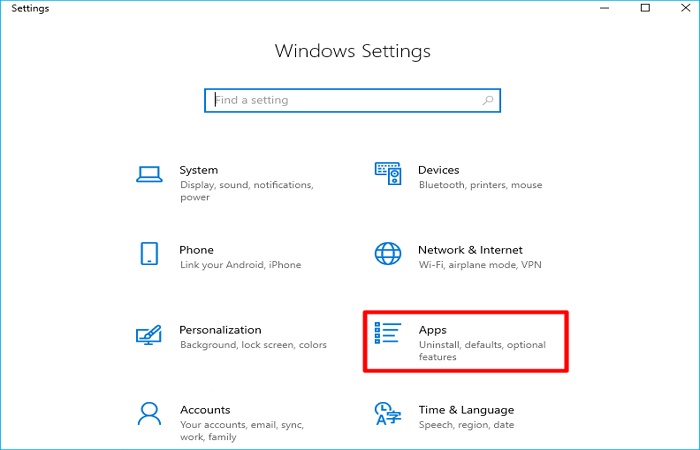
Step 2. Click Great Discover and select Uninstall, and then Uninstall again.
Be sure to remove any Great Discover-related apps, and keep an eye out for recent rogue or unstable installs to determine if the Great Discover infection is hiding as one of those other programs.
Way 2. End the Great Discover Processes
The Great Discover process typically ends when an application is removed from a computer, but this particular infection can persist by utilizing any remaining resort. It is essential to check if any associated processes are still active.
Step 1. Press the Ctrl + Shift + Esc keys on your keyboard to launch the Task Manager.
Step 2. Check if there are any rogue processes named "Great Discover" under the Processes tab, then right-click on it.
Step 3. To delete the file, select the Open file location option, then delete the file that appears in the pop-up window.
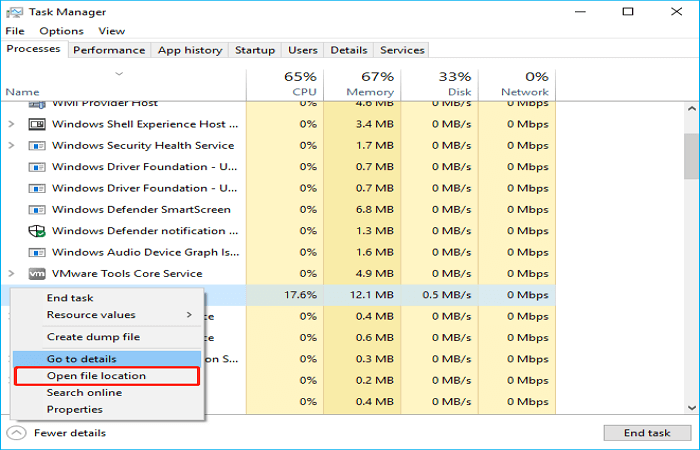
Step 4. To stop a rogue process, go to Task Manager, click on the process that's causing the issue, and select End task. This will terminate the process and free up system resources.
Way 3. Delete Leftover Files
If you've removed all associated apps from your computer, there might still be some files left behind. To avoid giving a computer virus a place to live, you should get rid of these remaining files.
Step 1. To open File Explorer Options, you can type "Folder Options" in the Search box in File Explorer.
Step 2. To view hidden files, folders, and drives, navigate to the View bar, select the "Show hidden files, folders, and drives" option, then tap "Apply" and "OK" to save the changes.

Step 3. To verify if there are Great Discover-related files, go to File Explorer and check the following location paths: C:\Users\username\AppData\Local\Great Discover, C:\Users\username\AppData\Roaming\Great Discover, and C:\Users\username\AppData\LocalLow\Great Discover.
Also check C:\Program Files (x86)\Great Discover, C:\Program Files\Great Discover, and C:\Users\username\Documents\Great Discover. If you find any files, delete them to remove the associated software.
- C:\Program Files\UserNamee Software Oy\Great Discover
- C:\Program Files\Devine Software Oy\Great Discover
- C:\Users\UserName\AppData\Local\Microsoft\CLR_v2.0\UsageLogs\Great Discover App.exe.log
Way 4. Clean the Registry
Numerous Trojans can alter the Windows Registry of the infected computer, adding harmful entries that compromise the system's stability. To resolve the issue, it's essential to delete Great Discover-related entries from your computer's Registry.
Step 1. To open the Registry Editor, press the Win + R keys to launch the Run dialog box, type regedit, and then press Enter.
Step 2. Select Find…under the Edit bar.
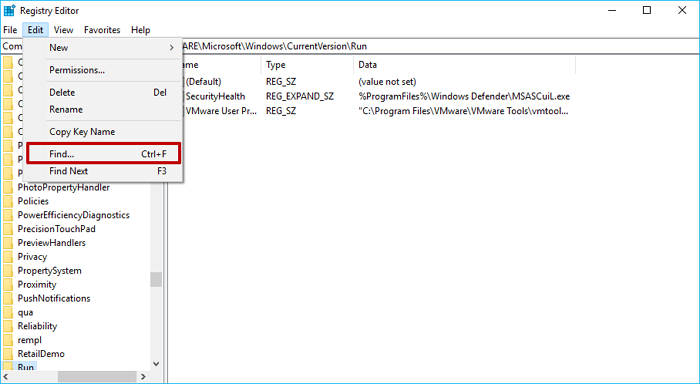
Step 3. To search for "Great Discover" entries, use the Find feature in Registry Editor. Type "Great Discover" in the search box and select Find Next to locate the first occurrence.
Once you have found a Great Discover-related entry, right-click on it and select Delete to remove it from the registry. Press F3 to find the next occurrence and repeat until all related entries are deleted.
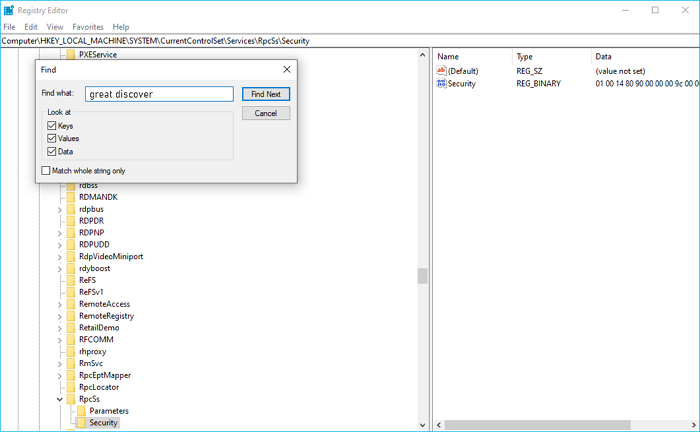
Step 4. To delete unnecessary registry entries, navigate to the sidebar and manually delete each of the following folders:
- HKEY_CURRENT_USER > Software > Random Directory
- HKEY_CURRENT_USER > Software > Microsoft > Internet Explorer > Main > Random
- HKEY_CURRENT_USER > Software > Microsoft > Windows > CurrentVersion > Run > Random
The Bottom Line
The Great Discover virus is a type of malware that can cause significant harm to your computer. Its symptoms include system crashes, slow performance, and unauthorized changes to your system settings.
While it is challenging to prevent this virus, taking certain precautions can minimize its impact. If your computer has been infected, applying the methods outlined above can help you remove the virus and protect your system.
Related Articles
- Windows 11 Is Affecting Performance on AMD CPUs, Fixes Are Coming Soon
- GPU vs CPU? What's the Difference? Which Is Better?
- What Is Boot Partition? [Specifically Explained]
- How to Use iCloud, What Are iCloud Features | Ultimate Guide 2023
- How to Increase Hard Drive Speed on Windows 10 [Step-by-Step Guide]
To increase hard drive speed on Windows 10, consider freeing up space by removing unnecessary files, enabling write caching, or using software that helps manage it, as outlined in our post on how to Increase Hard Drive Speed on Windows 10. - How to Fix Insert Media Some Files Are Missing Windows 10
If you meet the insert media some files are missing Windows 10 error. This post will offer you 4 methods to fix this problem with simple steps to follow and clear screenshots.
Products
Articles & Tutorials
- Data Recovery
- Data Backup
- File Recovery
- File Backup
- System Backup and Restore
- Disk and Partition Clone
- Technical articles
- Mobile articles
- Disk Master Help
- Windows Data Recovery Tutorials
- Windows Secure Delete Tutorials
- Windows Partition Management Tutorials
- Windows File Backup and Restore Tutorials
- Windows System Backup and Restore Tutorials
- Windows Disk Backup and Restore Tutorials
- Windows Clone Tutorials