MacBook Pro Full Information | MacBook Pro Models, Features, and Comparison
MacBook Pro is one of Apple's most popular laptops, but it's actually one of two models, the MacBook Pro and the MacBook Air, developed for different consumer groups. We'll be discussing the differences between the two in the following sections.
The new MacBook Pro series uses Apple silicon M-series CPUs and comes in 13, 14, and 16-inch screen sizes, with enhanced power capabilities following the launch of macOS Ventura.
Apple introduced the M2 Pro and M2 Max processors for the new MacBook Pro family in January 2023, offering the most powerful MacBooks yet, outperforming nearly all other laptops despite their thin and light design.
Which MacBook Pro Model Should You Buy
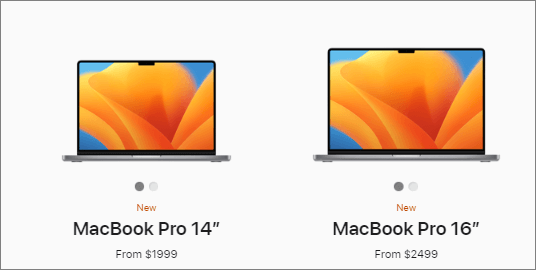
There is more than one model of MacBook Pro, and we will discuss the popular MacBook Pro models you can buy. Check the table below to learn the detailed information, which includes the different models available, their specifications, and features.
| MacBook Pro 14-inch 2023 | MacBook Pro 16-inch 2023 | MacBook Pro 13-inch 2022 | MacBook Pro 14-inch 2021 | MacBook Pro 16-inch 2021 |
|
14.2" Liquid Retina XDR display |
16.2" Liquid Retina XDR display |
13.3" Retina display |
14.2" Liquid Retina XDR display |
16.2" Liquid Retina XDR display |
| Apple M2 Pro chip or Apple M2 Max chip | Apple M2 Pro chip or Apple M2 Max chip | Apple M2 chip |
Apple M1 Pro chip or Apple M1 Max chip |
Apple M1 Pro chip or Apple M1 Max chip |
| Up to 12-core CPU | 12-core CPU | 8-core CPU | Up to 10-core CPU | Up to 10-core CPU |
| Up to 38-core GPU | Up to 38-core GPU | 10-core GPU | Up to 32-core GPU | Up to 32-core GPU |
| Up to 96GB unified memory | Up to 96GB unified memory | Up to 24GB unified memory | Up to 64GB unified memory | Up to 64GB unified memory |
| Up to 8TB storage | Up to 8TB storage | Up to 2TB storage | Up to 8TB storage | Up to 8TB storage |
| Up to 18 hrs battery life | Up to 22 hrs battery life | Up to 20 hrs battery life | Up to 17 hrs battery life | Up to 21 hrs battery life |
| Touch ID | Touch ID | Touch Bar and Touch ID | Touch ID | Touch ID |
The MacBook Pro is a high-performance laptop designed for creative professionals, gamers, and heavy users. The 13-inch and 14-inch models are ideal for everyday tasks, while the 16-inch model is designed for heavy users who need more power and a larger screen.
MacBook Pro Advantages and Disadvantages
After reading the table comparing different MacBook Pro models, you may still be unsure if you should choose a MacBook Pro. To help you make a decision, we'll highlight both the advantages and disadvantages of the MacBook Pro, showcasing what makes it special.
Advantages of MacBook Pro
- The MacBook Pro has a sturdy external surface, making it less likely to break easily during daily use.
- The new MacBook Pro 16-in (2023) offers a long battery life of 22 hours, eliminating the worry of a sudden power-off while traveling.
- The operating system is unique, built on a powerful and user-friendly macOS base system, providing a superior user experience.
- The MacBook Pro has a secure operating system that makes it difficult for viruses and malware to attack, making it a safe device to use.
- The product has a great user interaction. If you have other Apple devices, you can easily transfer photos, films, and documents between them.
Disadvantages of MacBook Pro
- The MacBook Pro is more expensive than other Windows laptops due to its exclusive features.
- The MacBook Pro has a limited selection of native apps compared to Windows, as some software developers prioritize the larger Windows user base when creating applications.
- Upgrading the MacBook Pro can be difficult due to Apple's focus on creating its own ecosystem.
- The macOS gaming scene is limited due to Apple's exclusive operating system and peripheral configuration, which discourages game studios from producing releases for the platform.
Choose MacBook Pro or MacBook Air
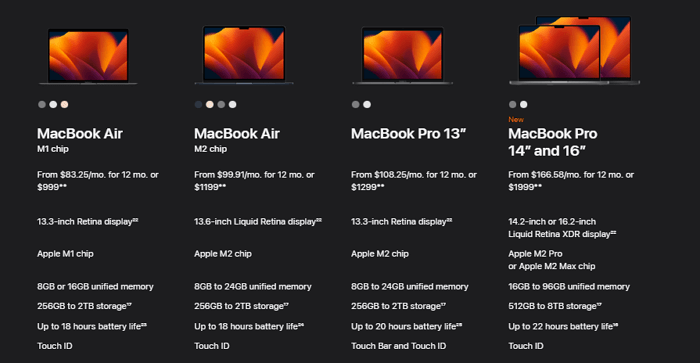
The main differences between MacBook Air and MacBook Pro are their processing power, display quality, and battery life. The MacBook Air is a more portable and lightweight option, ideal for basic tasks such as browsing, emailing, and streaming. The MacBook Pro, on the other hand, is a more powerful machine, suitable for demanding tasks like video editing, software development, and gaming.
?️Display: The main difference between MacBook Air and MacBook Pro in terms of display is that MacBook Air uses a Liquid Retina display, while MacBook Pro has an advanced mini-LED Liquid Retina XDR display. This means that if you're looking for a larger screen size or better display performance, the MacBook Pro would be the better choice.
?Design: The MacBook Air and MacBook Pro have similar designs, but the Air offers more color options. If you're a traveler, the Air's 2.7-pound weight makes it a lighter and more portable choice.
?Ports: The new MacBook Pro in 2023 has an HDMI 2.1 port, while the MacBook Air only has two Thunderbolt 4 ports. If you need more ports, the MacBook Pro might be a better option.
?Chips: The M2 Pro and M2 Max chips in new MacBook Pros are more powerful than the M2 chip in MacBook Air, with more transistors, CPU cores, and GPU cores, making them suitable for professionals with demanding workloads.
How to Use Your MacBook Pro Correctly
Here are some tips to extend MacBook Pro's lifespan and protect your data:
?Stable battery conditions. To keep your battery performing well, keep it between 20-80% charged, and consider lowering the screen brightness to conserve power.
?Update your MacBook Pro properly. To update your MacBook Pro, you can have it check for updates automatically. However, when manually updating your software or macOS, it's recommended to stay in a stable internet environment and keep your MacBook Pro charged to ensure a smooth and uninterrupted process.
Clear system storage. To clear system storage on a Mac or MacBook Pro, regularly remove unused apps, delete unnecessary files and documents, and empty the trash. You can also use the Storage tab in the About This Mac window to see which files and apps are taking up the most space, and then delete or remove them. Additionally, consider deleting browser cache, app cache, and other temporary files that may be taking up space.
?️Back up data. To avoid data loss on your MacBook Pro, back up your data frequently with Time Machine. If you lose essential data without backups, you can use Deep Data Recovery for Mac to recover your lost files.
Bottom Line
Sharing information about MacBook Pro can help you learn more about it and choose the right model for you. Reading tips on how to use your MacBook Pro properly can also be helpful.
Related Articles
- How to Factory Reset from BIOS on a Windows PC [Methods in 2023]
- How to Access Startup Security Utility Mac? [Latest Tips]
- GPU vs CPU? What's the Difference? Which Is Better?
- What Is Mac Finder & How to Use It
- 8 Ways to Fix Migration Assistant Not Working on Mac
Is migration assistant not working on your mac? Worry no more; this article will help fix the issue with multiple methods! - How to Mirror a Hard Drive in Windows 10 [step by step]
If you want to create a mirrored drive on your existing hard drive, you will first need to partition your hard drive. Want to know how to mirror a hard drive in Windows 10? Read through this detailed guide on the process and related details.
Products
Articles & Tutorials
- Data Recovery
- Data Backup
- File Recovery
- File Backup
- System Backup and Restore
- Disk and Partition Clone
- Technical articles
- Mobile articles
- Disk Master Help
- Windows Data Recovery Tutorials
- Windows Secure Delete Tutorials
- Windows Partition Management Tutorials
- Windows File Backup and Restore Tutorials
- Windows System Backup and Restore Tutorials
- Windows Disk Backup and Restore Tutorials
- Windows Clone Tutorials