What Is APFS Format? [Full Information]
When formatting your Mac system, you will be prompted to choose a format. The two main options are Mac OS Extended (also known as HFS and HFS+) and APFS.
Mac OS Extended works best with mechanical drives and offers faster write speeds. However, APFS is considered an optimized version with better specifications, making it the recommended format for most users.
What Is APFS Format
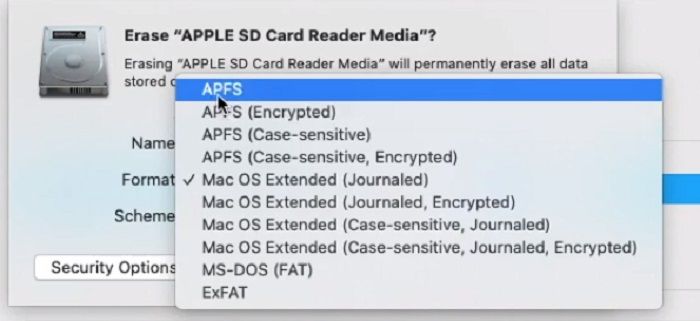
APFS, Apple's modern file system, is an upgrade to Mac OS Extended, offering improved encryption and reliability. It is particularly well-suited for solid-state drives and flash drives.
Its advanced encryption reduces the risk of file corruption when formatting the system. This makes APFS the best option for users who value data security and want to minimize the risk of data loss.
The Benefits of APFS
- Security Enhancements: APFS has more secure data encryption, making it ideal for file-sharing and transfer, as it uses multi-key encryption to keep all data safe.
- Faster Encryption: The encryption speed of APFS is impressive, making it suitable for larger files. Its speed in processing and formatting is fast, making tasks like copying and pasting files more convenient. This is one reason why APFS is considered a better choice for disk formatting.
- Crash Protection: System crashes are frustrating, especially when you're in the middle of something important. However, with APFS, you can enjoy better crash protection, ensuring your computer runs smoothly even after formatting, minimizing disruptions and keeping your workflow uninterrupted.
- Lesser Risk of File Corruption: The APFS is an optimized file system that is regularly updated, making file corruption during backup or restore extremely unlikely, although not impossible.
How to Format Drive as APFS on Mac
When formatting your Mac, first determine if you plan to keep it or give it away. This will help guide your decision-making process and ensure you're taking the necessary steps to either preserve your data or erase it securely.
Step 1. Restart Mac
Restart your Mac and once you hear the bootup tone, press and hold the appropriate key combination:
- Command + R. Use this if you plan to keep using the Mac yourself. This option reinstalls the current macOS version without erasing your data.
- Command + Option + R. Use this if you plan to give the Mac away or sell it. This option reinstalls the latest compatible macOS version and securely erases all your data.
Step 2. Open Disk Utility
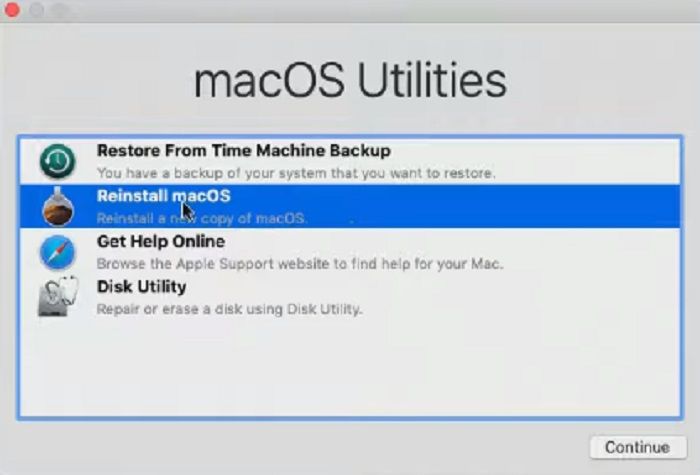
Once the loading bar appears at the bottom of the Apple logo, you can release the keys. Wait for the Recovery screen to appear, then select Disk Utility from the four options available.
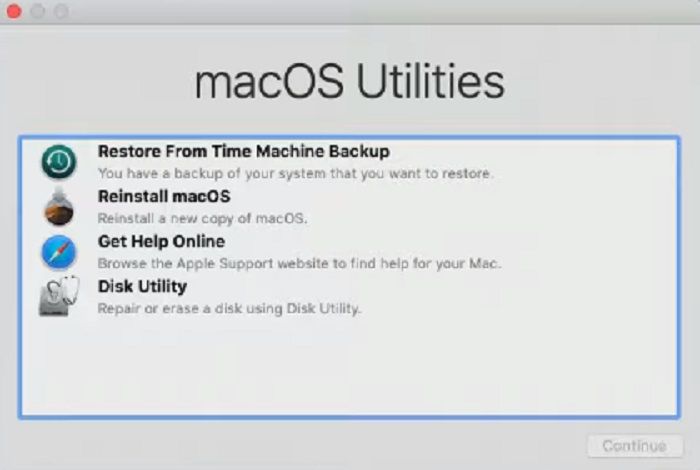
Step 3. Select Hard-drive and Erase
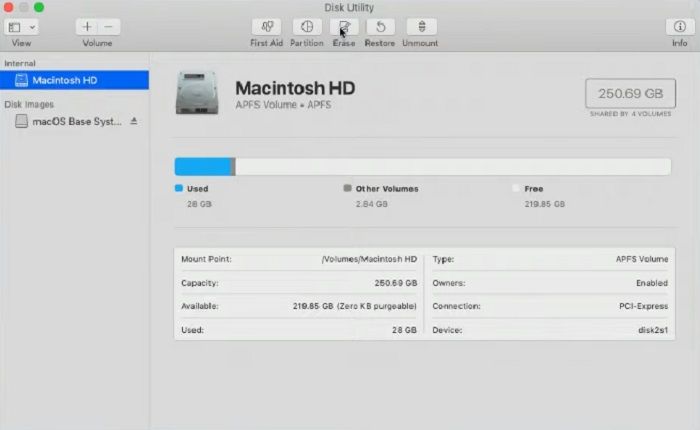
When formatting a disk, be sure to select the correct one, specifically the Macintosh HD, and its partition folders Macintosh HD DATA, to avoid damaging the system. Click on Erase to proceed with the formatting process.
Step 4. Format as APFS
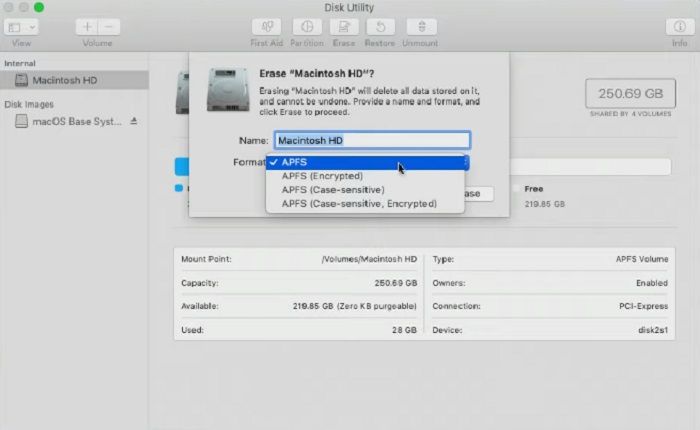
On a Mac with macOS 10.13 or later, the startup disk is formatted with APFS. To delete the data partition, click on the volume with the -DATA suffix, then click the minus (-) button to delete the volume.
Step 5. Restart
To start fresh with your Mac, click on Disk Utility at the top and quit. Then, on the recovery page, click on Reinstall OS, and follow the prompts to reinstall your Mac's operating system. If you're done using it, you can shut it down after reinstalling the OS.
Final Verdict
The APFS format has several appealing features. While HFS+ is also a good option for disk formatting, APFS stands out as the best choice due to its optimized nature. When formatting a system, it is essential to be careful.
APFS FAQs
1. Is APFS better than macOS Journaled?
In a way, yes. It is because new updates are undoubtedly better than any previous version.
2. Why did Apple switch to APFS?
APFS offers enhanced file protection compared to Mac OS Extended, making it a superior choice for system upgrades.
New system updates require a thorough security encryption process to ensure seamless integration and protect user data. This ensures that the system remains secure and efficient, even with the latest updates.
3. How do I know if my Mac is APFS?
10.13 and later systems have APFS, making it easy to determine if your system has APFS.
Related Articles
- What Is C-Band in 5G and How to Get It?[ 2023 Complete Understanding ]
- What Is Disk Space, All You Want 2023
- Types of Hard Drives 2023 | Which One to Choose - Qiling
- Mac Studio Main Features and Price | M2 Max vs. M2 Ultra [Update 2023]
- [5 Quick Fixes] Samsung Data Migration Not Working
Samsung data migration not working may be caused by various issues, but can be easily fixed and analyzed with simple solutions, and an alternative method is available to transfer old hard drive data onto a new Samsung SSD. - How to Fix Samsung SSD Clone Failed [2023 Full Guide]
Do you know why Samsung SSD Clone Failed? This guide will help you figure out the reasons and give you full guide to fix this error.
Products
Articles & Tutorials
- Data Recovery
- Data Backup
- File Recovery
- File Backup
- System Backup and Restore
- Disk and Partition Clone
- Technical articles
- Mobile articles
- Disk Master Help
- Windows Data Recovery Tutorials
- Windows Secure Delete Tutorials
- Windows Partition Management Tutorials
- Windows File Backup and Restore Tutorials
- Windows System Backup and Restore Tutorials
- Windows Disk Backup and Restore Tutorials
- Windows Clone Tutorials