What Is Disk Space, All You Want 2024
The definition of disk space is explained on this page, which also clarifies the differences between disk space, memory, and storage.
Now, let's dive into this article for more details on disk space.
What Is Disk Space
Disk space, also referred to as disk capacity or disk storage, is the total amount of storage available on a device for saving files and data.
On a web server, disk space determines how much website content you can host. On devices like laptops, Macs, and phones, disk space is the built-in storage capacity for your files, apps, and media.
What Is Disk Space on a Laptop
On a Windows laptop, disk space is a crucial factor, as excessive usage can impact disk performance. To check your available space and identify what is consuming it, click the link below.
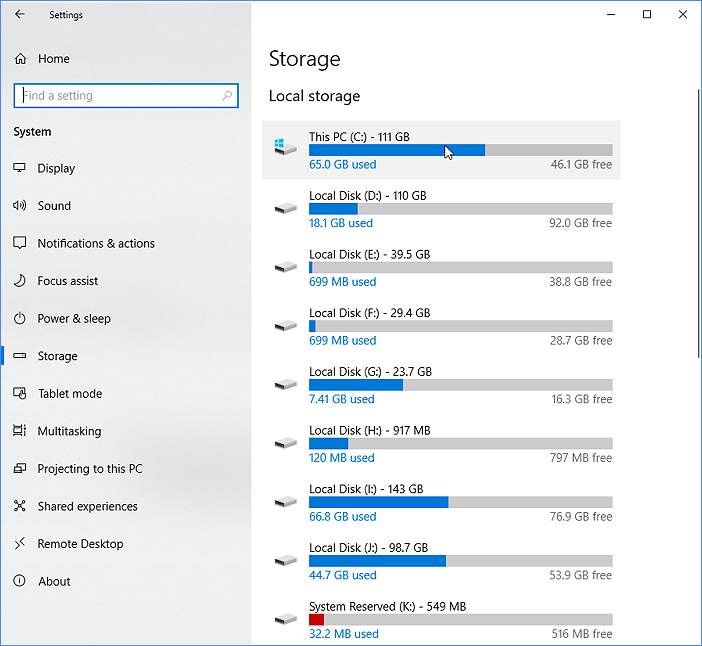
To identify what's taking up space on your hard drive in Windows 10/8/7, open File Explorer, click on "This PC" or "Computer" in the left sidebar, and then click on the drive you want to investigate. Look for the "Properties" option, usually found in the top right corner, and click on it.
A hard drive can become full unexpectedly without a clear cause. If the hard drive is the system disk and is nearly full, it can slow down Windows, affecting its performance.
After knowing the details of your disk space, you can free up hard drive space in the following ways:
- Uninstall apps
- Enable Compact OS
- Transfer larger files
- Empty Recycle Bin
- Run Disk Cleanup
- Disable Hibernation Mode
- Extend hard drive partitions
- Use Storage Sense to delete unnecessary files
What Is Disk Space on Mac
On a Mac, disk space refers to the total capacity provided by your internal drive. You can extend this capacity by upgrading to a larger SSD or adding an external hard drive.
To check your current available disk space on a Mac, follow the steps below:
Step 1. To access your hard drive, find it in the Finder and select it. You can either click on its icon in the sidebar of the Finder window, or go to Go > Computer and click on the hard drive icon under Devices.
Step 2. To view information about a file, click the File menu and select Get Info or press Command and I on your keyboard, which will display the Information window showing capacity, free and used space, and other details.
What Is Disk Space on Phone
Different phones come with varying amounts of built-in disk space, which affects how many apps, photos, and files you can store. Some Android phones allow you to expand storage by inserting an SD card.
The method for checking disk space differs between Android and iPhone, as shown below:
Android:
Click Settings > Device Care > Storage.
This window will display the remaining space on your device, including the SD card if one is present, and will show the available storage at the bottom of the screen.
iPhone:
To check your iPhone's storage, go to Settings, then General, and finally Storage. This will show you a list of suggestions to optimize your storage, followed by a list of installed apps and the storage space each one is using.
What Is Disk Space on Steam
The Steam Deck offers storage options from 64GB to 512GB, with each upgrade adding features but also increasing cost. The required storage depends on the chosen model and the size of games to be downloaded.
You may also like the following:
- Why Does Steam Say I Have No Disk Space
- What Does Low Disk Space Mean
We have discussed the concept of disk space, but some users may wonder if it is the same as memory. To clarify, disk space and memory are not the same thing.
Disk space refers to the storage capacity of a device, such as a hard drive or solid-state drive, where files and programs are permanently stored. Memory (RAM), on the other hand, is temporary storage that allows a computer to access and process data quickly.
Disk Space VS Memory: What's Their Difference
In the world of computing, memory and disk space are often misunderstood terms. To grasp how a computer functions, it is essential to understand the distinction between these two concepts.
Memory refers to the temporary storage area where data is held while it is being processed, whereas disk space refers to the permanent storage area where data is saved for long-term use.
Disk space refers to the available storage capacity on your hard drive, where files and programs are stored. As you install new programs, download files, or save data, your hard drive becomes fuller, consuming more space until it reaches its capacity.
Memory and disk space are often confused with each other, but they are not the same thing. Memory refers to the RAM (random access memory) inside your computer, which is made up of small chips called memory modules.
RAM stores the programs currently running on your computer, including the operating system, and is loaded into memory when you start up your computer or open a program like Microsoft Word. When you exit a program, the memory is freed up for other use.
This is different from disk space, which refers to the storage capacity of your computer's hard drive.
Read Also:
Accessing RAM is faster than a hard drive, so active programs are loaded into RAM. This is why computers usually have more hard disk space than RAM, as only a small amount of data is needed to be loaded into system memory at a time. For example, a computer might have a 3 TB hard drive and only 16 GB of RAM.
When running low on disk space or memory, solutions include deleting unnecessary files from the hard drive or upgrading the memory by purchasing more RAM. This can help free up space and resources to run programs smoothly.
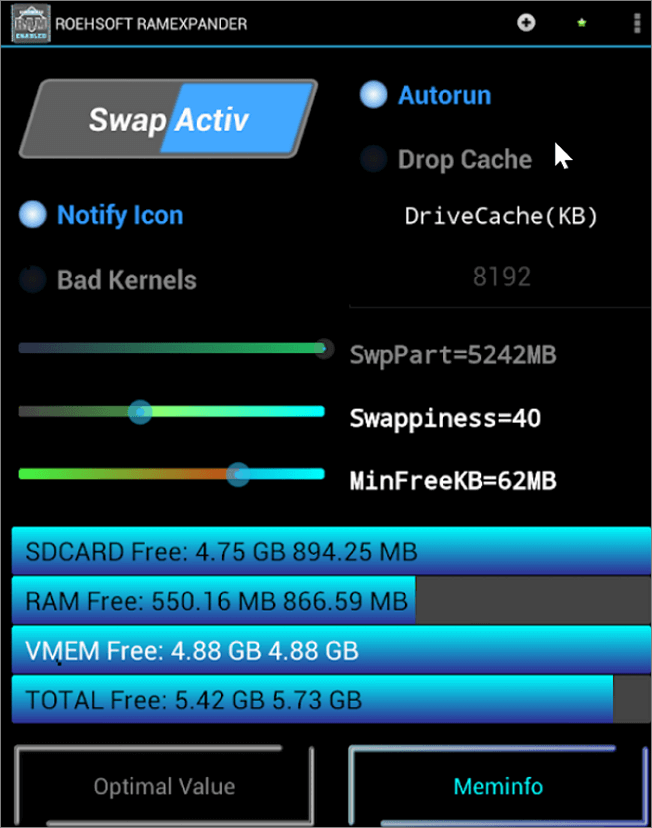
Unfortunately, it is not possible to use an SD card as RAM on either Android or Windows. While some devices may have expandable storage options, the SD card slot is specifically designed for storing data, not for increasing the device's RAM.
The two functions are fundamentally different, with storage being used for holding files and programs, and RAM being used for temporarily storing data that is being actively used by the device.
Conclusion
Checking disk space on your computer is essential to ensure you have enough storage space for your files. As you store more files, you will need more disk space, which can impact your computer's performance.
Understanding the difference between disk space and memory (RAM) is also crucial, and knowing how to check disk space on various devices is vital for maintaining your computer's health. Sharing this article on social media can help others learn about the importance of disk space and how to manage it.
Related Articles
- What Is A Modem and How Does It Work?
- RAM vs. Hard Drive: The Key Differences You Need to Know
- What Are the Best External Hard Drive for PS4? Top 8 Choice in 2024
- All Information About WannaCry Virus [Updated 2024]
- Samsung T5 VS T7: Which One to Choose?
Samsung T5 vs T7: which is better and which one to choose? If you have no idea, you have come to the right page. This article will tell you the difference between Samsung T5 SSD and Samsung T7 SSD. After reading this article, you can pick the right one. - Samsung T7 vs. T9: Which SSD to Choose?
A post comparing the Samsung T7 and T9 SSDs provides valuable insight into the performance and features of these drives, highlighting the pros and cons of each model to help users make an informed decision when choosing an external SSD.
Products
Articles & Tutorials
- Data Recovery
- Data Backup
- File Recovery
- File Backup
- System Backup and Restore
- Disk and Partition Clone
- Technical articles
- Mobile articles
- Disk Master Help
- Windows Data Recovery Tutorials
- Windows Secure Delete Tutorials
- Windows Partition Management Tutorials
- Windows File Backup and Restore Tutorials
- Windows System Backup and Restore Tutorials
- Windows Disk Backup and Restore Tutorials
- Windows Clone Tutorials