Mac Studio Main Features and Price | M2 Max vs. M2 Ultra [Update 2023]
Apple released the Mac Studio with Apple M1 chips (M1 Ultra and M1 Max) in March 2022, marketed as a high-end pro-tier Mac, comparable to a Mac mini on steroids.
The Mac Studio with M1-series chips lost its luster when the Mac Mini with an Apple M2 chip was launched in January 2023, but the wait for M2 Ultra and M2 Max Mac Studio is over as it is now available for purchase, starting shipping on June 13.
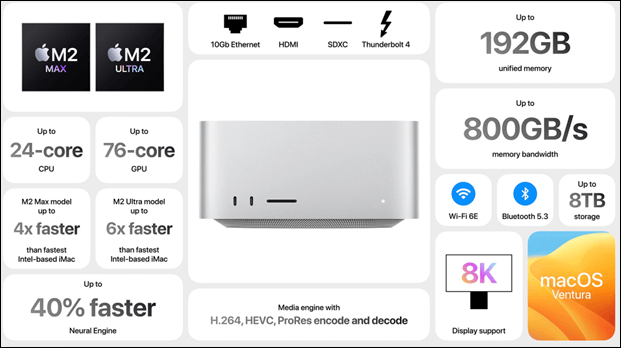
The Mac Studio is a powerful device that allows you to create a professional studio with 12 high-performance ports, including an SDXC card reader for transferring videos and photos, and an extended HDMI output that supports 8K resolution, making it ideal for attaching to TVs.
Apple's M2 Max and M2 Ultra Mac Studio are designed to handle various tasks, from music production to video editing, with the M2 Ultra offering an unparalleled scale of power for creative professionals.
Mac Studio is a powerful, compact desktop computer designed for creative professionals and enthusiasts. It features a wide range of configurations with different processors, graphics cards, and storage options, making it suitable for various tasks such as video editing, music production, and software development. The base model starts at $1,999 with a 12-core CPU, 30-core GPU, 512GB SSD, and 32GB unified memory.
Main Features of Mac Studio
Apple's upgraded Mac Studio with M2 Max and M2 Ultra processors has gone on sale and started shipping to consumers in June 2023, featuring top-tier specs for creative professionals.
Design of Mac Studio
The new Mac Studio has a similar design to the 2022 model, but features Apple's latest M2 Ultra and M2 Max chips, along with improved connectivity options like Wi-Fi 6E and Bluetooth 5.3, and enhanced support for high-impedance headphones.
The 2023 Mac Studio has a design similar to the Mac mini, with a 7.7-inch square base and a height of 3.7 inches, making it taller than the Mac mini. It features a silver finish and an Apple logo on top.
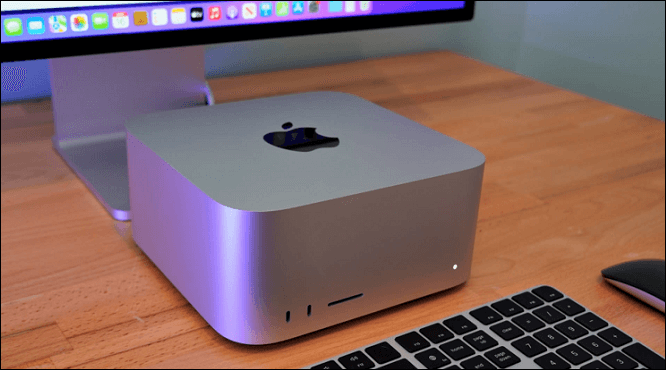
The main difference between the Max and Ultra variants in terms of design is the number of Thunderbolt ports, with the Max having 4 and the Ultra having 6 Thunderbolt 4 ports.
The Mac Studio with M2 Max chip weighs 5.9 pounds, while the M2 Ultra model weighs 7.9 pounds due to its larger thermal system. It also includes two USB-A ports for older peripherals.
M2 Chips in Mac Studio
The Mac Studio is a compact, all-in-one desktop Mac that combines the power of the Mac Pro with the compactness of the Mac mini. It features either an M2 Max or M2 Ultra chip, a unique thermal design, and a range of ports, making it a hybrid powerhouse for creative professionals.
The M2 Ultra is built using Apple's UltraFusion architecture, which combines two M2 Max dies into a single chip. This design provides a significant boost in performance and power efficiency, effectively doubling the capabilities of the M2 Max.
This architecture delivers impressive performance gains that exceed expectations, confirming Apple's continued leadership in chip design and integration.
- M2 Ultra: This system-on-a-chip has a powerful CPU with up to 24 cores and a GPU with up to 76 cores, as well as up to 192 GB of unified memory and 800 GB/s memory bandwidth.
- M2 Max: The Mac Studio with M2 Max features a 12-core CPU and up to a 38-core GPU, offering up to 400 GB/s memory bandwidth and support for up to 96GB of unified memory.
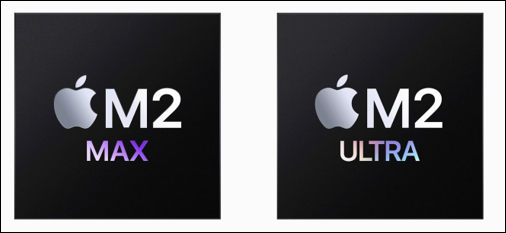
Compared to the M2 Max, the M2 Ultra offers double the CPU and GPU cores, as well as double the memory bandwidth. This comparison is explored in more detail in the sections below.
The M2 Max and M2 Ultra are Apple's high-performance chips designed for the Mac Studio desktop. The M2 Max features a 12-core CPU and up to 38-core GPU, while the M2 Ultra doubles these specs with a 24-core CPU and up to 76-core GPU, plus up to 192GB unified memory.
The Apple M2 chip family, including the M2 Max and M2 Ultra, offers a range of CPU and GPU performance levels. The M2 Max provides up to 400 GB/s memory bandwidth, while the M2 Ultra reaches 800 GB/s, making both ideal for demanding professional workflows.
Mac Studio Display
Thanks to the power of Apple Silicon, Mac Studio with M2 Ultra and M2 Max processors delivers seamless performance in a surprisingly compact footprint. It is designed to fit perfectly under any display, providing a powerhouse of connectivity and performance at your fingertips.
The Mac Studio can support up to 8 4K displays, 6 6K displays, or 3 8K displays, with the M2 Ultra model being able to handle 6 6K Pro Display XDRs and one 4K display via HDMI simultaneously.
Apple offers the Studio Display, a 27-inch 5K retina display designed to complement the Mac Studio. This display features a built-in A13 chip, driving a 12-MP Ultrawide camera, 6-speaker sound system, and Center Stage with Spatial Audio.
The Studio Display features a three-microphone array of studio caliber and a tilt- and height-adjustable stand solution for greater flexibility. The Mac Studio supports connecting up to 5 displays with M2 Max and 8 displays with M2 Ultra.
Mac Studio Price
The M2 Max Mac Studio models have two configurations, with the prices remaining similar in the USA but increasing by 100-200 pounds in the UK. The prices for the M2 Max Mac Studio models are:
- Mac Studio with M2 Max (12-core CPU, 30-core GPU, 512GB SSD, 32GB RAM): $1,999 / 2,099 pounds.
- Mac Studio with M2 Max (12-core CPU, 38-core GPU, 1TB SSD, 64GB RAM): $2,799 / 2,899 pounds.
The M2 Ultra Mac Studio prices are the following:
- Apple M2 Ultra with 24-core CPU, 60-core GPU, 64GB RAM, and 1TB SSD starts at $3,999 / 4,199 pounds.
- Apple M2 Ultra with 24-core CPU, 76-core GPU, 64GB RAM, and 1TB SSD costs an additional $1,000 for the upgraded GPU.
- Upgrading to 8TB SSD costs an extra $2,200.
- The unified memory can be upgraded up to 192 GB, which requires an additional cost of $1,600.
The Mac Studio 2023 is a highly anticipated computer that promises to deliver top-notch performance and versatility. With its sleek and compact design, it is perfect for creative professionals, developers, and anyone who needs a powerful machine for demanding tasks.
M2 Max vs. M2 Ultra Mac Studio, Which One to Choose
The M2 Ultra Mac Studio and M2 Max Mac Studio have their pros and cons. The M2 Ultra Mac Studio offers improved performance and power efficiency, with a higher core count, making it suitable for the most demanding tasks and applications.
| M2 Ultra Mac Studio | M2 Max Mac Studio | |
| Pros |
|
|
| Cons |
|
|
The M2 Max and M2 Ultra both support a large number of external displays. The M2 Max supports up to 5 external displays, including 4 6K displays and 1 4K display at 60Hz. The M2 Ultra supports up to 8 4K displays and 6 6K displays, all at 60Hz.
Bonus Tips:
Losing data on your Mac Studio can be a major productivity killer, with system crashes, sudden shutdowns, and accidental deletions leading to serious data loss. Fortunately, there are six ways to recover data, providing a safety net against these common issues.
- Use Qiling Data Recovery for Mac
- Use Share Disk Utility
- Restore from the Trash on Mac
- Use Time Machine Backup
- Use Terminal
- Restore from iCloud Backup
Conclusion
If you are looking for a Mac Studio, consider whether you need the M2 Ultra model. It is a better choice if you are familiar with how CPUs work and plan to use the device for tasks that heavily rely on CPU power, like video editing or complex coding.
The M2 Max is a better option for GPU-intensive tasks like 3D graphics and modeling due to its 30 or 38 GPU cores.
Mac Studio FAQs
Let us consider the FAQs below to understand the topic better:
1. What is a Mac Studio used for?
With a selection of 12 high-performance ports, Mac Studio enables you to design the creative space of your dreams. It allows for seamless connections, including transferring pictures and videos via an SDXC card reader, linking to screens or TVs with an improved HDMI connection that can handle 8K resolution, and connecting with Bluetooth 5.3-compatible peripherals.
2. How much does it cost to get a Mac Studio 2023?
The M2 Ultra Mac Studio starts at $3,999, while the M2 Max Mac Studio is priced from $1,999.
3. Is the Mac Studio the most powerful computer?
Apple released revised editions of the Mac Studio at WWDC 2023, featuring the M2 Ultra and M2 Max Apple Silicon, making it one of the most potent personal computers ever.
4. What is the difference between Mac Studio and iMac?
The main difference between Mac Studio and iMac is their performance, driven by distinct processors. The iMac is equipped with Apple's M1 chip, supporting up to 16 GB of RAM. The Mac Studio boasts an M2 Ultra or M2 Max chip, capable of handling up to 192 GB of RAM, which is a significant jump in power.
Related Articles
- Macintosh HD vs. Macintosh HD Data: What Are the Differences
- What Is Incremental Backup? Definition, Pros, and Cons
- What Is Mac Startup Disk | Accidentally Deleted Startup Disk on Mac [Fixed]
- What Is Minimum Processor State? Everything You Need to Know
- MBR Error 1 on Windows? Reason & Fixes
If you're experiencing MBR error 1, as this error can cause Windows to fail to boot. Fortunately, there are three effective ways to fix it, which will be covered in this article. - What Is MBR Maximum Size [Full & Quick Guide]
This article details MBR maximum size and provides an easy way to convert MBR to GPT without losing data.
Products
Articles & Tutorials
- Data Recovery
- Data Backup
- File Recovery
- File Backup
- System Backup and Restore
- Disk and Partition Clone
- Technical articles
- Mobile articles
- Disk Master Help
- Windows Data Recovery Tutorials
- Windows Secure Delete Tutorials
- Windows Partition Management Tutorials
- Windows File Backup and Restore Tutorials
- Windows System Backup and Restore Tutorials
- Windows Disk Backup and Restore Tutorials
- Windows Clone Tutorials