What Is MBR Maximum Size [Full & Quick Guide]
If you're already using the MBR partition or considering switching to it, there are a few things to keep in mind. MBR has limitations, such as a maximum of 4 primary partitions per disk and a maximum size of 2TB per partition, and may not be compatible with newer systems or software.
This article provides a comprehensive overview of MBR, covering its maximum size and other essential details.
What Is the MBR Maximum Size
The Master Boot Record (MBR) is a partition type that uses standard BIOS partition tables to store data on a hard drive or SSD, supporting drives up to 2 TB.
If your drive is larger than 2 TB, only the first 2 TB will be accessible, with the remaining portion shown as "Unallocated".
You can click the following links to learn more about this issue:
An MBR disk can be divided into four primary partitions, which can include three primary partitions and one extended partition.
The Master Boot Record (MBR) supports only 2 TB because a hard disk uses 512-byte sectors. This limitation is due to the way data is stored on a hard disk, with each sector being 512 bytes.
The number of addressing bits in the MBR determines the maximum size of a disk, with 32 bits allowing for a 4GB address range, and a 2TB capacity when multiplied by 512 byte sectors.
GPT (Global Partition Table) was introduced to overcome the limitations of MBR, allowing for larger storage capacity and being used by both Microsoft and Apple.
MBR Maximum Size VS GPT
GPT has a much larger maximum disk size of 9400000000 TB compared to MBR's 2 TB, and also supports up to 128 partitions, whereas MBR is limited to 4 partitions.
IBM introduced the Master Boot Record (MBR) in 1983 to support the 10 MB hard disk of their IBM Personal Computer XT, while Intel introduced the Globally Unique Identifier Partition Table (GPT) later on.
GPT partitioning is used by both Apple and Microsoft due to its technical superiority over MBR and the fact that Intel has been the default chip manufacturer for both companies for many years.
If your hard disk or SSD uses an MBR partition style and you want to convert it to GPT, you can do so by following the instructions in the next section, which highlights the differences between MBR and GPT. To give you a head start, check out the table that summarizes these differences before moving on.
| Comparison | MBR | GPT |
|---|---|---|
| Maximum Primary Partitions |
4 |
128 |
| Maximum Capacity |
2TB |
9.7 billion terabytes |
| Boot data location |
At the start of the drive |
Whole drive |
| BIOS type |
Legacy BIOS |
UEFI |
The Master Boot Record (MBR) disk and the Globally Unique Identifier Partition Table (GPT) disk are two different types of disk partitioning schemes. The MBR disk uses a 512-byte MBR to store the partition table, while the GPT disk uses a 16-byte header and a 32-byte partition entry to store the partition table.
The age-old debate between MBR (Master Boot Record) and GPT (GUID Partition Table) has been a topic of discussion among tech enthusiasts. While both serve the same purpose - to manage disk partitions - they differ in their approach.
The choice between MBR and GPT partitioning methods depends on the type of system and the desired features. MBR, which stands for Master Boot Record, is a traditional partitioning method that was widely used in older systems.
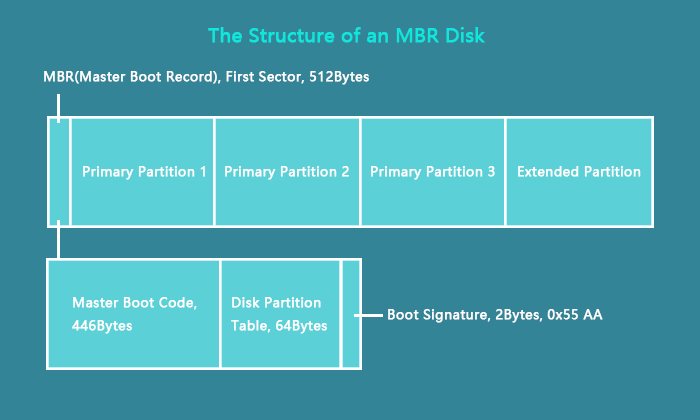
We can break the limits of MBR disk by using alternative partitioning schemes such as GPT. GPT allows for more than 4 primary partitions per disk, making it ideal for systems that require multiple operating systems or data partitions.
How to Break MBR Maximum Size Limit
For Windows PCs, you can easily convert your hard drive or SSD from MBR to GPT partition style using Qiling Disk Master Professional, a user-friendly program that takes care of all your disk-related needs with just a few clicks.
With Qiling Disk Master, you can create or delete partitions based on various file system types, merge or extend partitions, copy OS and files to other drives, resize, format, or wipe unallocated space, and more.
Here are a few other amazing features of Qiling Disk Master:
- Hide/unhide partitions
- Clone System Partitions
- Convert NTFS to FAT32 and vice versa
- To change the cluster size, you can adjust the exFAT allocation unit size and NTFS allocation unit size. This can be done by using the built-in Disk Management tool in Windows.
If you're looking for a tool to unlock the full potential of your drive and gain control over it, Qiling Disk Master is the ideal choice.
Conclusion
MBR, a partition type from the past, has many limitations that make it unsuitable for modern use. Fortunately, you can convert the partition type from MBR to GPT, but it can be a bit difficult to do with traditional tools from Microsoft.
We recommend using Qiling Disk Master to convert MBR to GPT in a few seconds.
FAQs About MBR Maximum Size
What is the maximum size of an MBR? The maximum size of an MBR is 4KB (2048 bytes) and it's usually located at the beginning of the disk.
1. Should SSD be GPT or MBR?
Solid-State Drives (SSDs) can be formatted using either GUID Partition Table (GPT) or Master Boot Record (MBR), but it's recommended to use GPT due to its advantages over MBR.
2. Can SSD use MBR?
If the SSD capacity is 2 TB or less, you can use the MBR partition.
3. Can I use MBR on a 3TB drive?
2 TB of the 3 TB will be usable, while the remaining 1 TB will be hidden and unusable.
Related Articles
- How to Solve the Mac Error Code 100006 [ 8 Proven Ways]
- How to Fix "Unable to Connect to Virtual Disk Service" Windows 10/11
- Why Is My Chromebook So Slow and How Do I Speed It Up? [Complete Guide]
- [2023 macOS Catalina Download Guide] How to Download and Install macOS 10.15
- What Is The Root Directory and What Are The Folders in The Root Directory Used for
The root directory is the top-level folder on a drive, containing all other files and folders. In Windows, it is typically C:\, holding Program Files, Windows, and Users. - What Is the SysWOW64 Folder? SysWOW64 vs System32
Are you wondering what SysWOW64 Folder is on your Windows PC? Then follow this easy guide to learn about it, check if it's a virus, and you can safely delete the folder without breaking it.
Products
Articles & Tutorials
- Data Recovery
- Data Backup
- File Recovery
- File Backup
- System Backup and Restore
- Disk and Partition Clone
- Technical articles
- Mobile articles
- Disk Master Help
- Windows Data Recovery Tutorials
- Windows Secure Delete Tutorials
- Windows Partition Management Tutorials
- Windows File Backup and Restore Tutorials
- Windows System Backup and Restore Tutorials
- Windows Disk Backup and Restore Tutorials
- Windows Clone Tutorials