What Is the Best exFAT Allocation Unit Size [Guide on How to Set]
The exFAT file system is optimized for flash memory, but users often struggle to choose the right allocation unit size when formatting a drive to exFAT using disk management tools.
Today, we'll discuss the best exFAT allocation unit size, covering its needs and precise units, and provide a dedicated list of quick questions to address any queries. By the end of this article, you'll be able to change the allocation unit size yourself.
Why Set exFAT Allocation Unit Size
exFAT is the best solution to manage large files, which is impossible with NTFS or FAT32. Setting the exFAT allocation unit size is necessary because it allows for efficient storage and retrieval of data, improves data transfer rates, and reduces fragmentation, making it ideal for managing large files and files systems.
- Avoid space wastage: To avoid space issues on exFAT, it's essential to set the allocation unit size during partition creation or format, as the default setting can disrupt the system's space savings.
- Improving read/ write speed: The allocation unit size, also known as cluster size, has a significant impact on disk performance and space utilization. Improperly setting this value can lead to reduced disk read and write speeds, making it essential to optimize the partition's efficiency by setting the exFAT allocation unit size correctly.
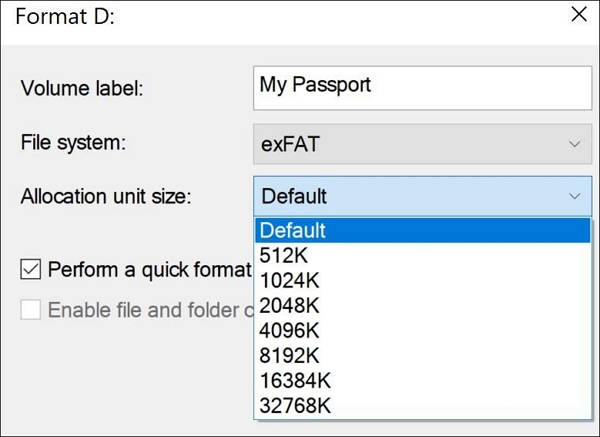
The ideal allocation unit size for exFAT is 4096 bytes. This size is recommended because it balances the need for efficient disk usage with the need for sufficient metadata to be stored in each allocation unit.
What Should Be the Allocation Unit Size for exFAT
If the actual size of the file is more than the cluster, it will acquire multiple clusters, while if the actual size of the file is less than the cluster, it will take at least one cluster, potentially wasting disk space.
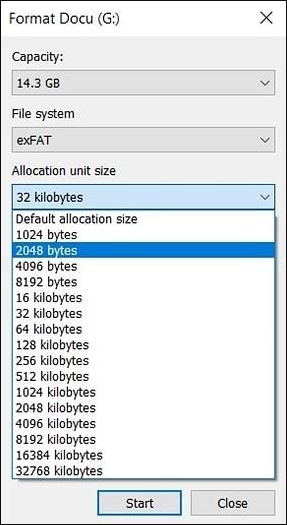
To avoid space wastage and delayed read/write performance, it's essential to balance the size of files with the size of clusters in the partition. This ensures that files are distributed evenly among clusters, minimizing time spent on gathering and optimizing storage efficiency.
The best case scenario is when large cluster size is used for big files to improve read/write efficiency, while small cluster size is recommended for small files to optimize disk space utilization.
32, 64, 128, or 256 kilobytes, with the default being 32 kilobytes. However, the allocation unit size can be adjusted to be a multiple of 32 kilobytes.
- 7MB - 256MB: 4KB
- 256MB – 32GB: 32KB
- 32GB – 256TB: 128KB
Can I Use the Default for the exFAT Allocation Unit Size
The default setting in the allocation unit size for exFAT can be a good option for users who lack detailed knowledge about the relation between cluster size and partition performance, as it automatically selects the best cluster size based on the partition's capacity.
Hence, it is easy to understand the ideal exFAT allocation unit size for different users. Let us now move to the steps to set this size.
How to Change exFAT Allocation Size Unit - Two Efficient Ways
To change the exFAT allocation unit size on your system, you can follow these quick steps. Based on the file size, users may need to adjust this setting. The top two methods for modifying and resetting the exFAT allocation unit size are:
Method 1. Change exFAT Allocation Unit Size with Qiling Partition Master
To change the exFAT allocation unit size, users can consider dedicated partition managers like Qiling Partition Master Professional, which is ideal for individual users managing different disk partitions or copying data to another HDD or SSD, and works seamlessly on Windows Vista, 7, 8, 8.1, 10, and 11.
Step 1. To change the cluster size of a partition, right-click on the partition, select "Advanced" from the context menu, and click on "Change Cluster Size".
Step 2. To adjust the disk partition cluster size, click on the size list below the "New size" section and select a desired cluster size from the options provided.
Step 3. Click "Proceed" to confirm the operation.
Qiling Partition Master is a reliable tool for changing the exFAT allocation unit size, ideal for beginners, and offers various disk partition management features, including deletion, wiping data, hiding, and unhiding partitions, with both free and paid versions available.
Features of Qiling Partition Master:
- It is an easy-A tool for beginners to set exFAT allocation unit size independently.
- This software runs smoothly on all Windows versions, from XP to 11, without any compatibility issues.
- The software adjusts the allocation unit size of FAT32 without causing any data loss issues.
- It is available in free and paid versions.
The steps to change the exFAT allocation unit size in Diskpart are as follows: Open Diskpart, select the correct disk, and then type the command "convert mbr" followed by "convert mbr" again to change the exFAT allocation unit size. Be cautious when entering commands to avoid errors or data loss.
Method 2. Change exFAT Allocation Unit Size with CMD
The Command Prompt (CDM) is the command-line interpreter for Windows, allowing users to manage disks and partitions, among other operations. To change the exFAT allocation unit size using CDM, follow these quick steps:
Step 1. To run a program as administrator in Windows, go to the search bar and select "Run as administrator."
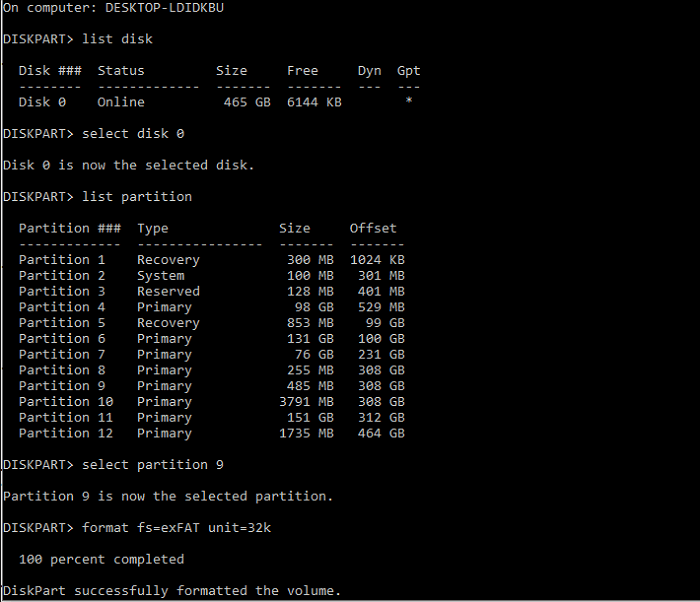
Step 2. To access the Disk Management tool, go to the Command Prompt, type "diskpart," and then press "Enter".
Step 3. Type the following commands one by one and press "Enter."
list disk
select disk * (* stand for target disk or partition number)
list partition
select partition * (* stands for the partition number)
format fs= exFAT unit=32k The 32k allocation unit size can be changed to other sizes for better performance and efficiency in disk management, allowing for more flexible and optimized storage configurations.
Conclusion
The best exFAT allocation unit size for your disk partitions is the minimum amount of storage required for any file on the partition, balancing space savings and performance.
Users can select the allocation unit size or stick with the default settings for the exFAT file format, with options available to change the allocation unit size using Qiling Partition Master or with CDM. This process allows users to quickly and precisely set the best allocation unit size for their exFAT quickly and precisely.
FAQ Related to exFAT Allocation Unit Size
Here are some frequently asked questions about exFAT allocation unit size for different file sizes and top methods to set them:
1. What is an allocation unit?
The allocation unit size is the smallest amount of storage that can be allocated to or removed from a disk group in an ASM disk group, allowing for efficient storage and retrieval of data in a partition.
2. What is the best allocation unit size for exFAT 64GB?
The best allocation unit size for exFAT 64GB is 128KB.
3. What allocation unit size should I use?
512 bytes, 1024 bytes, 2048 bytes, 4096 bytes, 8192 bytes, 16384 bytes, 32768 bytes, 65536 bytes, 131072 bytes, and 262144 bytes. These sizes are based on the size of the files and are chosen to optimize performance. Larger allocation unit sizes are more efficient for larger files, while smaller sizes are more efficient for smaller files.
- 7MB - 256MB: 4KB
- 256MB - 32GB: 32KB
- 32GB - 256TB: 128KB
4. Can exFAT hold more than 4GB?
ExFAT can store large file sizes, overcoming the 4GB maximum file size and 8TB maximum partition size of FAT32, making it effective for big files.
Related Articles
- How to Turn On/off Firmware Password on Mac [Fixed]
- Fix Deleting Files Does Not Free Up Space Error in Windows 10/8/7
- 4 Ways to Fix Mac Won't Start in Safe Mode [Support macOS Ventura/Big Sur/Mojave]
- System Service Exception Stop Code 0x0000003B in Windows 10 [10 Fixes]
- Adobe Serial Number Checker Free Download | Find Adobe Software Serial Key in Windows
You can easily find your Adobe serial number for your installed Adobe applications using a reliable Adobe serial number checker that can be downloaded and applied in a few simple clicks. - 2022 Aptio Setup Utility Ultimate Guide | How to Access and Fix It
Learn what Aptio Setup Utility is, how to access and configure AMI BIOS settings, fix boot loop errors, and recover data from an unbootable PC using bootable recovery software.
Products
Articles & Tutorials
- Data Recovery
- Data Backup
- File Recovery
- File Backup
- System Backup and Restore
- Disk and Partition Clone
- Technical articles
- Mobile articles
- Disk Master Help
- Windows Data Recovery Tutorials
- Windows Secure Delete Tutorials
- Windows Partition Management Tutorials
- Windows File Backup and Restore Tutorials
- Windows System Backup and Restore Tutorials
- Windows Disk Backup and Restore Tutorials
- Windows Clone Tutorials