How to Wipe Hard Drive in Windows 10 - 3 Safe Ways 🔥
To properly dispose of an old or outdated hard drive, it's essential to remove any sensitive data to prevent unauthorized access. While Windows provides the option to format and delete hard drive partitions, it's still possible to recover deleted data using data recovery software, making it crucial to take additional steps to ensure complete data erasure.
To protect your privacy, you can completely wipe a hard drive, making its data truly disappear. This is useful when discarding a computer or getting rid of a damaged drive.
To completely wipe a hard drive, you can use either physical damage or software within Windows. There are three methods to achieve this: one involves physically damaging the drive, which is not recommended, while the other two are software-based and can be done through Windows. These methods will erase all data on the hard drive, making it impossible to recover.
How to Completely Wipe Hard Drive
To completely wipe a hard drive, there are three primary methods: using a dedicated hard drive wiping software, physically destroying the hard drive, or using a secure erase feature built into the operating system. Dedicated software, such as DBAN or KillDisk, can overwrite the entire drive with random data, making it impossible to recover any information.
1. Completely Wipe Hard Drive by Using Qiling Disk Master
It is a professional third-If you need to wipe your hard drive, you can use data wipe software to completely erase its contents without damaging the drive itself. This software can be used to securely delete all data on the hard drive, making it impossible to recover any information. By using data wipe software, you can ensure that your sensitive data is protected and that your hard drive is completely wiped clean, leaving it ready for reuse or recycling.
2. Completely Wipe Hard Drive by Using Windows Settings
Resetting a computer allows you to remove all data and restore it to its original manufacturer settings, essentially giving it a fresh start.
3. Completely Wipe Hard Drive by Using Physical Damage
If you don't plan to reuse or recycle your hard drive, you can completely wipe it using this method, effectively destroying it.
If you plan to wipe your hard drive for reuse, you can choose method 1: Qiling Disk Master, which protects the integrity of your hard drive.
- Notice:
- If you use any of the three methods to completely wipe your hard drive, you will not be able to recover your data. Before taking such a step, it's essential to back up all your critical data. This will ensure that your essential files and information are safe, even if you choose to erase your hard drive.
Method 1. Completely Wipe Hard Drive by Using Qiling Disk Master
Qiling Disk Master is a disk management tool with powerful wipe functions that helps permanently clear all data from a hard drive by overwriting it multiple times. It has a clear and user-friendly interface, making it easy to use even for those not skilled in computers, and can safely wipe a hard disk without damaging it.5
A hard drive wiped by Qiling Disk Master can be used again or given away. Let's see how to wipe it.
We've set two options for you to wipe data. Choose the one you need.
Option 1. Wipe Partition
- Right-Select the partition you want to erase data from, and choose "Advanced" -> "Wipe Data".
- In the new window, set the time for which you want to wipe your partition. If you want to wipe your partition for a specific time, you can enter the time in the "Time" field.
- Check the changes, then click "Proceed".
Option 2. Wipe Disk
- Right-To erase data from a hard drive or solid state drive, click on the head of the drive, then navigate to "Advanced" and select "Wipe Data".
- Set the number of times to wipe data to 10 at most.
- Then click "Proceed" button.
Qiling Disk Master is the ultimate all-in-one disk management tool. Its capabilities extend beyond wiping hard disks, as it also offers a range of additional features.
- Wipe SSD on Windows 11 and older systems.
- As a power disk partition tool, this software allows you to not only resize, merge, create, and delete partitions, but also serves as a partition manager.
- This software can be used to convert a Master Boot Record (MBR) to a GUID Partition Table (GPT) without losing data. It can also be used for other purposes such as creating a new partition, resizing an existing one, and more.
If you have any disk-related problems, you can ask Qiling Disk Master for help.
On Windows 10, you can use the Diskpart command to clean all data, except for Qiling Disk Master. To do this, click Start, type "diskpart" in the search bar, and press Enter. In the Diskpart window, type "list disk" and press Enter to display a list of all disks.
Method 2. Completely Wipe Hard Drive by Using Windows Settings
The method uses the reset function in Windows to wipe the computer, allowing you to factory reset Windows 10 and wipe everything on the PC through the Windows setup, effectively reinstalling the operating system and erasing all programs and data.
To completely wipe the hard drive using Windows 10, go to Settings, then Update & Security, and select Recovery. Under "Reset this PC," select "Get
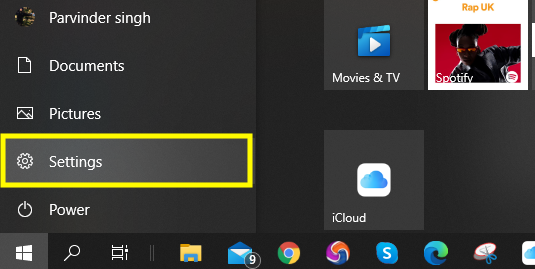
Step 1. Click on the Windows start menu and select "Settings."
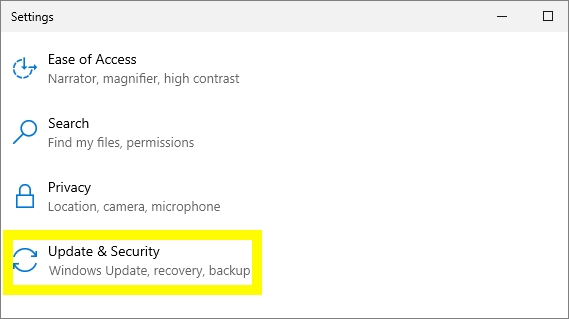
Step 2. Select "Update & Security."
Step 3. Select "Recovery" on the left side.
Step 4. Under "Reset this PC," select "Get Started."
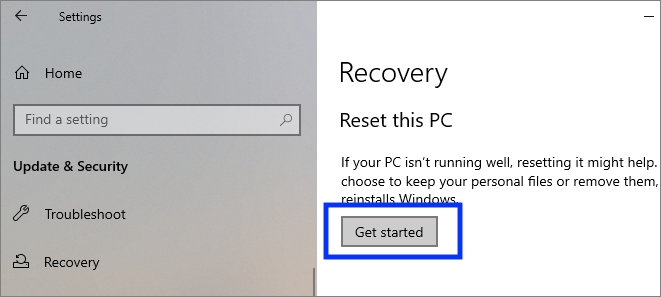
Step 5. Click on "Remove everything" and it will delete all programs and data.
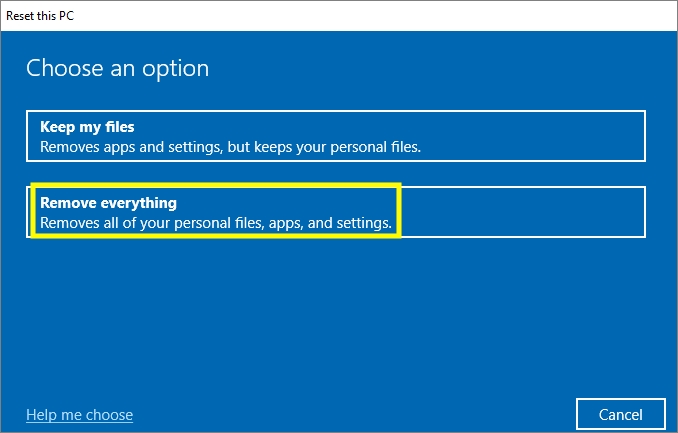
Step 6. To completely wipe a drive's contents, choose the "Remove files and clean the drive" option. This will remove all files, folders, and other data from the drive, leaving it completely empty.
Step 7. Select "Next" and "Reset" to complete the task.
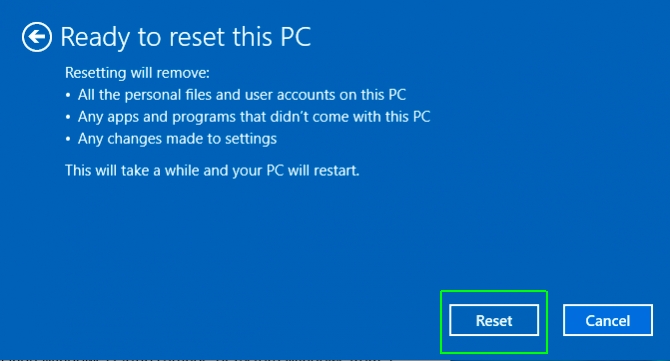
This process will take longer and is more complicated than Qiling Disk Master. If you are not that familiar with computers, to avoid mistakes, I recommend you to use Method 1.
Method 3. Completely Wipe Hard Drive by Using Physical Damage
Physically destroying a hard drive is a method to ensure it's completely wiped, making it unusable again. Methods include disassembling, shredding, burning, or crushing it, rendering it irreparable and unable to be reused. This approach is suitable if you don't intend to reuse the hard drive.
Step 1. Remove the screws from the hard drive case using a screwdriver and take off the casing.
Step 2. Remove the platters and heads and choose a method to destroy the hard drive.
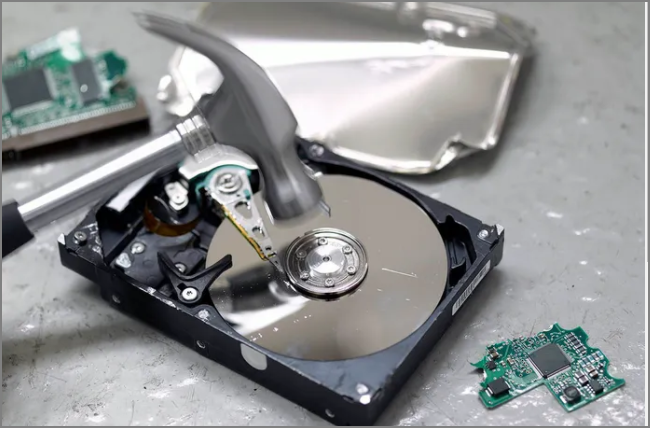
Step 3. Throw all components in the trash.
Conclusion
You can completely wipe a hard drive using Qiling Disk Master, ensuring that your data is completely erased and the drive is ready for reuse. In addition to wiping, Qiling Disk Master also allows you to remove data by formatting or deleting partitions, and can even resize partitions to optimize the drive's usage.
If you want to wipe a hard drive, you can either use a software or physically destroy it. If you choose to use software, resetting the PC will wipe the hard drive. If you won't be using the drive again, physically destroying it is an option. Before doing either, make sure to back up any important files.
FAQs About Completely Wipe Hard Drive
Here are a few questions related to completely erase a hard drive. If you are interested, please read on.
1. Is it possible to completely wipe a hard drive?
You can completely wipe a hard drive by using data recovery software, deleting a partition, or formatting it, but these methods don't completely erase data. To fully wipe the drive, you can reset the computer or use Qiling Disk Master to erase all data.
2. Does factory resetting wipe the hard drive?
Factory resetting a computer erases all data, including files, programs, and settings, restoring it to its original factory state, and the data is unrecoverable.
3. Should I wipe my hard drive before selling?
To sell a used hard drive, you need to completely wipe the data on it, which goes beyond simply formatting and deleting partitions. You can use Qiling Disk Master to securely wipe the hard drive before selling it.
Related Articles
- Fixed: Command Prompt Not Working in Windows 11/10
- Disk Read Only Fix: How to Change Drive from Read Only to Read Write (5 Ways)
- How to Create Partition from Unallocated Space in Windows 10
- SSD Optimzier for Windows 11 Free Download with Ultimate Guide
- Fix Error Code 0x8007025D When Installing Windows
If you're encountering Error Code 0x8007025d while installing Windows on your computer, this post will provide troubleshooting steps to help you successfully install Windows on your device. - How to Extend Partition Using Diskpart [Step-by-Step Guide]
Do you need to re-Learn how to extend partitions using Diskpart in this article. The article explains how to use the Diskpart command-line utility to extend the size of a partition on your hard disk.
Products
Articles & Tutorials
- Data Recovery
- Data Backup
- File Recovery
- File Backup
- System Backup and Restore
- Disk and Partition Clone
- Technical articles
- Mobile articles
- Disk Master Help
- Windows Data Recovery Tutorials
- Windows Secure Delete Tutorials
- Windows Partition Management Tutorials
- Windows File Backup and Restore Tutorials
- Windows System Backup and Restore Tutorials
- Windows Disk Backup and Restore Tutorials
- Windows Clone Tutorials