Best 3 DBAN Alternatives to Wipe Hard Drive - 2024 New
In this article from Qiling, you can learn the following content:
Darik's Boot and Nuke (DBAN) is a popular software for wiping hard drives or solid-state drives (SSDs). However, if you're looking for alternatives, there are other options available.
What Is DBAN
DBAN, also known as Darik's Boot and Nuke, is a free and open-source software that securely deletes all data on a hard drive, including programs, files, and the operating system, making it ideal for reusing, donating, or selling hard drives. It can be used as a standalone boot disk, downloaded and burned to a supported device from the official website.
Using Qiling Disk Master as a reliable DBAN alternative can make things easier. This tool allows you to wipe hard drives and SSDs directly while Windows is running normally, completing the disk erasure task without requiring any commands, making it user-friendly for beginners.
DBAN, a popular tool for wiping hard drives, has several limitations. Despite its effectiveness, it has some drawbacks, including being unable to completely erase data from SSDs, being incompatible with some operating systems, and having limitations in its ability to handle complex drive configurations. Furthermore, DBAN requires a bootable CD or USB drive to function, which can be a hassle to create and maintain.
- 1. DBAN stopped updating in June 2015, rendering further technical support unavailable to users.
- 2. DBAN is unable to detect SSDs and does not support erasing data on solid-state drives.
- 3. DBAN is a free disk-wiping tool for personal use only, but lacks features for audit purposes or regulatory compliance, which can be accessed through Blancco Drive Eraser for enterprise use.
- 4. DBAN works outside of Windows, so it won't run when your current operating system is in use, meaning you'll need to boot it from the optical drive even if you want to wipe an external hard drive.
- 5. DBAN uses commands to erase data, which may be unfamiliar to ordinary computer users, potentially leading to data loss.
DBAN Download Link: https://dban.org/
Don't forget to share this article and let more users know the limitations of DBAN.
Top 3 DBAN Alternatives in 2024 - With How-to Guide
Here are three free DBAN alternatives that can meet the needs of different users, including those who need a simple and user-friendly interface, those who require advanced features, and those who need a portable version.
- To erase the entire disk, you can use either Option 1 or Option 2.
- For a specific partition or unallocated space, you can use the built-in Windows tool Disk Management to delete the partition, or you can use a third-party tool to delete the partition and then use the built-in Windows tool to format the space. Alternatively, you can use the built-in Windows tool to delete the partition and then use the built-in Windows tool to format the space.
- To wipe your hard drive without booting into Windows, you can use Option 1. This involves creating a bootable USB drive with a Linux distribution, such as Ubuntu, and then using the built-in disk wiping tool, like `dd` or `shred`, to securely erase the hard drive.
Option 1. Qiling Disk Master Free
Qiling Disk Master is a simple DBAN alternative that offers an all-in-one partition manager with powerful features. It can completely erase all data on a disk, making it unrecoverable, and effectively replaces DBAN's limitations by allowing users to erase disks or SSDs while the current system is running, eliminating the need for a bootable USB or CD.
Here is how to wipe data using DBAN alternative - Qiling Disk Master Free: Qiling Disk Master Free is a free and open-source disk wiping tool that can be used as a DBAN alternative. To use it, download and install the software, then run it and select the disk you want to wipe.
We've set two options for you to wipe data. Choose the one you need.
Option 1. Wipe Partition
- Right-To erase data from a partition, click on the partition you want to erase data from, and select the "Wipe" option.
- In the new window, set the time for which you want to wipe your partition.
- Click the "Proceed" button in the lower right corner after checking the changes.
Option 2. Wipe Disk
- Select the HDD/SSD. And right-click to choose "Wipe Disk".
- Set the number of times to wipe data. You can set it to 10 at most.
- Click "Proceed" to start the operation.
Option 2. Diskpart Clean All Commands
Diskpart is a command-To delete all data on a hard drive using the "diskpart clean all" command, follow these steps:
Step 1. Type and enter cmd in the Windows search box and run Command Prompt as administrator.
Step 2. You will see a black Command Prompt window. Type the following commands and hit the Enter key in sequence: (insert commands here).
- diskpart
- list disk
- select disk 0 (0 means the number of the disk you want to clean.)
- clean all
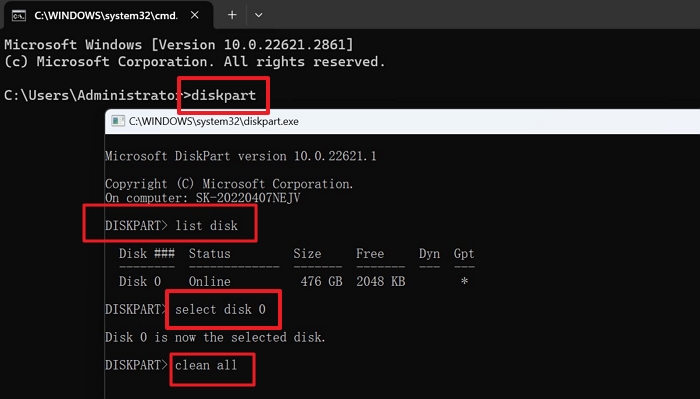
Then, type exit to leave the diskpart window.
It's a little difficult since it requires commands. Turn to Qiling Disk Master as an easier alternative if you are a beginner.
Option 3. Disk Management - Only Format Hard Drives
Disk Management, a Windows built-in feature, allows you to format your hard drive to delete data, but note that deleted data can still be recovered. If you need to erase data, you should use Qiling Disk Master Free instead.
Here's how to use a free alternative to DBAN - Disk Management:
Step 1. Right-click the Windows image and select "Disk Management" to launch it.
Step 2. Locate the target hard drive and right-click it.
Step 3. To format a USB drive, click on the "Format" option and follow the on-screen instructions to set the volume label, file systems, and allocation unit. If you're unsure, you can stick with the default settings.
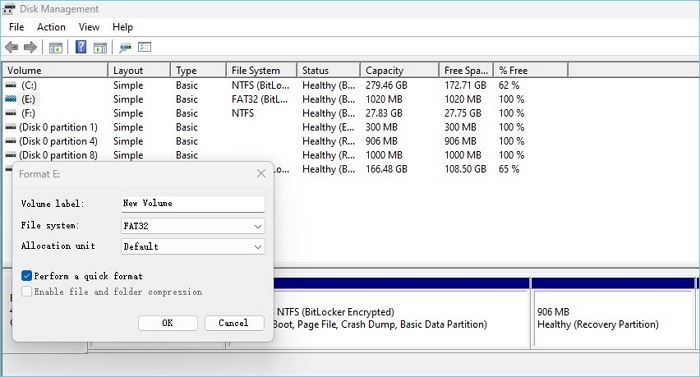
Step 4. To start the disk formatting process, check the "Quick format" box and click "OK" on the Format dialog box. This will initiate the formatting process.
Wait patiently, and it may take a few minutes, depending on how much data you store on the hard drive.
Don't forget to share this article and let other users know the best free alternatives to DBAN.
How to Use DBAN to Wipe Hard Drive on Windows 10/11
Since Dariks Boot and Nuke only work when the hard drive is wiped from the BIOS, you must prepare the USB to create a DBAN bootable USB. Then, follow the steps below.
Step 1. Go to the DBAN official website to download the ISO image file, then burn it to a USB drive.
Step 2. To erase a computer's hard drive, you need to enter the BIOS settings, set the DBAN bootable USB as the first boot option, and then reboot from this device.
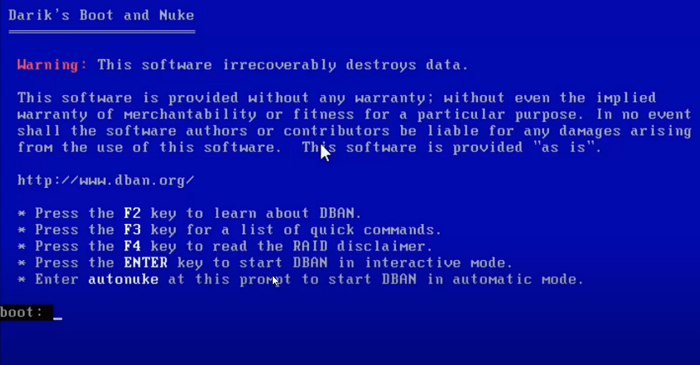
Step 3. Wait a moment, and you will see Darik's Boot and Nuke (DBAN) on the blue screen. You have several options: press the function keys shown to learn more about DBAN, or just press Enter to start the disk erasure process.
Step 4. In the next window, you can see the detected hard drives, along with a few options at the bottom, where you can type 'M' to learn about disk erasure methods.
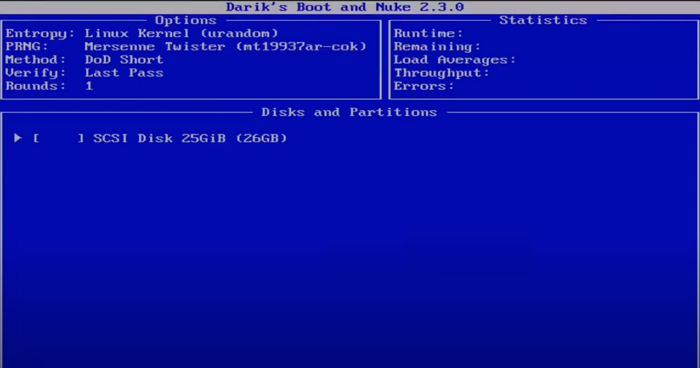
Step 5. In the "Erase Methods" section, you can scroll up or down using "J" or "K" to view the available disk erasure methods, and then select the desired method by pressing the space bar.
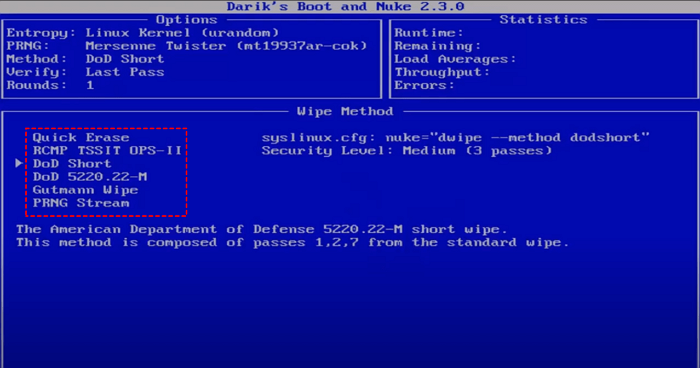
Step 6. Select the hard drive you want to erase and press the space key to confirm, then an "erase" word will appear at the beginning of the selected box.
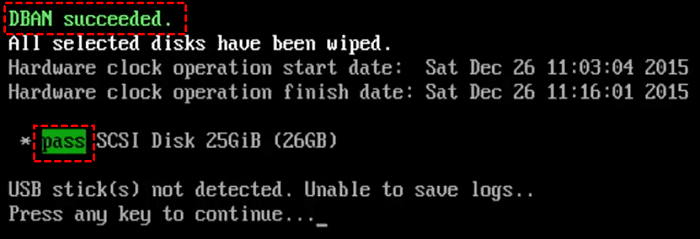
Step 7. Press F10 to begin the erasing process. Once the green "DBAN Success" text appears, it indicates that the disk wipe process has been successfully completed.
For beginners, wiping a hard drive can be a difficult process, which is why DBAN alternatives are needed. Options like Qiling Disk Master, nwipe, and shredos can serve as alternatives to Darik's Boot and Nuke, while others include parted magic, diskpart, and Disk Management. Among these, we've selected the top 3 free alternatives to DBAN.
How to Create Bootable USB to Wipe Hard Drive
In addition to DBAN, this guide will also show you another effective method to create a bootable USB and wipe your hard drive. Read more to learn about this alternative approach.
Conclusion
DBAN (Darik's Boot and Nuke) is a free, open-source hard drive wiping software that securely erases data on a hard drive, making it impossible to recover. To use DBAN, you need to create a bootable CD or USB drive, insert it into your computer, and restart it. Once DBAN boots up, it will automatically identify the hard drive and begin the wiping process. However, DBAN has limitations, such as not being able to wipe SSDs and requiring a separate operating system to run. If you find DBAN inconvenient, there are three simple alternatives: DBAN's built-in wipe option, the built-in wipe option on some motherboards, and using a third-party wiping software like KillDisk or Blancco. These alternatives offer more flexibility and convenience than DBAN.
Darik's Boot and Nuke Alternatives FAQs
There are several alternatives to DBAN, including nwipe, shredos, parted magic, diskpart, and Qiling Disk Master, among others. If you're looking for an alternative to DBAN, you may want to consider one of these options.
1. Is DBAN safe for SSD?
DBAN is not suitable for SSDs as it may damage them, and instead, use a tool like Qiling Disk Master or Diskpart to erase an SSD.
2. Is DBAN effective?
DBAN can be used to wipe multiple hard drives at once when booted from a bootable disk, such as a USB, and a 1TB drive can take 1-3 hours to complete.
3. Can data be recovered after DBAN?
A hard drive is not usable after DBAN, as the data is completely erased and the drive is reset to its factory settings, making it impossible for data recovery services or software to recover any data from it.
Data recovery from a wiped hard drive is possible if the target drive was not completely wiped or if only certain parts of the hard drive were wiped, allowing for some data to be recovered.
Related Articles
- How to Convert exFAT to FAT32 in Windows 11/10/8/7
- Solved: Win10 Disk Management Not Loading - 10 Fixes
- Partition Magic VS Qiling Disk Master, Which Is Better & How to Select
- How to Make MSI Boot From USB | Best Tutorial🔥
Additionally, if you're trying to install MSI, you may need to use a third-party tool or software to create a bootable USB drive specifically designed for MSI, as the process can vary depending on the specific model and version of MSI you're trying to install. - How to Format Hard Drive from BIOS in Windows [2024 How-to Tutorial]
If you're looking for a comprehensive guide on how to format a hard drive from BIOS on a Windows computer, you're in luck. We've got three reliable methods with step-by-step tutorials to help you successfully format your hard drive from BIOS. - How to Format Hard Drive in Windows 7? [Detailed Tips]
If you want to format a hard drive in Windows 7, you can do so using either Qiling Disk Master or Windows Disk Management. These tools allow you to format the disk and give you the option to choose the file system and other formatting options.
Products
Articles & Tutorials
- Data Recovery
- Data Backup
- File Recovery
- File Backup
- System Backup and Restore
- Disk and Partition Clone
- Technical articles
- Mobile articles
- Disk Master Help
- Windows Data Recovery Tutorials
- Windows Secure Delete Tutorials
- Windows Partition Management Tutorials
- Windows File Backup and Restore Tutorials
- Windows System Backup and Restore Tutorials
- Windows Disk Backup and Restore Tutorials
- Windows Clone Tutorials