Format/Reformat Seagate External Hard Drive on Windows or Mac
Key Takeaways
1. Unlike Seagate internal hard drives, most new Seagate external hard drives come preformatted as exFAT, but may need to be formatted if used with a new computer or to erase data.
2. This article provides instructions on how to format and reformat a drive on both Windows and Mac operating systems.
Page Content
What Happens If I format Seagate External Hard Drive?
Optional File Formats
Format Seagate External Hard Drive on Windows
Format Seagate External Hard Drive Mac
Format Seagate External Hard Drive FAQs
What Happens If I format Seagate External Hard Drive?
Formatting your Seagate external hard drive will erase all the data stored on the disk, including any files, folders, or programs you have installed.
The drive will be reformatted to the default file format, which might not be compatible with all devices. It's crucial to back up any important data before formatting to avoid losing it. Once formatted, the drive can be used like new and data can be stored without issues.
Optional File Formats
- NTFS - Compatible with Windows and Mac can only read it.
- exFAT - Compatible with Windows and Mac, but performs poorly in data corruption scenarios.
- FAT32 - Seagate external hard drives are compatible with both Windows and Mac, and have a small storage size, making them a convenient option. However, if your drive is larger than 32GB, you should use a different file system, such as NTFS, instead of FAT32.
- APFS (Apple-borned file system) - Support macOS 10.13 and higher versions.

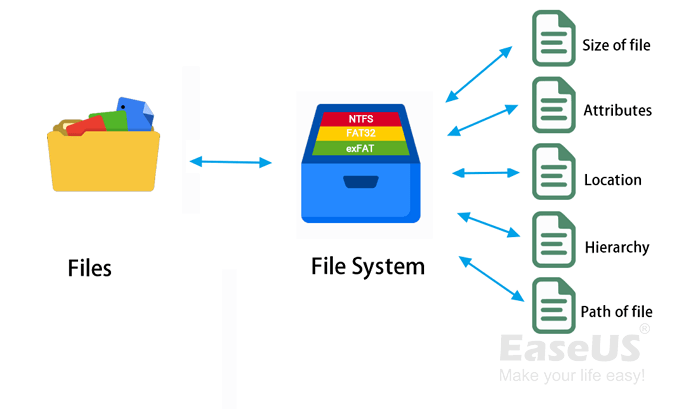
File System Comparison: NTFS, FAT32, exFAT, and EXT
This page compares four types of common file system formats - NTFS, FAT32, exFAT, and EXT2/3/4 - to help you decide which one to use on your storage devices. The comparison includes details about each file system format, allowing you to choose the most suitable one for your needs.
Format Seagate External Hard Drive on Windows
This part includes Qiling Disk Master Free (Recommend) and Disk Management.
1. Format A New Drive
You can start formatting your Seagate external hard drive directly without initialization, and we recommend using a free formatting tool called Qiling Disk Master Free. This partition manager allows you to format hard drives from any brand in just four steps, and even if you choose the wrong format, you can easily roll back without losing any data.
I recommend Qiling Disk Master Free, a simple and free tool.
Connect an external hard drive to your computer, then download and install a software program that can read and write data to the external drive. This software, often provided by the external hard drive manufacturer, enables your computer to recognize and interact with the external drive, allowing you to transfer files, copy data, and perform other operations on the external drive.
- Right-To format an external drive or USB, click on it to select it, then choose the "Format" option from the context menu or a dialog box, depending on the operating system and software being used. This will erase all data on the drive and prepare it for new files.
- Set the Partition label, File system (NTFS/FAT32/EXT2/EXT3/EXT4/exFAT), and Cluster size.
- Click the "Proceed" button to format the hard drive partition.
- Click "Yes" to continue.
Want to format USB or SD card?
2. Reformat Seagate External Hard Drive
You can reformat a Seagate external hard drive using a third-party format program or Windows Disk Management.
1. Open Disk Management.
2. Right-click the partition and select "Format".
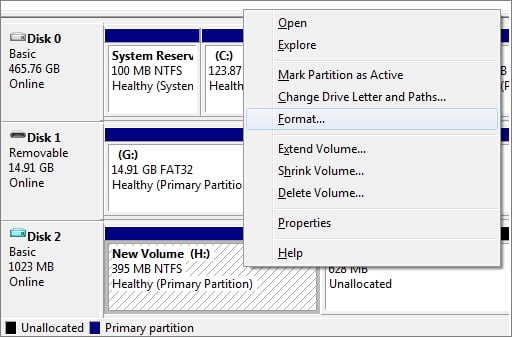
3. When the Format window appears, give your volume a label and select the file system. Set the Allocation unit size to its default value.
4. Click OK.
Format Seagate External Hard Drive Mac
To format a drive on your Mac, you can use the built-in Disk Utility tool without needing to download any additional software. This tool allows you to format, partition, and repair disks, as well as create disk images and burn CDs and DVDs. It's a powerful but potentially complex tool, making it a good idea to familiarize yourself with its basics before using it.
? Note: If you click on "erase", you'll be deleting all the data on the Seagate hard drive, essentially sending it to the recycle bin. It's recommended to back up all your data before doing this, as there's a low chance of recovering the data if it's erased.
Video Guide - How to Reformat Seagate Portable External Hard Drive
This video demonstrates how to use Disk Utility to reformat a Seagate external hard drive on a Mac.
- Start "Erase" from 0:52.
How to format Seagate for Mac
1. Plug the Seagate external hard drive on Mac.
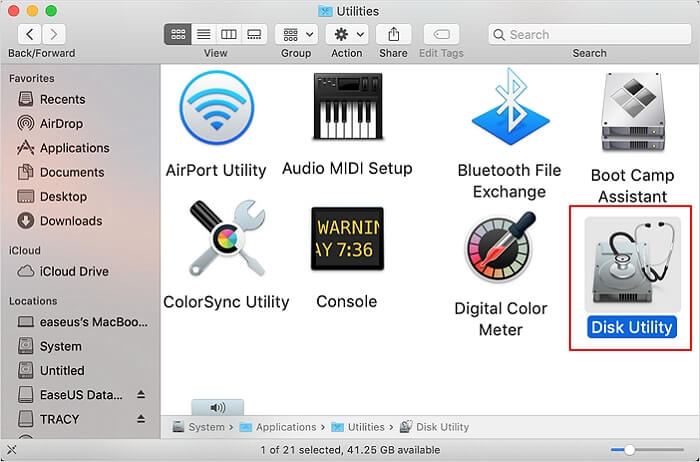
2. Press the "Command + Space" shortcut to locate "Disk Utility" and click to open it.
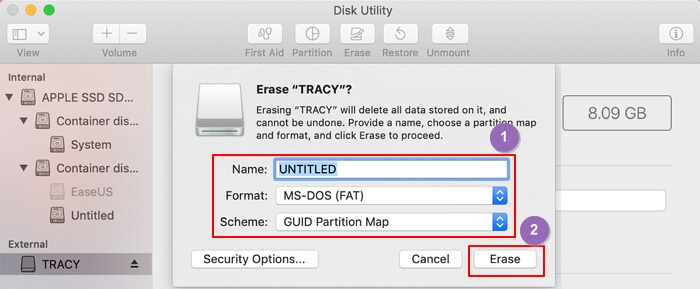
3. Select your Seagate external hard drive from the left pane and click the "Erase" button on the top right pane.
4. On the Erase window, name your drive and set the file format, then click "Erase".
Wondering how to format a USB drive on Mac?
Format Seagate External Hard Drive FAQs
Here we collect other two questions you may concerned:
1. How do I wipe and format a Seagate external hard drive?
To format a Seagate external hard drive, connect it to your computer, open the Disk Management utility, locate the drive, right-click on it, select "Format", confirm the operation, choose the file system, and click "OK".
2. Can I reformat a Seagate drive?
Seagate drives can be reformatted, but this will erase all data on the disk. To do this, connect the drive to a computer and use the built-in disk management tools to reformat it. Alternatively, you can use third-party software like Qiling Disk Master to reformat the drive.
Related Articles
- Move Partition to the Left and Unallocated Space to the Right or End of A Drive
- Extend Volume with Disk Management Tutorial with Pictures
- High-Level Format VS Low-Level Format, What's the Difference and How to Use [Full Guide]
- Top 5 Best SSD Speed Test Software Recommend with Pros & Cons
- Best Solution to Resize FAT32 Partition Without Losing Data
When you want to shrink or extend the FAT32 partition in Disk Management, you will find that you are unable to do this operation. This post offers a step-by-step tutorial to help you easily resize FAT32 partition without losing data. - How to Resize Partition on SSD without Losing Data [Windows11/10]
This article will provide guidance on how to resize partitions on an SSD, offering various methods to shrink or extend partitions on an SSD for Windows 11/10.
Products
Articles & Tutorials
- Data Recovery
- Data Backup
- File Recovery
- File Backup
- System Backup and Restore
- Disk and Partition Clone
- Technical articles
- Mobile articles
- Disk Master Help
- Windows Data Recovery Tutorials
- Windows Secure Delete Tutorials
- Windows Partition Management Tutorials
- Windows File Backup and Restore Tutorials
- Windows System Backup and Restore Tutorials
- Windows Disk Backup and Restore Tutorials
- Windows Clone Tutorials