Top 5 Best SSD Speed Test Software Recommend with Pros & Cons
Key Takeaways of SSD Speed Test Software:
By using reliable SSD speed test software, you can experience several benefits, including accurate measurements of your SSD's read and write speeds, identification of potential bottlenecks and areas for improvement, and the ability to compare your SSD's performance with others, helping you make informed decisions when choosing or upgrading your storage solutions.
- You can quickly test SSD speed.
- Get instant speed test results.
- Enable you to determine the performance level of your drive.
- The software can scan and identify if the SSD speed is slow in various aspects, providing a comprehensive evaluation of its performance.
In the vast jungle of SSD speed test software, we've curated the top five best options to help you quickly check your SSD's speed and gain valuable insights into its health and performance metrics.
| Best SSD Speed Test Software | Why Choose It | Target Users |
|---|---|---|
|
1. Qiling Disk Master🏆🥇 |
Free & best SSD speed test software | All levels Windows users |
| 2. CrytalDiskMark🥈 | Open-source SSD speed test tool | Advanced developers |
| 3. ATTO Disk Benchmark🥉 | Cross-platform SSD speed test software | Windows & Mac users |
| 4. AS SSD Benchmark | Portable SSD speed test tool | Old Windows owners |
| 5. BlackMagic Disk Speed Test | Mac SSD speed test software | All levels of Mac users |
If you liked this list of reliable tools to monitor SSD performance, please share it with your friends online to help them find the best tool for their needs. This will also help them improve their SSD's performance and extend its lifespan.
Top 5 Best SSD Speed Test Software Recommend, with Pros & Cons
Users are switching to SSD drives, which offer faster loading times and startup speeds compared to traditional hard drives. To take full advantage of this speed, it's essential to check the actual speed of your SSD. Several applications are available for measuring SSD speed, but the most popular and reliable ones can be used to determine the actual speed of your SSD.
1. Qiling Disk Master
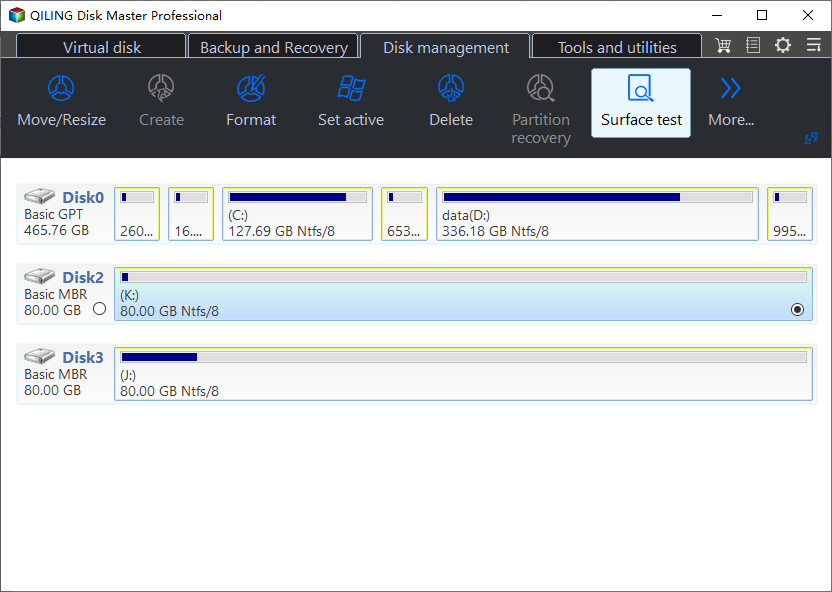
Qiling Disk Master is a software that offers a complete partition manager and is the best for SSD speed testing, with features like DiskMark for testing SSD speed, and Disk Health for testing SSD S. M. A. R. T status and temperature. It provides various useful features.
Key features of Qiling Disk Master:
- To check the speed of various storage devices, you can use tools like `hdparm` for hard disk drives, `dd` for USB drives and SD cards, and `bonnie++` for external disk speed. These commands can help you measure the sequential read and write speeds of these devices, providing valuable insights into their performance.
- Monitor HDDs, SSDs, and external disk drives health.
- It can optimize SSD performance by 4K aligning the disk.
- It fixes bad sectors and supports checking file system errors.
- It converts to Dynamic and Basic disks.
- It Initializes to MBR/GPT with simple steps.
- It migrates OS to HDD/SSD and clones the disk.
| Pros✅ | Cons❎ |
|---|---|
|
|
Download Qiling Disk Master:
#SSD Speed Test#SSD Speed Test Software #Free#Windows
Editors' Thoughts:
- ①. Very user-friendly, even for inexperienced computer users.
- ②The feature lets you preview changes before applying them, as mentioned by Tim Fisher from Lifewire.
Who to Use It - Qiling Editor's Suggestion:
Qiling Disk Master is a disk partition software that allows users to manage hard disk drives or solid-state drives on Windows PCs and servers. It's an ideal tool for beginners to test SSD speed and for SSD owners to optimize disk performance with additional features.
Also Read:
2. CrystalDiskMark
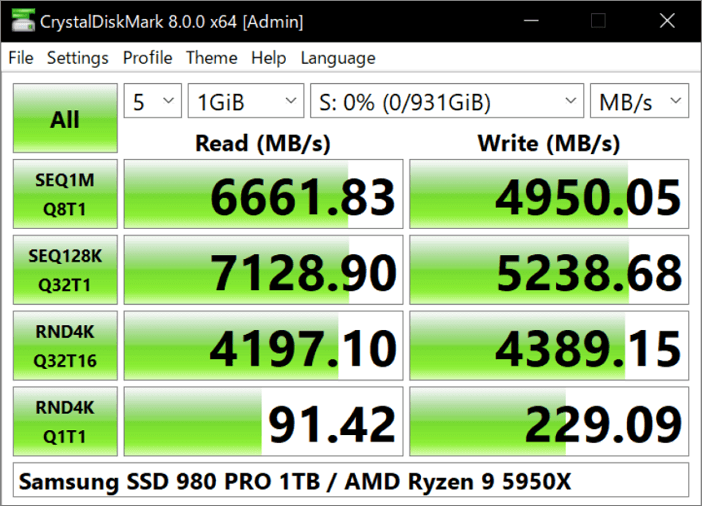
CrystalDiskMark is an easy-This program allows users to check the speed of various storage devices, including HDD hard drives, SSD solid-state drives, USB memory cards, SD memory cards, and NAS network storage. The program supports a range of devices, enabling users to easily monitor and compare the performance of different storage options.
Key features of CrystalDiskMark:
- SSD status monitoring.
- Receiving SMART information.
- Hard drive crash prediction.
- Checking for the latest firmware for SSD drives.
- Performance tuning for various PC configurations.
- Safe and irretrievable (non-recoverable) disk cleanup from confidential files.
| Pros✅ | Cons❎ |
|---|---|
|
|
Download CrystalDiskMark: Click to Download.
Editors' Thoughts:
Who to Use It - Qiling Editor's Suggestion:
CrystalDiskMark is an open-CrystalDiskMark is a disk drive benchmark tool for Microsoft Windows, developed by Crystal Dew World. It can be used by advanced developers to apply the utility for further programming purposes and usage.
#SSD Test#Free SSD Speed Test Software#Free
3. ATTO Disk Benchmark
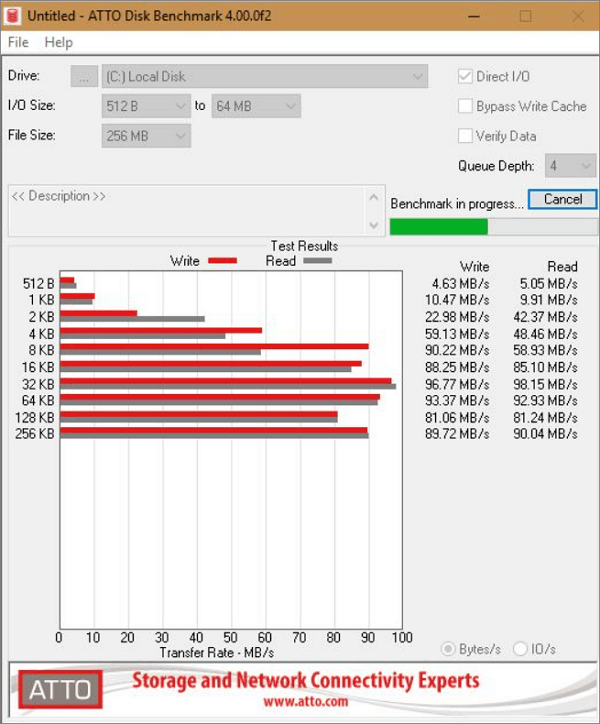
ATTO Disk Benchmark is a tool used for hardware inspections and SSD drive speed testing. It measures the performance of an SSD in reading and writing with different file sizes.
Key features of Features:
- File sizes up to 64 MB and lengths up to 32 GB can be transferred.
- Its time mode provides room for continuous testing
- Supports multiple list depths
- Supports overlapping I/O
| Pros✅ | Cons❎ |
|---|---|
|
|
Download ATTO Disk Benchmark: Click to Download.
Editors' Thoughts:
Who to Use It - Qiling Editor's Suggestion:
ATTO Disk Benchmark is a cross-platform tool designed to test the speed of various storage devices, including HDDs, SSDs, network drives, and RAID controllers, on both Windows and Mac computers.
#SSD Benchmark Tool#SSD Speed Test Utility#Windows#Mac
4. AS SSD Benchmark
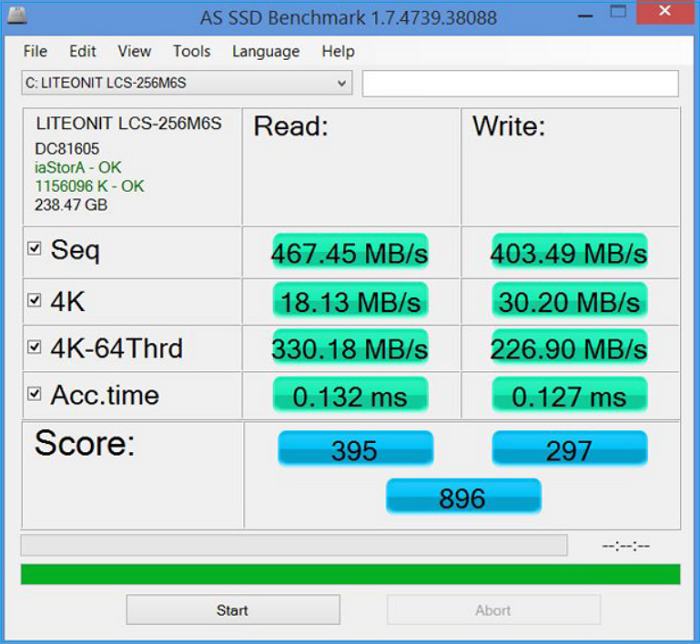
AS SSD Benchmark is a tool primarily designed for benchmarking SSD drives, offering a similar interface to CrystalDiskMark. It measures the performance of SSDs in various aspects, making it a good tool for evaluating their capabilities. However, it is not a comprehensive benchmarking tool.
Key features of AS SSD Benchmark:
- Excellent features for SSD speed test
- NVMe SSD support
- 4K LBA sectors support
- Increased accuracy for fast SSDs
| Pros✅ | Cons❎ |
|---|---|
|
|
Download AS SSD Benchmark: Click to Download.
Editors' Thoughts:
Who to Use It - Qiling Editor's Suggestion:
AS SSD Benchmark is a dedicated utility for advanced users to test SSD disk performance. It doesn't require software installation for most Windows users, making it a convenient option for evaluating SSD performance.
#SSD Speed Software#SSD Speed Test App#Free
5. Blackmagic Disk Speed Test
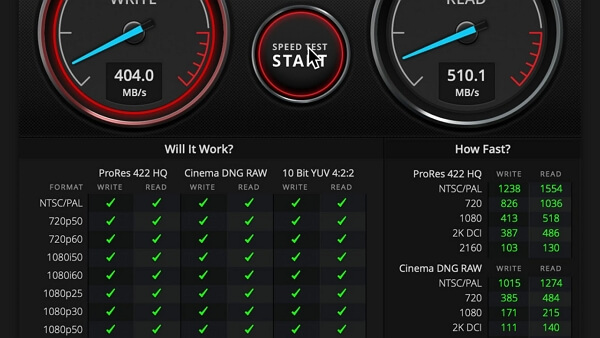
Blackmagic Disk Speed Test is a tool designed by Blackmagic Design to measure the performance of SSDs, included in the Blackmagic Desktop Video software available for Mac, Windows, and Linux.
Key features of Blackmagic Disk Speed Test:
- It checks the performance of the hard drive
- It shows write/read speeds in MB/second
- It encloses just one window
- Requires a few easy settings
| Pros✅ | Cons❎ |
|---|---|
|
|
Download Blackmagic Disk Speed Test: Click to Download.
Editors' Thoughts:
Who to Use It - Qiling Editor's Suggestion:
Blackmagic Disk Speed Test is a user-friendly disk benchmark utility for Mac users, allowing them to inspect their OS disk or external disk speed with ease. Despite a slightly complex interface, it's an ideal and secure tool to trust for Mac users.
#SSD Test Tool#SSD Performance Tool#Mac
What Is SSD Speed Test Software? Benefits and Advantages
SSD speed test software To ensure your SSD is performing optimally, you can use various tools to test its speed and performance. If you find that your SSD isn't meeting your expectations, you can take steps to improve its performance and get a better user experience.
If you're using an SSD and it's not performing as expected, you can test its speed using a reliable SSD speed test software to identify any issues and improve its performance.
A reliable SSD speed test software quickly scans and tests your SSD speed, providing you with the actual results of your SSD's performance.
Some benefits and advantages of using SSD speed test software:
- It measures the read/write speeds of the SSD.
- If finds and determines if there is any issue that needs to be fixed.
- It monitors the SSD's health and predicts any potential loss.
- The software identifies any blockages in the system that may be impacting the SSD's performance, allowing for targeted maintenance and optimization.
- The SSD provides detailed information about itself, including its capacity, firmware version, and current temperature.
- This tool can compare the performance of different SSDs to determine the best option for a particular system, taking into account factors such as read and write speeds, power consumption, and compatibility with specific devices.
SSD Speed Test Software Selection Criteria or Checklist
Choosing the best SSD speed test software can be overwhelming with many options available online. However, we've made it easy for you to select the best one by considering the following criteria:
- 🛡️ Safe & secure
- 😉 Easy to use
- 💽 Support all types of SSD disks
- 💻 Compatible with the operating systems of users' computers
- 🔍 This software efficiently and quickly scans the SSD, providing a full report of the SSD speed test results.
Choosing the best and most reliable SSD speed test software can be a challenge, but these useful tips can help. To make an informed decision, consider factors such as accuracy, ease of use, compatibility, and supported test modes, then compare the options to find the one that suits your needs.
Which Is the Best SSD Speed Test Tool? Qiling Disk Master Deserves a Try
If you're still unsure which speed test software is best for you, don't worry - all five software options (SATA, M.2, and NVMe SSDs) can fulfill your needs in testing the speed of your SSDs.
Qiling Disk Master is the best and most advanced SSD test software for all levels of Windows users, providing extra benefits alongside testing disk performance. It's an exciting option for users to try now!
FAQs About SSD Speed Test Software
These FAQs may be helpful if you have more queries regarding SSD speed test software.
1. How do I check the speed of my SSD?
You can check your SSD speed through the Task Manager. Open Task Manager, navigate to the "Performance" tab, and click on "Disk C" - you'll see the read and write speed of your SSD displayed.
There are many ways and third-party apps to test your SSD speed and get detailed reports, with Qiling Disk Master being one of the most reliable tools.
2. Can I run an SSD speed test on Windows 11?
On Windows 11, using the Command Prompt is the simplest method to test the speed of a solid-state drive (SSD).
Open "Command Prompt" this command "winsat disk". Wait for a while, and the results will be displayed shortly.
3. When should I test SSD on Windows 10?
If you're experiencing slow performance that doesn't function properly, test your SSD on Windows 10 to identify any issues.
4. How do I check my SATA SSD speed?
To accurately check SATA SSD speed, you can use apps like Qiling Disk Master, a free app that provides a more accurate reading of your SSD's speed. Simply download and run it.
Related Articles
- How to Boot from USB on HP Laptop on Windows 11/10 [Step-by-Step]
- High-Level Format VS Low-Level Format, What's the Difference and How to Use [Full Guide]
- Mark Partition as Active in 4 Ways [Step-by-Step Guide]🔥
- PS5 SSD Temperature Test: Do You Need A Heatsink?
- Is It Possible to Increase the Size of a FAT32 Partition Without Losing Data?
Is it possible to increase the size of a FAT32 partition without losing data? Can we break the limits of the FAT32 file system? Yes, and you will find more details in this article. - Is There Any Way to Copy Windows 10 Installation to New Hard Drive
If you are looking for effortless methods to copy Windows 10 installation to a new hard drive, this page covers a full guide on quickly transferring Windows 10 to another hard drive.
Products
Articles & Tutorials
- Data Recovery
- Data Backup
- File Recovery
- File Backup
- System Backup and Restore
- Disk and Partition Clone
- Technical articles
- Mobile articles
- Disk Master Help
- Windows Data Recovery Tutorials
- Windows Secure Delete Tutorials
- Windows Partition Management Tutorials
- Windows File Backup and Restore Tutorials
- Windows System Backup and Restore Tutorials
- Windows Disk Backup and Restore Tutorials
- Windows Clone Tutorials