M.2 Temperature Monitor | How to Check M.2 Temperature [Step-by-Step]
M.2 is an SSD or solid-M.2 SSDs are small in size and faster than conventional SSDs, making them ideal for gaming laptops. However, some users may be concerned about the potential for M.2 SSDs to overheat, but this is generally not a major issue as they are designed to operate within a safe temperature range.
The M.2 temperature refers to the temperature range that the M.2 form factor can tolerate while performing efficiently. This article will discuss the M.2 temperature monitor and delve into the details of this matter.
What Temp Should an M.2 Be
The average temperature range for an M.2 is around 35-40°C, which can stretch to 60-70°C under heavy workload, and overheating can cause several issues.
- High heat cycles can cause a decrease in the performance of a device.
- Overheating can cause data loss, slow loading speed, and data corruption.
- Overheating can significantly reduce the lifespan of a system by causing components to degrade faster, which can lead to premature failure.
Warranties typically don't cover damages caused by excessive heat, which is why monitoring the temperature of your M.2 drive is crucial to prevent costly replacements.
Further Reading: SSD Temperature Range: Everything You Should Know
M.2 Temperature Monitor: How to Check M.2 Temperature
To keep M.2 healthy, monitoring its temperature is crucial. Two solutions can be followed to keep an eye on the M.2 temperature, ensuring its optimal functioning.
Way 1. Check M.2 Temperature via Qiling Disk Master
If you're concerned about M.2 temperature, a simple solution is to use Qiling Disk Master, a professional and user-friendly software that allows users to monitor and optimize disk performance, including checking the temperature of your M.2 drive.
The user can use Qiling Disk Master to monitor the temperature of an M.2 drive by running the software and accessing the temperature monitoring feature, which can provide real-time data on the drive's temperature. This can be useful for identifying potential issues or overheating problems with the drive.
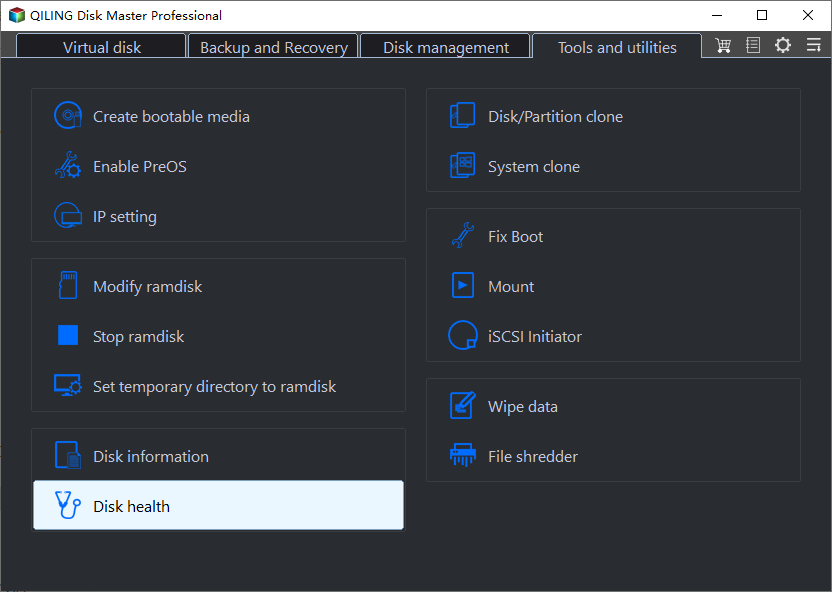
Step 1. Launch Qiling Disk Master and activate the "Disk Health" feature under the "Discovery" section by clicking the blue arrow.
Step 2. Select the target disk and click the "Refresh" button to view the health condition of your disk.
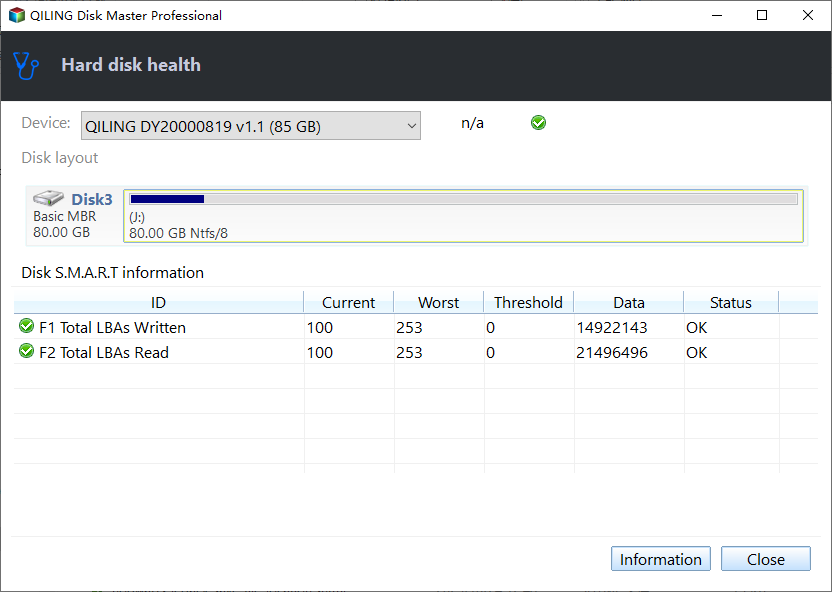
The tool not only checks the M.2 temperature but also offers other features.
- Check hard drive health and SSD health
- Test SSD speed, such as testing NVMe speed
- Run disk surface test to check bad sectors
- Solve why my SSD so full error
- Extend or resize a partition to optimize disk space usage
Haven't you used Qiling Disk Master? What are you waiting for? Check out this reliable program today!
Way 2. Check M.2 Temperature via Manage Disks and Volumes
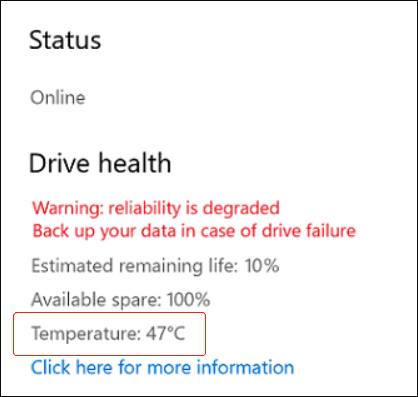
To check the M.2 temperature, go to the Manage Disks and Volumes feature, and look for the temperature range, which is usually indicated in degrees Celsius. It's essential to monitor this range to prevent the degradation of the M.2.
Step 1: Go to Start and click on Settings.
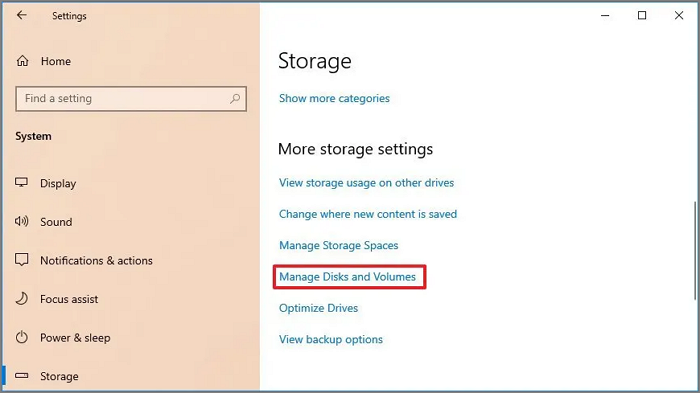
Step 2: Select System. Click on Storage. Now, select Manage Disks and Volumes.
Step 3: To view the drive temperature, search for the drive and click on the arrow button next to it.
Step 4: Check the temperature of the drive health by going to Properties > Drive health.
Conclusion
Knowing how to check M.2 temperature is crucial. There are two ways to monitor the temperature: using the Manage Disks & Volumes feature or opting for Qiling Disk Master.
The Qiling Disk Master is a professional, user-friendly, and reliable tool that offers a range of features, including checking M.2 temperature, resizing partitions, backing up data, and more.
FAQs About M.2 Temperature Monitor
Checking the M.2 temperature at periodic intervals is essential to ensure the overall health and performance of the system, as high temperatures can lead to data loss and hardware damage. Regular monitoring can help identify potential issues before they become major problems.
1. How do I check my m 2 SSD temp?
To check your M.2 SSD temperature, go to Windows Settings, navigate to Manage Disks and Volumes, select the drive you want, and choose Properties to see the temperature.
2. How hot is too hot for SSD?
Most SSDs can operate within a temperature range of 0-70°C, but temperatures above this can cause overheating. Industrial-grade SSDs, however, can withstand temperatures between -40-85°C, though high temperatures can still cause decreased performance and potential damage.
3. Can an M.2 SSD overheat?
An M.2 SSD can overheat due to its high speed, which can lead to thermal throttling and slow down the drive to prevent further heat damage.
Related Articles
- How to Securely Erase or Wipe SSD in Windows 11/10
- How to Convert a Dynamic Disk to Basic Windows Server
- How to Extend Partition Using Diskpart [Step-by-Step Guide]
- [Easily Solved] Delete Volume Greyed Out in Windows 10, 8, 7
Find Delete Volume grayed out in Disk Management? In this article we introduce Qiling Disk Master to solve the problem. - How to Perform High Level Format on Hard Drives for Windows 10/8/7?
High level formatting is a process of initializing portions of hard disk and recreate the file system on the disk. - How to Easily Add Unallocated Space to D Drive in Windows 10/8/7?
How to add unallocated space to D drive when there is not enough space? Here, 2 ways will be provided to extend D drive easily, including Disk Management and Qiling Disk Master. In addition, it will offer a step-by-step guide.
Products
Articles & Tutorials
- Data Recovery
- Data Backup
- File Recovery
- File Backup
- System Backup and Restore
- Disk and Partition Clone
- Technical articles
- Mobile articles
- Disk Master Help
- Windows Data Recovery Tutorials
- Windows Secure Delete Tutorials
- Windows Partition Management Tutorials
- Windows File Backup and Restore Tutorials
- Windows System Backup and Restore Tutorials
- Windows Disk Backup and Restore Tutorials
- Windows Clone Tutorials