Your Easiest Guide for Running USB Flash Drive Speed Test Online
| ⏰Duration: | 3-5 minutes reading |
| 🎯Goal: | Perform USB flash drive speed test online. |
| 💻Supported Operating Systems: | Windows 11/10/8.1/8/7 and older Windows OS, and Windows Servers. |
| 💽Supported USB Flash Drives Brands: | Seagate, WD, Toshiba, Sony, Samsung, Kingston, SanDisk, etc. |
When buying a USB flash drive, it's essential to consider its write speed, especially if you plan to use it for booting Windows or storing files and media. A USB drive with slow write speeds may not be suitable for today's needs.
USB drives that use the USB 3.1 or 3.2 standards have faster write speeds and are widely compatible, unlike the latest USB4 and USB 4 2.0, which are compatible only with modern machines.
If you already have a USB flash drive and want to know its write speed, you can put it through a speed test online to determine its suitability for use as a primary drive.
To put your USB flash drive speed test online, follow these steps. First, download and install a USB benchmarking tool, such as CrystalDiskMark or HD Tune, on your computer.
Tools You Need to Run a USB Flash Drive Speed Test Online
To run a speed test on your USB flash drive online, you'll need to download a software tool, such as CrystalDiskMark or HDTune, which will allow you to measure the read and write speeds of your drive. You'll also need to create a bootable USB drive using a tool like Rufus, which will enable you to run the speed test on your drive. Additionally, you may need to disable any antivirus software that could potentially interfere with the test.
Here are the list of things you need:
- 💽USB flash drive: You can use any USB flash drive from any brand, regardless of its limit or USB standards.
- 💻A healthy computer with working USB ports: To ensure your PC's USB ports are working and its drivers are updated, you can start by checking the Device Manager. Look for any USB-related drivers and update them if necessary.
- 🧰A reliable USB flash drive speed test online tool: To get accurate results, find a reliable USB speed test tool to measure the speed of your USB drives or ports.
Finding a reliable USB speed test tool can be a challenge, but it's essential to get accurate speed results. To make things easier, we'll guide you through the process of selecting the right speed test tool for your USB flash drive in the next section.
USB Flash Drive Speed Tester Online Recommend 2024
Qiling Disk Master is a reliable and easy-to-use program available for Windows that allows users to test the speed of their USB drive for free using its DiskMark feature, and also offers other features for configuring the USB drive.
Download Qiling Disk Master to experience firsthand how effortless it is to run a speed test on your drive.
To make it easier for you, we've laid out step-by-step instructions in the following section, so be sure to check it out!
Pros & Cons, Why Recommend Qiling Disk Master
Qiling Disk Master is a tool for testing the speed of your USB flash drive, offering several benefits. It provides accurate read and write speed tests, allowing you to compare the performance of different USB drives.
Expert's Rating:
👍🏻
Pros
- Free SSD read/write speed testing available
- All types of external storage devices, including USB drives, SSD drives, HDDs, and more, are supported.
- Provides extra features to boost the performance of USB drives.
- Easy-The interface is designed to be very user-friendly, making it easy for inexperienced computer users to navigate and use. It's straightforward and simple, allowing users to quickly find what they need without feeling overwhelmed or confused.
👎🏻
Cons
- Mac version of this software is unavailable
- The DiskMark feature provides accurate results, and users can also export the results using Qiling Disk Master.
Professionals' Thought:
The reviewer found Qiling to be a solid tool with many disk and partitioning options, and appreciated the reasonable lifetime pricing option for the Professional version, considering it a good product.
Share this tool with your friends online to help them easily monitor their USB speed. This tool is designed to provide a convenient way to check the speed of USB drives, making it a useful resource for anyone who wants to optimize their USB performance.
Guide On Running USB Flash Drive Speed Test Online
Using Qiling Disk Master's DiskMark feature is pretty easy, but if you need help, check out our step-by-step guide to learn how to use it properly.
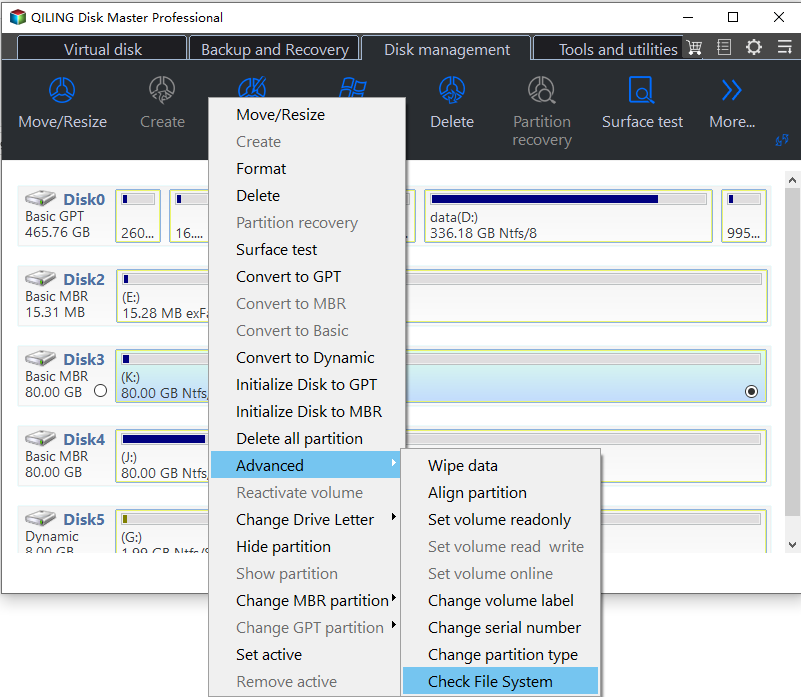
Step 1. Launch Qiling Disk Master and click the download button to activate the "Surface test" feature under the "disk management" section.
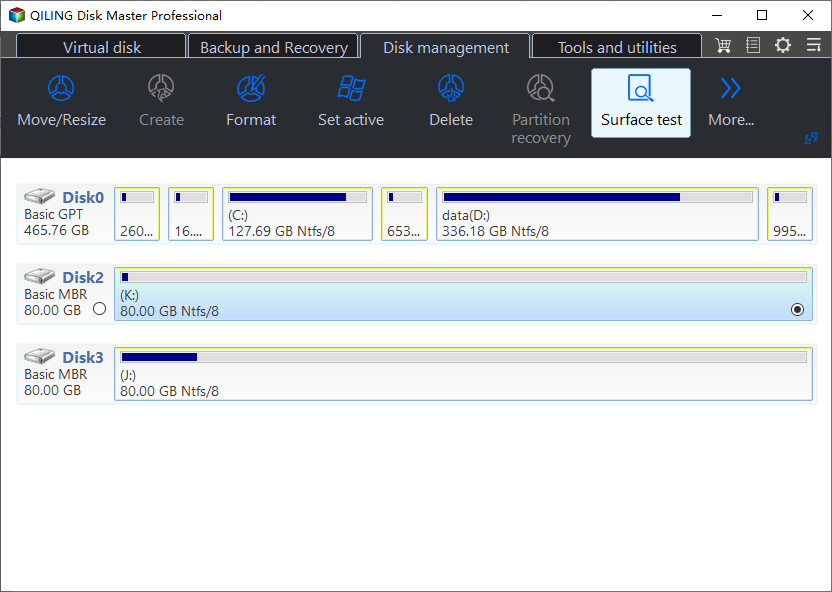
Step 2. To begin the test, click on the drop-down box to select the target drive, test data, and block size. This will ensure that the test is run on the desired drive, with the appropriate data and block size for the test.
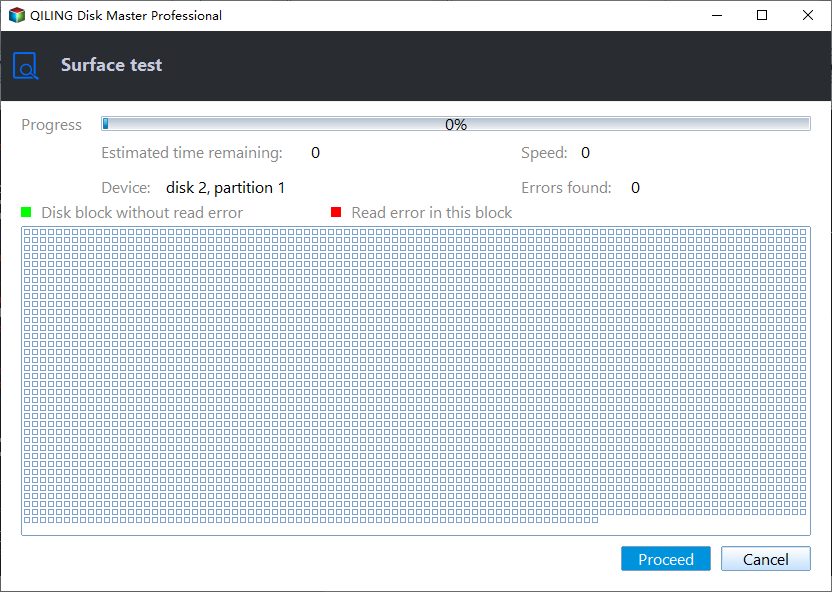
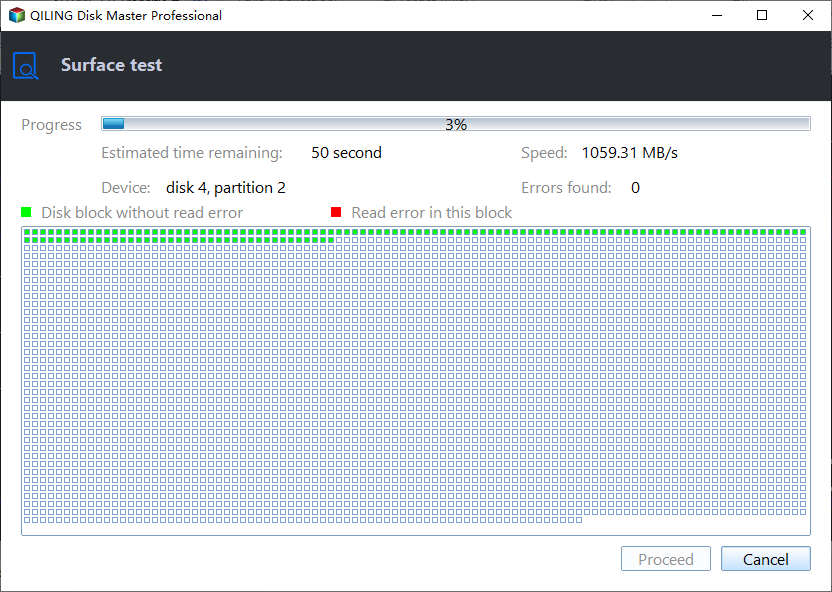
Step 3. Once everything is configured, click "Proceed" to start the disk test, which will display the Sequential read speed, I/O, and Delay data.
Further Guide: Compare and See If USB Flash Drive Speed Is Slow
If your USB drive is slow, don't worry! In this section, we'll share everything you need to know about USB drive speeds, including what speeds are considered good, and how to optimize or troubleshoot your drive to get it working properly.
#1. Export USB flash drive speed test result
After running the speed test using Qiling Disk Master's DiskMark feature, export the results and save them on the desktop or a preferred location on your PC.
#2. Check the normal average speed of a USB flash drive
Here are the average speeds of the following USB drive standards: USB 1.0 (1.
- USB 2.0: write speed of 3-10 Mbps and a read speed of 10-25 Mbps on average.
- USB 3.0: write speed of 10-45 Mbpmbps and a read speed of 10-45 Mbps.
- USB 3.1 has a write speed of 10 to 25 Mbps and a read speed of 60 to 100 Mbps.
- USB 4.0 has a write speed of 1,000-1,500 Mbps and a read speed of 2,000-3,000 Mbps.
#3. Compare USB speed with the test result
This USB drive can achieve speeds that are comparable to or higher than the average speeds mentioned, depending on the test results.
If the speeds are lower than the average speeds, you'll need to optimize your USB drive by formatting it, checking for viruses, and more to achieve optimal speeds.
To monitor the USB speed with ease, follow these simple steps: First, download and install the USB Deview tool from the official website. Next, plug in the USB device you want to monitor and run the USB Deview tool.
Tips to Select a USB Flash Drive Speed Tester Tool Online
Before selecting a USB speed tester tool, you need to ensure it meets certain criteria. You must determine what you need to test, such as the speed of a specific USB device or cable, and then choose a tool that can accurately measure that. Additionally, you should consider the type of data you will be transferring and the desired level of precision in your results.
- If it is easy to use
- If the tool supports USB speed testing and also
- This app provides a comprehensive stress test experience, offering multiple tests to evaluate various aspects of your device's performance. The results are thoroughly analyzed and presented in a detailed breakdown, allowing you to understand your device's capabilities and identify any potential issues.
- If it is available for your operating system and more
Here are a few things to keep in mind when selecting a good speed testing tool for your USB flash drive that's also accurate:
- 🎈Features: The software supports USB speed testing and provides additional features for your USB drive, including formatting it, checking for errors, and more. This allows you to thoroughly test and maintain your USB drive, ensuring it's running smoothly and efficiently.
- 🔢Complexity: The user needs to assess the ease of use of the system, determining whether it is simple and intuitive or complex and overwhelming. This evaluation will help identify areas for improvement and inform design decisions to create a more user-friendly experience.
- 💻Supported OS: The tool is designed to be available on multiple operating systems, including Windows, macOS, and Linux, to ensure compatibility and flexibility for users. This allows users to run the tool on their preferred operating system without any issues.
- 💵Price: You need to select a tool that isn't expensive.
Bonus Tips to Improve and Optimize USB Flash Drive
If your USB drive is slower than average, you can try a few fixes to improve its speed.
Here are a few of them:
- Format the USB drive to the NTFS file system.
- Run antivirus software to check for any viruses or malware that might be affecting your USB drive's performance, and remove them if detected.
- Update the drivers of your computer's USB ports.
- Update the drivers of your USB flash drive.
For more details, follow the tutorial articles for help:
Conclusion
USB flash drives have become significantly more powerful in recent years, capable of booting Windows or transferring large files in mere seconds. However, if your USB flash drive is experiencing slower performance, you're missing out on its full capabilities.
Qiling Disk Master provides accurate results for USB flash drive speed tests, unlike other tools. Its DiskMark feature allows you to check the read and write speeds of the drive accurately. (Note: I removed the "Moreover" as it was not necessary and made the text more concise)
Qiling Disk Master is a software that allows users to easily format their USB drive to various file systems, including NTFS, APFS, and exFAT, among others. It also enables users to check for file system errors, create partitions, and perform other disk management tasks.
If you want an all-If you want to run a speed test of your USB drive easily and efficiently, you should try Qiling Disk Master today!
FAQs About Running USB Flash Drive Speed Test Online
If you have any other questions about testing the speed of your USB flash drive, we've can help. We've answered all your questions about it.
1. What is the best USB flash drive tester online?
Some of the best tools to test USB flash drives include Qiling Disk Master, Blackmagic Disk Speed Test, and CrystalDiskMark.
2. Can it be free to run USB flash drive speed tests online?
Several USB flash drive speed test tools are available, but most are inaccurate, making a reliable tool like Qiling Disk Master a great choice for a precise speed test.
3. When should I run a USB speed test on Windows 11 or 10?
There's no specific time or place required to run a speed test on a USB drive. You can run it whenever you want.
Related Articles
- Can't Install Windows 7 on Dynamic Disk - 3 Fixes 🔥
- Lenovo Laptop Stuck on Lenovo Screen? 9 Easy Fixes Here!
- Does Formatting a Drive to exFAT Wipe It?
If you need to format your internal drive or external device to exFAT for some reason, you might wonder, 'Does formatting a drive to exFAT wipe it.' Here in this post, We provide you the answer you are looking for. - Does SSD Slow Down Over Time, How to Optimize It
Does SSD slow down over time? This post will answer your question and provide effortless methods to optimize and speed up your SSD. - How to Create A Partition Windows 11? [Solved]
Creating a partition in Windows 11 is a straightforward process that offers several benefits, including improved organization and management of your physical drives. This can help you maintain a clutter-free system, make backups easier, and even boost your computer's performance. - How To Create Bootable USB for Windows Server
To create a bootable USB for Windows Server 2019, you can follow a detailed guide that includes formatting the USB drive, downloading the Windows Server 2019 ISO file, and using a tool like Rufus or Windows Media Creation Tool to create a bootable USB drive.
Products
Articles & Tutorials
- Data Recovery
- Data Backup
- File Recovery
- File Backup
- System Backup and Restore
- Disk and Partition Clone
- Technical articles
- Mobile articles
- Disk Master Help
- Windows Data Recovery Tutorials
- Windows Secure Delete Tutorials
- Windows Partition Management Tutorials
- Windows File Backup and Restore Tutorials
- Windows System Backup and Restore Tutorials
- Windows Disk Backup and Restore Tutorials
- Windows Clone Tutorials