DISM Error 4448 on Windows 11: Fix the Component Store
Quick Navigation:
- What Error 4448 Means
- How It Differs From 0x800f081f
- Locate the Damage
- Back Up Before Repair
- Frequently Asked Questions
Error 4448 shows up when the servicing stack tries to use a component in the component store and cannot resolve it. The store is present and can be enumerated, but at least one component has a manifest or a compressed payload that cannot be read, so every repair that starts from that store fails at the same point. The code rarely travels alone: File Explorer crashes, delayed context menus, and updates that end with 0x800f081f often belong to the same machine.
What Error 4448 Means
The component store is the WinSxS folder, the pool of servicing packages that Windows uses to build and repair itself. Each component is described by a manifest and stored as a compressed resource, and the driver that decompresses those resources reports a failure when a resource table is damaged. Error 4448 is that report reaching the servicing stack.
The practical consequence is that the repair and the damage live in the same place. Scanning the image may still report that the store is repairable, because the scanner can read the manifests it needs, while the repair stops as soon as it tries to open the damaged component. That difference between a clean scan and a failing repair is the signature of this code.
File Explorer symptoms come from the same component family. Shell extensions, thumbnail handlers, and property pages are serviced components, and a resource that cannot be decompressed shows up as a crash when a folder is opened or a file is right-clicked. A machine in that state is not stable enough to trust with an in-place upgrade until the store is repaired.
How It Differs From 0x800f081f
0x800f081f means the requested source files were not found. The store may be perfectly healthy, and the repair fails because the image that was offered as a source is missing a package or belongs to a different build. Supplying a matching source is the fix, and the error disappears without touching the store.
Error 4448 moves the problem inward. The source can be correct, present, and mounted, and the repair still fails because the store cannot read its own component. Adding more sources to a damaged store cannot help, which is why the same command keeps returning the same code after every attempt.
The two codes can appear together, and the order matters. A store damaged by 4448 often produces 0x800f081f later, when an update looks for a component that the store can no longer supply. Fix the store first, and treat the source error as a second problem rather than the primary one.
Locate the Damage
SFC and DISM are built into Windows and are not features of Qiling Disk Master. They are the right tools for this diagnosis, and they belong to the operating system's own repair path rather than to the software steps further down this page. Their different roles are compared in the SFC, CHKDSK, and DISM breakdown.
Start with a scan rather than a repair. The servicing log records every component the stack failed to open and the path it tried, and that line identifies whether the damage is a missing manifest, an unreadable resource, or a folder that a cleanup tool truncated. A WinSxS folder far smaller than the build expects has usually been cleaned by a third-party utility.
Check the disk and the free space before blaming the store. A volume with less than ten percent free cannot stage a repair, and a disk returning read errors produces identical symptoms while the real fix is a surface check. The repair image also needs a matching build, so confirm the version before mounting anything.
Back Up Before Repair
Qiling Disk Master can copy the system disk from bootable media while Windows is unbootable, which matters here because the repair may end in a reset. Turn the current state into an image first, and every later decision becomes reversible.
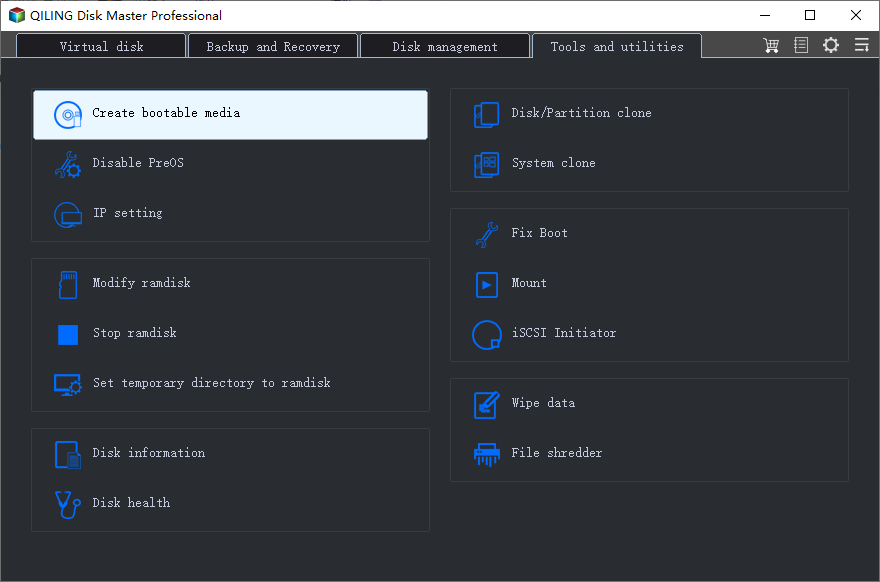
Step 1. Create Bootable Media
Use a working PC and a USB drive with at least 8 GB free. The wizard builds a pre-installation environment that starts the program on the affected machine without loading its damaged installation.
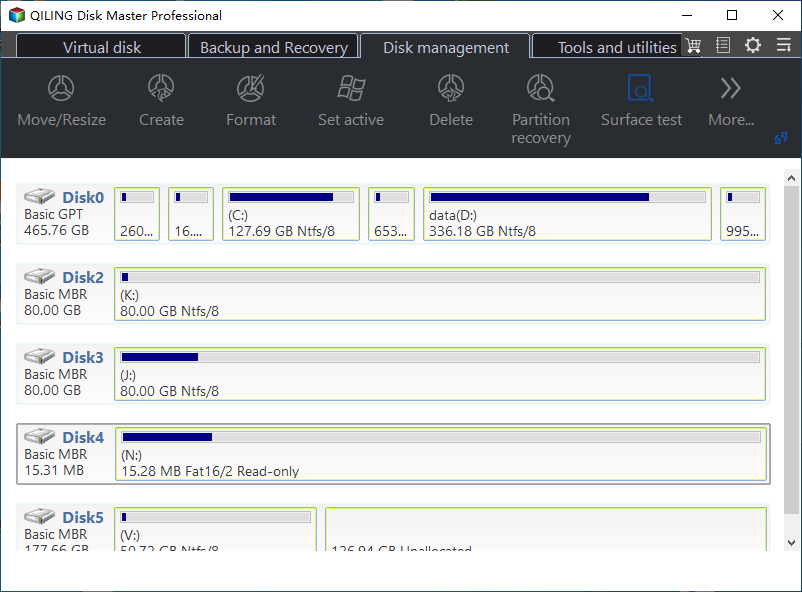
Step 2. Read the Disk Map From the Media
Start the affected machine from the USB drive and let the disk map load. Identify the system disk by capacity, confirm the Windows volume keeps its original size, and open a folder to check that the file system is readable.
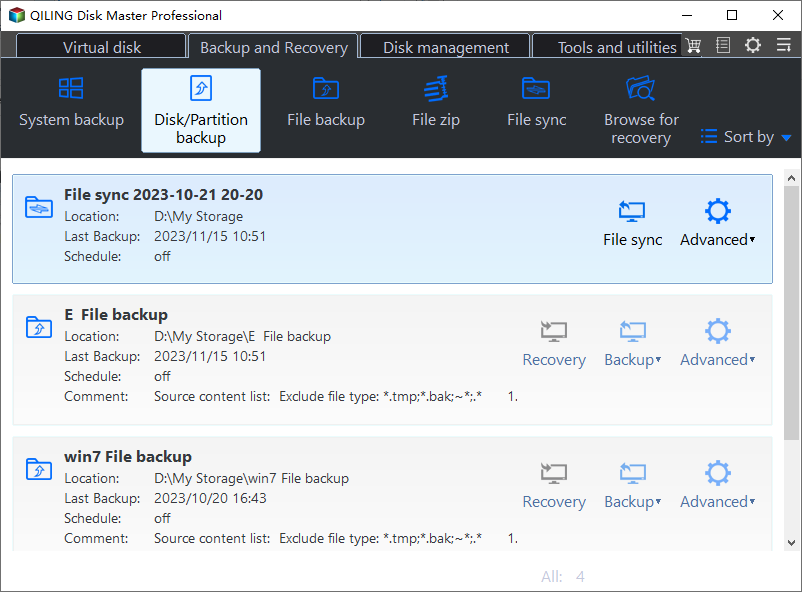
Step 3. Back Up the Whole System Disk
Choose Disk backup, set the system disk as the source and an external drive as the destination, then review the summary and click Proceed. Keep the image until the store has been repaired or the data has been copied out of the old installation.
With the image in hand, run the offline store repair against the mounted installation. If the repair succeeds, start Windows and confirm that updates install; if it fails again, an in-place repair install is the next step, and the backup covers the case where that install cannot finish.
The alternative to both is a reset, which removes installed programs even when personal files are kept. That is why the copy comes first: a reset is a decision you can take later, but only if the data already exists somewhere else. The 0x800f0915 store failure follows a similar order for the same reason.
Frequently Asked Questions
Can 4448 be fixed without reinstalling Windows?
Sometimes. A store with a few damaged components can be repaired from matching installation media, and the repair keeps programs and files. If the damaged components are the servicing stack itself, the repair has nothing to start from and an in-place repair install is the realistic path.
Does error 4448 damage personal files?
No. The code describes servicing components, not user data, and the Windows volume stays readable. File Explorer crashes can interrupt a save, so copy important work to another disk before you spend hours on repairs.
Will a reset keep my programs?
No. A reset that keeps personal files still removes installed applications and their settings. Treat it as a last resort, take a disk image first, and list the programs you will need to reinstall before you start.
Related Articles
- DISM Error 0x800f0915: Repair the Component Store
- Difference Between SFC, CHKDSK, and DISM in Windows 11
- DISM RestoreHealth Stuck at a Percentage
- How to Fix DISM Error 87: Option Is Unknown
- What to Do with a Corrupted Operating System
Products
Articles & Tutorials
- Data Recovery
- Data Backup
- File Recovery
- File Backup
- System Backup and Restore
- Disk and Partition Clone
- Technical articles
- Mobile articles
- Disk Master Help
- Windows Data Recovery Tutorials
- Windows Secure Delete Tutorials
- Windows Partition Management Tutorials
- Windows File Backup and Restore Tutorials
- Windows System Backup and Restore Tutorials
- Windows Disk Backup and Restore Tutorials
- Windows Clone Tutorials