Fix 0x80070013: The Media Is Write Protected
Quick Navigation:
- What ERROR_WRITE_PROTECT Means
- Three Layers That Set the Flag
- Read the Flag Before You Clear It
- Clear It and Format with Qiling
- Frequently Asked Questions
You try to copy a file, format a card, or create a partition, and Windows stops with 0x80070013 and the message that the media is write protected. Every action that would change the volume fails, while reading the old files still works, which makes the drive look half broken. The code is a Windows system error rather than a disk error: the write was refused before it reached the platters, because something declared the device read-only. The flag can sit on the hardware, on the disk itself, or in a policy inside Windows, and the three are cleared in different places.
What ERROR_WRITE_PROTECT Means
0x80070013 is the hexadecimal form of a Windows system error whose name is ERROR_WRITE_PROTECT. It is returned when a write request reaches a device that declares itself read-only, and it appears in Disk Management, in DiskPart, in file copy dialogs, and in tools that create or format a volume. The exact wording varies, but the cause does not: the request was never applied.
Because the message names the media, it is easy to assume that the disk is failing. Sometimes it is, and a drive that turns itself read-only without any switch being touched is often near the end of its life, because the controller protects the existing data when it can no longer write reliably. That is a reason to copy the files off first, not a reason to clear flags in a loop.
In most cases, however, nothing is wrong with the drive at all. A card left in a locked adapter, a switch moved by accident, or a policy left behind by a tool that prepared a USB stick for imaging all produce the same code. Separating those cases is the whole job, and it starts with knowing which layer declared the device read-only.
Three Layers That Set the Flag
The first layer is physical. Full-size SD cards carry a sliding lock on the left edge, and many USB card readers and adapters repeat that switch on the outside. MicroSD cards have no switch of their own, but the adapter they sit in usually does. If the switch is in the lock position, no software step will change anything, because the device reports read-only to Windows by design. Flip the switch, reinsert the card, and test with a small new file before going further.
The second layer is the disk attribute. Windows can mark a disk read-only in the storage stack, and the flag survives a reconnect. This is the layer that tools set when they prepare a drive for a raw image, and the one that a failed conversion can leave behind. It is visible from DiskPart, and it applies to the whole disk rather than to a single volume, so every partition on that disk becomes read-only at once.
The third layer is a policy in the registry. A value under StorageDevicePolicies can make removable media read-only for every user on the machine, and some older security and imaging tools create it deliberately. When that key exists, even an unlocked card with a clean disk attribute refuses writes, and the fix is to remove the value rather than to fight the device.
Two more conditions look similar but are not the same error. A disk marked offline is not mounted at all, so reads fail as well, and a volume with a permission problem returns access denied rather than write protect. Check which message you actually get, because 0x80070013 always points to one of the three layers above.
Read the Flag Before You Clear It
DiskPart, Disk Management, and the registry editor are Microsoft tools that ship with Windows. They are not part of Qiling Disk Master, and this section uses them to read the state of the device before anything is changed. Open a command prompt as administrator, start diskpart, run list disk, and select the disk by its number, checking the capacity against the drive in your hand so that you do not touch the system disk.
The command attributes disk prints the current state of the selected disk, including whether it is read-only. Read that line before you change it. Only a disk that reports a read-only attribute needs attributes disk clear readonly, and the command confirms when the attribute has been cleared. Run detail disk afterward to see the volumes, and exit the tool without formatting anything from the command line.
Then check the policy. In the registry editor, look for the StorageDevicePolicies key under both HKLM\SYSTEM\CurrentControlSet\Control and HKLM\SYSTEM\CurrentControlSet\Policies. If a WriteProtect value exists and is set to 1, the key is the cause. Record its original setting, then remove the value or set it to 0, and restart so the storage stack reads the new state.
If both the attribute and the policy are clean and the switch is unlocked, treat the drive as suspect. Copy the files you need before any further write, and run a surface test to see whether the controller has switched to read-only because of failing media.
Clear It and Format with Qiling
Qiling Disk Master exposes the same disk attribute in its Disk management tab and adds a preview before any volume is formatted, so the disk number and the file system are confirmed before the write begins. Use it after the two software layers have been checked, and format only the volume you actually need to reuse.
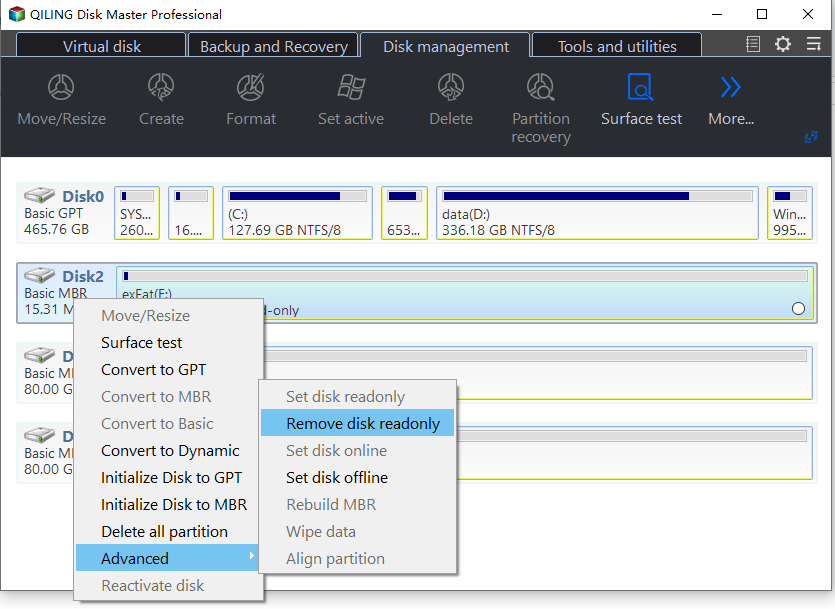
Step 1. Remove the read-only attribute from the disk. Select the drive in the Disk management tab, compare its disk number and capacity with the device in your hand, then right-click the disk label on the left of the map and choose Advanced and Remove disk readonly. If the drive is still protected afterward, the policy in the previous section is the remaining software cause; if neither applies, stop here and copy your data off the drive.
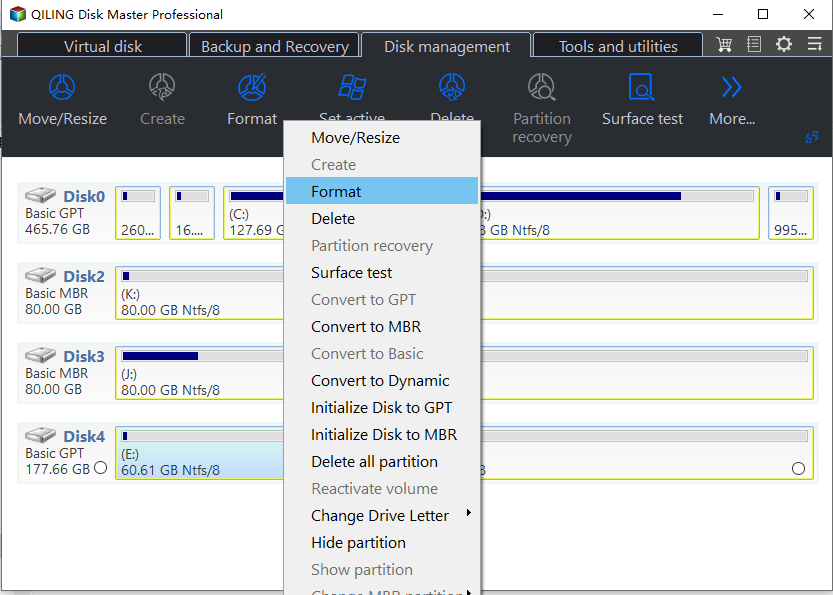
Step 2. Format the volume that needs to be reused. Right-click the partition on the disk map and choose Format, then set the volume label, the file system, and the cluster size. Formatting erases the volume, so confirm the letter and the size first, and leave a volume that holds data you still need untouched.
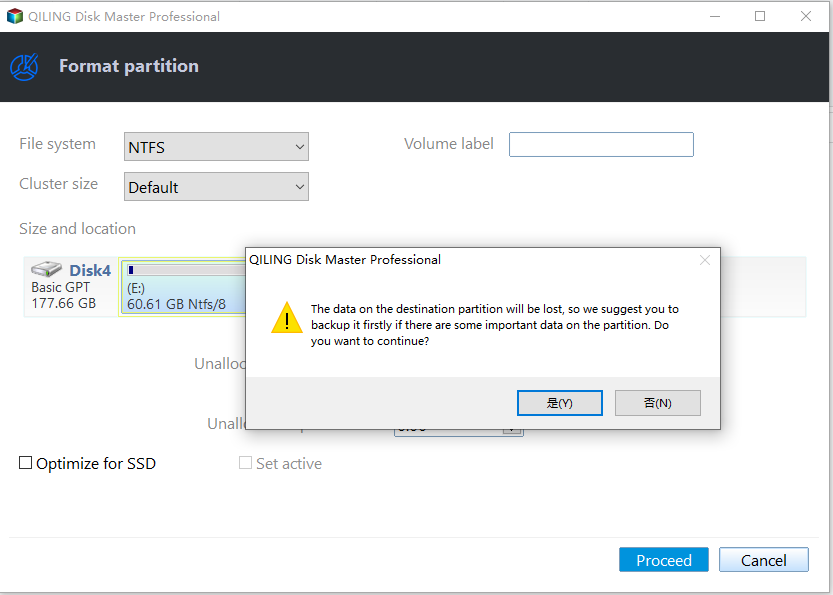
Step 3. Click Proceed and confirm the warning. The pending operation is listed in the preview; start it, accept the warning about the data on the volume, and wait for the task to report completion. If the drive returns 0x80070013 again at this point, the write path is still blocked and the drive should be treated as failing rather than formatted again.
When the format finishes, the volume mounts with a letter and accepts new files. Create a partition in the freed space only if the layout needs one, and copy your data back from the external copy you made before the first write. Never clear the attribute on a drive that changed to read-only by itself and then write to it as if nothing had happened, because the same failure will return under load.
Frequently Asked Questions
Does clearing the attribute destroy data?
No. Removing the read-only attribute changes the state of the disk, not its contents, and the existing volumes stay as they are. Formatting is the step that erases a volume, which is why it comes after the attribute and after a copy of anything you still need.
Why does the flag come back after a restart?
Because the layer that set it is still active. A switch that is still locked, a registry policy that was recreated by a tool, or a failing controller that re-protects the media will restore the read-only state at the next boot. Fix the source rather than clearing the flag repeatedly.
Can a write-protected drive still be read?
Usually yes. Read-only is a limit on writes, so the files that are already on the volume can be copied off. Copy them first; if the drive became read-only by itself, that copy may be the last reliable read you get from it.
Related Articles
- How to Fix USB Is Write Protected or Read Only
- Fix an Offline or Read-Only Disk in Windows Server 2025
- Fix 0x8004240F: Cannot Create Partition or New Simple Volume
- SD Card, USB Drive or Pen Drive Shows 0 Bytes
- Storage Spaces Pool Read-Only: How to Fix It Safely
Products
Articles & Tutorials
- Data Recovery
- Data Backup
- File Recovery
- File Backup
- System Backup and Restore
- Disk and Partition Clone
- Technical articles
- Mobile articles
- Disk Master Help
- Windows Data Recovery Tutorials
- Windows Secure Delete Tutorials
- Windows Partition Management Tutorials
- Windows File Backup and Restore Tutorials
- Windows System Backup and Restore Tutorials
- Windows Disk Backup and Restore Tutorials
- Windows Clone Tutorials