KB5074109 Leaves the PC Unable to Boot
Quick Navigation:
- What the Reports Show
- Check the Partition Layout
- Roll the Package Back
- Confirm the Boot Files
- Frequently Asked Questions
KB5074109 is the November 2026 security update for Windows 11. Most machines install it without a visible change, but a smaller group stops at the vendor logo on the first restart and never reaches the login screen. In those reports the partition layout explains the failure more often than the package itself.
What the Reports Show
The first restart after the package is installed stops at the vendor logo, and in many reports the spinning dots never appear. A few machines show a message about a missing boot device instead, and some reach the recovery screen after two or three attempts.
Three patterns appear in the reports. The EFI system partition is present but its contents are incomplete, the Windows volume lost the flag that marks it bootable, or the recovery partition was rewritten and still holds files from the staged package.
A security update replaces components that start before Windows itself, so part of the work happens while the firmware is still reading the disk. If that write is interrupted by a restart or a power loss, the firmware is pointed at an entry that leads nowhere.
Collect what the machine reports before you change anything. On a machine that still starts, the update history shows the package and its error. On one that does not, the recovery environment lists the same package under the uninstall options.
Check the Partition Layout
Start the machine from a Windows installation USB, or move the disk to a working PC, and look at the layout before you run any repair. A repair that writes to the wrong partition turns a boot problem into a data problem.
On the disk map, find four items in order: the EFI system partition of about 100 to 300 MB formatted as FAT32 without a letter, the Microsoft Reserved partition, the Windows volume, and the recovery partition at the end.
If the EFI partition is missing, the firmware has nothing to start and no amount of file copying will fix it. If it exists but the Windows volume has no letter or reports RAW, the fault is in the volume rather than in the package.
Write down the order and the free space inside each partition. Those numbers decide whether a resize can help or whether the boot files have to be rebuilt from the installation media.
Roll the Package Back
In the recovery environment, open Uninstall Updates and remove the latest quality update. The rollback rewrites the boot-time files and returns the machine to the build that started normally.
If Windows starts afterwards but the same package is offered again, pause updates before the next restart and check the vendor support page for a revised release. Installing it again without a change reproduces the fault.
System Restore is the faster route when a restore point exists from before the update, because it also returns the driver store and the registry to that state. Both options sit in the Windows recovery tools and touch system files only, so personal files stay where they are.
Confirm the Boot Files
After the package is gone, the machine still has to find its boot files. A System Reserved or EFI partition that is full, or one that sits behind a volume the update moved, cannot take the repaired files. Qiling Disk Master shows the order of the partitions and the free space inside each one, which is what the repair depends on.
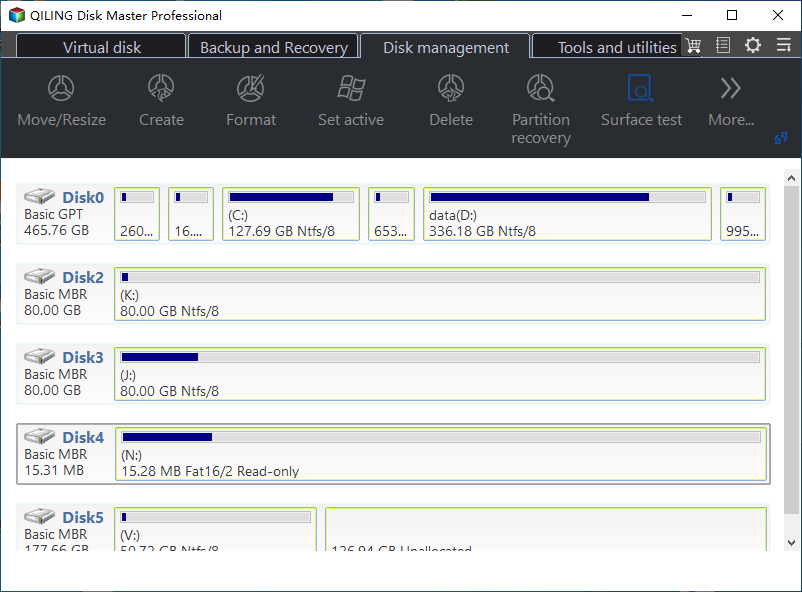
Step 1. Read the Layout on the Disk Map
Open the program and read the disk map from left to right. Check that the EFI partition and the Windows volume are both present, that the Windows volume carries its letter, and how much free space the EFI partition has. A partition with no free space cannot accept the files the repair writes.
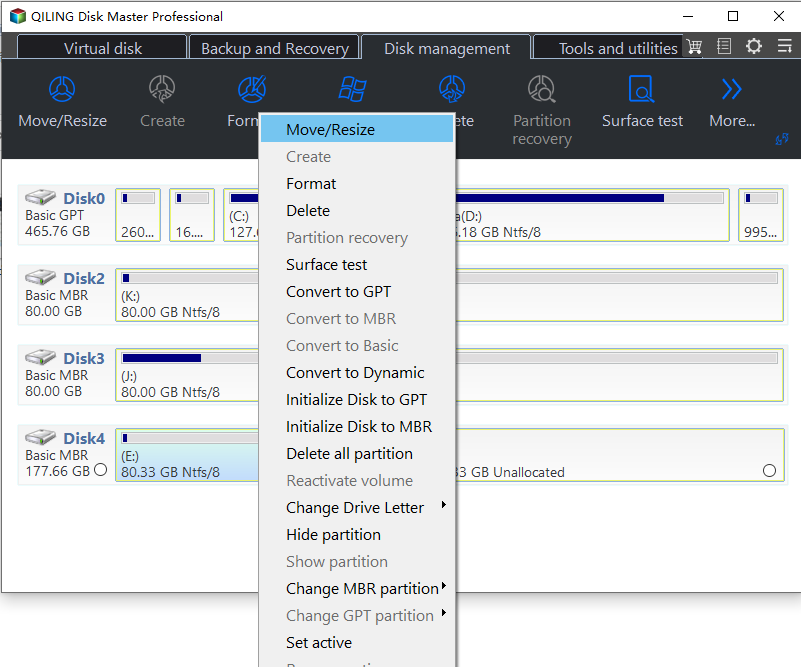
Step 2. Open Move/Resize on the Partition That Holds the Boot Files
Right-click the partition that holds the boot files. The context menu lists Move/Resize with the other disk operations, and choosing it opens the wizard for that partition. When the EFI partition sits behind another volume, resize the neighbour first so the free block lands next to it.
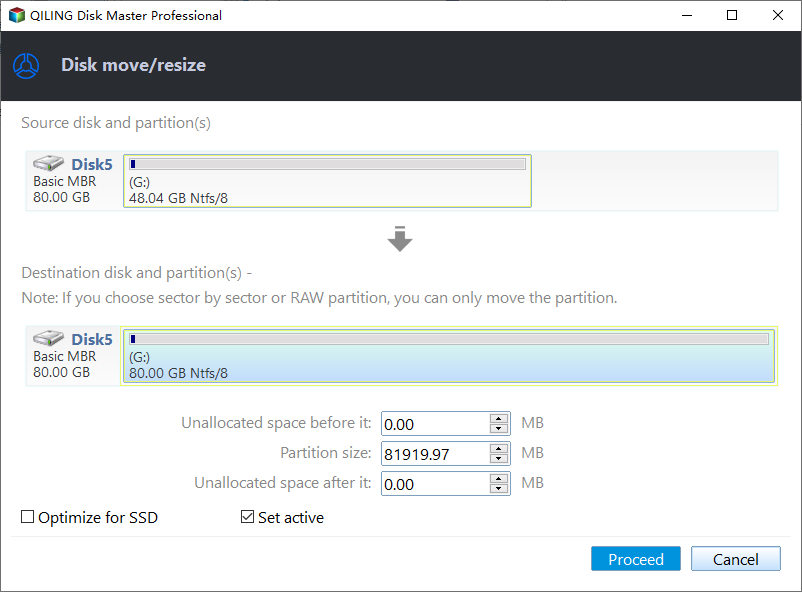
Step 3. Give the Partition Room and Click Proceed
In the disk move/resize window, set the partition size and check where the unallocated space stays before and after the partition. Click Proceed; the change runs in a progress window that reports Moving or resizing, and the machine restarts if a partition in use has to be moved. Leave it powered until the window closes, then run Startup Repair once more from the recovery environment and restart.
Frequently Asked Questions
Did KB5074109 delete the EFI partition?
No. The package replaces files inside that partition, and an interrupted write leaves it incomplete rather than deleted. A partition that is missing was removed by something else.
Can the PC start from the installation USB alone?
It can boot into the recovery environment, which is enough to roll the package back and read the layout. It does not restore the normal start on its own.
Is a clean install the only remaining option?
No. Rolling the package back and repairing the boot files solves most of these machines. A clean install is the last step, after the data has been copied to another disk.
If the machine repeats the same restart instead of stopping at the logo, the sequence in a package that causes a boot loop is the closer match.
Related Articles
- KB5127648 Install Fails and Causes a Boot Loop
- Roll Back the Windows 11 26H2 Update
- Boot Binary Corrupt After an Update
- All Options Grayed Out in Disk Management
- 26H2 Upgrade Failed With 0x800F0922
Products
Articles & Tutorials
- Data Recovery
- Data Backup
- File Recovery
- File Backup
- System Backup and Restore
- Disk and Partition Clone
- Technical articles
- Mobile articles
- Disk Master Help
- Windows Data Recovery Tutorials
- Windows Secure Delete Tutorials
- Windows Partition Management Tutorials
- Windows File Backup and Restore Tutorials
- Windows System Backup and Restore Tutorials
- Windows Disk Backup and Restore Tutorials
- Windows Clone Tutorials