VHD or VHDX Will Not Mount on Windows 11
Quick Navigation:
- Read the Error Before You Retry
- Check the Chain and the File
- Attach Read-Only and Repair
- Copy the Contents Out with Qiling Disk Master
- Frequently Asked Questions
A virtual hard disk that refuses to attach is not necessarily corrupt. Windows 11 reports several unrelated problems with similar dialogs, and the error code is the only reliable way to tell them apart. A missing parent file, a read-only attribute, and a volume locked by another process all fail at the same place but need different fixes.
Read the Error Before You Retry
A message about a file that is in use means another process holds the file, usually a virtual machine that is still running or a backup tool that mounted it. Close the process rather than clicking Attach again.
A message about a parent disk means the image is a differencing disk and the base file it points to has moved or been renamed. Both files must be present and the path in the child must still resolve.
A generic failure with no detail usually points to the file attribute or to the image format. A VHD stored on a compressed or deduplicated folder can also fail, because the sparse file cannot be opened for random access.
Check the Chain and the File
Open the folder that holds the image and confirm the file size. A dynamic VHD with a reporting size close to its maximum but a tiny size on disk is normal; a file that shrank to a few kilobytes is not.
Clear the read-only attribute on the file. Downloads and copies from a network share often carry it, and Windows refuses to attach a read-only VHD through the graphical dialog.
Move the image to a local NTFS folder that is not compressed, encrypted, or deduplicated, then try again. That single change resolves a large share of attach failures on machines with a small system disk.
Attach Read-Only and Repair
Attach the image in read-only mode first, which works even when the volume inside is dirty. The graphical dialog offers the option, and the command line equivalent is part of Windows rather than part of this software.
If the volume attaches and shows as RAW, do not format it. A RAW volume inside a VHD usually means a damaged partition table or an interrupted write, and formatting destroys the chance of reading it.
Run a read-only check on the mounted volume to see whether the file system can be repaired without writing. If the check reports errors it cannot fix in read-only mode, copy the data out before attempting a repair.
Copy the Contents Out with Qiling Disk Master
Once the image attaches read-only, the data is reachable and should be copied before any repair. Qiling Disk Master can copy the mounted volume to a physical disk, so a damaged image can be rebuilt from a clean copy instead of being repaired in place.
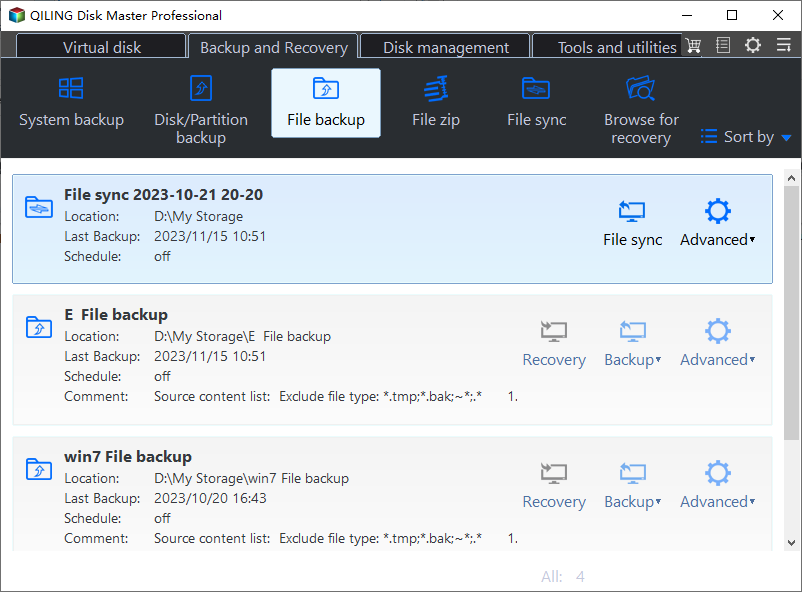
Step 1. Choose File Backup
Attach the image first, because the backup reads the volume through its drive letter. Then open the Backup and Recovery tab and click File Backup.
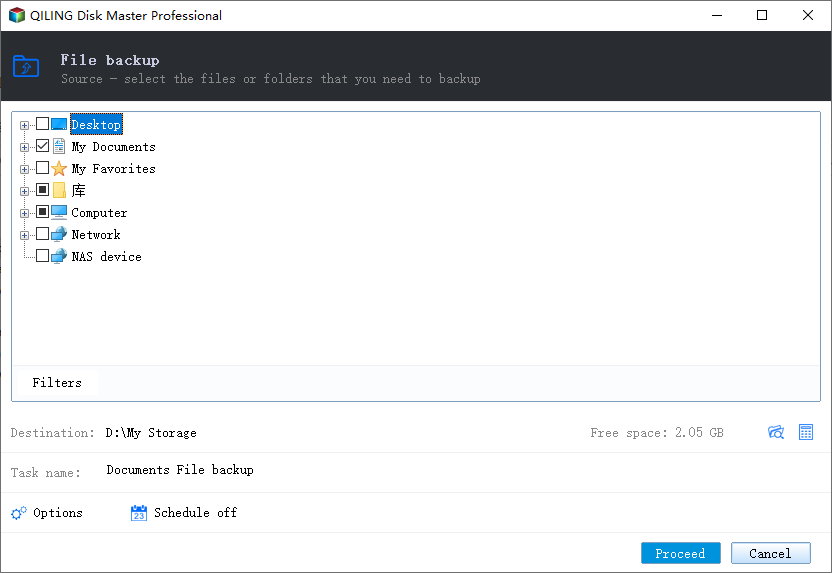
Step 2. Select the Mounted Volume as the Source
Expand Computer in the source tree and tick the letter that the attached image received. Check the task summary under the tree to confirm the selection and its size, and compare the letters rather than the labels when two images are attached.
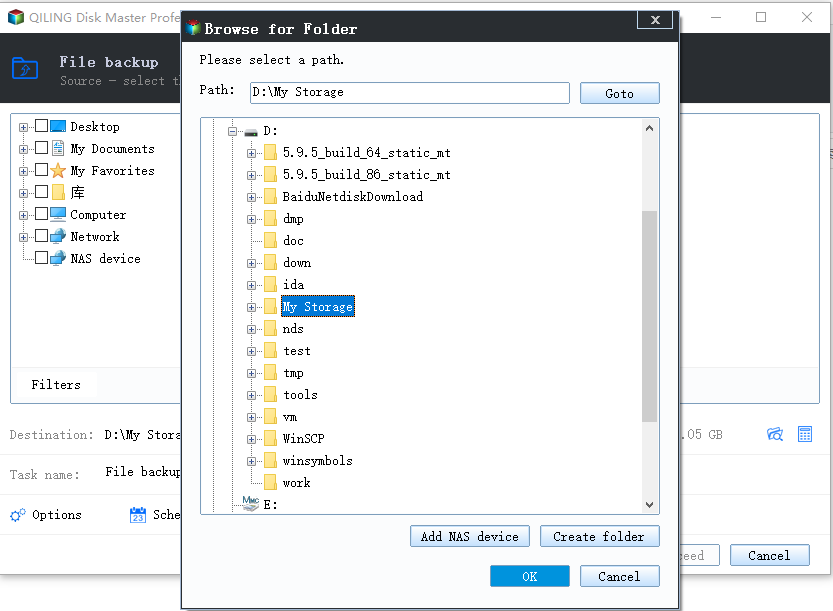
Step 3. Choose a Physical Destination
Click the destination box and browse to an internal disk with enough free space. Do not choose the folder that holds the image itself, because writing beside the damaged file leaves the copy exposed to the same problem.
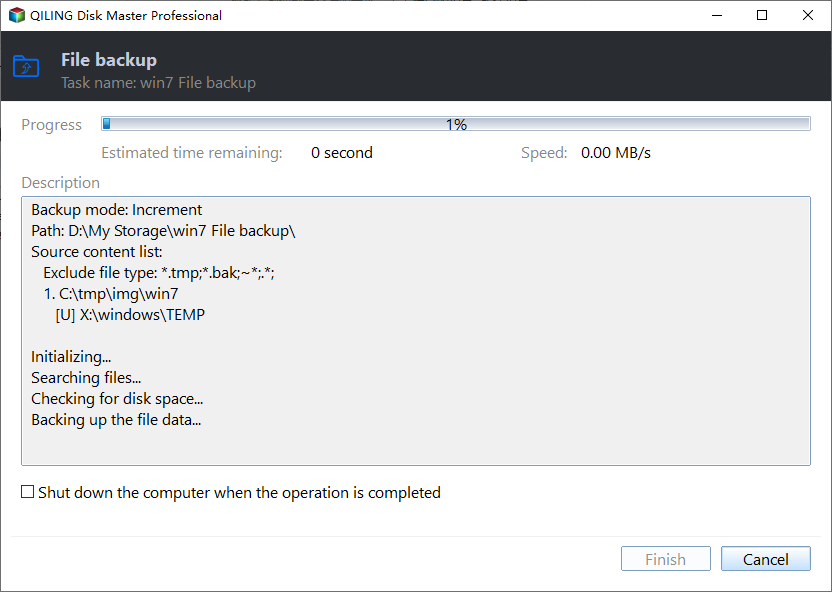
Step 4. Preview and Proceed, then Verify
Name the task, read the summary once more, and click Proceed. When the job finishes, open a sample of files from the copy; only after the copy is verified should you consider repairing or recreating the original image.
Frequently Asked Questions
Why does the same VHD attach on one PC but not another?
The difference is usually the folder. Compression, encryption, or deduplication on the host blocks random access, and so does a file attribute carried over from a download.
Can I attach a VHDX on Windows 11 Home?
Yes, Hyper-V is not required to attach a virtual disk. Only running a virtual machine needs the Hyper-V feature.
What does a parent disk error mean?
The image is a differencing disk and cannot find the base file it was created from. Restore the base file to the original path, or discard the child if you no longer need its changes.
Should I convert the VHD to VHDX?
Not as a repair step. Convert only after the data is copied, because conversion rewrites the whole image and a failing source can fail halfway.
For the related case of a mounted image without a letter, see ISO mounts that leave no drive letter.
Related Articles
- Windows 11 26H2 ISO Mount Leaves No Drive Letter
- BitLocker Drive Unlocked but No Drive Letter
- All Options Grayed Out in Disk Management
- Assign a Drive Letter in Windows
- Recover Files After a Failed Disk Clone
Products
Articles & Tutorials
- Data Recovery
- Data Backup
- File Recovery
- File Backup
- System Backup and Restore
- Disk and Partition Clone
- Technical articles
- Mobile articles
- Disk Master Help
- Windows Data Recovery Tutorials
- Windows Secure Delete Tutorials
- Windows Partition Management Tutorials
- Windows File Backup and Restore Tutorials
- Windows System Backup and Restore Tutorials
- Windows Disk Backup and Restore Tutorials
- Windows Clone Tutorials