How to Delete Photos Permanently from Computer/Recycle Bin
Quick Navigation:
- Is it possible to delete photos permanently from computer?
- How to delete pictures from computer permanently
- How to make sure deleted photos are not recoverable
Though we have talked about how to recover deleted pictures from a computer, there is still an exception. If the pictures are permanently deleted from the computer, you cannot recover them at all. This brings us to the question of how to delete photos permanently from a computer. The answer is QILING File Shredder, professional software designed to make deleted files unrecoverable, including pictures, videos, audio files, documents, downloaded files, and more. Download it to give it a try!
How to make sure deleted photos are not recoverable is a question that bothers many people, especially those who know that data recovery software is available to recover deleted files. Don't worry. There is a type of software known as a file eraser, file wiper, or file shredder that can help you achieve this.
Is it possible to delete photos permanently from computer?
No matter which method you use to delete photos from your computer -- such as emptying the Recycle Bin or using Shift+Delete -- the deleted photos remain recoverable. All deleted photos, though not visible, are still on your computer until they are overwritten by new data. That is how data recovery software can recover them, and why File Shredder can destroy them. File Shredder creates useless data to occupy the space previously held by the deleted photos, overwriting them and making them disappear permanently.
How to delete pictures from computer permanently
There are several software tools available for download online. Here, I strongly recommend QILING File Shredder, a professional tool designed to protect user privacy and delete photos permanently from a PC. Here are some of its features:
Your Safe & Permanently Delete Photo Program
- Permanently delete photos from computer easily and simply.
- Allow users to delete selected folders, partition, hard drives to permanently delete files.
- 100% accuracy to delete photos from laptop permanently, including permanently delete files from recycle bin.
Download the file shredder to delete photos permanently from your computer. Here are the steps for how to delete pictures from a computer permanently with QILING File Shredder. It is simple and easy with the streamlined built-in navigation.
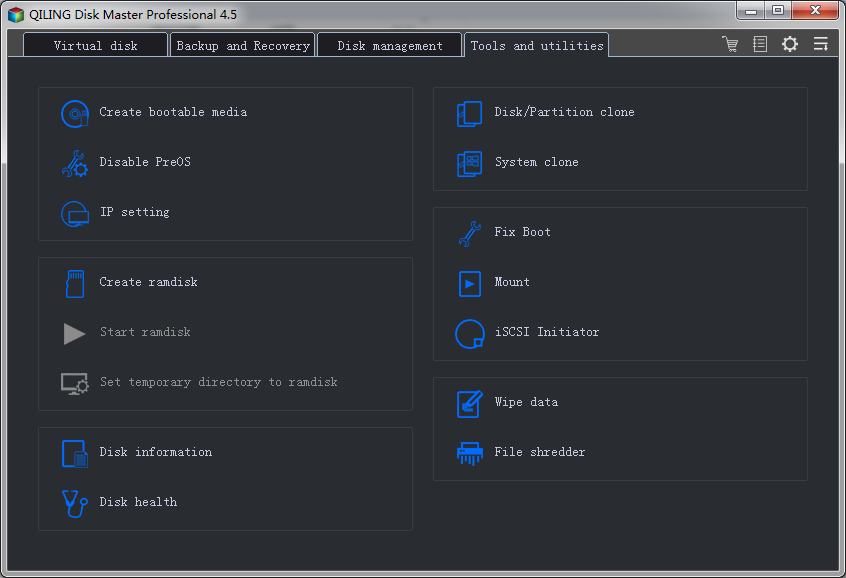
Step 1. Click the "Tools and utilities" tab, and then click "File shredder" to select a specific folder, partition, drive, even the external hard drive if you have connected it with your computer before, to locate the destination.
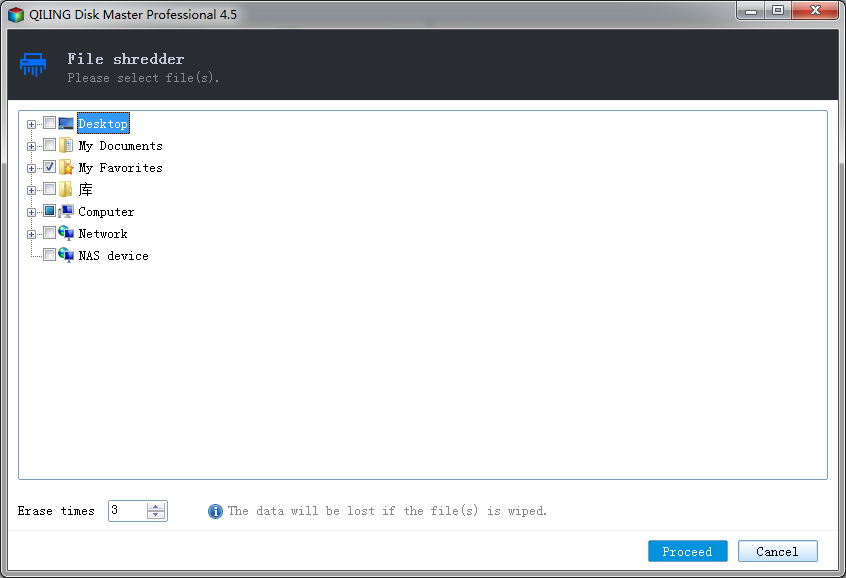
Step 2. After you locate the target files or destination, click "Proceed", letting the software permanently delete photos for you.
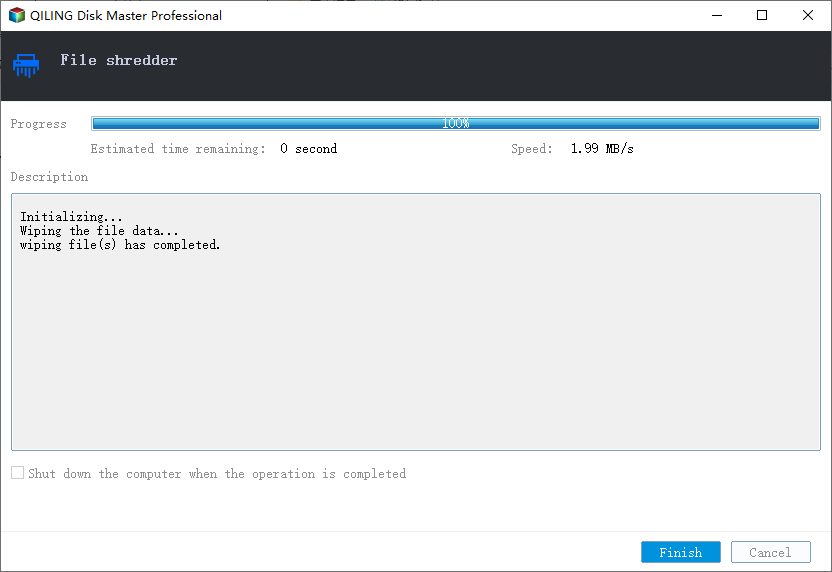
Step 3. After that, you can see the message "Files shred have been completed."
How to make sure deleted photos are not recoverable
After permanently deleting photos on your computer, you can no longer find them. Some people wonder whether deleted file recovery software can still recover them. You can test this with Deep Data Recovery. The process is quick and easy.
- 1. download Deep Data Recovery. Install it on your computer.
- 2. Launch the data recovery software. Select "Pictures" in the first window and deselect other file types. Click "Fast Scan".
- 3. In the next step, target the destination and click "Scan".
- 4. Check out the scanning result, whether the permanently deleted pictures are there or not.



Please note that once all photos are permanently deleted using QILING File Shredder, there is no possibility of getting them back. Before you proceed, think twice before making a decision.
Related Articles
- How to Deleted All Data from Laptop Permanently
- 3 Ways to Delete Windows.old Folder
- How to Permanently Delete Videos from Laptop/PC without Recovery
- Monster Hunter Rise Save File Location [Detailed Information]
- How to Backup Outlook Emails to Gmail [2023 Detailed Tutorial]
Do you know how to backup outlook emails to Gmail? This article will tell you three ways to back up emails from Outlook to Gmail. After reading this post, you can choose a way to move emails from Outlook to Gmail on your own. - Bypass "Administrator Blocked You From Running This App" in Windows 10 [Full Information]
Looking for ways to fix the 'Administrator blocked you from running this app' error in Windows 10? Try these 5 proven solutions to bypass the block. - ISO Recovery: Recover Deleted ISO Files with ISO Recovery Software
If you've accidentally deleted or lost an ISO file, Qiling's data recovery software can help you restore it. This program allows you to recover deleted, lost, or formatted ISO files with ease, and it's free to download.
Products
Articles & Tutorials
- Data Recovery
- Data Backup
- File Recovery
- File Backup
- System Backup and Restore
- Disk and Partition Clone
- Technical articles
- Mobile articles
- Disk Master Help
- Windows Data Recovery Tutorials
- Windows Secure Delete Tutorials
- Windows Partition Management Tutorials
- Windows File Backup and Restore Tutorials
- Windows System Backup and Restore Tutorials
- Windows Disk Backup and Restore Tutorials
- Windows Clone Tutorials