Monster Hunter Rise Save File Location [Detailed Information]
Monster Hunter Rise offers an unparalleled combat experience with its intense battle scenes, versatile movement options, and impressive special action effects.
The game MH Rise continues the core gameplay of the series, where the player's avatar hunter kills or captures strange monsters, using their fur and skeleton to craft stronger armor and weapons, preparing for the next confrontation.

The frustration of losing progress in a growth game like Monster Hunter Rise, where hours of exploration and progress are at stake, can be overwhelming.
Don't worry about losing your progress in Monster Hunter Rise! As long as you can find the save file location and back up your saves, you won't have to worry about forging your armor and weapons again.
Here are more posts about game information offered for you:
How to Find Monster Hunter Rise Save File Location
The Monster Hunter Rise saves location on your PC is where you can find the save data for the game, specifically if you have purchased Monster Hunter Rise: Sunbreak, the save data will be located in the same path as the original game.
C: Program Files (x86)>Steam> Library>UserData> Your Steam ID>1446780>Remote
To access the Monster Hunter Rise Save File, you can follow the tutorial we provided, which should guide you through the process with ease.
Step 1. Open the File Explorer on your PC
Step 2. Navigate to the saves folder, typically located at C:\Users\username\AppData\Roaming\Microsoft\Windows\Savegame or C:\Users\username\AppData\LocalLow\username or C:\Users\username\Documents\My Games, depending on the game.
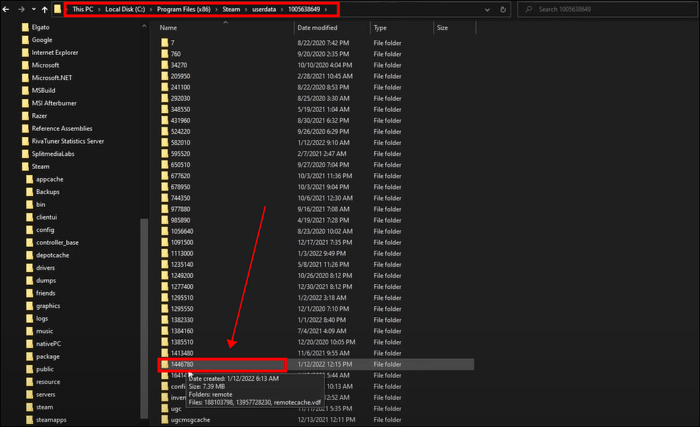
- Tip
- When you navigate to the Program Files (x86)>Steam>Library>UserData>Your Steam ID folder, you will see several folders with numerical labels. Look for the folder labeled 1446780, which contains your save data.
Why Did Monster Hunter Rise Save File Gone
After the release of Monster Hunter Rise: Sunbreak, the game's popularity surged, drawing in new players and causing many to join the Monster Hunter community. However, this influx of new players has also led to a rise in questions and concerns about save data disappearing, with many users taking to online forums like Reddit to seek answers and solutions to this issue.
The reason you can't find any data on the Monster Hunter Rise Save File location may be due to the Steam Cloud, which stores game saves online, potentially making the local save file location invisible.
Steam Cloud allows users to upload their game saves to the cloud, aiming to provide a seamless gaming experience across devices. However, despite its original intention, Steam Cloud still experiences unknown errors, resulting in many players losing their game saves irregularly when storing them in the cloud.
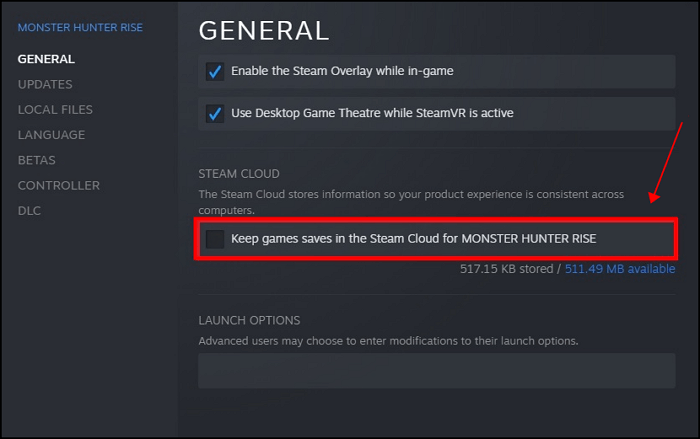
When playing games like MH Rise that require a lot of time and energy, we strongly recommend backing up your local game saves file every time you end the game to avoid losing progress.
How to Backup Monster Hunter Rise Saves
To avoid the hassle of manually backing up Monster Hunter Rise each time you end the game, you can use the in-game feature to automatically backup your save files, ensuring your progress is preserved without the need for manual intervention.
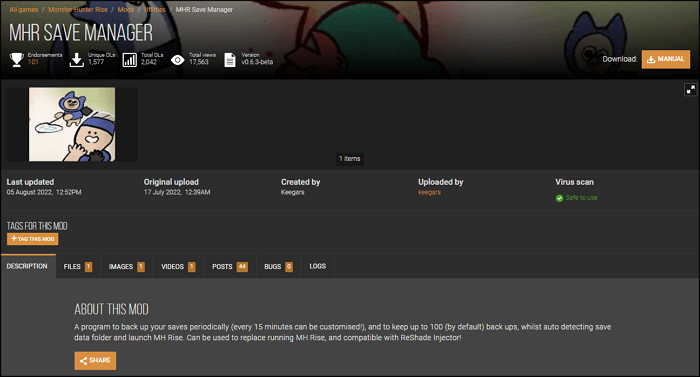
You can also use mods like MHR Save Manager from Nexus Mods to regularly back up your saves, but be aware that installing mods can have hidden dangers. If the game is updated or a new patch is released, mods can cause the game code to become disordered, leading to crashes or bugs.
To better protect your game data, consider using a professional software like Qiling Disk Master Pro for secure backups.
Qiling Disk Master Pro is an excellent offline backup software for game players, offering rich backup modes and customizable automatic backup cycles tailored to your game-playing plan. It can also backup PC game saves, providing 250 GB Cloud storage for free, allowing you to transfer your saves to another device without any pressure.
Compared to Steam Cloud and Nexus mods, Qiling Disk Master Pro offers automatic and stable backup, providing a secure guarantee for game data.
Conclusion
This article provides information on the Monster Hunter Rise Save File location, along with simple steps to find the game save. To avoid losing your saves due to Steam Cloud or other factors, it's recommended to use Qiling Disk Master Pro to back up your local game data, which can be found at the MHR file location.
FAQs
1. Can you transfer Monster Hunter Rise save?
You can transfer Monster Hunter Rise save between PCs using Steam Cloud or Qiling Disk Master Pro, but transferring the game across platforms is not currently supported.
2. Does Monster Hunter Rise have multiple save files?
Monster Hunter Rise allows each user ID to create up to 3 game characters, which are saved in separate archive files.
3. Is Monster Hunter Rise Sunbreak standalone?
Monster Hunter Rise: Sunbreak is the DLC of Monster Hunter Rise, a supplement to the game content that requires completing the specified game progress in Monster Hunter Rise to unlock.
Related Articles
- SSD Not Detected in BIOS | Top 8 Ways to Fix🔥
- An Error Occurred While Processing Your Request [How to Fix]
- Free PDF Editor - Top 6 Best Free PDF Editors 2023 Update
- MacBook Password Not Working! 6 Proven Solutions to Fix It
- What is Video Ram (VRAM)? How to Check and Increase VRAM in Windows 10
VRAM, or video random access memory, is a type of RAM used for graphics processing in computers, and checking it on Windows 10 involves a straightforward process. - What Is Werfault.exe and How to Fix Werfault.exe Error in Windows
If you're experiencing the Werfault.exe error on your computer screens, this guide can help with the best possible fixes to overcome this issue. Keep reading to learn more about the solutions to resolve this error.
Products
Articles & Tutorials
- Data Recovery
- Data Backup
- File Recovery
- File Backup
- System Backup and Restore
- Disk and Partition Clone
- Technical articles
- Mobile articles
- Disk Master Help
- Windows Data Recovery Tutorials
- Windows Secure Delete Tutorials
- Windows Partition Management Tutorials
- Windows File Backup and Restore Tutorials
- Windows System Backup and Restore Tutorials
- Windows Disk Backup and Restore Tutorials
- Windows Clone Tutorials