Recover Files After Deleting a Storage Spaces Pool
Quick Navigation:
- What Deleting a Pool Removes
- Stop Writing to the Member Disks
- Scan the Members One at a Time
- Recover with Qiling Deep Data Recovery
- Frequently Asked Questions
Deleting a Storage Spaces pool is a configuration change, not a wipe. The pool object and its virtual disks disappear from Windows at once, while the blocks that held the files are usually still sitting on the member disks until something writes over them.
What Deleting a Pool Removes
The pool keeps its configuration, its virtual disk definitions, and the map that ties virtual addresses to slabs on each member. Deleting the pool removes that layer, so every volume that depended on it vanishes from Explorer in the same moment.
The files themselves live in the slabs the pool allocated to those volumes. A delete does not go through the slabs and rewrite them, so on a simple or mirrored space the content is normally intact on the disks for as long as nothing else writes there.
One exception matters. If a disk was removed through the pool's own retire or prepare-for-removal option, Storage Spaces rewrites the slabs as part of that operation, and that data is genuinely gone rather than merely orphaned.
Stop Writing to the Member Disks
Do not build a new pool from the same disks, and do not initialize or format them. Each member carries a Storage Spaces header that Windows no longer recognizes, and the system will offer to prepare the disk; decline every one of those prompts.
Move the members to another machine or disconnect them, and leave them that way until you have a plan. A disk that stays connected can receive a new volume, a page file, or an index update without any action from you.
Write down which disk occupied which slot and record the layout: simple, mirror, or parity. The layout decides how much of any file sits on a single disk, and therefore how much one scan can find.
Scan the Members One at a Time
Connect one member through a USB dock or adapter at a time. Do not assign a drive letter and do not accept any prompt to initialize the disk, because both actions can write to the header area that still describes the old pool.
A two-way mirror keeps a complete copy of the volume on every member, so a single disk can return whole files. That is the best case after a pool deletion, and it is the reason a mirror is worth its capacity cost.
A simple space stripes the data across members. Each disk holds only a slice of a large file, so a scan tends to return fragments and small files, while complete archives usually cannot be rebuilt from one disk alone.
A parity space needs the other members to rebuild anything that was not stored whole. Scanning a single disk recovers only the pieces that landed intact on that one drive, and the rest requires the full set.
Recover with Qiling Deep Data Recovery
Qiling Deep Data Recovery reads a member as a raw device and looks for file system records and intact file signatures, so it does not need the pool to be mounted. The advice to scan a mounted volume applies only while the pool still exists, as described in recovering deleted files from a Storage Spaces volume; once the pool is deleted there is no volume left to mount.
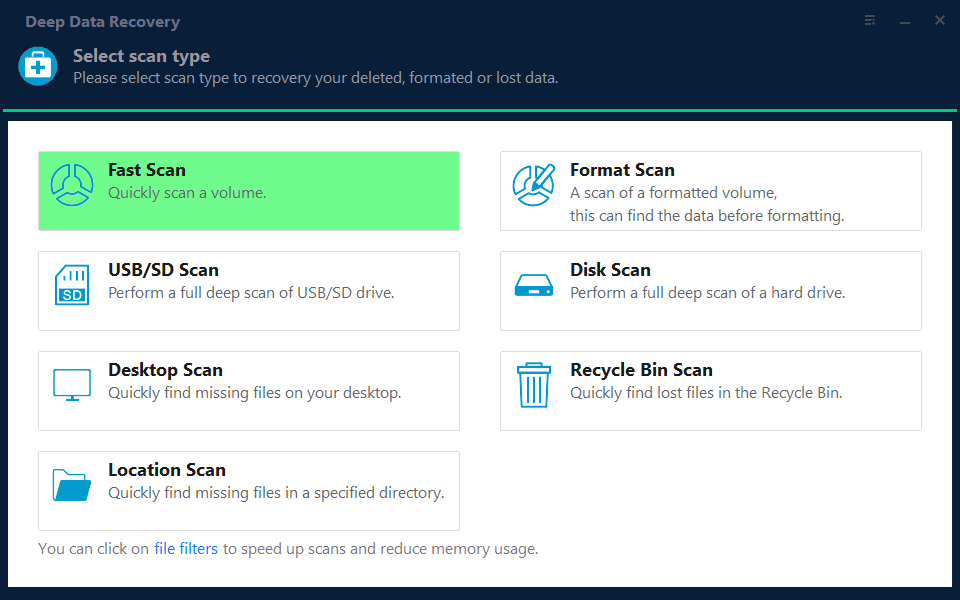
Step 1. Choose the Recovery Mode
Use the standard scan when the member still shows a recognizable volume, and the format scan when the header is gone and the disk appears empty or unallocated.
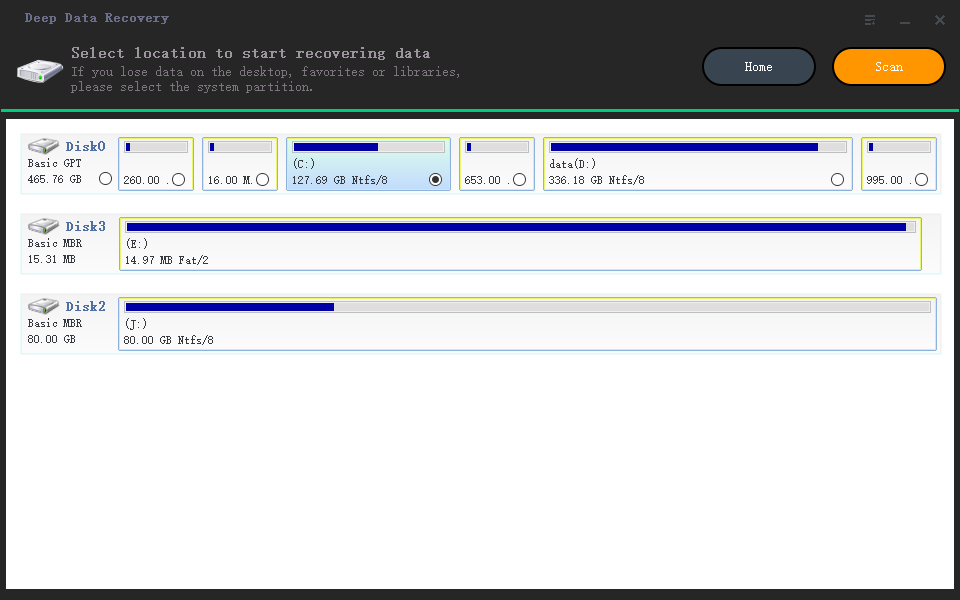
Step 2. Select the Member Disk
Pick the physical disk by its capacity and model. The member usually has no drive letter, so the list entry without a volume is the one you want, and the other members should be scanned in later passes.
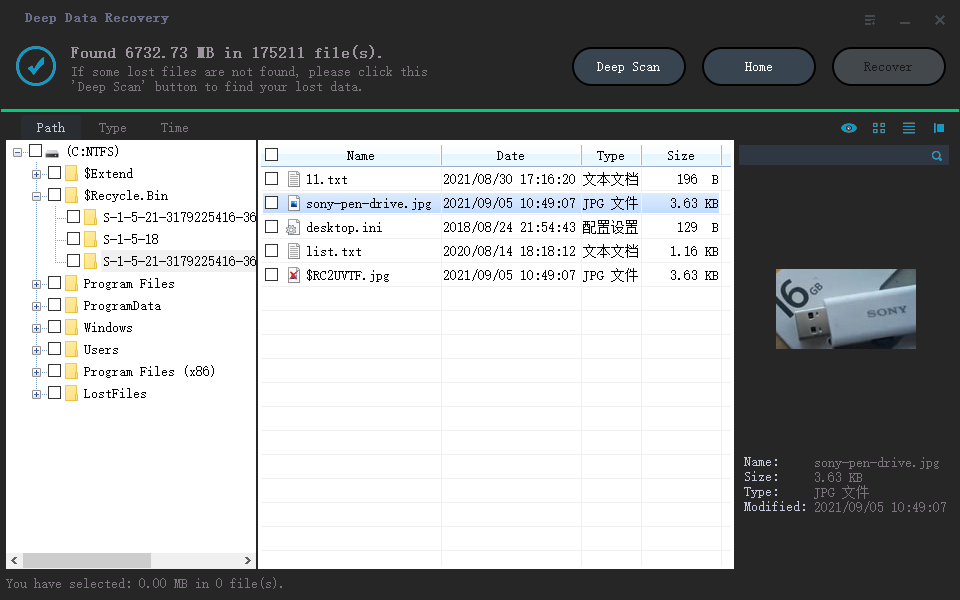
Step 3. Review the Results
Filter by type and by date, because files recovered from a striped member often lose their original folder paths. Preview documents and photos before selecting, and keep the ones that open.
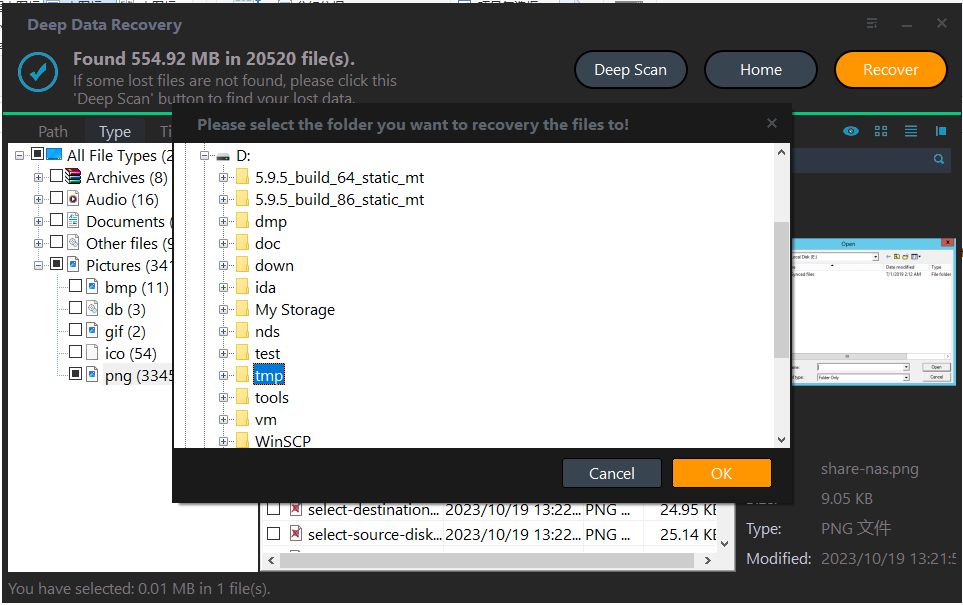
Step 4. Save to a Disk Outside the Pool
Write the results to a healthy disk that was never part of the pool. Saving onto a member overwrites the very slabs the next pass still needs.
Frequently Asked Questions
Can I recover after deleting the pool and creating a new one?
Only in part. A new pool writes its own headers and allocates slabs on the same disks, and those writes consume the space the old files occupied. Stop after the first deletion and read the members before rebuilding.
Do I need every member disk?
For a mirrored space, one is enough to start. For simple and parity spaces, each disk adds more of the original data, so collect all of them before scanning.
Can Windows reattach the pool?
Only while the pool metadata is still present on the members. Once the pool is deleted the configuration is gone, and there is nothing left for Windows to reattach.
If a member refuses to leave the pool cleanly, see a Storage Spaces disk that is missing and cannot be removed.
Related Articles
- Recover Deleted Files From a Storage Spaces Volume
- Storage Spaces Disk Missing and Cannot Be Removed
- Recover Data From a Single RAID Member Disk
- Two-Way to Three-Way Mirror Conversion Fails in S2D
- How to Do RAW Drive Recovery and Fix RAW Drive to NTFS/FAT
Products
Articles & Tutorials
- Data Recovery
- Data Backup
- File Recovery
- File Backup
- System Backup and Restore
- Disk and Partition Clone
- Technical articles
- Mobile articles
- Disk Master Help
- Windows Data Recovery Tutorials
- Windows Secure Delete Tutorials
- Windows Partition Management Tutorials
- Windows File Backup and Restore Tutorials
- Windows System Backup and Restore Tutorials
- Windows Disk Backup and Restore Tutorials
- Windows Clone Tutorials