Avast Deleted My Files, How to Recover?
Avast Keeps Deleting My Files
Avast is a widely-used antivirus software with over 435 million PC users worldwide who rely on it to protect their systems from threats. It detects suspicious or vulnerable files on your computer and deletes them immediately to prevent future security issues.
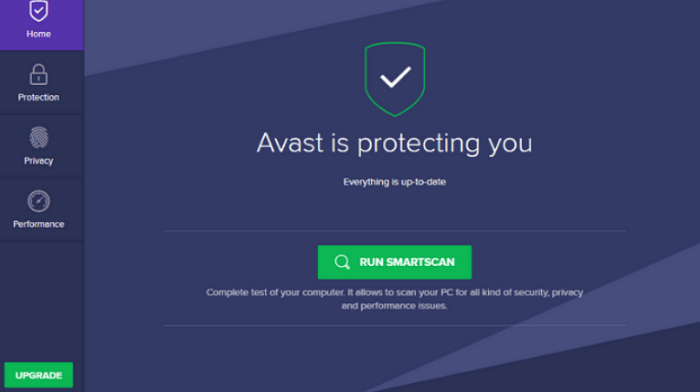
Avast regularly scans and runs all computer files through its scanner to keep the system safe, deleting malicious files and automatically sending them to the Avast Virus Chest with other malware.
Unfortunately, Avast's inspection can sometimes mistakenly flag important files as malware, leading to their automatic deletion, but they can be easily recovered with the help of this guide.
How to Recover Files Deleted by Avast Antivirus (2 Ways)
Recovering deleted files with Avast is easier than it sounds if you follow the steps carefully. You can recover deleted data from the Virus Chest, Avast's equivalent of a recycle bin, or use a good data recovery software to retrieve files that haven't landed in the Virus Chest.
Method 1. Restore Avast-Deleted Files from Virus Chest
If you've fallen victim to Avast's file deletion, you can easily recover them by following these steps. First, understand why Avast deletes files and where they're stored in the Virus Chest. Once you know this, you can restore your deleted files by following the given steps. This will help you recover your lost files without any hassle.
Step 1. To find the Avast icon, look for it in the bottom right corner of your screen, specifically under the system tray.
Step 2. Right-click on the icon of the program you want to quarantine and select the option for "Virus Chest".
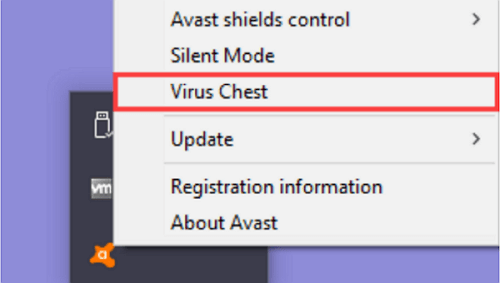
Step 3. To recover deleted files, search for the files you want to recover and click the three horizontal dots to undelete them.
Step 4. To restore a file, go to the "Restore" option in Avast, and it will automatically remove the file from the virus chest and put it back in your system. As a precaution, try running the file again with any anti-malware solution to ensure it doesn't harm your PC.
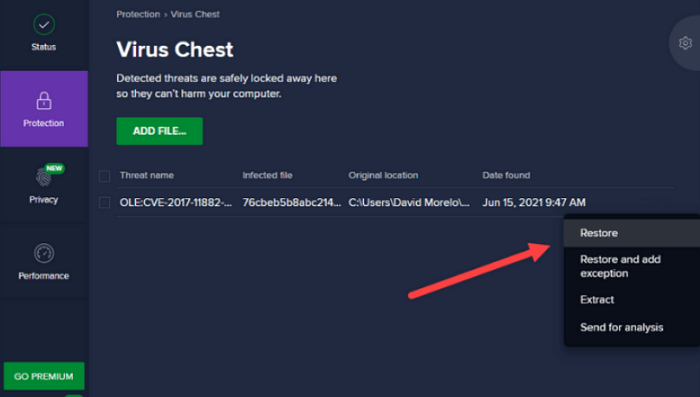
However, selecting the "Restore and Add an Exception" option can prevent Avast from deleting the same file again in the virus chest.
Method 2. Recover Files Deleted by Avast Antivirus (Not from Virus Chest)
To recover Avast-deleted files that are not located in the Virus Chest, use good data recovery software like Qiling hard disk data recovery software. This will help you recover permanently deleted files and folders.
Qiling data recovery software has helped over 75 million users recover lost files, pictures, videos, and data from various storage devices, including hard drives, SSDs, external hard drives, cloud drives, USB drives, and SD cards.
Qiling offers flexible scanning modes to search, scan and preview deleted files before recovery, making the process smooth, and allows recovery of over 1000 file types, including documents, graphics, video, audio, email, and more, before recovering deleted files from Avast.
Step 1. Run Deep Data Recovery on your computer, select file types and click "Fast Scan" to start the recovery process.

Note: You can choose different search modes based on where and why the data was lost.
Step 2. After using an antivirus program, select the disk drive where you lost files and click "Scan" to locate the missing files.

Step 3. When the scan process finishes, the lost and deleted files on the selected drive should appear. You can find the antivirus deleted items in the tree-view panel on the left or use the "Filter" function to specify file formats like pictures, videos, emails, documents, etc.

Step 4. Double-click a file to preview it, then select the file(s) and click "Recover" to retrieve them.
How to Recover Files Deleted by Other Popular Antivirus Software
When running an antivirus scan, it's not uncommon to encounter lost or missing files, especially with Avast or other antivirus software solutions. If you've experienced this issue with other antivirus applications, this section is a must-read for you.
Kaspersky
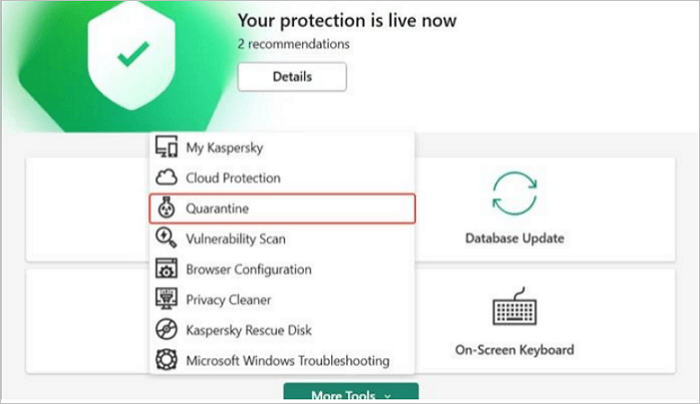
- To access Kaspersky on your PC, search for "Kaspersky" on your screen, and then open the main application that appears in the search results. This will allow you to interact with the Kaspersky interface and access its various features and tools.
- Select the option "More Tools" and then click on "Quarantine".
- To recover deleted files, select the files you want to restore and click on "Restore Files".
McAfee
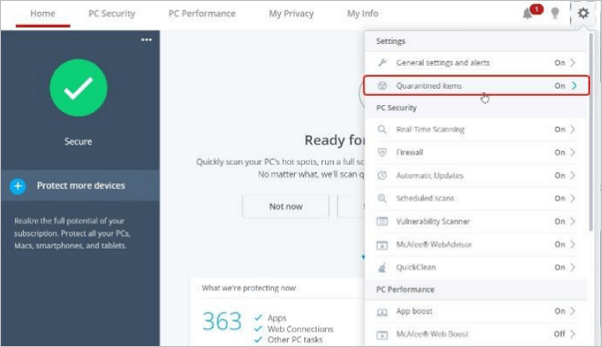
- To access McAfee's main application page settings, click on the settings icon located in the top right corner of the window.
- Select the option to quarantine items, then tick the items you want to recover from the recycle bin.
AVG
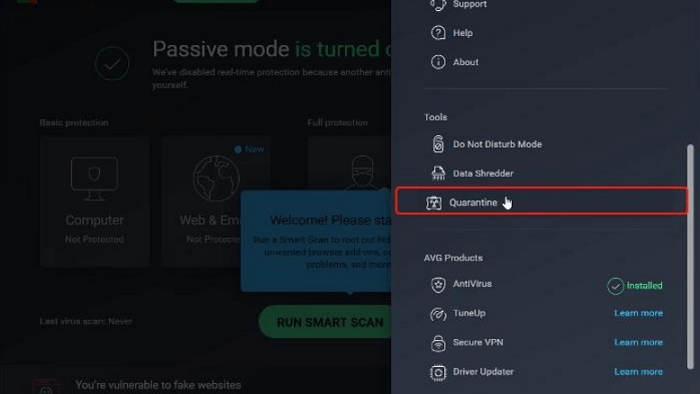
- To access the "Tools" option in the AVG main window, follow these steps: Open the AVG main window, then click on the "Tools" option. This will open a new window with various tools and settings available.
- To recover deleted files from your PC, select the option "quarantine" and choose the files you want to restore.
Windows Security
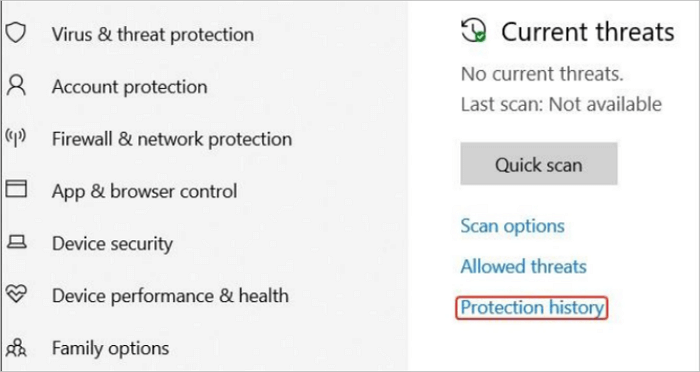
- To access the virus and threat protection feature in Windows Security, open the main application, and on the left side of the screen, click on the option for Virus and threat protection.
- To recover quarantined items, go to the protection history, click on "Quarantined items", and select the files you need to recover.
Conclusion
If you've experienced issues with Avast deleting your important files by mistake, you can now find relief with the solutions provided. This guide offers a quick and easy way to restore any file or data mistakenly deleted by Avast or other antivirus software, allowing you to recover your lost files in just a few minutes.
If the traditional method doesn't help, Qiling data recovery software can be a lifesaver in data loss scenarios. This software can assist with recovering files from the recycle bin or formatted hard drives, and its special features ensure the best care for your lost data.
Related Articles
- Recover Deleted Word Documents Windows 10/11 in 4 Ways [2022 Update]
- Cloud Drive Data Recovery: Recover Data from WD, Dropbox, Google
- SD/Memory Card Recovery Software Free Download
- Fix Corrupted Data and Recover Files from PSP Memory Stick
- What to Do When Computer Says Invalid System Disk Replace the Disk Windows 10/8/7
This guide provides solutions to fix the “invalid system disk” error on Windows 10, which can be caused by a faulty hard drive. Before attempting to fix the issue, it's recommended to use Qiling data recovery software to restore data from the hard drive to prevent data loss. - [2022 New] LaCie External Hard Drive Troubleshootings, No Data Loss
If your LaCie external hard drive is not turning on, showing up, or working on your computer. You can try troubleshooting with Qiling hard drive recovery software to repair the issue without losing any data.
Products
Articles & Tutorials
- Data Recovery
- Data Backup
- File Recovery
- File Backup
- System Backup and Restore
- Disk and Partition Clone
- Technical articles
- Mobile articles
- Disk Master Help
- Windows Data Recovery Tutorials
- Windows Secure Delete Tutorials
- Windows Partition Management Tutorials
- Windows File Backup and Restore Tutorials
- Windows System Backup and Restore Tutorials
- Windows Disk Backup and Restore Tutorials
- Windows Clone Tutorials