Corrupted HTML File Recovery Solutions (Online & Offline)
HTML stands for Hypertext Markup Language, a standard language used to design and develop web pages. HTML files are plain text files that can be edited with a basic text editor like Notepad or TextEdit. However, if an HTML file is corrupted, it may not render correctly in a web browser, requiring a corrupted HTML file recovery solution to repair and reopen the file.

If the HTML file has not been saved yet or has been saved over by other files with the same type, the recovery chance of each following solution will be greatly reduced.
How to Recover Unsaved/Deleted Notepad (TXT) Files on Any Device
If you accidentally close Notepad without saving your work, or experience a power failure or system crash, you can recover your unsaved notes. Additionally, a file recovery tool can also help you recover deleted or lost .txt files with ease.
Fix 1. Online Method - Upload and Fix Corrupted HTML File
You should select OnlineFile.Repair to recover your corrupted HTML files because it offers a reliable solution to restore your files. The reasons for choosing this service are mainly as follows:
- HTML file type supported
- Website comfortably designed
- Nothing advertised on the website
- The service is not free, but the price is considered reasonable, with a cost of $10 for files under 100MB, and an additional $1 for every 50MB over 100MB.
How to recover a damaged HTML file with online file repair software:
Step 1: Upload your corrupted HTML file by manually selecting or dropping it onto a specified area, then provide an email address to proceed.
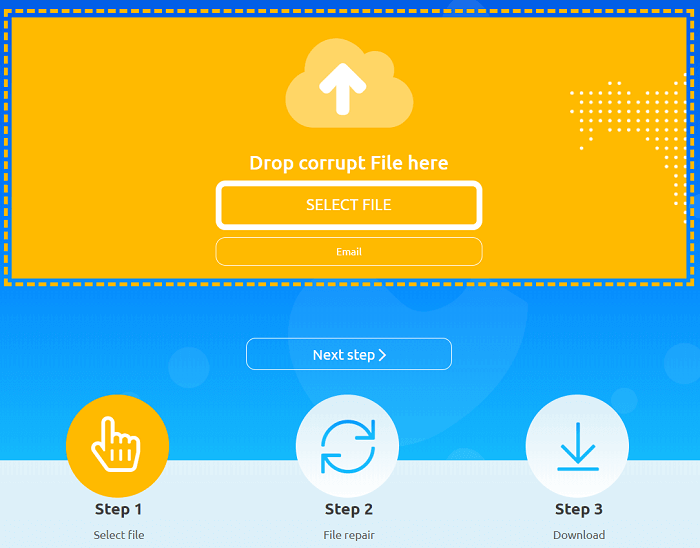
Step 2: The service automatically analyzes uploaded files, saving recoverable data to a new file and reporting results immediately or via email.
Step 3: After making a payment through PayPal or Credit Card, the system will provide a download link for the recovered data, either online or via email.
Fix 2. Offline Software - Download and Recover Corrupted HTML File
Online solutions for repairing files with opening issues exist, but they may not guarantee the safety of personal data stored in the corrupted file. Unlike corrupted file recovery software, which often requires IT skills to install and use, online solutions may be more accessible but also riskier in terms of data privacy. However, they can still be effective in restoring severely corrupted items.
We selected Deep Data Recovery to recover corrupted HTML files based on the following facts:
- Free trial of 2 GB
- Recover unlimited data
- Preview before recovery
- Recover numerous types of files and documents
To maximize Deep Data Recovery's effectiveness in recovering a corrupted HTML file, create a copy of the file first. Then, delete the original corrupted file from the drive and follow the software's guide to scan and automatically repair the corrupted file.
Step 1. Launch Deep Data Recovery. Select file types and click "Fast Scan" to start the recovery process.

Note: You can choose different search modes based on where and why the data was lost.
Step 2.To repair corrupted files, select a disk location where the broken files are saved and click "Scan" to start finding the damaged files. Qiling file repair tool can fix various types of files, including documents, videos, and pictures in different formats.

Step 3.After scanning, you can quickly find corrupt data by file type. To repair damaged files, select the type, such as Documents, and filter a specific category, like Word, Excel, or PDF. For pictures and videos, all common types are supported, including JPEG, PNG, BMP, MOV, MP4, GIF, and more.

Step 4.Qiling file repair software automatically fixes broken files, allowing you to preview the repaired files before recovery. Once satisfied, click "Recover" and save the recovered files to a different location to avoid data overwriting.
Haven't You Backed Up Yet? Do It Now.
Losing important files, such as an HTML file, can be a frustrating experience, and the chances of recovering them through online or offline means are not always 100% effective, especially if the file content has been compromised.
Having a timely backup can be a lifesaver if your files experience a crash or corruption. With a reliable backup, you can quickly restore files from their previous version, making it a top choice for a simple and affordable file backup plan for all kinds of files and folders on your Windows PC. Configuring it now can give you peace of mind.
Related Articles
- How to View/Delete Chrome History
- How to Repair Windows 10 for Free with 6 Effective Ways
- Fix Device Not Migrated Problem in 4 Ways
- Recover Data After Formatting Laptop/PC
- How to Restore Previous Versions of File or Folder Windows 10/8/7
To recover an older version or restore a previous version of a file or folder in Windows 10/8/7, you can use the built-in feature called Previous Versions. - How to Fix Database from MDF File in SQL Server 2008/2008 R2
A database failure in SQL Server 2008 or 2008 R2 indicates corruption and can be resolved by restoring the database from its MDF file. To repair the SQL database, you can either use the MS SQL itself or employ Qiling MS SQL Recovery, a dedicated SQL repair tool.
Products
Articles & Tutorials
- Data Recovery
- Data Backup
- File Recovery
- File Backup
- System Backup and Restore
- Disk and Partition Clone
- Technical articles
- Mobile articles
- Disk Master Help
- Windows Data Recovery Tutorials
- Windows Secure Delete Tutorials
- Windows Partition Management Tutorials
- Windows File Backup and Restore Tutorials
- Windows System Backup and Restore Tutorials
- Windows Disk Backup and Restore Tutorials
- Windows Clone Tutorials