Top 5 PST Repair Tools in Windows 10/11
If you're experiencing issues with your PST files, don't worry - we've can help. We'll take a look at some handy tools that can help repair your Outlook data, making it easier to access your emails, contacts, and other important information.
Outlook is a popular emailing service widely used by students and professionals globally, offering quick and convenient access. Its advantages make it a top choice among institutions and professional environments.

The problem of a corrupted or lost PST file, saved by Outlook, can be a significant issue for many users. Fortunately, PST repair tools can provide an extraordinary solution to this problem. In this article, we'll explore the top 5 free PST repair tools and examine the reasons behind this issue, providing a comprehensive guide for users to recover their damaged PST files.
Common Causes of PST Files Corruption
A PST or personal storage table is a file extension code used by Microsoft programs, primarily Outlook, to store essential information like calendar events, contacts, emails, and messages.
PST files can become corrupted due to various reasons such as hard drive crashes, software glitches, or even user errors. This corruption can lead to the loss of important data like emails, contacts, and calendar events. Users may experience errors such as "file not found" or "file is corrupted" when trying to access their PST file, resulting in the loss of valuable information. To recover lost data, users can try using built-in tools like Microsoft's Inbox Repair Tool or third-party software specifically designed for PST file recovery.
Let's divide them into two categories:
PST File Corruption Due to Hardware Reasons
The first and most common cause of PST data corruption is hardware failure, which can result in three main types of errors and losses: loss of data, loss of metadata, and loss of integrity. This can occur due to various issues, including file system corruption, disk crashes, and power outages. As a result, the PST file becomes corrupted, leading to data loss and inaccessibility.
- Network issues
- Bad Sectors on Hard Drive
- Sudden Power Failure
Network issues or sudden power failure can cause the computer to misread or corrupt a PST file, potentially ruining all the data within it.
A bad sector on a storage device can cause issues with Outlook and lead to corrupted PST files that are unreadable.
PST File Corruption Due to Software Reasons
Software issues can cause PST file corruption, likely due to two reasons: bugs in the software used to create or access the PST file, or compatibility problems between different software programs that interact with the PST file. This type of corruption can occur without any hardware involvement, making it a software-specific issue.
- Malicious Software
- File System Recovery
A malicious virus attack or a poorly recovered system file can cause PST files to become unreadable, potentially ruining all types of files. These two events are the significant reasons behind the corruption of PST files.
Tip: Recover Lost PST Files for Free (Recommend)
Corrupted PST files can still be recovered, even if they're beyond readable. To recover them, you can use a free PST file recovery tool like PST Repair or PST Recovery Software. These tools can scan the file and recover as much data as possible, even if it's heavily corrupted. They're free to use and can be downloaded from the internet.
The best way to recover lost files is by using a professional recovery tool, preferably a third-party one, such as Deep Data Recovery. This tool stands out as the top contender for file recovery due to its effectiveness.
Brief Introduction to Deep Data Recovery Software
Deep Data Recovery is a top-notch recovery program that can recover files, including corrupted PST files, making it a popular choice among users worldwide.
The PST repair tool should be your top priority due to its ability to recover lost or corrupted files in case of a disaster. This tool can salvage valuable data that would otherwise be lost, making it an essential component of any email management system.
- Deleted files
- Files lost in storage formatting
- Accidental deletion
- Virus attack
This tool can help with various scenarios, including recovering Outlook data. It can recover file types such as PST, OST, and DBX, which are commonly used in Outlook. By utilizing this tool, users can retrieve their lost or corrupted email data, contacts, calendar events, and other important information, making it a valuable resource for those who need to recover their Outlook data.
- PST
- DBX
- EMLX
Deep Data Recovery can help retrieve lost PST data from Outlook or Outlook Express, and it's mostly free, also allowing recovery of other essential media like documents, videos, photos, audio, and other files.
How to Recover Lost PST Files Using Deep Data Recovery
To recover PST files using Deep Data Recovery Software, you'll need to follow these steps: First, download and install the software on your computer. Then, launch the software and select the drive or location where your PST file is stored. Then, click on the "Scan" button to start the scanning process.
Step 1. Launch Qiling file recovery software on your Windows computer. Select file types and click "Fast Scan" to start the recovery process.

Note: You can choose different search modes based on where and why the data was lost.
Step 2. To recover lost email files, choose the drive or partition where the files were located and click on the "Scan" button.

Step 3. The software will start scanning immediately. Please wait until the scanning process is complete. To quickly find email files, click "Others" in the left panel and look for PST files or Outlook files in the file type list.

Step 4. Select the desired email files, click "Recover", and save them to a different location to avoid overwriting the original files.
The tool comprehensively recovers corrupted PST files for free, making it an ideal recovery option to get back vital information.
Top 5 Free PST Repair Tools
The five best options for recovering lost PST files have been selected based on user satisfaction, quality, and free usage. These programs were chosen for their ability to effectively recover lost files, and they are highly rated by users for their performance in this area. They are also free to use, making them a convenient and cost-effective solution for those in need of file recovery.
The best PST repair tools in 2022 can be categorized into two groups: direct tools for PST recovery and general data recovery tools. These tools can help recover and repair corrupted or damaged PST files, allowing users to access their emails and data again. Some popular options include popular options like Deep Data Recovery.
- 1. Qiling Email Recovery Wizard
- 2. Stellar Repair – PST File Recovery Tool
- 3. DataNumen Outlook Repair Tool
- 4. Kernel for Outlook PST Repair Tool
- 5. MS Inbox Repair Tool
1. Qiling Email Recovery Wizard
Qiling Email Recovery is a specialized program designed to recover emails only, making it an ideal solution for those who lose or corrupt their PST files.
- The software supports Microsoft Outlook, including versions 2010, 2007, 2003, 2002, 2000, 98, and 97.
- Shows a preview before recovery - making selective recovery easier
- Recovers corrupted or damaged PST files
- It offers an easy UI
This software can recover deleted emails, restore corrupted PST files, and help with password recovery, making it a comprehensive solution for PST file repair.
Pros:
- Easily recovers PST files
- Recovery of lost or deleted files
- Recovers corrupted or damaged PST files
- The free version does the same as a paid one
Cons:
- Paid versions don't offer a lot
- The free version undermines paid version
2. Stellar PST File Repair – PST File Recovery Tool
Stellar is a leading provider of recovery tools, and their PST File Recovery tool is a top contender. This program can recover Outlook data, including emails, contacts, calendar entries, and more, helping you get back on track quickly and easily.
- Emails, attachments, contacts, and calendars
- Damaged or broken PST files
- Recovers Outlook inbox
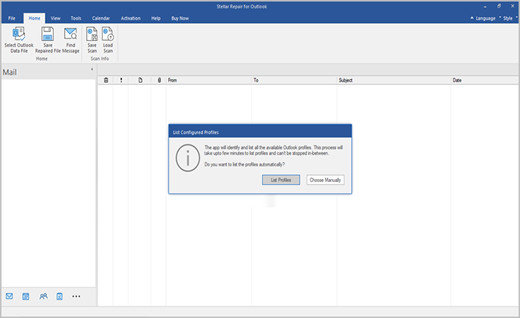
The program provides a complete solution by allowing users to recover Outlook passwords, retrieve lost or missing emails, and remove duplicate emails, ensuring 100% performance of their Outlook inbox.
Pros:
- Easy to use
- File preview
- Recovers PST files comprehensively
Cons:
- A little on the expensive side
- Limited free use
- In extreme cases, such as when files have been deleted or are infected with a virus, recovery may not be possible.
3. DataNumen Outlook Repair Tool
DataNumen Outlook repair tool is a highly-rated option with a 4.9 user rating, and for good reason - it's one of the most efficient tools for recovering PST files, formerly known as Advanced Outlook repair, and can quickly and comprehensively recover various files.
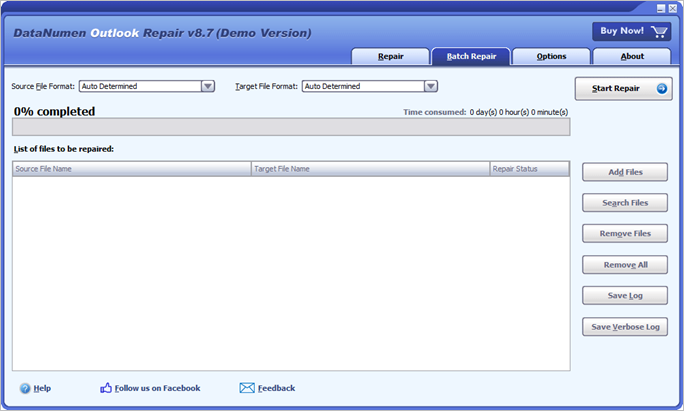
This software is capable of recovering various types of data such as emails, posts, folders, calendars, and events, and can handle large-sized PST files, making it a well-rounded program for data recovery needs.
Pros:
- Highly convenient
- Supports large PST file sizes
Cons:
- A bit expensive
- Outdated UI design
- Known to face problems when recovering attached images, videos, etc.
4. Kernel for Outlook PST Repair Tool
The PST Repair tool has a 4.9 rating from users, with a 90%+ recovery rate, making it a significant consideration due to its capability and effectiveness in repairing PST files.
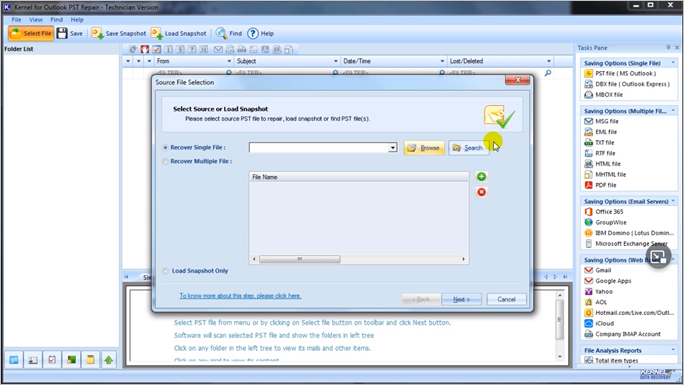
It's an easy-The program offers a comprehensive PST recovery solution with many great features, allowing you to recover damaged or corrupted PST files. Besides supporting Outlook, it also provides various other options, making it a versatile tool for users.
Pros:
- Repair multiple PST files
- Very detailed UI
- Perhaps the quickest on this list
Cons:
- It might be confusing for new users
- The cheapest version will cost you $70
5. MS Inbox Repair Tool
The MS Inbox Repair tool is the final tool on this list, and it's actually from Microsoft itself. Despite not seeing an update in years, this program is still one of the best options available.
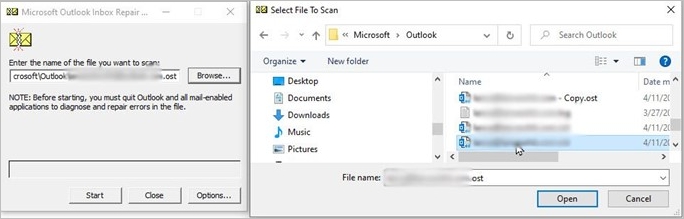
Microsoft's program is highly capable and quickly recovers files in a systematic way.
Pros:
- Easy to use
- Recovers aptly
- Recovers quickly
- Microsoft made it
Cons:
- Can't recover in extreme cases
- Faces some problems in Windows 11
Conclusion
If you're experiencing issues with damaged PST files, there are several programs that can help you recover them. These programs can assist in identifying the causes of the damage and provide solutions to restore your PST files. By using these tools, you can recover your valuable data and get back to work without any further disruptions.
While all of these programs are dependable, using the one from Qiling is your best option, not only because it offers a free version but also because it provides more features than any other program.
PST Repair Tools FAQ
This article is bound to generate some questions in your mind. If you have any queries, then this FAQ section might help you answer some of them:
How do I repair a corrupt PST file?
To recover damaged PST files, you can download one of the tools or use Qiling Email Recovery Wizard, which can quickly repair them.
How do I fix a PST file is not an Outlook data file?
The tools mentioned can support PST files, but in extreme cases, only Qiling Email Recovery can help recover and repair them.
How do I find a lost PST file?
The MS Inbox repair tool or Deep Data Recovery can help retrieve deleted or lost PST files.
Related Articles
- There Is a Problem with This Drive. Scan the Drive Now and Fix It
- The Best SSD Data Recovery Software for SSD Data/File Recovery
- Top10 Best USB Repair Tool 2022 Update
- Recover Data from a Dead Hard Drive and Repair the Corrupted Disk
- 3+ Solutions: Cannot Format Raw Drive Error in 2022
If you're unable to format a RAW drive or external hard drive, stay calm! First, use reliable RAW drive data recovery software to recover any important data from the drive. - 4 Methods | Convert RAW to FAT32 for Micro SD Card/USB
Learn how to convert a RAW micro SD card or USB flash drive to FAT32 and recover data before fixing the inaccessible RAW drive.
Products
Articles & Tutorials
- Data Recovery
- Data Backup
- File Recovery
- File Backup
- System Backup and Restore
- Disk and Partition Clone
- Technical articles
- Mobile articles
- Disk Master Help
- Windows Data Recovery Tutorials
- Windows Secure Delete Tutorials
- Windows Partition Management Tutorials
- Windows File Backup and Restore Tutorials
- Windows System Backup and Restore Tutorials
- Windows Disk Backup and Restore Tutorials
- Windows Clone Tutorials