Deep Data Recovery vs Disk Drill: Which Is Better for You
Data loss is a common problem caused by accidental deletion, formatting, disk damage, or malware attacks. In such situations, professional data recovery tools can help retrieve valuable data.
When searching for the best data recovery software to restore lost data, two popular options are Deep Data Recovery and Disk Drill by Cleverfiles, which are widely used worldwide.
Choosing between Deep Data Recovery and Disk Drill for data recovery can be a daunting task, but this article aims to provide a detailed comparison of the two from a user's perspective. A thorough introduction and analysis of their versatility, features, price, and reviews will help you make an informed decision without having to spend time and energy on testing and selecting the best program.
Deep Data Recovery Review
Deep Data Recovery offers simple solutions to recover lost data from various data loss situations, making it accessible to all levels of users, from beginners to IT experts.
Deep Data Recovery is compatible with the latest Windows and macOS versions, offering features like deleted file recovery, formatted recovery, RAW recovery, and Recycle Bin recovery.
This powerful file recovery tool allows you to restore hundreds of file types, including documents, graphics, video, audio, email, and more, with a simple 3-step wizard. It can help you retrieve permanently lost data from a variety of devices and storage media, including PCs, laptops, Macs, SSDs, external hard drives, USB flash drives, pen drives, camcorders, music players, video players, and CF/SD cards.
Deep Data Recovery Main Features and Highlights
- Data recovery tools can help restore lost data from various loss cases, including accidental deletion, formatting, operating system crashes, partition loss, and more. These tools can recover data from different types of storage devices, such as hard drives, solid-state drives, USB drives, and memory cards, and can even recover data from damaged or corrupted storage media.
- The software supports over 1000 file types for various file formats, including documents, videos, audio files, graphics, emails, and more.
- Repair corrupted photos, documents, and videos for free
- The operating system supports FAT, exFAT, NTFS, NTFS5, ext2/ext3, HFS+, and ReFS file systems.
- Provide both Windows and macOS versions
What We Like
- Simple three-step data recovery solution, select > scan > recover
- Powerful recovery capabilities, support advanced RAID and Windows Server recovery
- Fast deep-scan algorithm
- The Filter feature enables users to rapidly locate and recover specific files by filtering through a list of available files, making it easier to find and restore target files.
- Before performing a restore, preview the files that can be recovered to ensure you're restoring the correct data.
- Get free data recovery software to restore up to 2GB of data.
What We Don't Like
- The average scan speed depends on the size of the data and the health of the disk, with faster speeds possible for smaller data sets and healthy disks.
- A little expensive lifetime license for $149.95
Step-by-Step Tutorial to Recover Lost Data withDeep Data Recovery
You can download Qiling data recovery software for free to recover lost files in complex data loss situations.
Step 1. Select file types and click "Fast Scan" to start
Launch Deep Data Recovery, select file types and click "Fast Scan" to start the recovery process.

Note: You can choose different search modes based on where and why the data was lost.
Step 2. Select a location and start scanning
Choose the partition where you lost data. Then, click "Scan".

Step 3. Filter and preview files
To find the files you need, use the file format filter on the left or upper right corner. Once you've selected the files, you can click the "Preview" button or double-click a file to preview its content.

Step 4. Recover lost data or files
To recover lost data, select the file that needs to be recovered, check the box next to it, and then click the "Recover" button to securely restore the file.
Disk Drill by Cleverfiles Review
Disk Drill is a hard disk data recovery software that effectively recovers deleted files from various storage devices. It supports recovery of photos, videos, music, documents, and more from internal or external drives, USB flash drives, SD cards, and other devices.
After scanning the data, you can efficiently find a specific file by filtering the results and preview it directly inside Disk Drill before recovering it.
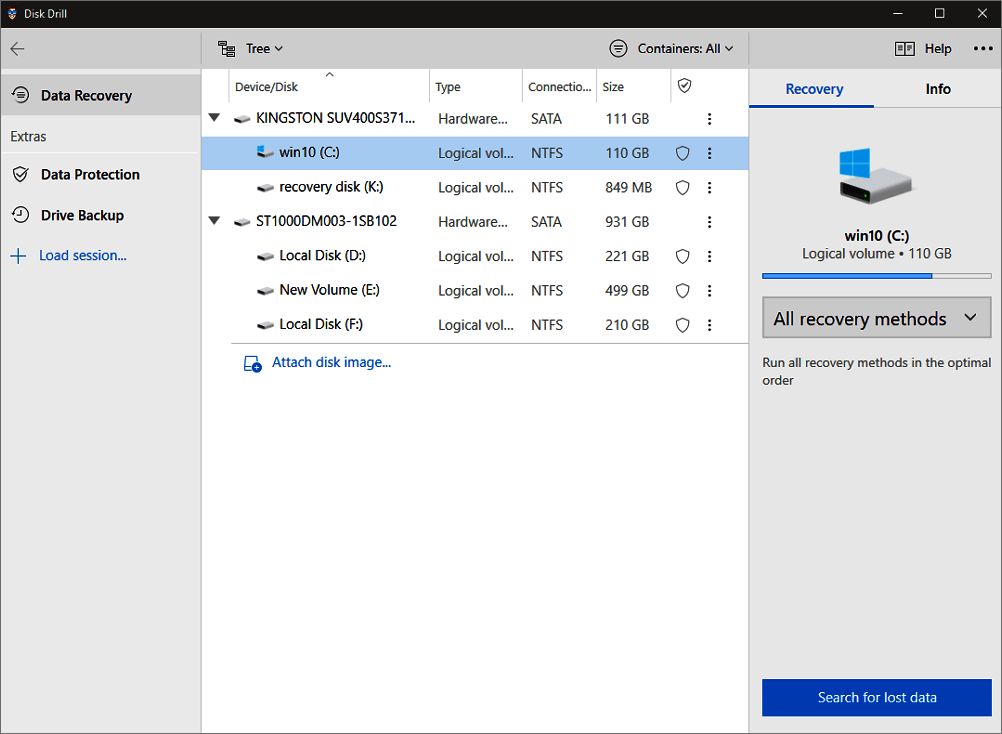
Disk Drill Key Features and Highlights
- This software supports hundreds of file formats, including documents, videos, archives, music, and photos.
- Users can create image files in the form of ISO, IMG, or DMG files, allowing them to save and share their digital content in a standardized format. This feature enables users to easily capture and store snapshots of their system or applications, making it convenient for backups, troubleshooting, and testing purposes.
- The system fully supports variable file systems, including FAT, NTFS, HFS+, and EXT4, among others.
- Ability to mount scan results as a folder
- A quick scan with the option to stop/resume
What We Like
- Intuitive and user-friendly interface
- Support all the common disk-based storage devices
- Data protection and backup features are available
- Support both Windows and Mac data recovery
What We Don't Like
- The free version only recovers up to 500 MB
- Lack of phone technical support
- The Pro version is expensive at $89.00
Video Tutorial on Recover Deleted Files on Mac with Disk Drill
Video resource page:https://www.youtube.com/watch?v=SB45cqQV0XU&feature=emb_rel_pause
Deep Data Recovery vs Disk Drill Comparison in Tabular Form
The table below provides a visual comparison of Qiling and Disk Drill, offering a side-by-side view of their features and performance. This summary aims to help users make an informed decision between the two tools.
| Comparison | Deep Data Recovery | Disk Drill |
|---|---|---|
| Ease of use | Easy | Easy |
| Recovery capabilities | Data recovery in various data loss cases | Data recovery in various data loss cases |
| Preview | Yes | Yes |
| Free version | 2GB | 500M |
| Plans and pricing | $69.95 a month | $89.00 a month |
| Platform | Windows and macOS | Windows and macOS |
| Exclusive offers | Corrupted file repair | Data protection |
| Phone support | Yes | No |
| Ratings | Trustpilot 5.0 | No authoritative website rating information |
Final Verdict
Both Deep Data Recovery and Disk Drill offer advanced features for data recovery on Windows and Mac, making it possible to retrieve lost files. If you've lost data, you can choose either Deep Data Recovery or Disk Drill to recover it.
Deep Data Recovery is a better choice than Disk Drill if you need to fix corrupted files after data recovery or if you want to recover more data for free.
To compare the two Windows recovery workflows without relying on a general verdict, see Disk Drill vs Qiling for Windows file recovery.
Related Articles
- $RECYCLE.BIN Folder | All You Want to Know About $RECYCLE.BIN Folder Is Here
- How to Find a File in Linux Using Terminal and Commands
- Recover Deleted Volume Windows 10/11
- Free Undelete Software for Windows 10/11
- Hard Drive Recovery| Recover Files from a Hard Disk
Have you ever lost your hard drive data? We compiled super easy methods to perform hard drive data recovery on Windows 11/10/8/7 and restore hard drive data on Mac. Read on to get the full guide to recover hard drive data in no time. - Recover Data from Formatted Transcend External Hard Disk/SD Card
You can recover deleted or formatted data from your Transcend storage device, such as an external hard drive or memory card, using the reliable Deep Data Recovery software.
Products
Articles & Tutorials
- Data Recovery
- Data Backup
- File Recovery
- File Backup
- System Backup and Restore
- Disk and Partition Clone
- Technical articles
- Mobile articles
- Disk Master Help
- Windows Data Recovery Tutorials
- Windows Secure Delete Tutorials
- Windows Partition Management Tutorials
- Windows File Backup and Restore Tutorials
- Windows System Backup and Restore Tutorials
- Windows Disk Backup and Restore Tutorials
- Windows Clone Tutorials