Hard Drive Recovery| Recover Files from a Hard Disk
Losing important data can be a frustrating experience, whether it's due to accidental deletion or a hard drive failure. Fortunately, hard drive recovery is often possible, allowing you to recover files from a hard drive with or without software, depending on the cause of the data loss.
4 Most Common Reasons for Hard Drive Data Loss
Hard drive data loss can occur due to physical damage, logical damage, software errors, or malware, leading to corruption and loss of stored data.
Hard Drive Formatting
Hard drive data can be lost through formatting, erasing all data on the drive, making recovery difficult.
Accidental Deleting
Hard drive data can be lost through deletion, where the user deletes files or folders without intending to, marking the space as available for overwriting. However, if the hard drive is not rewritten, the deleted data can be recovered using special software.
Hard Drive Crash/Damage
A hard drive crash can result in lost data, and it can occur due to improper shutdown, bad sectors, or malware infection. Logical damage can be repaired with data recovery software, but physical damage requires a professional data recovery service. Experts can assist with corrupted hard drive recovery.
Software Errors
Software errors can also cause hard drive data loss, often due to corrupt firmware or accidentally deleted system files. Fortunately, these issues can be resolved by reinstalling the operating system or affected applications, effectively fixing the problem.
Hard Drive (HDD) Data Recovery Methods
Hard drive data loss can be devastating, but fortunately, recovery is often possible. Whether due to hardware failure, accidental deletion, or disk crash, files can be recovered with the help of specialized data recovery software. However, if the hard disk is severely damaged, it's usually best to seek the expertise of a professional hard drive recovery service, which can quickly and safely retrieve your lost files.
Hard Drive (HDD) Data Recovery Service
Data recovery from hard drives is typically performed by a team of experts who physically open the drive in a clean room environment to repair any damage. This is the most expensive option, but offers the highest success rate, and is necessary in cases where the drive is severely damaged or corrupted.
- Repair corrupted RAID drive and recover data from NAS.
- Repair corrupted virtual disk file (.vmdk, .vhd, .vhdx, etc.).
- Unformat a hard drive that was formatted by mistake.
- Repair unbootable Windows operating system, including Windows 10/8/7.
- To fix a damaged RAW drive that needs to be reformatted, including Bitlocker encrypted drives, you can use a data recovery software like DiskGenius. This software can scan the drive, identify the damaged areas, and recover any recoverable data.
- Recovering a lost partition or repartitioned drive that cannot be recovered by software requires a more advanced approach. This typically involves using specialized tools or techniques, such as booting from a live CD or USB, accessing the drive through a Linux-based system, or using a hardware-based solution like a recovery stick.
A data recovery service retrieves data from failed, damaged, or corrupted storage devices, including hard drives. To recover data, you typically send the drive to a service where they perform the recovery in a clean environment using dedicated equipment. There are five top-rated HDD recovery services available, including Ontrack HDD Recovery, Secure Data Recovery Service, SALVAGEDATA Data Recovery Service, Stellar Data Recovery Lab-services, and Qiling Manual Data Recovery Service.
Hard Drive Recovery Software
Hard drive recovery software is a self-service solution that uses specialized software to scan your hard drive for recoverable data, typically offering a lower success rate compared to a hard drive data recovery service, but at a lower cost. If you have some technical know-how, you can try using it to recover data.
- Retrieve lost files after deletion or emptying the recycle bin.
- Accidentally formatted a hard drive and caused data loss.
- The hard drive becomes "RAW" or some software error happens.
- Run GPT partition recovery or MBR partition recovery with simple steps to recover lost partitions.
Hard Drive Recovery Software VS Hard Drive (HDD) Data Recovery Service
Hard drive data recovery services and recovery software are two popular methods for recovering lost data. While both options are effective, they differ in their approach and convenience. A comparison table can provide more detailed information on the differences between these two methods, helping you determine which one is best for your specific needs.
| Comparison | Hard Drive Recovery Software | Hard Drive Recovery Service |
|---|---|---|
| Hard Drive Recovery Cost | Cheap | Expensive |
| Recovery Guarantee | No | Yes |
| Executor | You | Experts |
| Process | Time-consuming | Easy |
| Supported Devices | Internal/External Hard Drive, SSD, USB, etc | Almost All |
| Supported Brands | Western Digital, Seagate, Sony, Toshiba, SanDisk, etc. | Almost All |
| Supported File Systems | FAT32, exFAT, NTFS, etc. | Almost All |
If you have valuable data that you can't afford to lose, a hard drive data recovery service is likely your best option. However, if you're trying to recover less important data or are on a tight budget, using hard drive recovery software might be a viable alternative.
How to Recover Deleted Files from Hard Drive in Windows 10
If you're running Windows 10, you can try using the built-in File Recovery feature, which can scan your hard drive for recoverable files. Alternatively, you can use a third-party data recovery software, such as Deep Data Recovery or Deep Data Recovery, to scan your hard drive and recover lost files. You can also try using a USB drive to create a bootable copy of your hard drive and then use the built-in File Explorer to recover files.
Method 1. Recover HDD Data from Recycle Bin
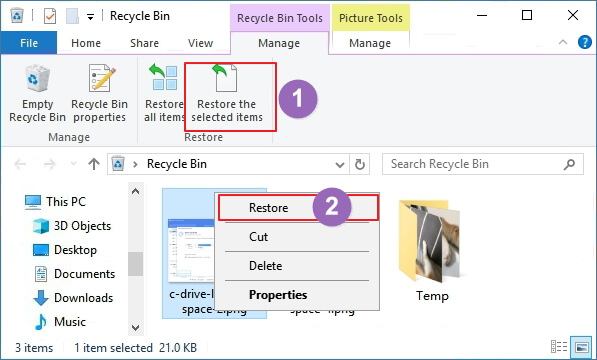
One of the first steps to take is to check the Recycle Bin, as deleted files often go there in Windows 10. You can directly recover the removed files from the Recycle Bin, bringing them back to their original state.
Step 1. Double-click the Recycle Bin icon on the Desktop.
Step 2. To restore a deleted file or folder, locate and select the item you need to recover.
Step 3. Right-click the selected item and choose "Restore".
Method 2. Recover HDD Data with Hard Drive Recovery Software
Another option is to use Qiling hard disk data recovery software is a standout tool that can recover files in just 3 steps, and supports over 1000 file types, often surpassing the capabilities of Windows' built-in recovery tool.
Step 1. To recover lost data, launch Deep Data Recovery in Windows 11/10/8/7, select the desired file types, and click "Fast Scan" to initiate the recovery process.

Note: You can choose different search modes based on where and why the data was lost.
Step 2. To recover data from a lost or corrupted hard drive, select the affected hard drive and click "Scan" on the recovery software. This will initiate the scanning process, which may take some time depending on the size of the hard drive and the extent of the data loss.

Step 3. When the scan is complete, you can use the "Filter" or "Search" feature to find the lost files. This allows you to quickly locate and recover the files you need.

Step 4. Select all the HDD files you want and click "Recover". Then, browse another secure location to save them.
Method 3. Restore Hard Drive Files from a Backup
If you've lost files, try using the built-in File History tool to automatically back up your files regularly, or use System Restore to take your system back to a previous point in time that may include a working copy of your lost files.
Full Guide
To recover deleted files from a hard drive in Windows 10, follow this guide. If you're a Mac user, refer to the Mac hard drive recovery guide instead.
To Sum Up
For hard drive recovery, you can use various methods depending on your system. In Windows 11/10/8/7, check the Recycle Bin, use File History, or run Qiling data recovery software. If you're using a Mac, turn to Time Machine or Mac hard drive recovery software to restore lost files.
Hard drive recovery is possible in both Windows 10 and macOS, and can be achieved with the right tools to restore a hard drive to its original state.
Hard Drive Recovery FAQs
If you are still having trouble with your hard drive, you're not alone. Here, we'll answer some of the most frequently asked questions about hard drive recovery. Keep reading and get further help.
1. How can I recover my hard drive for free?
Qiling free data recovery software allows you to recover up to 2GB of data for free.
- Download, install and launch Qiling hard drive recovery software.
- Select the disk or partition that contained the lost files.
- Click the "Scan" button to start scanning for lost files.
- Choose the deleted files you want and preview these files.
- Click the "Recover" button to get back hard drive files for free.
2. Can a file be recovered from a failed hard drive?
Files can be recovered from a failed hard drive using a reliable hard drive recovery program, such as Deep Data Recovery, if the system can still be booted, or by following steps for recovering data from a dead hard drive if access is lost.
3. How much does it cost to recover a hard drive?
The cost to recover data from a hard drive can vary depending on several factors, including the type of data being recovered, the condition of the hard drive, and the expertise of the data recovery service provider. Generally, the cost can range from $50 to $1,000 or more, depending on the complexity of the recovery process and the amount of data being recovered. Some data recovery services may also offer tiered pricing based on the level of service and expertise required, with more advanced services costing more.
- The size of the lost data
- The data loss scenarios
- The time spent on the hard drive
4. How to repair corrupted or damaged hard drives on Windows 10/11?
When it comes to hard disk repair, things could be different, with erratic computer behavior and inaccessible files. In some cases, the computer may not boot up at all. To repair a corrupted hard drive without formatting and data loss, consider using a hard drive repair software or taking the hard drive to a professional data recovery service. These options can help retrieve your files and restore your hard drive to a functional state.
Note: If you haven't previously backed up your data, use data recovery software to retrieve it before proceeding.
1- Repair Hard Drive Using CMD
CHKDSK can scan to mark bad sectors and fix corrupted file system errors to prevent data loss. To run CHKDSK and fix damaged hard disks without formatting, follow the instructions below.
- Click the Search box and type cmd.
- Right-To open Command Prompt as administrator, click on the Start menu, type "cmd" in the search bar, and select "Command Prompt" from the search results. Then, right-click on the Command Prompt icon and select "Run as administrator" from the context menu.
- To fix a corrupted drive, open the Command Prompt window, type `chkdsk E: /f /r /x` (replace E with your actual drive letter), and press Enter. This command will run a thorough check on the drive, attempting to repair any errors it finds, and potentially recover data from the drive. The `/f` option forces the check, `/r` option scans for bad sectors and attempts to recover data from them, and the `/x` option forces the volume to dismount before scanning.
- Wait for the process to finish. Then, check if the hard drive works properly.
2 - Fix Corrupted Hard Drive with File Manager
Windows has its built-in tool, Check Disk (chkdsk), which can scan and repair corrupted hard drive issues. It can be run manually to identify and fix problems.
- Click This PC or My Computer.
- Select the damaged hard drive, right-click it, and choose "Properties".
- To check and correct errors on your hard drive, select the "Tools" option and click "Check" under Error-checking. This will initiate a scan to identify and correct any possible errors on the hard drive.
5. How can I recover data from a hard drive that won't boot?
To recover data from a hard drive that won't boot:
- Create a bootable disk with Deep Data Recovery WinPE Edition.
- Boot from the bootable disk to open Deep Data Recovery.
- Recover files/data from a PC/laptop hard drive that won't boot.
6. How do you fix a hard drive failure?
To fix hard drive failure:
- Clean out the computer vents.
- Check the power and data cables.
- Check the BIOS...
Related Articles
- How to Recover Unsaved Excel Files (2022 Tips)
- Recycle Bin Windows 10 - Full Guide [with Pictures]
- Everything You Need to Know About Shortcut Virus
- File Repair| How to Repair Corrupted File (PST, PDF, Photo, etc.)
- GIF Repair | How to Repair Corrupted GIF Files
If you have a corrupted GIF file and want to repair it, you can try the solutions outlined on this page. There are four useful methods to repair a GIF and restore deleted or lost GIFs step by step, which can be found by reading on. - How to Repair a Corrupted Hard Disk Without Formatting It in Windows 10/8/7
This guide shows you how to fix a corrupted hard drive in Windows 10/8/7 without formatting it, and also introduce you to a program that can help recover data from your hard drive to a safe place, giving you five ways to do so.
Products
Articles & Tutorials
- Data Recovery
- Data Backup
- File Recovery
- File Backup
- System Backup and Restore
- Disk and Partition Clone
- Technical articles
- Mobile articles
- Disk Master Help
- Windows Data Recovery Tutorials
- Windows Secure Delete Tutorials
- Windows Partition Management Tutorials
- Windows File Backup and Restore Tutorials
- Windows System Backup and Restore Tutorials
- Windows Disk Backup and Restore Tutorials
- Windows Clone Tutorials