What Is an SD Card and What Is It Used For
PAGE CONTENT:
What Is a Secure Digital Card (SD Card)
SD cards, short for Secure Digital, are small, electrical devices with microchip circuitry that enable the uploading, processing, storing, and transferring of media files, photos, and apps. They can be used with various technology devices, such as PCs, cameras, mobile phones, and some medical diagnostic devices, that have an SD slot, allowing for instant access. The benefits of SD cards include their portability, convenience, and versatility, making them a widely used storage solution.
- Improves storage capacity with minimal effort
- A huge storage capacity card is cost economical.
- Decreases the consumption of internal memory used by the phone.
- Consumes a little amount of electricity.
The secure digital (SD) card system has undergone several modifications since its inception in 1999, with various versions offering different storage capabilities and data transmission rates. A table showing the different variants, including their storage capacity and highest data transmission rate, can be referenced.
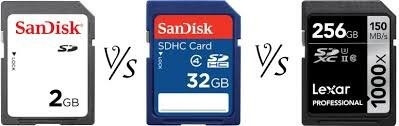
| Versions | Definitions | Storage Capacity | Data Transmission Rate |
|---|---|---|---|
| SD | A Secure Digital (SD) card is a type of memory card that securely stores and saves various types of data, including files, audio, photos, and more. | 2GB | 12.5 MB Per Second |
| SDHC | SDHC is a type of flash memory card that can hold up to 32 GB of data. | 32GB | 25 MB Per Second |
| SDXC | SDXC is the most recent type of Secure Digital card, with a maximum capacity of 2TB. | 2TB | 312 MB Per Second |
Also read: TF card VS SD card
What Is an SD Card Used For?
Before using an SD card, consider the various shapes, sizes, and capacities available, which can be used as primary storage or to expand storage on devices like tablets and smartphones. Let's get started with helping you choose the right card for your needs.
- Speed: The most important factor in determining storage needs is the camera's speed category, which should match the SD card's speed category to avoid overpaying for unnecessary features.
- Size:Knowing the size of a memory card is crucial in determining its suitability with your device. Memory cards come in three sizes: micro, mini, and standard, each offering the same reliability. However, the critical factor is the card's capacity, which varies depending on the size, making it essential to consider this when choosing a memory card.
- Capacity: Users can choose a memory card with the desired storage capacity based on their specific needs and the capabilities of their device.
- Compatibility: To summarize, the compatibility of your device with the SD card is a crucial factor. Older devices may not be able to support the latest SDXC cards, but they can still work with older versions, which may affect performance due to their slower speed.
The cards are widely used in various consumer gadgets to store gigabytes of data at a low cost due to their compact size, and are commonly employed in devices such as.
- Recover Lost Files from SD Cards
- Video game consoles
- Smartphones
- Set-top boxes
- Home theatre devices, including Blu-ray players
- IoT devices like security cameras
- Video camcorders
- Latest TV models
What's the Difference Between a SIM Card and an SD Card
A Subscriber Identity Module (SIM) is a small card provided by cellular service providers that enables a device to interact with the mobile network and function on it.
The main difference between SIM cards and SD cards is their purpose. A SIM card is essential for network access in a mobile phone, allowing you to make calls, send texts, and access the internet. In contrast, an SD card is used to store data and files, such as photos, videos, and apps. As a result, a SIM card is far more crucial than an SD card.
To differentiate between a credit card and a debit card, consider the following key points. A credit card allows you to borrow money from the bank, pay a fee, and repay it later, while a debit card directly deducts funds from your account when you make a purchase.
| Point of Difference | SIM | SD |
|---|---|---|
| Involvement of Cellular Provider | Yes | No |
| Storage Capacity | The device has a limited storage capacity, and it can only store contacts. | You can decide the storage capacity as per your requirements, allowing you to store files, data, images, and other items. |
| Account Creation | The specific number you're referring to is likely a unique identifier, such as an account number or a customer ID, that helps in the account creation process in a bank. This number is often used to verify the customer's identity and to link their accounts to their personal information. | No certain feature. |
| Replaceable in case of Loss or Theft | Yes, you can get the same number with the cellular provider. | If you delete your account, you will no longer be able to access your account, and you will not be able to recover any data that was saved in your account. If you want to delete your account, you can do so by going to the account settings page and following the instructions provided. |
SD Card Recovery: How to Recover Deleted Files from an SD Card
Secure Digital cards are convenient, but they also risk data loss from even the simplest operation, with the most common problem being the loss of photographs, typically occurring in scenarios such as accidental deletion, formatting, or physical damage to the card.
- Delete photographs by accident
- Card Formatted, becomes corrupted or destroyed.
- Virus infection
- Power outages
Fortunately, data on formatted cards can be recovered using data recovery software, which can also help with damaged or lost data, and RAW data recovery.
Deep Data Recovery is a reliable tool for retrieving lost data, effortlessly and rapidly handling over 100 real-life data loss scenarios such as formatting, deletion, and RAW. It's a must-have instrument for recovering data from memory cards, CF or SDHC cards, microSD cards, and other storage devices, making it a savior for users who need a confirmed and secured card recovery.
Qiling SD Card Recovery Software
- FAT, NTFS, exFAT, NTFS5, HFS+, ext2/ext3, and ReFS are all compatible file systems.
- This software allows data recovery from various devices, including PCs, laptops, USB drives, micro cards, digital cameras, and more.
- This tool repairs damaged or corrupted JPG or JPEG photographs and MP4 or MOV camera videos, restoring them to their original quality.
Step 1. Select file types and click "USB/SD Scan" to start
- Download and install Deep Data Recovery on your Windows PC.
- To properly connect your SanDisk/Lexar/Transcend SD card to your computer, you should first insert the SD card into a card reader. The card reader should be connected to your computer via a USB cable. This will allow your computer to recognize the SD card and allow you to transfer files to and from the card.
- Launch Deep Data Recovery software, select the desired file types, and click "USB/SD Scan" to initiate the recovery process.

Note: You can choose different search modes based on where and why the data was lost.
Step 2. Select the SD card to scan
- Here, all connected drives will be displayed. Select your SD card and click "Scan" to proceed.

Step 3. Check for scan results
- Wait for the scanning process to complete.
- To filter the files on your computer, click on the "Filter" button and select one or multiple file types from the list, such as Pictures, Word, Excel, PDF, Videos, and more.
- Click "Preview" to check if they are the wanted files.

Step 4. Recover SD card data
- Choose desired files and click "Recover".
- If you're recovering files from a damaged SD card, it's generally a good idea to save the recovered files to a different location to avoid overwriting any existing data on the original card. This can be done by choosing a different location, such as the computer's hard drive or an external hard drive, to save the recovered files.
Conclusion
The article has covered SD cards, their versions, and the distinction from SIM cards. It also introduced the best SD card data recovery tool, Deep Data Recovery, which can recover deleted images and files in three simple stages. If you accidentally delete or lose your memory card data, this tool can assist you in retrieving it.
Related Articles
- Repair and Recover Corrupted/Unreadable VHD or VHDX Files
- How to Fix Seagate External Hard Drive Not Working in Windows/Mac
- How to Fix Overheated Hard Drive and Recover Data [Symptoms, Causes & Fixes]
- Fix 'CHKDSK Is Not Available for RAW Drive/USB/SD Card' Error
- Easy Data Recovery Software Free Download with Crack
Stop using the so-called easy data recovery software with crack full version. Here, Qiling software provides you with free access to download genuine data recovery software crack alternative with license key to restore unlimited data in 3 simple steps. - Word Recovery for Unsaved, Deleted, and Corrupted Word Documents [Professional Guide]
If your Word documents are deleted, unsaved, or corrupted, they can be recovered. Start reading now to learn how to recover your lost Word files.
Products
Articles & Tutorials
- Data Recovery
- Data Backup
- File Recovery
- File Backup
- System Backup and Restore
- Disk and Partition Clone
- Technical articles
- Mobile articles
- Disk Master Help
- Windows Data Recovery Tutorials
- Windows Secure Delete Tutorials
- Windows Partition Management Tutorials
- Windows File Backup and Restore Tutorials
- Windows System Backup and Restore Tutorials
- Windows Disk Backup and Restore Tutorials
- Windows Clone Tutorials