Can Antivirus Scan an Encrypted Drive?
You keep your most important files in an encrypted drive, and your antivirus is supposed to protect them. But the two seem to work against each other: encryption hides files from everyone, including your security software.
This guide explains what antivirus can and cannot do with an encrypted drive, how to scan a container safely, and how to combine encryption with malware protection.
PAGE CONTENT
- Why Antivirus Cannot Scan a Locked Container
- What Happens When the Container Is Mounted
- The Real Threat: Malware on the Host PC
- Scan and Use Your Encrypted Drive with Safe Disk
- A Layered Protection Plan
- FAQs About Antivirus and Encrypted Drives
- Back Up Windows Before You Change Settings
Why Antivirus Cannot Scan a Locked Container
An unmounted container is a single encrypted file, and antivirus has nothing to inspect inside it.
- The contents are encrypted. Every file inside the container is scrambled, so there is no readable code for antivirus to match against.
- It looks like one file. The scanner sees a large .fvd file, not the documents or programs inside it.
- Only the password unlocks it. Without the password, even Safe Disk cannot read the contents, and neither can antivirus.
- No filename or path. The container hides the names and folder structure inside, so there is nothing to flag.
This is not a flaw. It is exactly how encryption is supposed to work. A locked container is invisible to everyone without the password, whether that is a thief, a friend, or your antivirus.
What Happens When the Container Is Mounted
Once you mount the container, the situation changes.
- The files become visible. The container appears as a drive letter, and the files inside look like ordinary files.
- Antivirus can scan them. Real-time protection scans files as they are opened, and manual scans can target the mounted drive.
- Malware can also read them. If the container is mounted, any program running on your PC can access the files, including malware.
- Malware can infect them. A virus that runs while the drive is mounted can encrypt, modify, or delete the files inside.
So the container is scannable only while it is open, and that is also the only time malware can reach it. This is the trade-off you manage with mounting habits.
The Real Threat: Malware on the Host PC
The danger to an encrypted drive is not the drive itself but the computer that opens it.
- Keyloggers. Malware that records keystrokes can capture the container password as you type it.
- Cryptolockers. Ransomware can encrypt or delete the container file, or the files inside it while mounted.
- Backdoors. A remote access trojan can open the container and copy files out while you are working.
- Infected downloads. A file saved into the mounted drive from an unsafe source carries malware inside the container.
- USB auto-run. Malware on an infected USB stick can spread when the stick is used to move the container.
Antivirus matters most here. It stops the malware that would otherwise steal your password or read the mounted drive, so encryption and antivirus are partners, not rivals.
Scan and Use Your Encrypted Drive with Safe Disk
Qiling Safe Disk creates the container that protects your files. Download and install it first, then follow these steps to use a container with antivirus on the host PC.
Step 1. Keep your antivirus installed, updated, and running before you open any container.
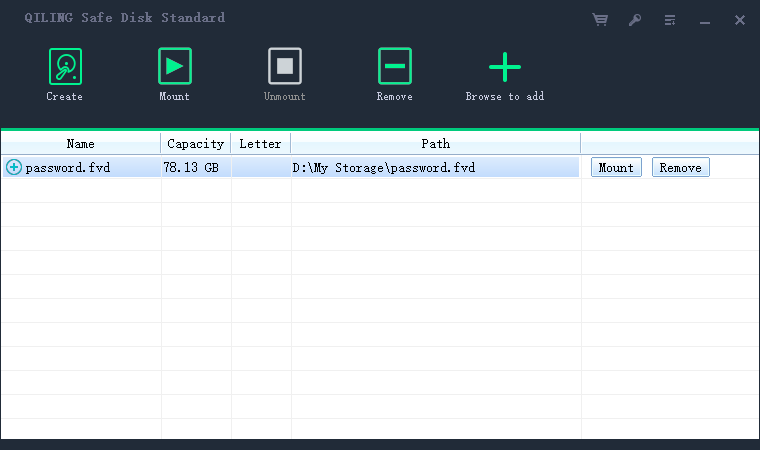
Step 2. Mount the container in Safe Disk with the password and choose a drive letter.

Step 3. Run a manual scan on the mounted drive letter to check the files inside for malware.
Step 4. Work with your files as usual. Real-time protection scans anything you open or download into the drive.
Step 5. When you are done, unmount the container. The files become invisible to malware again.
Step 6. Never disable your antivirus to make mounting faster. The protection is worth the small delay.
Step 7. Back up the container regularly so a malware infection on the host PC cannot destroy your only copy.
A Layered Protection Plan
Encryption and antivirus work best together with a few other habits.
- Run reputable antivirus. Keep it updated and let real-time protection stay on.
- Keep Windows patched. Most malware exploits flaws that updates have already fixed.
- Unmount containers when idle. A locked container cannot be read or infected by malware.
- Scan before you open. Scan downloaded files before moving them into the container.
- Use a firewall. Block the outbound connections that malware uses to send your data out.
- Back up the container. Keep a copy on a separate drive that you disconnect after copying.
- Watch your USB drives. Disable auto-run and scan removable drives before use.
No single tool covers everything. Encryption hides your files, antivirus stops the malware, and backups make sure a bad day does not become a disaster.
FAQs About Antivirus and Encrypted Drives
Can antivirus scan an unmounted encrypted container?
No. The contents are encrypted and unreadable, so the scanner sees only one large encrypted file with nothing to inspect.
Does encryption make my files safe from viruses?
It makes them safe from theft and unauthorized access, but not from malware running on the host PC while the drive is mounted.
Should I exclude the container from antivirus scans?
You can exclude the container file itself to avoid slowdowns, because the scanner cannot read inside it anyway. Never exclude the mounted drive if you want the files scanned.
Can a virus hide inside an encrypted container?
Yes, if an infected file was placed inside while the container was mounted. Run a scan on the mounted drive to catch it.
Do I need antivirus if I encrypt everything?
Yes. Antivirus protects the password and the mounted files from malware, which encryption alone cannot do.
Back Up Windows Before You Change Settings
Before changing security software or storage settings, create a full Windows backup. Qiling Disk Master creates a system image you can restore from.
Step 1. Open Qiling Disk Master and select "System Backup" to include Windows and the boot partitions.
Step 2. Save the image to a drive other than the Windows disk and start the backup.
Step 3. If a change causes issues, restore from the image to return Windows to its working state.
Conclusion
Antivirus cannot scan an encrypted drive while it is locked, because the contents are unreadable to everyone without the password. Once you mount the container with Qiling Safe Disk, the files become normal visible files, and antivirus can scan them like anything else. The real threat is malware on the host PC, which can steal your password, infect the mounted drive, or lock the container file itself. The answer is layers: keep antivirus updated, patch Windows, run a firewall, unmount containers when idle, scan files before moving them inside, and back up the container to a separate drive. Encryption hides your data, and antivirus keeps the machine that opens it clean.
For more on encryption and protection, see Is Encryption Enough to Protect Your Data?, Can Ransomware Encrypt an Already-Encrypted Drive?, How to Backup an Encrypted Drive or Container, and How to Use Qiling Safe Disk.
Related Articles
- Ransomware: The PC Virus You Must Fight Against!
Understand the malware that targets the host PC and the container file itself. - Is an Encrypted Drive Safe from Hackers?
See what antivirus and encryption together stop that neither can stop alone. - Should You Encrypt Backups to Protect Against Ransomware?
Encrypt the backups that malware cannot reach while they are disconnected. - All Information About WannaCry Virus
Learn how a major ransomware outbreak spread through unprotected machines. - What is Disk Imaging
Image the host PC so an infection or failed scan never means starting over.
Products
Articles & Tutorials
- Data Recovery
- Data Backup
- File Recovery
- File Backup
- System Backup and Restore
- Disk and Partition Clone
- Technical articles
- Mobile articles
- Disk Master Help
- Windows Data Recovery Tutorials
- Windows Secure Delete Tutorials
- Windows Partition Management Tutorials
- Windows File Backup and Restore Tutorials
- Windows System Backup and Restore Tutorials
- Windows Disk Backup and Restore Tutorials
- Windows Clone Tutorials