How to Mount an Encrypted Drive on Another Computer
One of the best things about an encrypted container is that it is a single file. You can copy it to a USB stick, a network drive, or a cloud folder, and open it on any Windows PC that has Qiling Safe Disk.
This guide explains how to move the container to another computer, mount it with the password, and what to do if you cannot install software on the host machine.
PAGE CONTENT
- Why the Container Is Portable
- What You Need on the Other Computer
- Copy the Container to the Other PC
- Mount the Container with Safe Disk
- Use the Portable Version Without Installing
- FAQs About Mounting on Another PC
- Back Up Windows Before You Change Settings
Why the Container Is Portable
A Safe Disk container is a self-contained file, which is why it travels so easily.
- One file. Everything encrypted lives in a single file, usually with an .fvd suffix. Copying that file copies the entire encrypted drive.
- Format-independent. The container works on NTFS, FAT32, and exFAT drives, so it opens on any Windows PC regardless of the file system.
- Password-bound. The password is stored inside the container, so the same password works on every machine that opens it.
- No registry dependency. Safe Disk stores its settings in the installation, not in the container, so moving the file does not break anything.
The only requirement is that the host computer has Qiling Safe Disk installed or can run the portable version.
What You Need on the Other Computer
Before you mount the container, make sure the host PC has what it needs.
- Qiling Safe Disk installed. A normal installation is the most reliable way to open the container.
- Or the portable version. If you cannot install software, Safe Disk has a portable edition that runs from a USB stick.
- The password. Without it, the container cannot be opened on any machine.
- A free drive letter. Windows needs an unused letter such as Z: or X: to mount the container.
- Windows 7 or later. Safe Disk supports Windows 11, 10, 8, 8.1, 7, Vista, and XP.
If the host PC runs macOS or Linux, Safe Disk will not work there. You will need to use a Windows machine or a virtual machine running Windows.
Copy the Container to the Other PC
The first step is to get the container file onto the computer where you want to open it.
- USB stick. Copy the container to a USB drive and plug it into the host PC. This is the simplest method for a large container.
- External hard drive. For containers larger than a USB stick, use an external hard drive.
- Network share. If both PCs are on the same network, copy the file over the network.
- Cloud storage. Upload the container to OneDrive, Google Drive, or Dropbox, then download it on the host PC.
- Verify the copy. After copying, check the file size matches the original to make sure the transfer was complete.
Avoid opening the container directly from a slow network drive; copy it to the local disk first for better performance.
Mount the Container with Safe Disk
Once the container file is on the host PC, mounting it takes a few clicks.
Step 1. Install Qiling Safe Disk on the host PC if it is not already there.
Step 2. Open Safe Disk. The image list is empty on a fresh install.
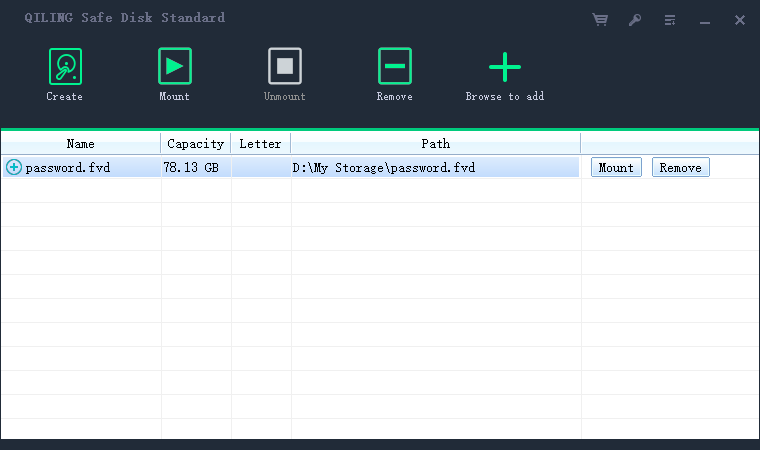
Step 3. Click Add Old Image and browse to the container file you copied.
Step 4. The container appears in the list. Select it and click Mount.

Step 5. Choose a drive letter, enter the password, and decide whether to mount as read-only. Read-only is safer on a shared computer.
Step 6. Click Mount. The drive appears in File Explorer, and you can work with your files normally.
Step 7. When finished, select the image and click Unmount to lock the data again.
Use the Portable Version Without Installing
If you cannot install Safe Disk on the host PC, the portable version runs directly from a USB stick.
- Copy Safe Disk Portable to a USB stick. Download the portable edition and extract it onto the USB drive along with your container file.
- Plug the USB stick into the host PC. No installation is needed.
- Run Safe Disk from the stick. Double-click the executable to open the program.
- Add and mount the container. Follow the same steps as the installed version.
- Unmount and eject when done. The container and the program both live on the USB stick, so nothing is left on the host PC.
The portable version is ideal for public computers, office machines where you cannot install software, or any situation where you want to leave no traces behind.
FAQs About Mounting on Another PC
Will my files look the same on another computer?
Yes. The container holds the same files in the same structure, regardless of which PC mounts it.
Can I open the container on Mac or Linux?
No. Safe Disk is Windows only. For cross-platform access, use a tool such as VeraCrypt instead.
Do I need to activate Safe Disk on every computer?
You need a license to use the full version on each PC. The portable version can be run on any Windows machine.
What if the container file is corrupted during transfer?
Mounting will fail. Keep a backup copy of the container and use that instead.
Can I mount the same container on two computers at once?
Not recommended. Two computers writing to the same container file can corrupt it. Mount on one machine at a time.
Back Up Windows Before You Change Settings
Before installing software on a new PC, create a full Windows backup so you can roll back if needed. Qiling Disk Master creates a system image you can restore from.
Step 1. Open Qiling Disk Master and choose "System Backup" to include Windows and the boot partitions.
Step 2. Save the image to a drive other than the Windows disk, then start the backup.
Step 3. If a change causes problems, restore from the image to return Windows to its working state.
Conclusion
Mounting an encrypted drive on another computer is straightforward because the container is a single, self-contained file. Copy it to the host PC, install Qiling Safe Disk or run the portable version, add the old image, and mount with your password. The files appear exactly as they did on the original machine, and unmounting locks them away again. If you cannot install software, the portable edition runs from a USB stick and leaves no traces on the host. Remember to keep the password safe and mount the container on only one machine at a time to avoid corruption.
For more on using encrypted drives, see How to Create an Encrypted Virtual Drive, How to Encrypt a USB Flash Drive, Best Encryption Algorithm for Files, and How to Use Qiling Safe Disk.
Related Articles
- How to Share Encrypted Files Securely
Send the container and the password through separate channels so only the recipient can open it. - Automatically Copy Files When USB Drive Connected
Move the container file between computers with automatic USB copy tools. - How to Backup an Encrypted Drive or Container
Keep a backup copy of the container before you move it to another computer. - Encrypt Backup Drive to Protect Your Data
Encrypt the drive that carries your container copies between computers. - What is Disk Imaging
Back up the entire container file with a disk image so you never lose access on any machine.
Products
Articles & Tutorials
- Data Recovery
- Data Backup
- File Recovery
- File Backup
- System Backup and Restore
- Disk and Partition Clone
- Technical articles
- Mobile articles
- Disk Master Help
- Windows Data Recovery Tutorials
- Windows Secure Delete Tutorials
- Windows Partition Management Tutorials
- Windows File Backup and Restore Tutorials
- Windows System Backup and Restore Tutorials
- Windows Disk Backup and Restore Tutorials
- Windows Clone Tutorials