Your Private Files, Locked with AES-256 Encryption
QILING Safe Disk creates a virtual encrypted drive on any Windows PC. Put your sensitive files inside, set a password, and they become invisible to everyone but you. No Windows Pro required; it works on every edition.
Trusted by users worldwide: AES-256 military-grade encryption, works on Windows 11/10/8/7/Vista/XP, and Windows Server 2003-2019.
PAGE CONTENT
- Why Encryption Isn't Optional Anymore
- Protect Any File in 3 Simple Steps
- Built for Real-World Privacy
- Who Uses Safe Disk
- Security You Can Verify
- Safe Disk vs BitLocker
- Frequently Asked Questions
- Back Up Windows Before You Change Settings
Why Encryption Isn't Optional Anymore
Every unencrypted file on your PC is one accident away from becoming public. Here are the three problems Safe Disk solves with a password only you know.
| Problem | What It Means |
|---|---|
| Stolen laptop, stolen life | Your laptop holds tax returns, IDs, passwords, and private photos. Without encryption, anyone who finds it can read everything. |
| Windows Home can't encrypt the whole drive | BitLocker is locked behind Windows Pro. On Home edition you have no built-in way to protect your files, until now. |
| Cloud storage can read your files | OneDrive, Google Drive, and Dropbox can scan and hand over your files. A locally encrypted container keeps them out. |
Safe Disk solves all three with one password that only you know.
Protect Any File in 3 Simple Steps
You do not need to understand encryption to use it. Safe Disk hides the complexity behind three clicks.
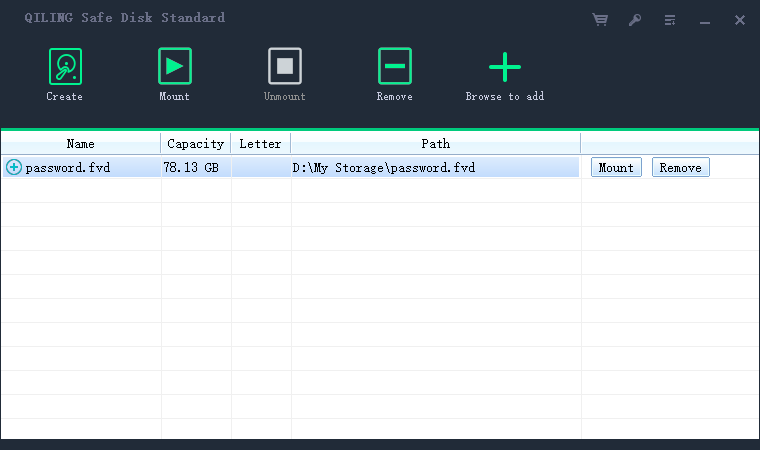
| Step | What You Do |
|---|---|
| 1. Create | Click Create, choose a size, and set a password. A new encrypted drive appears in File Explorer. |
| 2. Drop files in | Drag your sensitive folders into the virtual drive. Everything is encrypted automatically, in real time. |
| 3. Unmount | Click Unmount when you are done. The drive vanishes, and your files stay locked until you enter the password again. |
Tip: You can store the container on a USB stick, an external drive, or even upload it to the cloud, and take it between PCs.
Built for Real-World Privacy
Safe Disk gives you the encryption features that matter in everyday use, not just on a specification sheet.
| Feature | Why It Matters |
|---|---|
| AES-256 plus Blowfish, GOST, and 3DES | Choose from four industry-standard algorithms. AES-256 is the same encryption banks and governments trust. |
| Works on every Windows edition | No Pro license needed. Safe Disk runs on Windows 11, 10, 8, 7, Vista, and XP, plus Windows Server 2003-2019. |
| Up to 2 TB per container | Create an encrypted drive as large as 2048 GB, enough for entire photo libraries and backups. |
| No backdoor, no master key | If you forget the password, the data is gone. That is the point: even we cannot open it. |
| Mounts as a normal drive letter | The container appears as a regular drive in File Explorer, and every app can read and write to it. |
| Read-only mounting | Mount the drive read-only to view files without risking accidental changes or malware infection. |
| Auto-unmount on logoff | Step away from your PC and the encrypted drive locks automatically, with no action needed. |
| Auto-backup on unmount | Keep the latest 2 to 32 backup copies every time you unmount, so a corrupted container never means data loss. |
Who Uses Safe Disk
- Freelancers and remote workers. Lock client contracts, NDAs, and invoices in a container, even on a shared work laptop.
- Students. Keep thesis drafts, personal journals, and private photos hidden from roommates who borrow your PC.
- Small businesses. Protect customer lists and financial records on office PCs without expensive BitLocker upgrades.
- Travelers. Store passport scans and backup IDs in an encrypted USB container for border crossings.
- Journalists and activists. Hide sources and sensitive research in a password-locked drive.
Security You Can Verify
- AES-256 encryption. The standard used by banks and militaries.
- No data leaves your PC. Encryption happens locally, never in the cloud.
- No telemetry, no phone-home. Safe Disk never sends your files anywhere.
- 20+ years on the market. Trusted by individuals and businesses worldwide.
- Clean installer. No malware, no adware, and no bundled junk.
Compatible with: Windows 11, Windows 10, Windows 8/8.1, Windows 7, Vista, XP, Server 2019, Server 2016.
Safe Disk vs BitLocker
| Comparison | QILING Safe Disk | Windows BitLocker |
|---|---|---|
| Windows Home support | Yes | No, Pro only |
| Separate password | Independent of your Windows account | Tied to your login |
| Portable container | One .fvd file, move it anywhere | Tied to the drive |
| File and folder control | Encrypt only what matters | Whole drive only |
| Deniable encryption | Hidden container option | Visible partition |
| Recovery backdoor | None, your password only | Recovery key exists |
Frequently Asked Questions
Can Safe Disk encrypt my whole C drive?
Safe Disk creates an encrypted container, a single file that mounts as a drive, rather than full-disk encryption. Move your sensitive folders into the container and they are protected with their own password.
What if I forget the password?
There is no backdoor and no recovery key. If you lose the password, the data cannot be recovered. This is by design, since even Qiling cannot open your container. Back up the container and use a password manager.
Does it slow down my PC?
On modern hardware with AES-NI acceleration, the performance impact is negligible in everyday use.
Can I open the container on another computer?
Yes. Copy the .fvd file to any PC, install Safe Disk or use the portable edition, and enter the password.
Is it compatible with antivirus?
Yes. An unmounted container appears as a single encrypted file. While mounted, antivirus scans the files inside normally.
Is Safe Disk free?
Safe Disk offers a free trial version so you can evaluate every feature before you buy. See the pricing page for full license options.
Stop Leaving Your Private Files in the Open
Download Safe Disk free and encrypt your first container in under a minute. No credit card required.
Back Up Windows Before You Change Settings
Before changing security software or storage settings, create a full Windows backup. Qiling Disk Master creates a system image you can restore from if anything goes wrong.
Step 1. Open Qiling Disk Master and select System Backup to include Windows and the boot partitions.
Step 2. Save the image to a drive other than the Windows disk and start the backup.
Step 3. If a change causes issues, restore from the image to return Windows to its working state.
Conclusion
QILING Safe Disk locks your private files behind AES-256 encryption with a simple create, mount, and unmount workflow. It works on every Windows edition, needs no BitLocker Pro upgrade, and lets you carry the encrypted container on a USB drive or in the cloud. Create your first container, set a strong password, and keep a backup somewhere safe, since there is no recovery key. Download Safe Disk free and protect your files in under a minute.
For more on Encryption and Safe Disk, see How to Use Qiling Safe Disk, Encrypted Drive vs BitLocker, and Qiling Safe Disk FAQ.
Related Articles
- How to Create an Encrypted Virtual Drive
Follow the full steps to make your first .fvd container with a strong password. - How to Encrypt a Folder with Password on Windows
Password-protect an entire folder with an encrypted container on any Windows edition. - How to Encrypt Files Before Uploading to Cloud Storage
Upload the encrypted container to OneDrive or Google Drive and keep the contents private. - How to Hide Files with Encryption
Hide the container so your private files are not just locked, but invisible. - Best Encryption Algorithm for Files
Choose between AES-256, Blowfish, GOST, and 3DES for your container.
Products
Articles & Tutorials
- Data Recovery
- Data Backup
- File Recovery
- File Backup
- System Backup and Restore
- Disk and Partition Clone
- Technical articles
- Mobile articles
- Disk Master Help
- Windows Data Recovery Tutorials
- Windows Secure Delete Tutorials
- Windows Partition Management Tutorials
- Windows File Backup and Restore Tutorials
- Windows System Backup and Restore Tutorials
- Windows Disk Backup and Restore Tutorials
- Windows Clone Tutorials