How Does an SSD Work | SSD VS HDD 2023 - Qiling
What Is SSD?
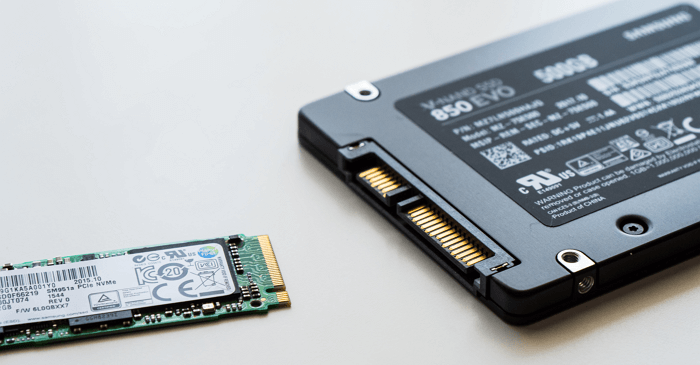
SSD has undergone significant improvements over the years, becoming more resistant to vibration compared to other electromechanical drives. While it may not have been as effective in the past, advancements have enhanced its performance, making it a more reliable option. If you're interested in learning more about its development, you can check out the list below.
- 1958 - The first hard drive was invented.
- 1970 - The first SSD was invented by Sun StorageTek.
- 1980 - Fujio Masuoka, a researcher at Toshiba, invented the flash memory technology used in solid-state drives (SSDs).
- 1998 - SanDisk introduced SSDs in 2.5-inch and 3.5-inch form factors with PATA interfaces.
- 2009 - Micron Technology released an SSD with a 6 Gbit/s SATA interface.
- 2016 - Seagate has released a 60 TB SSD in a 3.5-inch form factor.
- 2019 - Gigabyte Technology launched an 8 TB 16-lane PCIe 4.0 SSD.
As we've seen, SSDs are widely used in various fields, including computers, smartphones, and even cars. Now, let's consider when we might need to use an SSD. Typically, an SSD is necessary when we need to store and access large amounts of data quickly, such as in video editing, 3D modeling, or gaming.
When Do We Use SSD?
SSDs can be used anywhere traditional hard drives can, including PCs, laptops, cameras, music players, phones, tablets, and thumb drives, as well as with graphics cards. They are a suitable option for users who want to move their operating system to an SSD or clone their hard drive to an SSD, offering a safe and reliable way to store data. However, it's worth noting that SSDs are generally more expensive than traditional hard drives.
ADATA XPG Atom 50: 99$
Intel SSD 670p: 179$
Samsung SSD 870 EVO: 58$
Addlink S70: 35$
Addlink S70:39.9$
The price of SSDs varies by model and capacity, with options ranging from budget-friendly to premium offerings. Common SSD models include the ADATA XPG Atom 50, Intel SSD 670p, Samsung SSD 870 EVO, and Addlink S70, with prices typically ranging from $35 to $180 depending on the brand and specifications.
How Does an SSD Work?
Are you curious about SSDs' working principles? Does it work in the same way as other drives? Of course not! Now, let's have a further study on how an SSD works.
1. How Does SSD Store Data and Can SSD Store Data Without Power?
SSDs (solid-state drives) don't rely on spinning disks or moving parts, instead using a pool of NAND flash to store data. This NAND flash is a type of non-volatile memory that maintains its charge state without a power supply, making it faster than traditional hard drives. While writing to an SSD may be slower than reading from it, it's still significantly faster than mechanical hard disk drives. Additionally, SSDs can store data even without power, thanks to their non-volatile nature.
An SSD stores data in a NAND flash, which is non-volatile and electrically programmed, allowing it to retain data without power backup. This means that data on an SSD is safe even in the absence of power, and it can last long without any power backup. However, the longevity of data on an SSD depends on various factors, including the quality of the NAND flash, the number of write cycles, and the overall health of the drive. Regular maintenance and monitoring can help ensure that data on an SSD remains safe and accessible for a long time.
2. How Long Can SSD Store Data?
Most SSDs can store data for 5-10 years without power, and are more reliable than HDDs due to their lack of moving parts, making them a good choice for storing important data.
3. Why Is SSD Suitable for Laptops?
The popularity of SSDs is on the rise, while traditional hard drives are becoming less favored, especially among laptop users. This shift can be attributed to several factors, including the need for faster data access and transfer speeds, improved durability and resistance to physical shocks, and the overall reduction in power consumption, making SSDs a more efficient and reliable choice for many users.
- How Does an SSD Work in Laptops?
A laptop's storage drive, specifically a Solid-State Drive (SSD), is more important than its CPU and graphics chip as it significantly affects operating speed. Even when not actively using files or apps, the operating system and software utilize virtual memory in the background. An SSD is ideal for laptops due to its speed and reliability. It's also a suitable backup destination, with many users backing up their hard drives to SSDs. Unlike traditional hard drives, SSDs have no moving parts, making them more durable and faster in reading and writing data. As a result, laptops equipped with SSDs provide a quicker user experience.
- How Does an SSD Work with Animation?
When it comes to making animation, CPU, GPU, and RAM are crucial, but choosing a suitable storage device matters a lot, and a hard drive's performance is undoubtedly the most important.

SSDs offer superior performance in both speed and security compared to traditional storage devices. With read speeds of up to 550MB/s and write speeds of 520MB/s, SSDs significantly reduce loading times, making them ideal for resource-intensive applications like animation. Additionally, SSDs are more resistant to vibration and external damage due to their solid-state design, which eliminates the risk of internal moving parts. This makes them a reliable choice for storing and managing critical data.
SSDs are the better choice when it comes to reliability and speed, but HDDs are also a suitable option. What's the difference between the two? Let's explore in the next part.
SSD VS HDD, How Does an SSD Work Differently from an HDD?
A Hard Disk Drive (HDD) is a type of storage device that uses physical disks and mechanical heads to read and write data. It's a traditional storage option that's been around for decades, but it's being phased out by newer, faster technologies.
1. What Is an HDD?
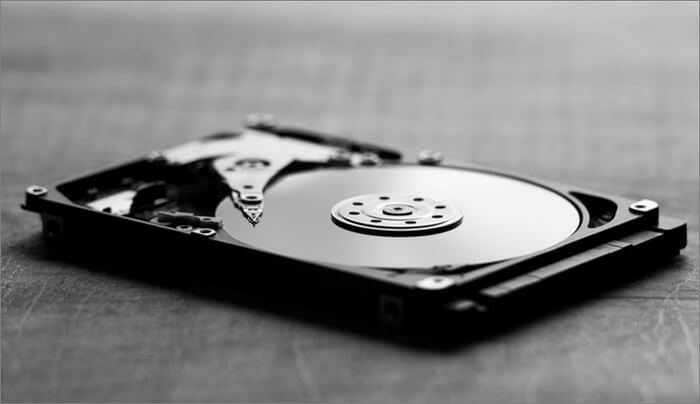
A hard disk drive (HDD) is a type of storage device that can be used to install an operating system and perform system backups. With capacities ranging from 1GB to 2TB, HDDs offer flexibility in meeting various storage needs, whether for cloning a system or simply storing data.
2. How Does an HDD Work?
Most HDDs consist of several disk platters that spin around a spindle, with reading and writing heads recording information to and from tracks on the platters. However, this design makes HDDs prone to mechanical failure and fragility, prompting users to regularly clone their data to a more reliable storage medium, such as an SSD. In contrast, SSDs store data in flash memory chips, eliminating the need for moving parts and making them more durable and efficient. This fundamental difference highlights the distinct characteristics of HDDs and SSDs.
3. What Is the Difference Between SSD and HDD?
The main difference between an SSD and an HDD is that an SSD uses flash memory chips to store data with no moving parts, while an HDD uses spinning magnetic platters and a mechanical read/write head. This means SSDs are faster, more durable, and consume less power, while HDDs offer larger storage capacities at a lower cost per gigabyte.
| Features | HDD | SDD |
|---|---|---|
| Speed | 80MB/s - 160MB/s | 200MB/s - 550MB/s |
| Cost | 39$ - 200$+ | 30$ -100$ |
| Noise | More noise | No noise |
| Weight | Heavier | Lighter |
| Vibration resistance | Fragile | Shock-resistant |
| Reliability | Not that reliable | More reliable |
| Lifespan | Shorter | Longer |
Conclusion
Hard disk drives (HDDs) are suitable for storing non-essential data, movies, and documents, while solid-state drives (SSDs) are better for storing vital data that needs to be kept safe for a longer period.
This page explains how Solid-State Drives (SSDs) work and how they differ from Hard Disk Drives (HDDs). It provides information to help resolve issues related to SSDs and HDDs, offering a clearer understanding of these storage devices.
Related Articles
- Macintosh HD vs. Macintosh HD Data: What Are the Differences
- 0xC1900101 Error in Windows Update, Cannot Install Windows 11 [FIXED]
- What Is an Intrusion Prevention System (IPS)?
- Laptop vs. Desktop: Which Is Better for You? [Comparative Analysis]
- Solved: How to Activate Protection System in Windows? - Qiling
What is a protection system in Windows? And how to activate protection system or access it? As a windows user, you must be keen on how to open Restore Point to keep the computer safer. This article will guide you through these questions. - How to Change Wallpaper on Windows 10
Learn how to change desktop wallpaper on Windows 10 using Settings, right-click shortcuts, and themes. Also discover the best sites to download HD wallpapers for your PC.
Products
Articles & Tutorials
- Data Recovery
- Data Backup
- File Recovery
- File Backup
- System Backup and Restore
- Disk and Partition Clone
- Technical articles
- Mobile articles
- Disk Master Help
- Windows Data Recovery Tutorials
- Windows Secure Delete Tutorials
- Windows Partition Management Tutorials
- Windows File Backup and Restore Tutorials
- Windows System Backup and Restore Tutorials
- Windows Disk Backup and Restore Tutorials
- Windows Clone Tutorials