How to Turn Off Xbox Controller on PC
Gaming fans often prefer using Xbox controllers on their PCs due to their versatility and quality controls. The modern Xbox controllers, which use Bluetooth to connect with PCs, offer features like the share button, quick pairing, and easy sharing, providing improved comfort during gameplay. However, many users face the issue of how to turn off the Xbox controller on a PC, which can be a common problem.
If your gaming setup also uses external storage, this guide can help when an Xbox external hard drive is not working.
To turn off an Xbox controller on a PC, you'll need to follow specific steps, which differ from the manual shutdown process on Xbox consoles.
How to turn off the Xbox controller on a PC
To turn off an Xbox controller on a PC, you have several options. You can press the Xbox button on the controller to turn it off, or use the Windows Settings app to disable the controller.
1. Disconnect the Bluetooth connection
The Xbox controller can be paired with various devices, including PC, Android devices, iPad, iPhone, and Apple TV, using Bluetooth, with a simple process of disconnecting the current Bluetooth connection.
Disconnecting the connection ensures that the Xbox controller is turned off and is no longer linked to the PC, making it one of the easiest and safest ways to turn off the controller.
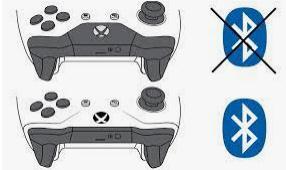
2. Remove the Xbox controller USB cable
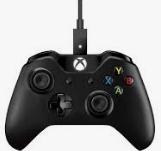
To turn off your wired Xbox controller, simply unplug the connection cable from the PC, effectively disconnecting it. This is a quick and straightforward method that requires no additional steps. Reconnecting the cable will allow you to use the controller again.
3. Long press the Xbox button to turn off the controller
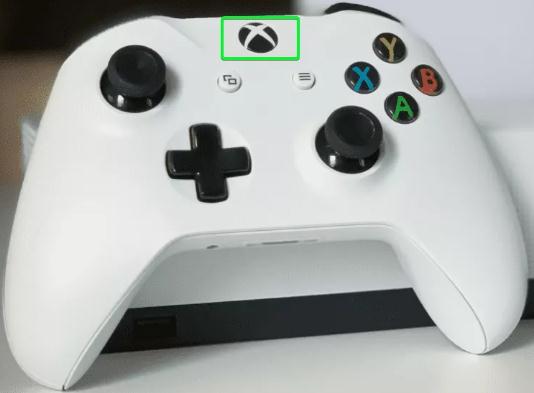
To turn off an Xbox controller, press and hold the guide button at the top for at least 6 seconds, then it can be easily paired again with your PC.
The method works ideally for Xbox controllers with wireless operations, and is also one of the safest ways to turn off the controller, allowing for safe reuse.
4. Remove the batteries
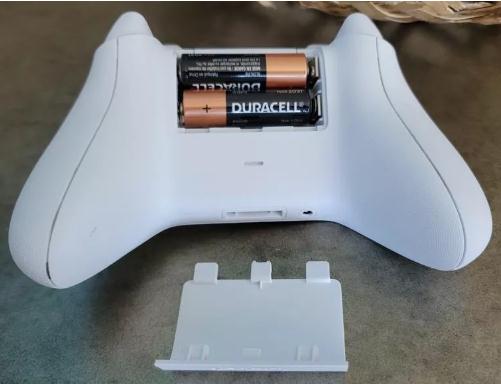
To turn off an Xbox controller on a PC, you can simply remove its batteries by sliding off the battery cover on the back, popping out one cell, and the controller will shut off immediately. However, keep in mind that this method is only a temporary solution and may cause the battery cover to lose its fitting over time, potentially leading to battery dislocation when used.
5. Use of third-party software
Multiple software programs are available that can quickly turn off an Xbox controller with a single click, requiring minimal setup or configuration, allowing for easy and efficient shutdown.
It is crucial to ensure that third-party software is compatible with the Windows version and safe for use on the device. This will prevent any potential issues or conflicts with the operating system.
Conclusion
While the process of turning off your Xbox controller on a PC is relatively simple, there are a few things you should keep in mind. By following the steps outlined above, you should be able to turn off your Xbox controller without any trouble.
Related Articles
- Linux Tips| E212 Can't Open File for Writing in Vim (3 Ways)
- How to Backup SD Card on the Go with Every Possible Way
- The Operation Could Not Be Completed Because the Volume is Dirty [SOLVED]
- How to Erase All Content and Settings on Mac [macOS Ventura/Monterey]
- What to Do If Computer Restarts After Shutdown (for Windows 11/10/8/7)
Fix a computer that restarts after shutdown. Learn common causes, including Fast Startup, power settings, drivers, BIOS, and hardware issues. - Computer Restarts When Playing Games | 10 Fixes🔥
The issue of computer restarts when playing games can be easily resolved if we understand the underlying reasons. This post explores the common causes and provides ten practical solutions to solve the problem, allowing you to enjoy gaming without interruptions.
Products
Articles & Tutorials
- Data Recovery
- Data Backup
- File Recovery
- File Backup
- System Backup and Restore
- Disk and Partition Clone
- Technical articles
- Mobile articles
- Disk Master Help
- Windows Data Recovery Tutorials
- Windows Secure Delete Tutorials
- Windows Partition Management Tutorials
- Windows File Backup and Restore Tutorials
- Windows System Backup and Restore Tutorials
- Windows Disk Backup and Restore Tutorials
- Windows Clone Tutorials