MacBook M1 VS M2: What Is the Difference?
The MacBook Air is Apple's most lightweight, thinnest, and reasonably priced laptop, making it a great option for a powerful and dependable daily notebook. It also offers outstanding performance with its M1 system-on-chip.
Apple has released a new MacBook Air with the latest M2 chip, offering improved performance and a higher price tag.
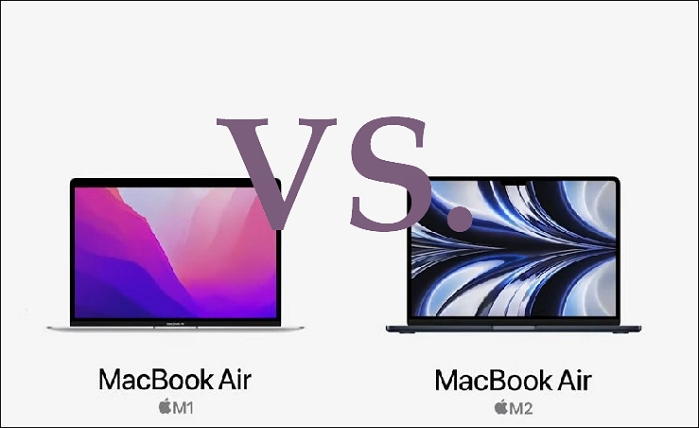
MacBook M1 VS. M2: Distinctive Designs
The M2 MacBook Air boasts a fresh design with a larger screen and new color options, mirroring the updated MacBook Pro. Despite this, it retains some similarities with its predecessor, the M1 model.
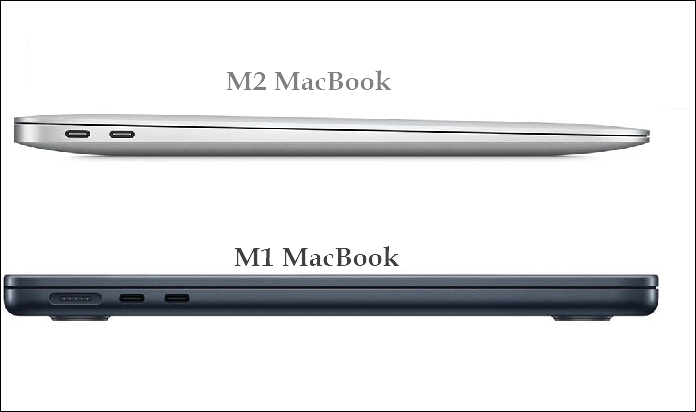
Screen design: different in bezel, notch, and dimension
The new M2 MacBook Air's screen outperforms the M1 Air, with a smaller top bezel and slightly larger overall size, but maintaining the same horizontal resolution.
Like the larger 14-inch and 16-inch MacBook Pro models, the new M2 MacBook Air has a notch on its top bezel, whereas the M1 MacBook Air has a flat but thicker top bezel. This is because the camera cannot fit in the slimmer bezel of the M2 model.
Compare in dimension is as follow:
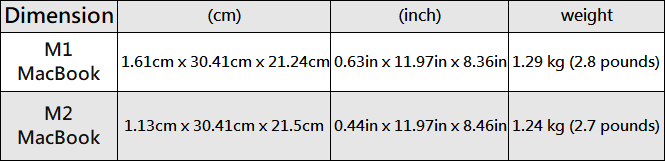
The M2 MacBook is thinner and lighter than the M1 MacBook, as shown in the chart.
Ports. The M2 MacBook Air brings back MagSafe, and also upgrades the 3.5mm headphone connector for better support of high-impedance headphones.
MacBook M1 VS. M2: Updated Performance
The MacBook M1 is still reliable for daily tasks and suitable for students, but the MacBook M2 is quicker. The key differences in their performance are:
Processer.
The MacBook M2 processor features 2 extra GPU cores than the M1 chip, upgrading from 8-core CPU to 10-core GPU, and can run with up to 24GB of unified memory, resulting in improved performance and reduced power consumption.
RAM.
The MacBook M1 and M2 have the same base memory option, but the M2 MacBook Air can accommodate up to 24GB, compared to the M1 MacBook Air's maximum of 16GB.
Heat spreader.
The MacBook M1 has a significantly larger metal heatsink compared to the MacBook M2, which has a smaller heat spreader.
Media engine.
The M2's enhanced media engine is the main reason for its improved performance over the M1, particularly for tasks that involve video, where hardware-accelerated encoding can provide significant benefits.
MacBook M1 VS. M2: Different Display
The MacBook M2 features a Liquid Retina display, which offers improved contrast ratios, more color compatibility, and higher pixels per inch, resulting in better color representation, particularly beneficial for professional design work.
The MacBook M2 has a larger 13.6-inch display compared to the 13.3-inch display of the MacBook M1.
The MacBook M2 has a higher quality 1080p FaceTime camera compared to the 720p one on the MacBook M1, making it sharper for video calls.

MacBook M1 VS. M2: Gap Between Prices
If you are currently debating which MacBook Air to purchase, here is a price comparison to help you decide.
The original M1 MacBook Air, priced at $999/£999, features a 7-core GPU, while the updated M2 MacBook Air costs $1,199/£1,249.
The MacBook M2 offers a new processor with 2 additional GPU cores, a larger screen, and a new design, all for just $200 more than the MacBook M1, making it a great value.
The MacBook Air M2 is a top-notch laptop that stands out for its sleek design, powerful processor, and numerous features that enhance productivity and entertainment. It's a great choice for those looking for a reliable and user-friendly device.
The MacBook M1 is the best option for those with a budget under $1,000, offering an entry-level model that's ideal for those on a tighter budget.

To Wrap It up
The MacBook M2 is a significant upgrade from the original, offering improved performance, a modern design, a better display, and some minor upgrades. It comes at a higher price, but brings benefits like a longer battery life, a higher resolution camera, more RAM options, additional color choices, and spatial audio support.
If you use your MacBook frequently or for work-related activities like video or photo editing, the M2 MacBook Air is more valuable than the M1 model. However, if you're satisfied with the M1, there's no need to upgrade to the M2.
Related Articles
- Network Switch vs. Router: What's the Difference
- Windows Command Line Cheat Sheet (Online Table and PDF)
- Windows Recovery Environment [How to Access with Video]
- Reviews on Paragon Backup & Recovery [All Information]
- Hades 2 Save File Location & Config File Location on PC/Steam/Xbox
If you're having trouble finding your Hades 2 save file location, this article is for you. we will guide you through different methods to locate your game saves and config files on PC, Steam, or Xbox, including how to back up your game saves using Qiling Disk Master. - Top 8 Hard Drive Temperature Monitor Software for Windows [Pros & Cons]
Tracking hard disk temperature helps users take the right action. If overheating disk issues persist, users can use any of the hard drive temperature monitor software listed to take corrective measures.
Products
Articles & Tutorials
- Data Recovery
- Data Backup
- File Recovery
- File Backup
- System Backup and Restore
- Disk and Partition Clone
- Technical articles
- Mobile articles
- Disk Master Help
- Windows Data Recovery Tutorials
- Windows Secure Delete Tutorials
- Windows Partition Management Tutorials
- Windows File Backup and Restore Tutorials
- Windows System Backup and Restore Tutorials
- Windows Disk Backup and Restore Tutorials
- Windows Clone Tutorials