Hades 2 Save File Location & Config File Location on PC/Steam/Xbox
Hades II is a rogue-like action role-playing game developed by Supergiant Games, released on May 6, 2024. The game is a direct sequel to Hades 2020 and is based on the Greek mythological underworld, where players battle past using dark sorcery and face the Titan of Time.

To find your Hades 2 save file location, you may want to locate the game saves and config files for different reasons, such as creating a backup or sharing them with another device. This article will outline how to find your Hades 2 game saves and config files, and provide a way to efficiently back up your game save files.
How to Find Hades II Save Location on PC/Steam/Xbox
Hades II has an autosave feature, automatically storing your game progress on your device. The early release of this game is only available on Windows, but the developers have promised it will also be available on other systems. Your game save locations are as follows.
Hades 2 Save File Location on PC/Steam
You can access your game saves on PC or Steam using the file path: C:\Users\YourUsername\AppData\Local\Company Name\Game Name\Saves. On Steam, you can also access saves through the Steam client by going to Library, right-clicking the game, and selecting "View save game location".
C:\Users\(Your_Username)\Saved Games\Hades IIC:\Users\(Your_Username)\
Alternatively, you can find them on:
%USERPROFILE%\Saved Games\Hades II
To find the game files on your PC, follow these steps: Open File Explorer, navigate to the "This PC" or "Computer" section, and look for the drive where you installed the game. Once you're on the correct drive, look for a folder with the game's name or a similar title.
Step 1. Open File Explorer on your PC and click Local Disk (C:).
Step 2. Click "Users" and select your username.
Step 3. To access the saved games of Hades 2, open the "Saved Games" folder on your device, where you'll find the game among the saved games.
Step 4. To access your game files, select "Hades II" and click on "Profile*.sav".
You can also access your Hades 2 game save location via the Run dialog box as follows:
Step 1. Hit Win + R to access the Run dialog box.
Step 2. Paste the following file path and hit Enter:
- %USERPROFILE%\Saved Games\Hades II
Step 3. To access your Hades 2 game saves, you can open the exact location by following these steps: Go to your computer's file explorer, navigate to the "Users" folder, then select your username, followed by "AppData" or "Library" (depending on your operating system), and finally, look for the "Local" or "Roaming" folder. Inside this folder, you should find a folder named "Hades 2" or similar, which contains your saved game files.
Hades 2 Save File Location on Xbox
Unfortunately, the exact location of Hades 2 game saves on Xbox is not currently known, as Hades 2 has not been released on Xbox. The original Hades game is available on PC, but not on Xbox, and the location of game saves would be specific to the device it's played on. We'll update you once Hades 2 is released on Xbox.
Share this article on your social media to help others find Hades II save files!
Where to Locate Hades II Config File Location
This guide explains where to find Hades 2 save files and how to back them up safely.
- C:\Users\(Your_Username)\Saved Games\Hades II\GlobalSettingsWin.sjsonC:\Users\(Your_Username)\
Below are the steps to open it on your PC:
Step 1. Open Local Disk (C:).
Step 2. Click "Users" and select your username.
Step 3. Next, open the "Saved Games" folder.
Step 4. Select "Hades II."
Step 5. Open the "GlobalSettingsWin.sjson" folder to access your config files.
Backup Hades II Game Saves to Protect Game Data
Protecting your game saves is crucial for a smooth gaming experience. To avoid any inconvenience, it's essential to create backups of your data, and one tool that can help with this is Qiling Disk Master. This tool allows you to back up your Hades 2 game saves and access them when needed, safeguarding your data against any losses or unauthorized access.
Qiling Backup allows you to encrypt game saves with a password and back them up to locations such as the cloud, NAS, local storage, network, or an external hard drive, following the 3-2-1 backup rule for better data availability.
When you lose your Hades 2 game files from their original location, Qiling Backup allows you to restore them and continue the game. The tool also supports incremental backups and differential and scheduled backup strategies.
Qiling Disk Master's main features include:
- Game data backup and recovery.
- Secured password-protect backups.
- Multi-path backup storage.
- Automatically backup files.
- Enhanced backup efficiency.
- Basic backup scheduling as daily, weekly, or monthly.
To protect your Hades 2 game saves from unwanted losses, download Qiling Disk Master, a tool that makes getting started easy with simple steps.
Step 1. Download and install Qiling Disk Master on your computer, then click the "Backup and recovery" tab page on the main interface.
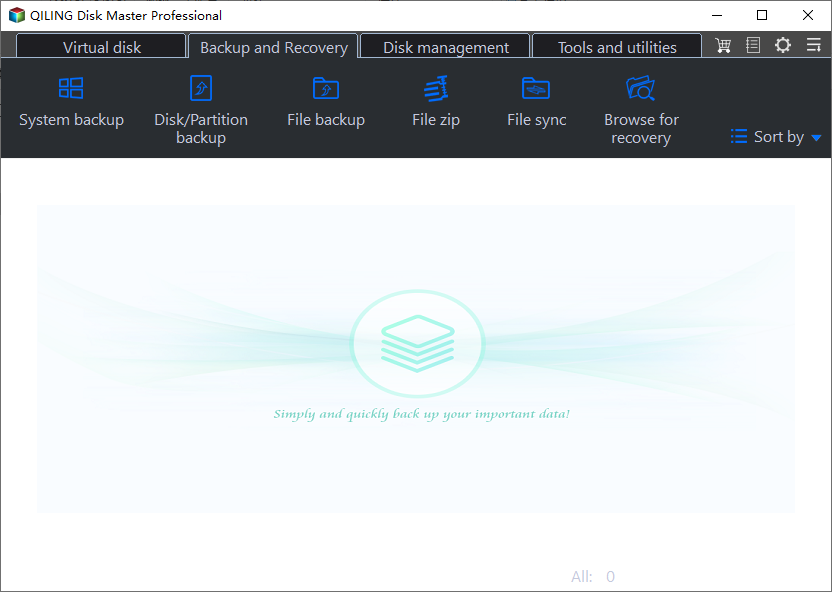
Step 2. Go to the "Settings" app, then click on the option that says "Apps data" to make a backup of your software applications.
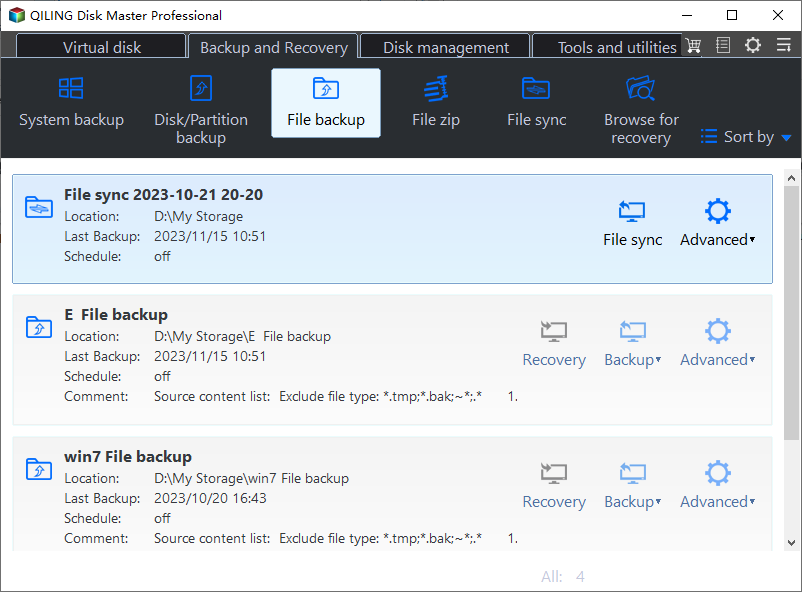
Step 3. Scroll through the list of apps that can be backed up on your screen to find the one you want to save.
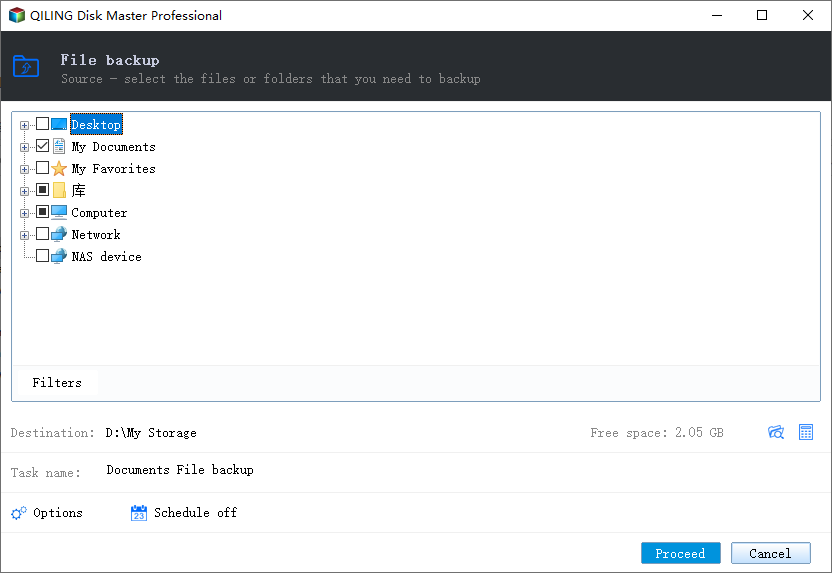
Step 4. Choose a place to store your backup, such as a cloud service, NAS (Network-Attached Storage), or an external hard drive, to prevent data loss in case your computer fails or crashes.
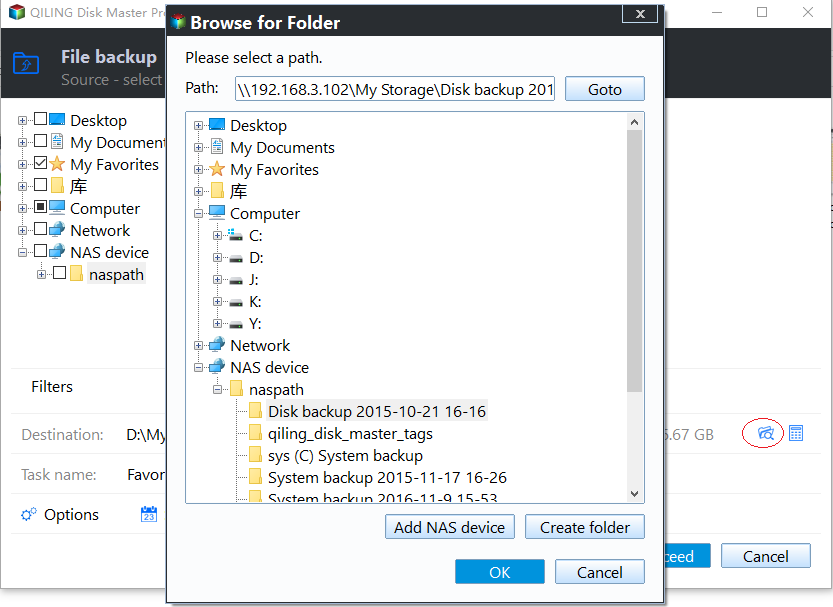
Step 5. You can customize your backup by clicking the "Option" button, which allows you to set a scheduled backup to occur daily, weekly, monthly, or upon a specific event. This feature also enables you to choose between differential or incremental backup types, tailoring the backup process to your specific needs.
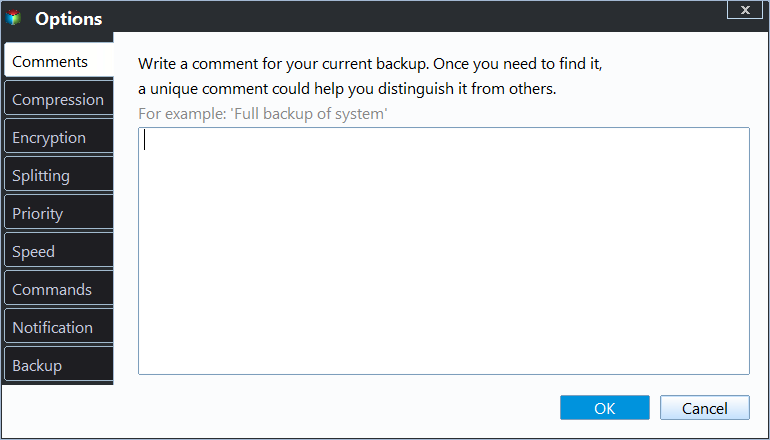
Step 6. When you're done setting up, click "Proceed" to begin the backup process. The time required will depend on the size of your source data, but it should be relatively quick.
To Sum Up
To find your Hades 2 save file location, note that the default drive for storing game saves and config files on your PC is Local Disk (C:), where Hades 2 automatically stores your files as you play. This means you can access your games at any time to share them or make a backup.
Qiling Backup The best solution to secure your Hades 2 save files is Qiling Backup, a tool that allows you to back up your game data securely and access it whenever needed, storing the files in the cloud, local storage, network, NAS, or external hard drives.
FAQs on Hades II Game Save Location
Below are common questions on this topic.
1. Where Are Hades Saves Stored?
They reside in your computer's Local Disk (C:) drive, and can be found at this file path: C:\Users\YourUsername\AppData\Roaming\Microsoft\Windows\Network Shortcuts.
C:\Users\(Your_Username)\Saved Games\Hades II\Profile*.savC:\Users\(Your_Username)\
2. How Do I Copy a Hades Save File?
You can follow these steps:
- Step 1. Open the exact location for your Hades game saves on your PC.
- Step 2. Right-click on the file with a .sav extension, select Copy from the context menu.
- Step 3. Navigate to the location where you want to paste the file, then hit CTRL + V to paste the file.
3. Can You Transfer Hades Save Data from Switch to PC?
To move your Hades data from a Nintendo Switch to a PC, use the cross-save feature by following these steps:
- Step 1. Launch Hades on your Nintendo Switch and ensure it's updated.
- Step 2. Navigate to the main menu and select Cross-saves.
- Step 3. Link up your Steam/Epic accounts.
- Step 4. To upload your game data from Switch to Steam/Epic, choose the option to Sync & Quit. This will allow you to access your Switch games on your PC.
4. How to Backup Save Files on Steam?
You can create backups on Steam using these steps:
- Step 1. Open the Steam library. Right-click on a game and click Properties.
- Step 2. To create a backup copy of game files, open the Local Files tab and select the "Create a backup copy of game files" option.
- Step 3. Select the games you want to back up and click Next.
- Step 4. Choose where to store the backup and click Next.
- Step 5. Follow the onscreen steps to finish the backup process.
Related Articles
- How to Solve Bitlocker Keeps Asking For Recovery Key? [Full Guide]
- Why Can't I Format My External Hard Drive on PS4? [Ultimate Answer and Tutorial]
- Msvcr100.dll Is Missing? Here Is How to Fix It [2023 Updated]
Are you receiving an error where it says Msvcr100.dll Is Missing? Then follow this easy guide to download the DLL and replace it on a working PC. You can also install the redistributable again to fix the problem or copy from a working PC of similar specification. - New Computer Keeps Freezing? Find Causes & Solutions Here
Are you facing issues with your computer freezing and lagging? This article will provide reasons and solutions to overcome this problem, so keep reading to find out more! - Difference Between Cloud Sync and Backup and Cloud Storage
Understand the key differences between cloud sync, cloud backup, and cloud storage. Learn how each service works and which one best fits your data protection needs. - What Is DRM? Introduction to Digital Rights Management [2023 Updated]
Learn what Digital Rights Management (DRM) is, how it works to protect digital content, and why it matters for copyright protection in the modern digital landscape.
Products
Articles & Tutorials
- Data Recovery
- Data Backup
- File Recovery
- File Backup
- System Backup and Restore
- Disk and Partition Clone
- Technical articles
- Mobile articles
- Disk Master Help
- Windows Data Recovery Tutorials
- Windows Secure Delete Tutorials
- Windows Partition Management Tutorials
- Windows File Backup and Restore Tutorials
- Windows System Backup and Restore Tutorials
- Windows Disk Backup and Restore Tutorials
- Windows Clone Tutorials