What Is RAM? Random Access Memory [Full Explanation]
Introduction
RAM is a type of computer memory that allows data to be accessed and written quickly. It's like a super-fast, super-efficient filing cabinet that lets your computer access the information it needs quickly. Think of it like a library: instead of having to search through shelves and shelves of books, you can just go straight to the book you need and access it instantly. That's basically what RAM does for your computer!
Following is an in-depth explanation of RAM, or Random Access Memory, which is a crucial component in devices that enables fast data access and processing. It's a type of computer storage that temporarily holds data and applications, allowing for quick access and manipulation. RAM comes in two main types: DRAM (Dynamic RAM) and SRAM (Static RAM), each with its own strengths and weaknesses.
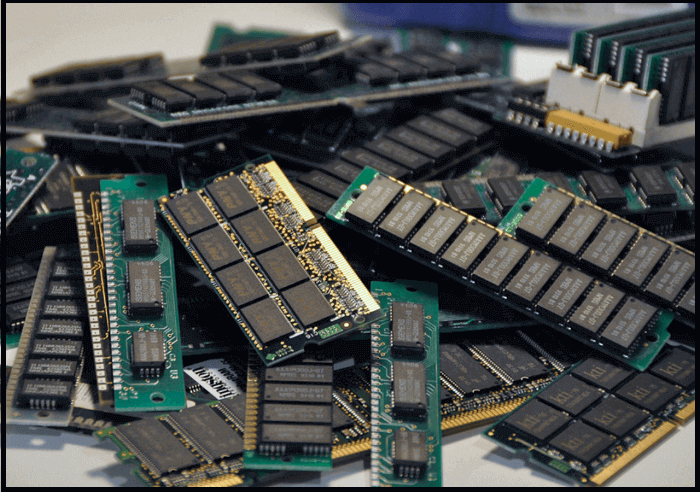
Random Access Memory (RAM): What Is It?
Random Access Memory (RAM) is a type of internal computer memory that stores application data and transmits it to the system's processor. This allows for fast read and write operations, making RAM a crucial component for efficient computer performance.
RAM is a type of volatile memory that loses all data when the device is powered off, requiring data to be reloaded from storage after a reboot. It works in conjunction with the system to process data.
For more information about RAM, I recommend checking out the following articles, which provide detailed answers to your questions.
Types of RAM
RAM is generally classified into multiple types, with the two main types being the focus of further exploration. These types of RAM are: (insert types here)...
1. SRAM
Static Random Access Memory (SRAM) is a type of memory that uses static techniques to store information, commonly used in microprocessors, electronic devices, and other applications.
SRAM stores data in memory chips using a bistable latching circuitry that remains static, and it's a type of volatile memory that doesn't require dynamic refreshing as long as power is supplied.
Key Features of SRAM
- SRAM offers fast speed in reading and writing operations.
- SRAM requires a moderate amount of energy and can thus operate on low power.
- SRAM storage capacity is limited and usually measured in MBs, acting as a cache storage due to its limited capacity.
2. DRAM
DRAM is a type of RAM that requires periodic refreshing of contents, using a transistor and capacitor to store data. Due to transistors' charge leakage, DRAM needs to be refreshed every few milliseconds.
DRAM is highly volatile and requires constant refreshing to retain data, but is cheaper and more space-efficient than SRAM, making it the most common type of memory used.
Key Features of DRAM
- DRAM is a cost-effective solution for main memory, much cheaper than SRAM, while still providing good performance for most computing needs.
- DRAM offers a large storage capacity, usually measured in GBs, and can be directly connected to the processor bus.
- A single transistor is required by DRAM to form a memory block, allowing for more memory to be stored in less space.
Other Uses of RAM
Random Access Memory (RAM) serves multiple purposes, primarily as a temporary storage site for data that is easily accessible to the CPU to increase processing speed. Additionally, RAM helps load software applications on a computer, making it a crucial component for efficient computing.
1. Virtual Memory
Computers use virtual memory to make up for a lack of physical memory by combining available hard disk space with RAM, allowing data to be moved from RAM to free up space for uninterrupted processing.
2. RAM Disk
A RAM disk uses RAM resources to create a virtual hard drive, increasing system speed and efficiency by utilizing memory blocks as storage areas.
3. Shadow RAM
Shadow RAM uses a RAM stick to store duplicate versions of the system's BIOS data, accelerating boot speed by transferring BIOS info from ROM to RAM, reducing boot time by up to half.
RAM vs. ROM: What Are the Differences Between Them?
In addition to Random Access Memory (RAM), computers also use a basic type of internal memory called Read-Only Memory (ROM). While RAM and ROM work together to ensure smooth processing, they serve distinct purposes: RAM temporarily stores data and applications, whereas ROM stores permanent data that can only be read, not written or modified. This fundamental difference between RAM and ROM enables computers to efficiently manage and process information.
What Is ROM?
Read Only Memory (ROM) is a type of non-volatile memory that permanently stores data in individual cells using binary codes, making it impossible to change or overwrite. Typically, ROM chips store startup information on computers and have limited storage capacity.
Comparison Between RAM and ROM
| Features | RAM | ROM |
|---|---|---|
| Access to Data | Data stored on RAM can be easily accessed and modified. | Data stored on ROM cannot be directly accessed or modified, as it is designed to be a permanent and unchangeable storage medium. |
| Storage Capacity | The storage capacity of RAM can range from 1 to 256 GBs. | ROM chips, also known as read-only memory chips, have limited storage capacities, generally ranging from 4 to 8 megabytes. |
| Speed | RAM chips provide faster data access, which can enhance processing speed. | ROM offers a slower processing speed when compared to RAM. |
| Cost | RAM chips cost much higher than ROM. | The cost of ROM chips is significantly lower compared to RAM, making them a more affordable option for various applications. |
| Volatility | RAM is a type of volatile memory. | ROM is a type of non-volatile memory. |
The RAM and ROM are two types of memory that serve different purposes. If you want to know more about the differences between them, you can read the article to find out more.

RAM vs. ROM: 8 Differences between RAM and ROM
This article will define both blockchain and cryptocurrency, followed by a discussion on the differences between the two technologies. Finally, it will explore which one is more important, if there is one, providing a comprehensive understanding of these concepts.
Sum Up
The basic knowledge taught in schools includes understanding the key components of a computer system, such as Random Access Memory. With the information provided, you now have a better grasp of what RAM is and its role in devices. This newfound knowledge will enable you to confidently engage in conversations about RAM, making you less likely to feel embarrassed when discussing it with others.
Related Articles
- How to Factory Reset from BIOS on a Windows PC [Methods in 2022]
- [3 Ways] How to Uninstall Apps on Windows 11
- What Is Cloud Computing? [Everything You Need to Know]
- Windows 11 Download: How to Download and Install Windows 11 [3 Ways]
- Any Tools to Check SD/MicroSD Cards Health? Sure!
There are tools to check the health of SD/microSD cards, and this article discusses one such tool that helps check the condition of these cards. - How to Fix "Unable to Connect to Virtual Disk Service" Windows 10/11
Windows 11 has been officially released, bringing changes to the taskbar layout, gaming experience, and new widgets. As a result, some common behaviors, such as uninstalling apps, may require updated operation steps.
Products
Articles & Tutorials
- Data Recovery
- Data Backup
- File Recovery
- File Backup
- System Backup and Restore
- Disk and Partition Clone
- Technical articles
- Mobile articles
- Disk Master Help
- Windows Data Recovery Tutorials
- Windows Secure Delete Tutorials
- Windows Partition Management Tutorials
- Windows File Backup and Restore Tutorials
- Windows System Backup and Restore Tutorials
- Windows Disk Backup and Restore Tutorials
- Windows Clone Tutorials