Any Tools to Check SD/MicroSD Cards Health? Sure!
Many users have been inquiring about a tool to check the health of SD/microSD cards, and in response, Qiling provides a detailed explanation.
Any Tools to Check SD/MicroSD Cards Health
SD/microSD cards are small and have a large storage capacity, making them ideal for storing image-intensive data in small devices.
There is no specific tool to check the health of an SD card on Windows, Mac, or Android, as SD cards do not have SMART technology like SSDs, and their primary function is not to be monitored for health.
There's no need to study the health status of the SD/micro SD card, but you can assess its performance by detecting its file system, bad sectors, or read speed using tools like H2testw, CrystalDiskInfo, or CrystalDiskMark. These tools can provide information on the card's condition and performance.
- H2testw: Windows only
- AI SD Bench: Android
- Blackmagic Disk Speed: MacOS
You may also like the following:
Be cautious when buying SD/microSD cards, especially if the reading speed is not consistent with what's advertised, as it may be a counterfeit product.
To assess the overall health of your SD Card, it's essential to consider various factors beyond just speed. This includes checking for health conditions, bad sectors, file system errors, and read/write speed. While tools like H2testw and QDvdMaster can test speed, they may not provide a comprehensive picture. Qiling Disk Master, on the other hand, is a more reliable tool that can help you evaluate your SD Card's overall health, including its speed. Let's see how it can help.
Check SD/MicroSD Card Status via Qiling Disk Master
Qiling Disk Master can help locate bad sectors on SD cards, check file system errors, and test speed, providing a comprehensive check of the SD card's status, and is compatible with all Windows versions, with an easy-to-use interface.
To check the health condition of your SD card, Qiling Disk Master can help by performing various checks, such as checking for errors, bad sectors, or damage, which are more likely to occur as the SD card is used for a longer period.
We will provide detailed guides on each of these topics in the following content.
🧩Guide 1. Check File System Error
🔎Guide 2. Locate Bad Sectors
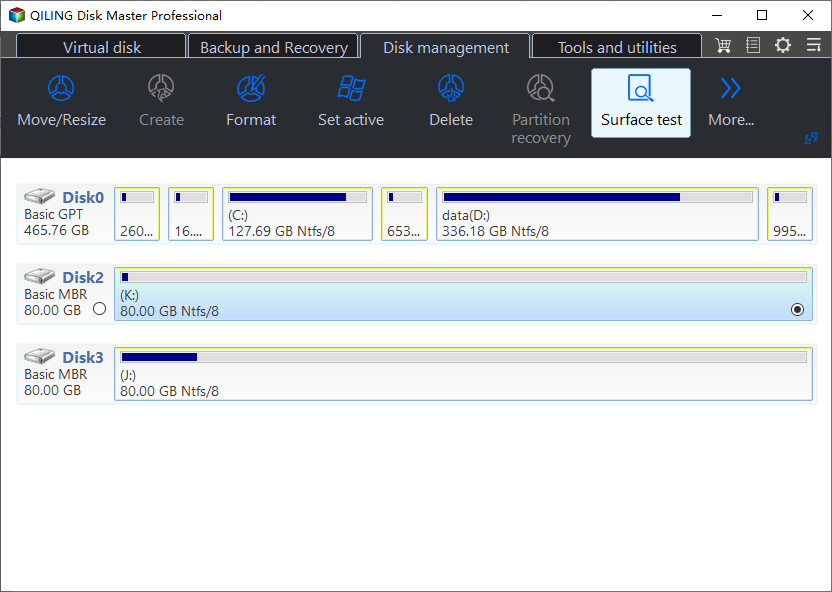
Step 1. Open Qiling Disk Master, right-click the target disk, and select "Surface Test".
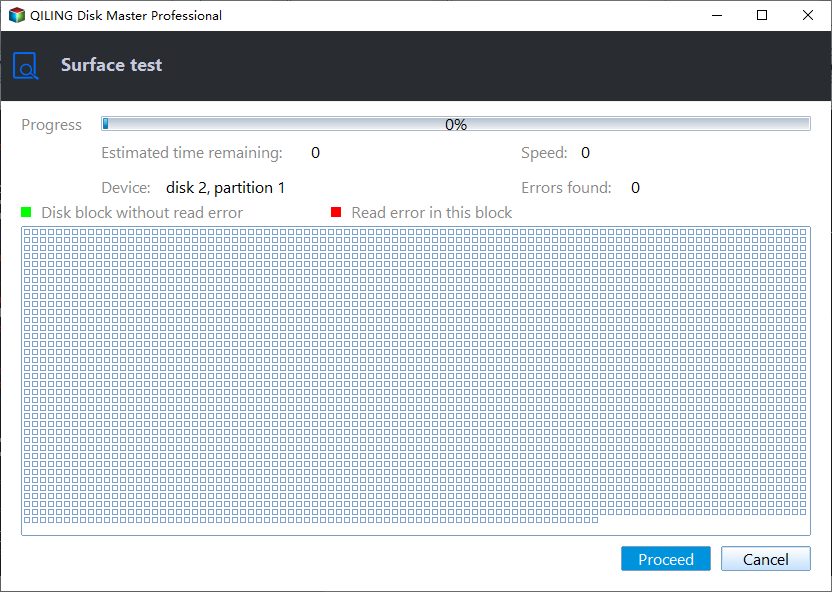
Step 2. The operation will be performed immediately, and all bad sectors will be marked as red.
⚙️Guide 3. Test SD Card Speed
Step 1. Launch Qiling Disk Master, then click the download button to activate the "DiskMark" feature under the "Discovery" section.
Step 2. To select the target drive, test data, and block size, click on the drop-down box and choose the desired options from the list provided.
Step 3. Once everything is configured, click "Start" to begin the disk test, and you can see the Sequential read speed, I/O, and Delay data.
The steps are the same if you want to run a microSD card speed test.
Key Features of Qiling Disk Master:
The tool allows users to check and repair SD cards, as well as format them. It can also scan for errors and provide a detailed report, including the type and location of any issues found.
- Clone SD card
- Do disk surface test
- Repair bad sectors on SD card
- Check SSD health and test its speed
- Format SD card on Windows 10/11
To manage your SD card well, don't miss this tool. Download it to try.
Conclusion
Using an unhealthy or fake SD card can eventually lead to it becoming unformatted, unrecognizable, and causing read and write errors. Over time, this can result in the SD card being unable to be formatted, showing 0 bytes, or being inaccessible, with errors in identifying the file system. However, detecting and repairing bad sectors in a timely manner can help prevent these issues, and tools like Qiling Disk Master can be useful in doing so.
Tools to Check SD/MicroSD Cards Health FAQs
SD cards or microSD cards do not use SMART, making it impossible to determine their health status using a specific tool. However, their health condition can be analyzed by checking for file system errors and read/write speeds. To assess their health, you can ask questions such as: what is the file system error rate, and what are the read and write speeds of the SD card? These metrics can provide insight into the overall health and performance of the SD card.
1. Is there any tool I can use to check the health of SD cards?
Qiling Disk Master is a tool that can test the health of your SD card, including its free space and read/write speed, making it a good choice if you want to check the condition of your storage media. It can also help you identify and fix issues such as bad sectors and file system errors on an SD card.
2. How to check SD card health Android?
Using an SD card health check app for Android can help you assess the health of your memory card, preventing data loss and nightmares. By downloading apps like SD Insight, Fake sdcard checker, or Fake Device Test, you can measure the card's speed and identify potential issues, such as slow running speeds or bad sectors, which may be causing poor health.
3. What is H2testw?
H2testw is a reliable software that tests SD cards and USB flash drives, detecting current problems and counterfeit products. However, it has a significant disadvantage when used on newer high-capacity SD cards or drives, as the scanning process can take hours or even days. For a safer and more effective speed measurement experience, Qiling Disk Master is a better alternative.
SanDisk card owners can follow the SanDisk SD-card health checklist to check the reader, file system, and recoverable data before attempting repairs.
Related Articles
- Detailed Tutorial for Diskpart Move Partition in 2024
- Different Ways to Fix Dragon Age Inquisition Crashing On Launch In Windows 10
- 5 Best Ways to Fix Windows Update Error 0x80080005
- Computer Shuts Down When Put to Sleep: Fixes Are Here
If your computer is shutting down when put to sleep, it can be due to various reasons, and you need to fix this immediately. The issue can be caused by a faulty power management system, outdated drivers, or a malfunctioning sleep mode. - How to Fix Samsung SSD Slow Write Speed on Windows 10/8/7 [Step-by-Step Guides]
If your Samsung SSD is running slowly, causing issues with copying, pasting, or moving files, there's a solution. - Samsung T5 VS T7: Which One to Choose?
Samsung T5 vs T7: which is better and which one to choose? If you have no idea, you have come to the right page. This article will tell you the difference between Samsung T5 SSD and Samsung T7 SSD. After reading this article. you can pick the right one.
Products
Articles & Tutorials
- Data Recovery
- Data Backup
- File Recovery
- File Backup
- System Backup and Restore
- Disk and Partition Clone
- Technical articles
- Mobile articles
- Disk Master Help
- Windows Data Recovery Tutorials
- Windows Secure Delete Tutorials
- Windows Partition Management Tutorials
- Windows File Backup and Restore Tutorials
- Windows System Backup and Restore Tutorials
- Windows Disk Backup and Restore Tutorials
- Windows Clone Tutorials