What Is Microsoft Update Health Tools? Everything You Need to Know
Microsoft Health Update Tools is a legitimate Windows utility that scans and updates your system for various health-related issues, such as outdated drivers, corrupted system files, and malware. It's designed to help maintain your computer's overall health and performance. However, some users may find it annoying or intrusive, especially if they're not familiar with the tool or its purpose.
Microsoft's services and processes are numerous and essential to the functioning of Windows. These services, which run in the background, are responsible for maintaining the upkeep and security of your computer, ensuring it operates smoothly and safely.
Microsoft Health Update Tools is not a virus or scam, but rather a legitimate tool that is often confused with the more well-known Microsoft Update, which is a legitimate service that provides updates for Microsoft products.
Microsoft's Windows Update is a program that ensures your Windows operating system runs smoothly and securely. Its primary function is to download and install updates, which include security patches, bug fixes, and new features. Without it, your computer may become vulnerable to security threats, experience system crashes, and struggle with performance issues. It's essential to keep Windows Update enabled to maintain a stable and secure computing environment.
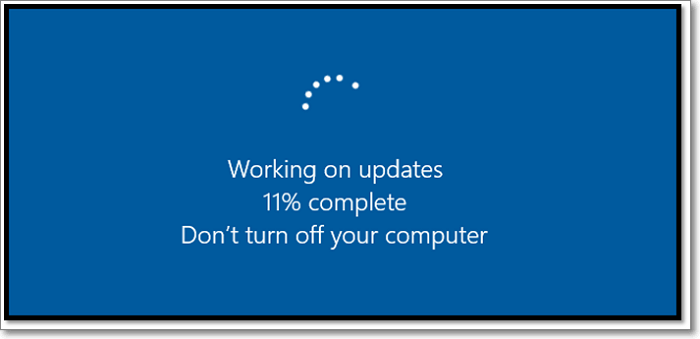
What Is Microsoft Update Health Tools?
Microsoft Health Update Tools, a collection of necessary tools deployed through Microsoft updates, became a separately apparent name after Windows 10 and its many builds.
The Windows Subsystem for Linux (WSL) was initially only available as a package within Microsoft updates, but it was not included in the initial Windows 10 RTM. It was first introduced in the Windows Build version 1507 and has been included in all subsequent versions up to the latest 20H2.
Windows 10 and Windows 11 versions have a built-in feature called Windows Update Agent, which is responsible for managing and deploying Windows updates and related services. This feature is essential for ensuring a smooth and efficient deployment of updates, and it is automatically installed and updated through the Windows Update Health Service. As a result, if you have Windows 10 or Windows 11 on your computer, you likely have the Windows Update Agent installed and running.
What Does It Do and Why Is It Important?
Microsoft Update Health Tools is an important part of Windows updates, and its latest update is significant. To understand its importance, let's consider what it does. The tool helps ensure that Windows updates are installed and functioning correctly, which is crucial for maintaining a secure and stable operating system. The latest update is likely to address any issues or bugs that were discovered in the previous version, making it a worthwhile update for users to install. Overall, the importance of this update cannot be overstated, as it plays a vital role in keeping Windows up-to-date and secure.
The key branch works in tandem with the main updates, ensuring that changes are applied step-by-step. This process guarantees that the updates are implemented correctly and efficiently.
- Your device to stay awake for smooth update installation;
- Deal with issues by resetting network settings or other preferences;
- Reset the Windows Update database in case the update runs into a problem or error;
- Change or shift settings to accommodate incoming updates;
- Compress the primary system drive files to create space for important updates;
- Repair corrupted or unwarranted updates that might cause problems;
- Ensure registry changes to deliver updates smoothly.
Microsoft Update Health Tools ensures the health and security of updates installed on your PC, guaranteeing their proper functioning and preventing potential issues.
Windows Update is a vital element in keeping your Windows Updates delivery smooth, ensuring that updates are delivered smoothly by keeping your device up and running, and repairing or disabling corrupted files.
Windows Update works behind the scenes to ensure updates are installed without errors, making it easy to install updates on the latest Windows 10 and Windows 11 builds.
How to Install Microsoft Update Health Tools?
Microsoft Update Health Tools can sometimes cause issues, leading some users to uninstall it. However, it doesn't interfere with normal Windows functions and can be safely removed from Apps and Features settings.
However, it does create problems for any future updates. So, if you wish to install it again, the first thing you'll do is to uninstall the existing version of the software, which will remove any existing configurations and data. This is because the new version of the software will not be able to read or work with the configurations and data from the previous version, and vice versa.
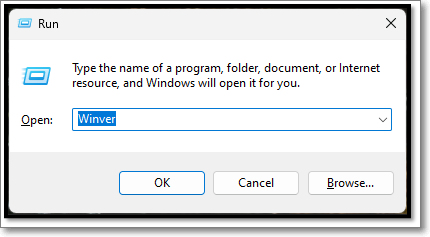
Step 1. Press Windows + R on your keyboard
Step2. Type Winver and click "OK"
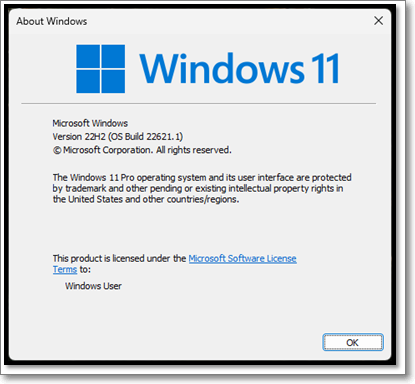
Step 3. Check your Windows versions
Step 4. Download Windows Update via Microsoft Officials
To proceed, download the Windows Health Update Tools version that matches your Windows version. Next, head to the official Microsoft Update Catalogue, where you'll need to ensure that two specific updates are available for download.
- Get the Windows Version right
- Get the Windows Update date right
After downloading the update, you'll have to install it and have Windows Update Health Tools on your PC again.
Conclusion
Microsoft Update Health Tools is a software that helps ensure your PC receives smooth updates. It can be downloaded from the Microsoft website and is available for Windows 10 and Windows 11 users. Having it installed can help prevent issues with updates and keep your PC running smoothly.
FAQs
The Microsoft Update Health Tools are a set of tools designed to help organizations assess and improve the health of their Microsoft 365 and Microsoft 365 Apps deployments. These tools provide detailed reports on security, compliance, and performance, allowing IT administrators to identify potential issues and take corrective action.
1. Is Microsoft Update Health Tools In Windows 7 & 8?
Microsoft started deploying a new branch of Windows updates in 2018, but it's not Windows 7 or 8.
2. Is Microsoft Update Health Tools necessary?
It's necessary to ensure your computer downloads and updates Windows updates swiftly and seamlessly.
3. How do I update Microsoft Update Health Tools?
If you don't have Microsoft Update Health Tools or uninstalled it by mistake, you can install it again by visiting the official Microsoft website, searching for the tool, and following the provided instructions to download and install it.
Related Articles
- Incremental Backup Advantages and Disadvantages [2022 Thorough Reviews]
- Windows File and Folder Permissions Guarantee Your File and Folder Security [You Must Know]
- Raid 6 vs Raid 10: Which is better in Speed and Security?
- What Is Verbose Mode Mac and How to Boot into It? [2022 Guide]
- HP Laptop Stuck on Loading Screen - Why & Fixes
If you're experiencing an HP laptop stuck on the screen error, you can resolve the issue using the troubleshooting methods mentioned in this guide. By following the best fixing tips outlined in this blog, you should be able to get your laptop up and running smoothly again. - HP Laptop Won't Turn On But Power Light Is On [Detailed Guide]
If your HP laptop won't turn on but power light is on, it could halt your daily work. The exact reason is hard to figure out, but it is better to fix the issues and get back to work. This article has simple solutions to fix an HP laptop won't turn on but the power light is on.
Products
Articles & Tutorials
- Data Recovery
- Data Backup
- File Recovery
- File Backup
- System Backup and Restore
- Disk and Partition Clone
- Technical articles
- Mobile articles
- Disk Master Help
- Windows Data Recovery Tutorials
- Windows Secure Delete Tutorials
- Windows Partition Management Tutorials
- Windows File Backup and Restore Tutorials
- Windows System Backup and Restore Tutorials
- Windows Disk Backup and Restore Tutorials
- Windows Clone Tutorials