MSI File Extension - What Is .MSI? How to Open or Install It?
What Is an MSI File?
EXE files and MSI files are both used to install and run Windows programs. However, EXE files can be executed directly when double-clicked, whereas MSI files always contain an installer package.
MSI files are opened by Windows using the Windows Installer software, which was previously known as Microsoft Installer, hence the name "MSI".
The file extension .MSI stands for Microsoft Software Installer, which is used to customize installer packages, such as Windows applications or update packages, by utilizing Microsoft's Windows Installer service.
The MSI file extension is used to install software on Windows operating systems, allowing users to customize, update, uninstall, and install applications on a computer.
How Do I Open an MSI File?
To view the content of an MSI file, you can use 7zip to extract it, which will allow you to read the files, but not modify them.
To quickly edit an MSI file, users can utilize the Orca tool, which is free software that allows them to view the MSI's content in table view mode.
Orca can be useful when end users want a fast overview of a package's details and internal organization without actually installing it, allowing them to view the property table and get a sense of the package's contents.
- product name
- product version
- manufacturer
- product code
The MSI file can be easily opened and edited with clarity using Advanced Installer.
Advanced Installer is more user-friendly and easier to navigate thanks to its advanced graphical user interface, making it more enjoyable and efficient to work with.
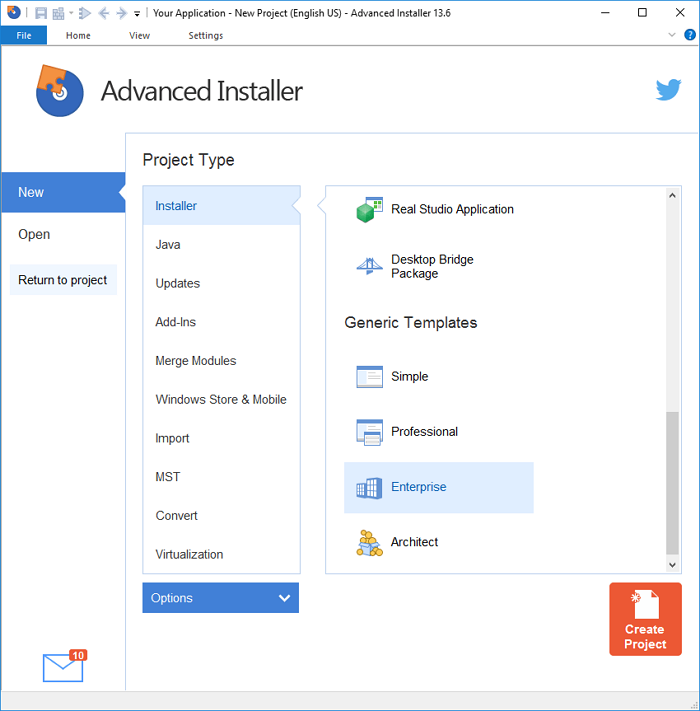
- File structure
- Registry
- Shortcuts
- Features
- Components
- Services, and more
To view MSI files on a Mac, you can't simply double-click them as you would on a Windows computer. Instead, use a file unzipping program to open and explore the contents of the MSI file, as the format is specific to Windows. This will allow you to see the contents of the file, even though it won't run as an executable on a Mac.
Advanced Installer features an automated installation process, making it easy to install without requiring manual effort. The installation steps are straightforward and simple.
What's the Difference Between an MSI File And an EXE File?
EXE files can be both installers and standalone program executables. While they're often associated with installers, they can also be the executable files that launch individual Windows programs. In other words, every time you run a Windows program, you're running an executable file, which is distinct from the installer format that might be used to install the program.
MSI files are preferred over EXE files for installation in enterprise settings due to the risk of malware hiding in EXE files, which could potentially start a virus sequence on the machine instead of launching the installation wizard.
However, if the .exe installations come from a trusted source, such as authorized vendors or reliable program hosting services, they are approved.
MSI and EXE installation files have different characteristics. One key difference is that MSI files have the same install parameters regardless of the application, whereas EXE files' parameters vary depending on the tools and choices made by the installer's creators.
Final Words
MSIs are a reliable installer format that adheres to industry standards and best practices, making them a suitable choice for enterprise situations where security is a top priority. They are often more secure than their EXE equivalents, making them a popular choice for companies looking to deploy software.
We'd like to know your preferred installation format - please share your thoughts in the comments. This will help us provide the most useful format for you, making the installation process easier to understand. We'll keep you updated with further information, so be sure to check back with us.
Related Articles
- What Is User Folder Mac and How to Manage It? [Updated 2022]
- What Is DRM? Introduction to Digital Rights Management [2022 Updated]
- How to Access Startup Security Utility Mac? [Latest Tips]
- A Mini USB - Things You Need to Know
- MBR Error 1 on Windows? Reason & Fixes
If you're experiencing MBR error 1, as this error can cause Windows to fail to boot. Fortunately, there are three effective ways to fix it, which will be covered in this article. - What Is MBR Maximum Size [Full & Quick Guide]
This article details MBR maximum size and provides an easy way to convert MBR to GPT without losing data.
Products
Articles & Tutorials
- Data Recovery
- Data Backup
- File Recovery
- File Backup
- System Backup and Restore
- Disk and Partition Clone
- Technical articles
- Mobile articles
- Disk Master Help
- Windows Data Recovery Tutorials
- Windows Secure Delete Tutorials
- Windows Partition Management Tutorials
- Windows File Backup and Restore Tutorials
- Windows System Backup and Restore Tutorials
- Windows Disk Backup and Restore Tutorials
- Windows Clone Tutorials