What Is NVMe? Fast SSD Storage Explained
Introduction
The world of IT is rapidly evolving with constant tech innovation, with data access speed being a crucial aspect of IT infrastructure. Traditional SSDs have played a significant role in offering excellent data access speed, but the latest technology, NVMe, has taken it to the next level, providing unfathomable data access speed.
In today's era, NVMe has become an essential storage technology, with its high speed making it a highly sought-after feature in PCs. Gone are the days when it was an afterthought, and now people actively look for it while purchasing a PC, making it a staple in the IT industry.
What is NVMe?
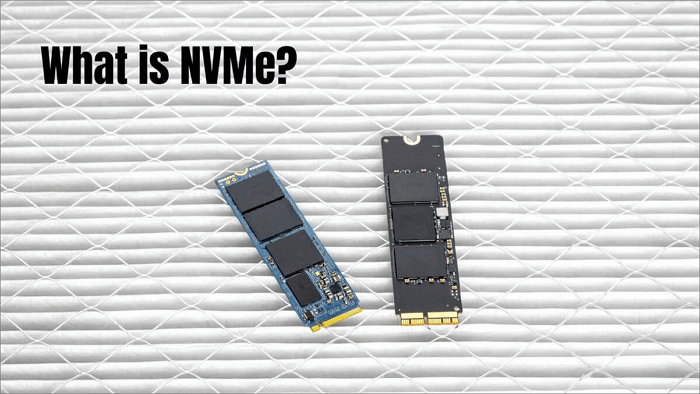
NVMe, also known as Non-Volatile Memory Express, is the NVM Host Controller Interface Specification, a transfer protocol specifically designed for solid-state memory. In simpler terms, NVMe is a protocol used by SSDs (solid-state drives) that connects through the PCI Express interface, and it is not a new technology itself.
The storage interface uses PCIe to transfer data at high speed between SSDs, offering high IOPS, reduced latency, and decreased power consumption. It outperforms SAS and SATA in terms of scalability.
NVMe is the newest communications standard implemented on SSDs in various form factors, including AIC, U.2, U.3, M.2, and EDSFF.
With the discovery of NVMe, PCs have gotten significantly faster, thanks to the integration of NVMe on SSDs, which has largely eliminated storage issues, and many users, such as those who recently purchased a MacBook Pro, have likely noticed the impressively fast system performance.
The NVMe SSD provides a significant speed boost, making it ideal for programs and operating systems, with data write and read speeds at least four times faster than SATA SSDs.
NVMe till date:
- 2.0 – 2.0a, 2.0b (2021)
- 1.4 – 1.4a, 1.4b (2019-2020)
- 1.3 – 1.3a, 1.3b, 1.3c, 1.3d (2017-2019)
- 1.2 – 1.2a, 1.2b, 1.2.1 (2014-2016)
- 1.1b (2014)
- 1.0e (2013)
Are NVMe and SSD the Same?
- What Is SSD?
- Is NVMe Faster than SSD?
- Is NVMe the Same as M.2?
- Benefits of NVMe for Data Storage and Its Use Cases
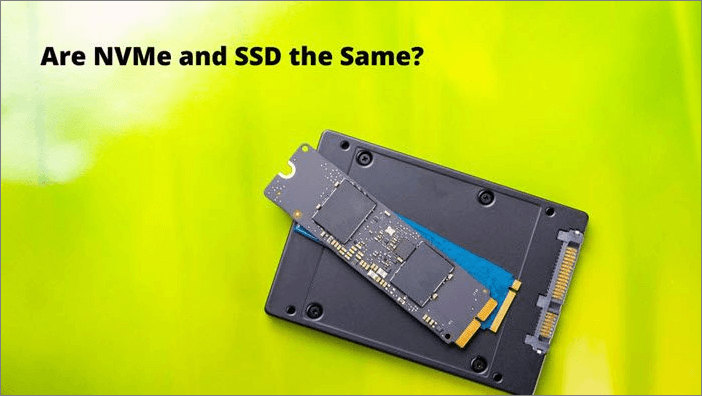
NVMe and SSD are not the same thing, although they are related. NVMe (Non-Volatile Memory Express) is a protocol that allows for faster storage access by using a dedicated controller and a specific set of commands. On the other hand, SSD (Solid-State Drive) is a type of storage device that uses flash memory to store data. While all NVMe storage devices are SSDs, not all SSDs are NVMe.
What Is SSD?
A Solid-State Drive (SSD) is a storage device used in various electronic devices, including tablets, computers, and mobile phones. It has become a popular alternative to traditional Hard Disk Drives (HDDs) due to its low latency and fast speed, making it an ideal choice for users seeking improved performance.
SSDs improve system performance and have high durability due to no moving parts, but were previously limited by the SATA interface, which hindered their full speed potential.
The transition of SSDs from SATA to PCIe has significantly improved data transfer speeds and overall performance.
SSDs have largely replaced hard drives in modern computers, including laptops and desktops. However, due to their higher cost, computer manufacturers often pair a larger HDD with a smaller SSD for data storage, striking a balance between affordability and performance.
There are various types of SSDs, including m.2, 2.5-inch SATA, M.2 SATA, M.2 NVMe, PCI Express, and U.2.
Is NVMe Faster than SSD?
SSD and NVMe are often confused, but they serve different purposes. SSD stands for Solid-State Drive, which is a type of storage drive, whereas NVMe stands for Non-Volatile Memory Express, a standard protocol that enables SSDs to communicate with the PCIe interface more efficiently, resulting in faster performance.
The correct question is: "Is NVMe faster than SATA SSD?" The answer to this question is pretty straightforward. Of course, NVMe is faster than SATA SSD.
NVMe is significantly faster than SATA SSDs, with speeds of up to 2000MB/s, which is nearly four times faster than the 600MB/s speed of SATA SSDs.
NVMe doesn't need a controller to communicate with the CPU, making CPU communication much faster.
Is NVMe the Same as M.2?
To clarify, NVMe is the protocol that allows for fast storage, while M.2 is the physical form factor that can be used to house this fast storage. In other words, M.2 is the physical connector or slot on a motherboard where you can install an NVMe drive. So, the answer is yes, M.2 is used to house NVMe drives. However, not all M.2 slots are NVMe compatible, and not all NVMe drives are M.
The 2.5 form factors were initially the go-to choice, but the emergence of NVMe and M.2 form factors has shifted the spotlight to them, making them the new popular choice.
While some people use the terms NVMe and M.2 interchangeably, they are not the same thing. M.2 is a type of solid-state drive (SSD) form factor, which refers to the physical size and shape of the drive. NVMe, on the other hand, is a type of interface, specifically a PCIe interface, that allows for faster data transfer rates and lower latency. In other words, M.2 is a physical description of the drive, while NVMe is a technology that enables faster performance.
Combining NVMe with M.2 results in a high-speed drive with easy installation and a tiny footprint.
Benefits of NVMe for Data Storage and Its Use Cases
Using NVMe for data storage offers several benefits, including efficient data manipulation and parsing through streamlined command sets, as well as leveraging solid-state storage and multicore CPUs.
NVMe exhibits high performance and provides multiple data streams, utilizing GPU and CPU resources efficiently. It also has a high storage capacity, offering three times the storage of a conventional solid-state drive.
NVMe is more durable and reliable due to its small size and light weight, reducing the likelihood of physical damage.
NVMe is used extensively in a wide range of industries, including cloud computing, data centers, gaming, and more, offering high performance and efficiency in data storage and transfer.
- DevOps: IIn this sector, NVMe can offer immense help, allowing you to run multiple iterations in a relatively shorter period.
- AI: Using NVMe in AI and ML systems can provide low latency and high bandwidth, resulting in fast data processing and improved performance.
- Relational databases: Companies using relational databases are now adopting NVMe technology, which provides improved performance and reduces the need for multiple databases or physical servers.
The Bottom Line
NVMe technology offers improved performance for users, making it an excellent choice for businesses that require fast working. Its growing popularity can be attributed to the numerous benefits it provides. However, it's essential to consider the price before deciding to opt for NVMe.
FAQS
NVMe is a must-have tech that offers improved PC performance with high-speed data transfer. However, before opting for NVMe, it's essential to have a detailed understanding of its benefits and requirements. You can browse through FAQs to learn more.
1. Which is Better: SATA or NVMe?
The introduction of SATA in 2000 addressed several drawbacks of hard disk drives, including improved system performance through Native Command Queueing (NCQ). However, this advancement also created a new challenge, as SATA's superior performance often outpaced other interfaces, leading to wasted resources, time, and money.
The debate between SATA and NVMe storage solutions continues, with each offering distinct benefits. NVMe excels with its parallel queuing and high read and write speeds, significantly improving system performance. On the other hand, SATA is more economical, making it a cost-effective option. Ultimately, the choice between the two depends on the specific needs of the business, with NVMe being the better choice for those requiring high-performance storage.
2. Do I Need NVMe SSD?
NVMe SSDs offer numerous benefits, including fast data access speed, low latency, high IOPS, and reduced power consumption, making them a popular choice. However, whether you need NVMe SSDs depends on your workload, as they are particularly suitable for applications requiring high-speed data transfer.
Investing in an NVMe SSD is a good idea if you work in a fast-paced industry, such as video editing, where time is of the essence. However, for those who don't require lightning-fast speeds, a more affordable SATA SSD is a suitable alternative. The high cost of NVMe SSDs makes them inaccessible to many.
To use an NVMe drive, your system needs to have BIOS support and a compatible M.2 slot. If it does, you're good to go. If not, you can add an adapter card to a PCIe slot to make it work.
Related Articles
- Should I Get a NAS or External Hard Drive for Backup?
- Ethernet Switch VS Hub: What Are the Main Differences
- How to Boot Surface from USB? [Efficient Information]
- MS-DOS Commands [Everything You Need to Know]
- PC Stuck on BIOS Screen - How to Fix?🔥
Read this guide to learn PC Stuck on BIOS Screen - How to Fix?🔥 with clear steps, practical tips, and safer troubleshooting methods. - PC Turns On, but No Display or Power to Keyword [Fixed]
If your PC turns on but shows no display or power to the keyboard, try unplugging all peripherals, pressing the power button for 30 seconds, and then plugging everything back in.
Products
Articles & Tutorials
- Data Recovery
- Data Backup
- File Recovery
- File Backup
- System Backup and Restore
- Disk and Partition Clone
- Technical articles
- Mobile articles
- Disk Master Help
- Windows Data Recovery Tutorials
- Windows Secure Delete Tutorials
- Windows Partition Management Tutorials
- Windows File Backup and Restore Tutorials
- Windows System Backup and Restore Tutorials
- Windows Disk Backup and Restore Tutorials
- Windows Clone Tutorials