Types of Network Switches That You Need to Know
You can add more ports to your existing network and connect more devices by using a network switch, which not only transfers data between devices but also keeps a record of connected devices and can act as a bridge between two Local Area Networks (LAN).
As you read, you will acquaint yourself with the types of network switches and their uses.
What is a Network Switch?
A network switch is a hardware device that connects multiple IT devices to a network, allowing them to communicate and share resources through packet switching and MAC address identification.
A network switch sends information to a specific device, whereas a router directs information to a different network or device. It accepts packets from access points and sends them through dedicated ports to the destination device.
Network switches work at Layer 2 of the OSI model, handling data link operations, and can also function at Layer 3, performing routing. They primarily use Ethernet, but are also found in InfiniBand, fiber channels, and ATM networks.
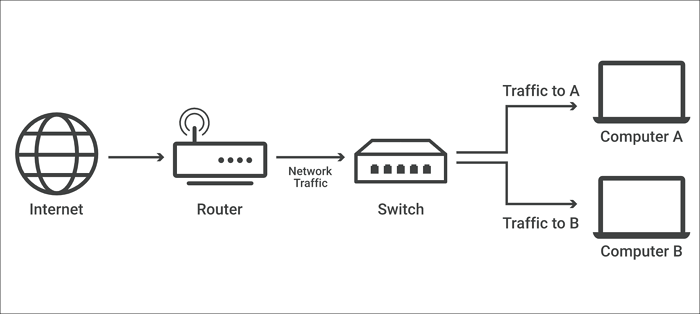
Network switches can be either software-based/virtual or hardware devices that manage the physical network in a workplace, connecting industrial machinery, desktop PCs, IoT devices like card entry systems, and wireless access points.
Network switches are the dominant type of network equipment, connecting servers, storage devices, and virtual machines in data centers, while in the telecommunications industry, they play a crucial role in transferring vast amounts of data.
Data transfer refers to the process of moving data from one location to another, whether it's within a computer system, between devices, or over a network, and is a crucial aspect of modern computing and communication.

Transferring files from one PC to another can be a convenient way to share files, move data, or even migrate to a new computer. To do this, you can use various methods such as using a USB drive, cloud storage services like Google Drive or Dropbox, or even network sharing.
If you're looking for a way to transfer files from one PC to another, this guide has got you covered. Whether you're upgrading to a new Windows 10 or 11 PC, or transferring files from an old computer to a new one, we've got every method covered. From transferring files directly using a USB drive, to using cloud storage services like Google Drive or OneDrive, and even using network file transfer methods, we'll walk you through each step to ensure a seamless file transfer process. So, read on and discover the best way to transfer files from your old PC to your new one on a Windows computer.
Types of Network Switches and Their Uses
Some types of network switches are:
1. Unmanaged switches
Unlike managed switches, unmanaged switches are cheaper and come with set configurations. They are often used to expand LAN's Ethernet connection and transmit data to local devices via MAC addresses. However, users have limited alternatives and poor capabilities, making them unreliable for enterprise applications.
2. Managed switches
In enterprise settings, these are popular because they allow administrators to dynamically configure settings like creating virtual LANs to split local networks into smaller parts, and provide troubleshooting information through protocol agents.
3. Smart switches
A miniaturized and cost-effective version of the conventional switch, smart switches offer more features than unmanaged switches but fewer than fully controllable ones. They are suitable for small networks with limited features and budgets.
4. LAN (Local Area Network) switches
A LAN switch is a device that connects multiple locations on an internal Local Area Network (LAN), preventing data packet overlap and delivering packets to their intended destination by efficiently allocating bandwidth.
5. Modular switches
A modular network switch allows for the addition of extension modules, providing flexibility as the network expands. This type of switch is more expensive than fixed ones, but is beneficial for large and growing networks that need to add features like firewalls, wireless connections, and network analysis to their existing switch.
6. Stackable switches
Stackable switches optimize and ensure reliability by functioning as a single switch through a cluster of switches, which can be powered by a single RMON/SNMP agent, domain, Web Interface, or CLI (Command Line Interface).
7. Fixed-configuration switches
Fixed-port switches offer affordability by having a set number of ports that cannot be expanded, with port speeds of at least 1Gbps, and connectivity options including optical fibers and wired RJ45 electrical ports.
8. Power over Ethernet (PoE) switches
Power over Ethernet (PoE) enables low-power devices in a network to receive power (DC) directly through the Ethernet cable, eliminating the need for separate power outlets, making IoT device installation simpler, faster, and safer.
9. Data center switches
Data center switches have become more popular due to their high speed, low latency, and large port capacity, making them ideal for virtualization, QoS, and security in consolidated data centers.
10. Layer three switches
Layer 2 and 3 switches are hybrid devices that work at the Network Layer of the OSI model, combining the features of Layer 2 and 3 devices. They have more complex software than traditional Layer 2 switches and are part of the Layer 2 layer.
The Uses of Network Switches?
IT managers must choose the types of network switches based on their specific use cases and requirements.
Connection with a specific or multiple hosts
In networking design, the switch plays a crucial role in data transportation, alongside other devices. Each port on a switch has the same mechanism of forwarding and filtering, allowing users to connect to multiple switches using different ports and operate each switch individually within a group setup.
Optimize LAN Bandwidth
To manage the surge in network traffic from bandwidth-hungry applications, video, and user devices, as well as packets heading to cloud storage and servers, effective switching is required. LAN switches split the network into separate broadband connections, increasing their frequency and enabling users to enjoy faster and more reliable connections.
Traffic control
Network switches help distribute traffic between multiple network devices by forwarding traffic between at least two different ports connected to separate devices, known as routing. This offloads traffic from a single device, improving network efficiency and performance.
Populate MAC address table
Network switches use their MAC address database to efficiently forward data packets between devices on the network. Initially, the database is empty, but as devices communicate, the switch populates it with the MAC addresses of devices and the ports they are connected to, allowing for efficient packet forwarding.
Final Words
The knowledge of network switches will be increasingly important in the coming years, as they play a critical role in maintaining and stabilizing resource distribution in large-scale computing environments. Understanding what a network switch is, the different types that exist, and their individual use cases will be essential, and the content of this article will provide valuable information on these topics.
Related Articles
- What Is Minimum Processor State? Everything You Need to Know
- What Is Bootrec.exe? Everything You Need to Know About This Tool
- What Is MSTSC and How to Enable Remote Desktop with It?
- A Mini USB - Things You Need to Know
- How Many Megabytes Are There in a Gigabyte
Want to know how many megabytes are there in a gigabyte? Read this guide thoroughly to learn more about megabytes and gigabytes to know the exact answer. Read to know how many megabytes are there in a Gigabyte. - Solved: How to Activate Protection System in Windows? - Qiling
What is a protection system in Windows? And how to activate protection system or access it? As a windows user, you must be keen on how to open Restore Point to keep the computer safer. This article will guide you through these questions.
Products
Articles & Tutorials
- Data Recovery
- Data Backup
- File Recovery
- File Backup
- System Backup and Restore
- Disk and Partition Clone
- Technical articles
- Mobile articles
- Disk Master Help
- Windows Data Recovery Tutorials
- Windows Secure Delete Tutorials
- Windows Partition Management Tutorials
- Windows File Backup and Restore Tutorials
- Windows System Backup and Restore Tutorials
- Windows Disk Backup and Restore Tutorials
- Windows Clone Tutorials