Know All: Qiling Disk Master Security Zone
Professionals often back up files to secure them from data failures or malicious threats, but household computers face the most risk of losing personal or important data, which is where Security Zone, a remarkable feature of Qiling Disk Master, comes in handy.
This feature is designed to provide an additional layer of security for your backups by creating a hidden, encrypted partition on your hard drive. This partition is invisible to Windows and third-party applications, meaning that even if malware or ransomware infects your system, the backed-up data stored in the Security Zone remains protected. It can be easily enabled with just a few clicks, and it doesn't require any technical expertise. Overall, it's a convenient and effective way to safeguard your important files.
Introduction
Backups are essential for any user today, protecting files from corruption or loss due to virus attacks, device failure, or other malicious threats. Whether using an internal hard disk drive or an external one, backups ensure files are secured and safe from corruption. However, even backups are not always foolproof, making it essential to have a reliable backup system in place.
Users often overlook the importance of having a physical backup, especially when relying on encrypted backups. A program like Security Zone in Qiling Disk Master provides a solution, offering a proper backup that can be accessed without internet connectivity. This ensures that users have a reliable and accessible backup, complementing encrypted backups for added security.
Having a feature like this can help you safeguard your file without spending another penny on a physical drive or online storage. It's suggested that you only secure the necessary files, such as key or activation code for a downloadable program, rather than backing up the entire program.
Is Your Backup Absolutely Safe?
While backups are generally safe, they are not absolutely invulnerable, as each type of backup carries its own risks. For example, a copy stored on a pen drive or external hard drive can be lost or damaged.
Now, your computer is attacked by a virus that corrupts a few of your important files. If you connect the backup drive back to your computer without first ridding your computer of the virus, there will be a risk of losing your backup as well, as the virus could potentially corrupt the backup drive.
- Losing data in case of external hard drive failure
- Losing data if pen drive or USB is lost
- Data loss in cloud storage due to forgotten passwords or blocked accounts, which can happen when a user forgets their password and is unable to recover it, or when an account is blocked due to suspicious activity or non-payment of subscription fees.
- Data mismanagement causing data loss
- Data lost because of attacks from viruses, ransomware, and malware
These are some of the common woes of creating a backup without proper assistance or tools.
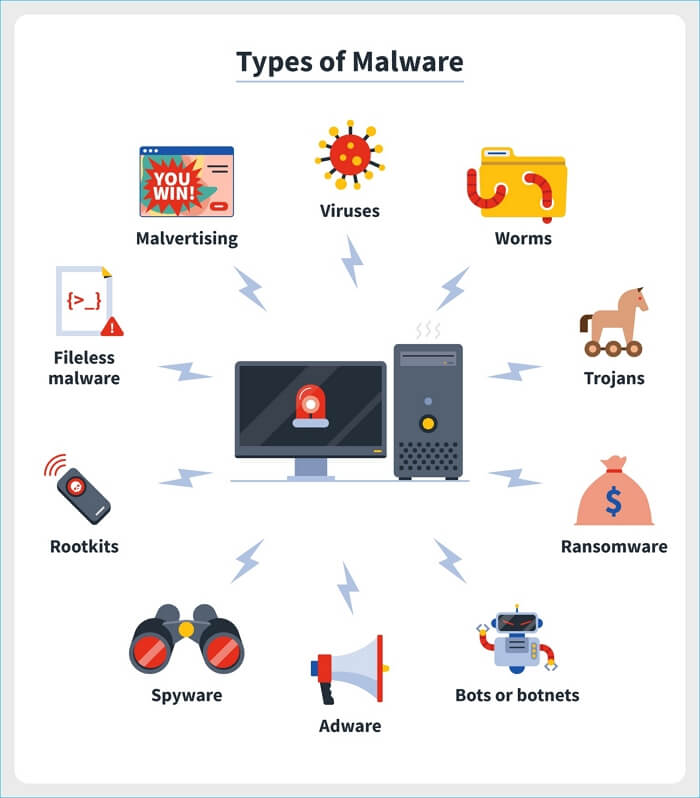
Here's a brief summary:
Virus, ransomware, and malware are often confused with each other, but they have distinct differences. A virus, for instance, is a type of malware that replicates itself and can cause harm to a computer system. Ransomware, on the other hand, is a specific type of malware that encrypts a victim's files and demands a ransom in exchange for the decryption key. Malware, meanwhile, is a broad term that encompasses any type of malicious software, including viruses and ransomware. In terms of harm, ransomware is often considered the most damaging as it can result in the loss of sensitive data and financial losses, making it essential to be aware of its symptoms and take preventive measures.
How to Keep Data Backup Safe?
Creating a viable backup is the best way to keep your data safe, but even backups, including those in the Cloud, are not completely secure. A well-organized gridlock of your important files ensures swift recovery in case of any data-related calamity. Your options include two main choices:
1. Make Comprehensive Backups
To ensure comprehensive backup, consider creating a separate partition or purchasing an additional hard drive to store important data, utilizing reliable and extensive cloud storage services, or keeping smaller but essential files on pen drives or separate partitions.
You can keep your files safe by using a secure password, encrypting your data, and using a reliable backup system, but these measures often require additional costs.
Pros:
- Keep files secure in a separate location
- Ensured availability
Cons:
- External disks can still carry malware that spreads to your computer once reconnected.
- Not easy to update backup files regularly
- Cost you double
2. Encrypt Backups
Encrypted backups are the most secure, safeguarding against ransomware, viruses, and malware with encrypted hard drives, password-protected access, and separate encrypted partitions.
Pros:
- Easy to make
- Easy to recover
- Password-protected and much safer
- Better protection against virus or malware attacks
Cons:
- Mismanagement of passwords might cause data loss
Given that encrypted backups have far fewer drawbacks than comprehensive physical backups, they are clearly a safer and more convenient choice.
Best Choice for You - Qiling Disk Master
The Security Zone feature in Qiling Disk Master creates a separate partition for your backed-up data that cannot be accessed or modified by the user, third-party apps, or even Windows itself. It also encrypts the partition so that only Qiling Disk Master can read it, securing your data from malware or faulty operations while providing an extra layer of protection and peace of mind.
The partition feature allows you to create, modify, remove, extend, and secure data on your computer. However, only one partition can be created on a single computer, and the partition can be customized to suit your data storage needs. This flexibility is beneficial for securing data, and the features can be tailored to your preferences and the amount of data you wish to protect.
- Offer a 250GB Cloud storage for free
- Provide easy scheduling and automatic backup execution
- Create copies of files and file folders to store them safely on USB drives, external disks, and in cloud storage services such as Google Drive, Dropbox, or OneDrive. This helps protect against data loss in case of hardware failure, theft, or other disasters.
- Offer options to create full, differential, and incremental backups
Getting Started with Qiling Disk Master Security Zone
Creating a Security Zone on Qiling Disk Master is a straightforward process. Simply download Qiling Disk Master and follow the steps to set it up, and you'll be able to create a Security Zone with ease.
To create a backup using this tool, you simply need to follow the steps, ensuring that the partition created is sufficient for your files. This straightforward process allows you to easily safeguard your important data.
Conclusion
Creating a backup is essential to protect your files, and you have various options to do so. However, Qiling Disk Master's Security Zone stands out as a secure and easy-to-use solution, making it a reliable choice for keeping your files safe.
Related Articles
- How to Image a Hard Drive Windows 10 in 2 Different Ways
- 9 Ways to Fix Google Drive Upload Stuck Problem
- (10 Picks) Best Backup Software for Windows and Mac of 2023 (Free & Paid)
- How to Fix Windows Defender Not Turning On | 7 Methods
- 3 Fixes to Completely Remove 0x0 0x0 Error for Windows 11/10/7
- How to Backup Windows 10 Before Upgrading to Windows 11✅
Are you looking to install the latest Windows 11 OS on your PC? If so, follow our step-wise guide on how to backup Windows 10 before upgrading to Windows.
Products
Articles & Tutorials
- Data Recovery
- Data Backup
- File Recovery
- File Backup
- System Backup and Restore
- Disk and Partition Clone
- Technical articles
- Mobile articles
- Disk Master Help
- Windows Data Recovery Tutorials
- Windows Secure Delete Tutorials
- Windows Partition Management Tutorials
- Windows File Backup and Restore Tutorials
- Windows System Backup and Restore Tutorials
- Windows Disk Backup and Restore Tutorials
- Windows Clone Tutorials