Backup Data to Cloud Free With Easy and Secure Steps
| Workable Solutions | Step-by-step Troubleshooting |
|---|---|
| 1. Benefits of cloud backup | If you wish to back up data to the cloud for free, then you might be wondering what it is. Cloud storage...Full steps |
| 2. Features of Good cloud backup | The main feature of outstanding cloud storage includes vast storage. While some premium services...Full steps |
| 3. Can cloud backup Be Free | You can use a backup/cloud service to keep your data secure for free. However, some of the most...Full steps |
| 4. Protect Data with cloud backup | The best way to protect your important data is to keep your files secure in a separate account. This...Full steps |
Backing up your data on cloud storage can provide peace of mind by ensuring the security of your data, even if you lose a physical drive or experience hardware damage. It also allows for easy access to specific data from any device, giving you flexibility and convenience.
To ensure the proper security of your files, you can set up a data backup using online storage services that offer various storage capacities, from 2GB on Dropbox to 15GB on Google Drive, allowing you to back up your data to the cloud for free.
To set up reliable cloud backups, you should be selective about what files you back up, focusing on personal files, important documents, and photos. This approach helps you make the most of the limited free cloud storage available. Understanding the cloud storage itself and third-party backup tools is also crucial for creating dependable backups.
Benefits of Backing Up Data to Cloud
Cloud storage is a form of online storage where data is stored on a physical server operated by companies like Google and Microsoft.
Cloud storage allows users to save their files and access them from several devices, providing a convenient and flexible way to store and manage digital data.
- Access files from anywhere and any device
- Easy remote working
- Lifelong storage
- Easily share files
Having a cloud backup provides an added layer of security, ensuring your files are safe and secure in case of system or hardware failure. Additionally, major cloud storages typically maintain their servers in optimal condition, offering fast and efficient backups and restore capabilities. This provides a reliable and speedy way to access and protect your data.
Cloud backup and local backup are two options for data preservation, each with its own advantages and disadvantages. Cloud backup, which stores data on remote servers, offers convenience, accessibility, and automatic backups, but may be vulnerable to internet outages and cybersecurity risks. Local backup, which stores data on a physical device, provides physical security and control over data, but may be more prone to data loss due to hardware failure or physical damage. Ultimately, using both cloud and local backup methods can provide the best of both worlds, offering a secure and reliable way to preserve data.
If you're torn between two backup options, we're here to help. We'll weigh the pros and cons of each, making it easier for you to make an informed decision.

The Key Features of An Excellent cloud backup Service
The main feature of outstanding cloud storage is vast storage, which is often offered by both premium and free services. However, when searching for a reliable cloud storage service, it's essential to look beyond just storage capacity and consider other factors such as security, accessibility, and user experience.
- Speed and server reliability
- Low costs or free usage
- The software allows for easy and convenient management of backup and restore points, making it simple for users to create, update, and restore their system to a previous state in case of any issues or data loss. This feature is particularly useful for users who need to frequently update their system or test new software without risking their current setup.
- Flexible scheduling
The speed and capacity of cloud storage should be top priorities, especially for those who frequently upgrade and upload files daily. A fast backup process is essential to minimize downtime, and generous storage space is also crucial, often provided for free. This ensures that users can quickly and easily store and access their files without worrying about storage limitations.
You need cloud storage that allows flexible scheduling, such as creating a schedule backup and restore point, and also makes uploading easier and less complicated.
Can You Backup Data to Cloud for Free
Some cloud storage providers offer limited free storage, but you can use a backup/cloud service to keep your data secure for free. However, if you need more storage, you may need to upgrade to a paid version, which can be more expensive. For example, popular cloud services like Google Drive, Dropbox, and Microsoft OneDrive offer varying levels of free storage, but also offer paid upgrades with more storage capacity, such as Google Drive's 15GB free storage and 100GB paid upgrade.
- Qiling Backup – 250GB free storage
- Google – 15GB
- Microsoft One Drive – 5GB
- Dropbox – 2Gb
Qiling Backup offers the most cloud storage for free and is the most efficient, providing features like Security Zone that ensure encryption of important data, keeping it safe from malicious threats.
To access free 250GB storage and create a security zone for double the security of your important data with Qiling Backup, you can follow the steps below.
Step 1. When you first use Qiling Backup, click on the "File backup" option on the home screen to select the files you want to back up, such as pictures, videos, documents, and more.

Step 2. To backup files, folders, or directories, follow the paths to locate the ones you want to save, and then select them all.
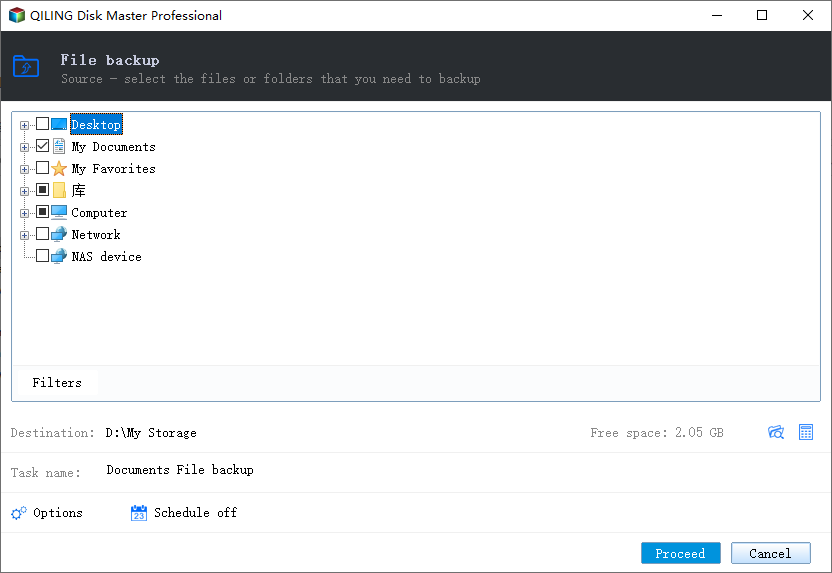
Step 3. To select a backup location, you can choose a local drive, network location, or cloud storage service such as Google Drive, Dropbox, or OneDrive. You can also select a USB drive or external hard drive if you have one connected to your computer.
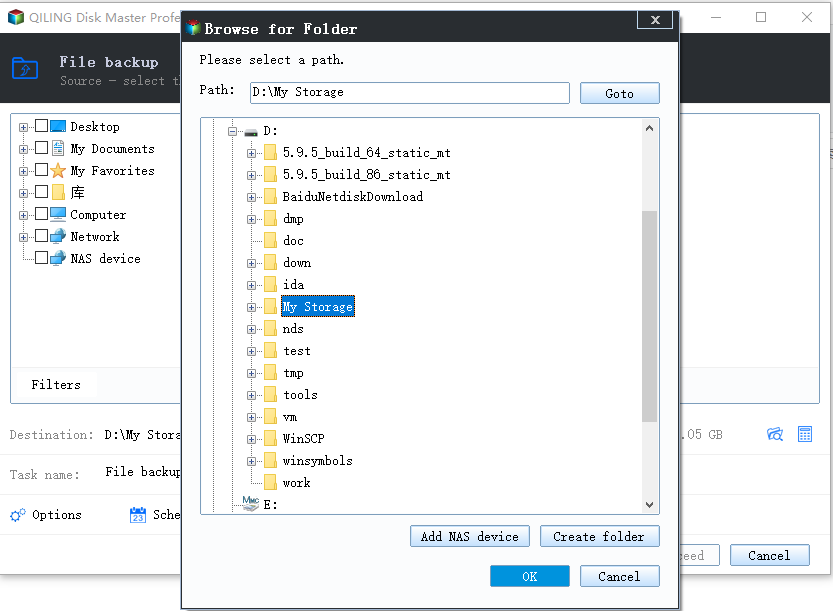
Step 4. Qiling Backup allows users to save backup files to various devices, including local hard drives, external USB drives, SD cards, network drives, NAS drives, and Qiling cloud drives. We recommend saving to cloud drives for greater accessibility, flexibility, and safety.
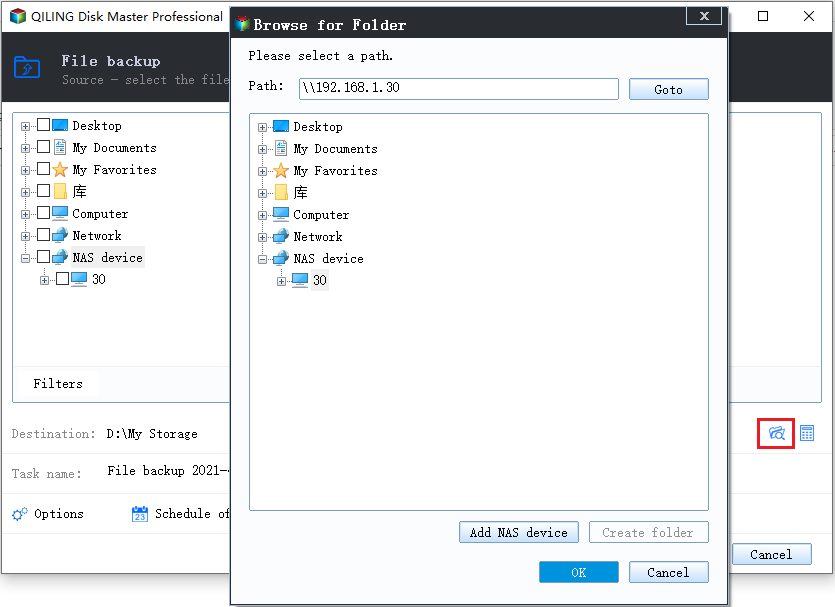
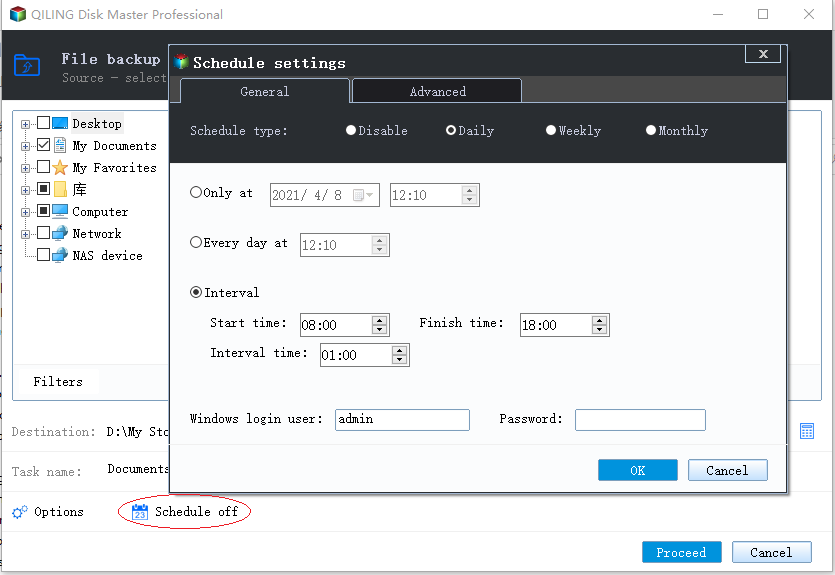
Step 5. If you want to set up an automatic and intelligent backup schedule for your next file backup task, go to the "Options" setting. There, you can choose to encrypt confidential files, compress the backup image to save space, or customize the backup schedule to specify when the next backup should start.
Customize an advanced and automatic backup task here:
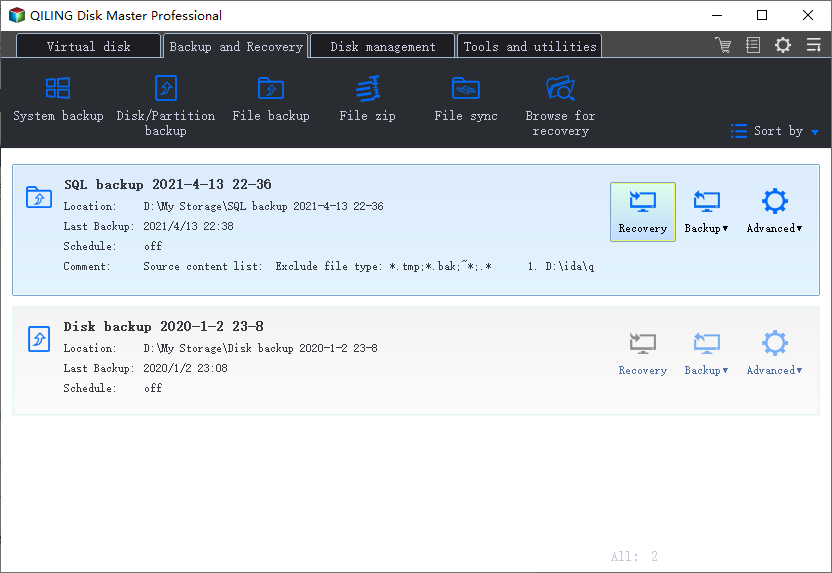
Step 6. Click "Proceed" to start the file backup process. Your completed backup files are displayed on the left in a card format.
The Best Ways to Protect the Data with cloud backup
The best way to protect your important data is to keep your files secure in a separate account, not connected to other social media or email accounts.
To ensure thorough security, you can take a few steps, such as using strong passwords, enabling two-factor authentication, regularly updating your software and apps, being cautious when clicking on links or downloading attachments, and keeping your personal and financial information private.
- Use an encrypted cloud storage
- Use a strong password
- Enable two-factor authentication
- Encrypt backup or important data before uploading them
- Use a separate account for cloud storage
- Don't log in without using VPN
To ensure the thorough security of your personal data, information, documents, photos, and more, follow these steps. Not only will you safeguard your data, but you'll also secure it by using a unique account that can only be accessed with two-factor authentication, providing an additional layer of protection.
To add an extra layer of security, you would need to verify your identity through email or phone verification, in addition to your password, to access your cloud storage files.
Conclusion
To back up data to cloud for free, consider using a dependable tool like Qiling Backup to ensure your files remain secure and up-to-date. This will help you protect your data and make it easily accessible from anywhere.
Related Articles
- The Settings You Should Change in Windows 11
- How to Back up Windows 10 to Network Drive: 3 Ways Explained
- Should You Encrypt Backups? Here's the Answer
- How to Create a Windows 11/10 Recovery USB for Another Computer
- How Do I Transfer Files from Google Drive to OneDrive [Ultimate Guide]
Download the files from Google Drive to your local hard drive and upload them to OneDrive. Use Google Takeout and share feature to transfer files from google drive to OneDrive. - How to Transfer Files from Mega to Google Drive
The fear of losing personal data is a common concern, but there's an easy solution. To keep your data secure and safe, you can transfer files from Mega to Google Drive, freeing you from the worry of accidentally losing your data.
Products
Articles & Tutorials
- Data Recovery
- Data Backup
- File Recovery
- File Backup
- System Backup and Restore
- Disk and Partition Clone
- Technical articles
- Mobile articles
- Disk Master Help
- Windows Data Recovery Tutorials
- Windows Secure Delete Tutorials
- Windows Partition Management Tutorials
- Windows File Backup and Restore Tutorials
- Windows System Backup and Restore Tutorials
- Windows Disk Backup and Restore Tutorials
- Windows Clone Tutorials