How to Upgrade Processor on Laptop [i5 to i7/i3 to i5/i3 to i7]
Upgrading a laptop's processor from i5 to i7 is a viable option on compatible laptops, offering improved performance for demanding tasks like gaming and video editing. However, it's essential to consider the laptop's age, motherboard compatibility, and other hardware limitations before proceeding. This guide will walk you through the entire process, from checking compatibility to completing the physical upgrade.
The Benefits of Upgrading Laptop Processor
Upgrading your laptop processor from an i5 to an i7 is possible, but it's essential to compare your current system specifications to the new CPU's requirements. The benefits of upgrading include improved performance, increased multitasking capabilities, and enhanced overall system speed. When considering an i3 to i5 or i5 to i7 upgrade, factor in the compatibility of the new processor with your laptop's motherboard, as well as any potential heat and power consumption issues. Additionally, consider the cost and potential need for additional upgrades, such as a new cooling system or power supply, to ensure a seamless and efficient transition.
- 🚩Improved compatibility with the latest hardware and software, including support for new technologies like DirectX 12 and 4K resolution, enabling top-notch features.
- ⏰A speedier start - Increased computing power can lead to faster system and application uptimes, resulting in a more fluid and responsive gaming experience.
- 🎮Overall enhanced PC gaming performance.
- 🔋Increasing energy efficiency not only extends the life of laptop batteries but also reduces power consumption overall.
- 🖥️Improved graphics performance allows for smoother and more detailed gameplay, enabling games to be played at higher resolutions or with more detailed settings, making them look more realistic.
What to Prepare Before Upgrading Laptop Processor
Before upgrading the laptop processor from i3 to i5 or i5 to i7, it's essential to research and ensure the new processor is compatible with your laptop's motherboard and BIOS. Additionally, you should check if the laptop's cooling system can handle the increased heat generated by the new processor. It's also crucial to back up all data and prepare for potential software and driver updates. Furthermore, you should consider the cost and warranty implications of the upgrade, and possibly seek professional help if you're not comfortable with the process.
- To check if the laptop's CPU is compliant with the upgraded standard, you can refer to the manufacturer's documentation or specifications for the laptop model. The documentation should list the CPU model and its specifications, which can be compared to the upgraded standard's requirements.
- Be a techie and rummage for a compatible processor to upgrade
- To replace a laptop processor, check the Motherboards: An Indispensable Part of Your PC socket type
- To prevent data loss, backup vital data
🎨You may be interested: Upgrade Motherboard and CPU Without Reinstalling Windows 10
Qiling Disk Master Pro is the best tool for data backup, offering automatic backup of data, system drives, entire hard drives, and specific files & folders. This premium backup software provides a comprehensive solution for safeguarding important data.
➔ Maximized backup efficiency
➔ Bootable Backup and Recovery
➔ Hassle-free backup management
➔ Know All: Qiling Backup Security Zone
You can download the Qiling Disk Master Pro software for free by clicking the provided button.
A Step-by-Step Guide to Upgrade Laptop Processor
To upgrade the processor on your PC, follow these steps carefully. Each step is crucial to a smooth upgrade, so make sure to execute them accurately. By doing so, you'll be able to successfully upgrade your processor.
- 1️⃣Check the laptop's options for the processor.
- 2️⃣Use tools like CPU-Z to simplify the process.
- 3️⃣Examine the laptop motherboard's socket type.
- 4️⃣Buy a processor that is compatible with your laptop's board
- 5️⃣Replace and upgrade your laptop's processor.
Upgrading a laptop processor from i3 to i5 or i7 involves following specific methods. Firstly, check the laptop's compatibility with the new processor by consulting the manufacturer's website or contacting their customer support.
Method 1. Check your laptop's upgrade options for the processor
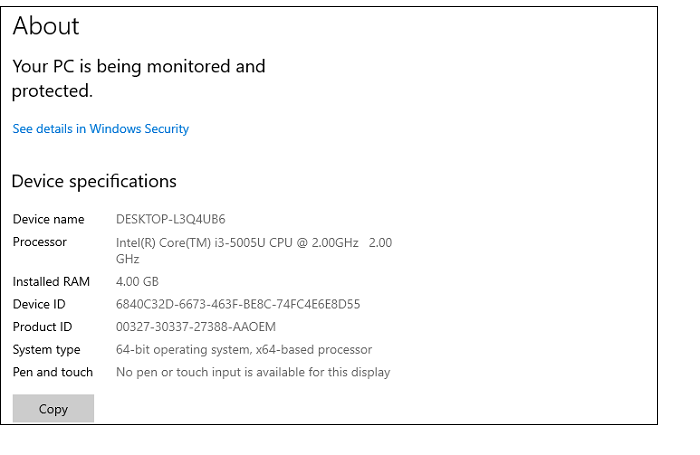
If your laptop has the ability to upgrade its processor, you must look into the specifics. It would be best to ascertain whether the board can accommodate the i5 or i7 processor. You can employ the following two short techniques for this purpose:
Step 1. On your desktop, right-click on "This PC."
Step 2. You will notice the current processor details right after going to "Properties."
Method 2.Using tools such as CPU-Z
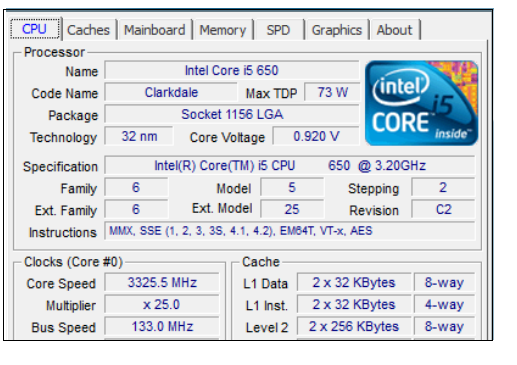
Utilizing tools like CPU-Z will make the process simple for you, providing detailed information about the motherboard as well as more comprehensive details about the processor.
Method 3.Examine the laptop motherboard's socket type
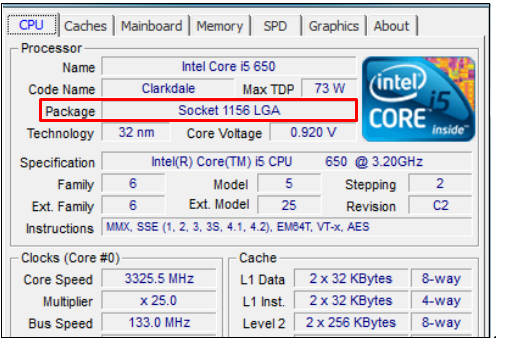
Before buying a processor, check the type of socket on your motherboard, such as LGA, PGA, or BGA, and ensure it allows for upgrades. This will save you time and money by avoiding a mismatch.
Upgrading a processor is possible with LGA and PGA sockets, but not with BGA sockets, allowing for efficient upgrades to i5 or i7 from i3, with specific LGA sockets supporting upgradation.
Method 4. Purchase a Processor Compatible with Your Laptop's Board
To determine if your processor and motherboard are compatible, you can use tools like CPU-Upgrade, which allows you to cross-check your current processor and the new one you're adding. When checking compatibility, one key statistic to consider is the TDP (Thermal Design Power) of the new processor, ensuring it doesn't exceed the maximum TDP supported by your motherboard.
After knowing your CPU's TDP, find another CPU with the same TDP to ensure your system doesn't overheat. Use Versus to compare your old and new processors thoroughly.
Sum Up
Upgrading a laptop processor from i5 to i7 or i3 to i5/i7 is possible with proper steps, considering the CPU's PGA or LGA surface mounting and CPU sockets compatibility.
To prevent data loss when upgrading from an i3 or i5 processor to an i7, it's essential to back up your data. A professional tool like Qiling Disk Master can help recover lost files and folders.
FAQ on How to Upgrade Processor on Laptop
To upgrade the processor on a laptop, it's essential to understand the FAQs provided below. These FAQs can help you better comprehend the process and ensure a smooth upgrade.
1. Can I upgrade my laptop processor from i5 to i7?
Upgrading from an i5 to an i7 processor is possible on laptops with socketed (LGA or PGA) CPUs, but you must first verify that the motherboard socket type and chipset are compatible with the i7 processor you intend to install.
2. How much does it cost to upgrade processor on laptop?
Upgrading a laptop's processor can cost anywhere from $200 to $1,000 or more, depending on the processor model chosen and whether professional installation is required.
Related Articles
- Total AV VS Avast: Which Is the Right One for You?🔥
- Microsoft Surface Factory Reset Without Password or Recovery Key
- How to Fix Error Code 0x80070002 in Windows 10/11 Update
- 5 Best Disk Imaging Software for Windows 10/7 in 2022 | Paid & Free
Disk imaging software creates an exact copy of a computer hard drive for backup and restore. It captures a drive snapshot at a specific time. - How Do I Clone My Old SSD to My New SSD?
Do you know how do I clone my old SSD to my new SSD? If you do not know. this short post can help you. After reading this post. you can learn how to clone an old SSD to a new SSD. - 4 Ways to Back Up Computer to the Cloud Drive
You can back up your computer to the cloud drive in four ways: running cloud drive backup software, turning on Google Drive, logging into Dropbox, or syncing with OneDrive. This post will guide you through the process.
Products
Articles & Tutorials
- Data Recovery
- Data Backup
- File Recovery
- File Backup
- System Backup and Restore
- Disk and Partition Clone
- Technical articles
- Mobile articles
- Disk Master Help
- Windows Data Recovery Tutorials
- Windows Secure Delete Tutorials
- Windows Partition Management Tutorials
- Windows File Backup and Restore Tutorials
- Windows System Backup and Restore Tutorials
- Windows Disk Backup and Restore Tutorials
- Windows Clone Tutorials