Total AV VS Avast: Which Is the Right One for You?🔥
Key Takeaway
- Total AV is a top-rated antivirus program that provides robust protection against various cyber threats.
- Avast has shown itself to be a trustworthy and powerful tool in identifying and preventing various types of cyber threats.
- Total AV takes the lead in most areas, but Avast isn't too far behind. However, relying solely on antivirus software is not enough, and regularly backing up data with free backup software like Qiling Disk Master is the best way to protect it.
When exploring antivirus software, you've likely come across two strong contenders: Total AV vs Avast. Personal computers have taken on a more prominent role in our lives, and in many ways, we can't argue that it's changed our lives and the world for the better. Unfortunately, there has been a surge in cyber threats over the past few years.
Antivirus programs have been a lifesaver for many users worldwide, protecting them from motivated cyber criminals. To help you choose the best option, this article compares Avast and Total AV, providing all the necessary information to make an informed decision.
Overview of Total AV & Avast
The following two antivirus software are briefly introduced: Total AV and Avast. Both offer comprehensive protection and effective malware detection, making them strong contenders in the antivirus market.
1. Total AV
Total AV is an excellent antivirus program that offers robust, comprehensive protection against a wide range of cyber threats. Its real-time protection feature is particularly effective, allowing users to detect and resolve threats promptly at any time.
Total AV is a product of Protected.net Group Ltd, founded in 2016 and headquartered in Fareham, United Kingdom. The company also produces various software for personal and home use.
 TOTALAV
TotalAV is an award-winning antivirus and security software that provides real-time protection against viruses, malware, and online threats.
Antivirus Protection Enabled
2. Avast
Avast is a well-established antivirus program that has been around since 1988, initially founded as a cooperative in Prague, Czech Republic. It has a long history of reliably detecting and thwarting various cyber threats, making it a formidable tool in the fight against online security threats.
Avast vs Total AV: Which Is Better
Choosing the best antivirus program can be a challenge, with many options available. Total AV and Avast are two highly respected and well-known tools, making it difficult to decide which one is better. This comparison will examine the two programs based on various aspects, including their features, pricing, and effectiveness in deterring cyber-attacks. We will discuss each of these aspects in detail to help determine which antivirus program is the most suitable for your needs.
1. Main Features
Total AV and Avast offer nearly similar features, including antivirus protection, password management, and a firewall, among others.
- Real-time protection
- Password manager/Password vault
- Web and email shield for phishing protection
- Malware removal
- Device optimization tool
- False positives reporting tool
Avast and Total AV offer additional features beyond antivirus protection, including a secure sandbox, firewall, secure browser, and ransomware protection with Avast, and a safe browsing extension, ad blocker tool, and data breach checker with Total AV.
While Avast offers more additional features, Total AV makes up for it with quality and customizability, making it a great alternative to Avast. The table below provides a detailed comparison of the two antivirus software's main features.
| Features | Total AV | Avast |
| Web Protection | YES | YES |
| Network Attack Protection | YES | YES |
| Firewall | YES | YES |
| Antivirus and Antispyware | YES | YES |
| Webcam Protection | NO | YES |
| Parental Controls | NO | NO |
| Password Manager | YES | YES |
| PC Cloud Backup | NO | NO |
| Ransomware Protection | YES | YES |
| VPN | YES | YES |
| Identity Theft Protection | NO | YES |
The choice of tool depends on your specific needs and preferences. If you prioritize ease of use and a user-friendly interface, Total AV may be a better fit, while Avast offers more advanced features for power users.
2. Pros & Cons
Total AV and Avast are two antivirus software options that have their strengths and weaknesses. While Total AV excels in its user-friendly interface and comprehensive protection features, it may be outperformed by Avast in terms of detection rates and system resource usage. On the other hand, Avast has a reputation for being highly effective in detecting malware, but its interface can be somewhat cluttered and overwhelming for some users.
| Total AV | Avast | |
|
Pros |
|
|
|
Cons |
|
|
Total AV has more listed pros, including a more user-friendly interface and better customizability, while Avast has more listed cons, such as a more complex interface and less transparent pricing.
3. Effectiveness Against Malware
Avast has the highest malware detection rate, followed closely by Total AV, according to recent tests.
Avast and Total AV both have a feature called smart scan, which is an AI-powered scan that detects and removes malware without slowing down the system. However, Total AV allows users to schedule custom scan dates, whereas Avast only allows periodic scheduling.
Avast is a leader in threat detection and elimination, but Total AV is gaining ground quickly, making Avast's victory narrow.
4. Ease of Use
It's a tie between Total AV and Avast, as both are designed with the user in mind. Both products have user-friendly interfaces, making it easy for a beginner to navigate and accomplish their goals.
5. Pricing
Both products have a free antivirus version, and you can get premium Total AV features for as low as $19, with options to upgrade to Internet Security for $39 per year or Total Security for $49.
Avast offers five product tiers: free, Avast One, Premium Security, One Individual, and One Family, with prices starting from $39.99 for Avast One, $50.28 for Premium and Individual, and $69.48 for Family, applicable to Mac, Windows, Android, and iOS.
Total AV
| Total AV Free | Total AV Antivirus Pro | Total AV Internet Security | Total AV Total Security | |
| Annual Price | Free | $19 | $39 | $49 |
| Renewal Price | N/A | $119 | $145 | $179 |
Avast Antivirus
| Avast One Free Antivirus | Avast One | Avast Premium Security | Avast One Individual | Avast One Family | |
| Annual Price | Free | $39.99 | $50.28 | $50.28 | $69.48 |
| Renewal Price | N/A | $39.99 | $75.99 | $99.99 | $139.99 |
6. Customer Support
Avast offers dedicated customer support for its premium plans, including 24/7 ticket, email, and phone assistance.
Avast's free plan users can access support through the company's community forums and FAQs section, which is more extensive than Total AV's. Additionally, all Avast users can seek help through the company's social media pages. The forums also show that Avast's support section is more active compared to Total AV.
Total AV offers live chat support in addition to email, telephone, and ticket support, along with a comprehensive support knowledge base covering technical, account, and billing support.
Final Verdict
Total AV and Avast are both top-notch antivirus options, but they differ in their features and support. Avast, a well-established antivirus program, offers users a range of features and extensive support options, making it a solid choice for those seeking comprehensive protection against cyber threats.
Total AV is a relatively new player in the market, but it has quickly proven itself as a reliable antivirus that's well-suited to the current cyber landscape. In most areas, it takes the lead, but Avast is a close second. Ultimately, the choice between the two comes down to individual needs.
Share this article on your social media to help more people.
Try a Better Way to Protect Your Data from Virus Attack
Relying solely on antivirus programs to protect your computer is insufficient, as it can still be compromised by stealthy viruses. To safeguard your data, it's advisable to employ additional measures, thus preventing potential data loss.
Qiling Disk Master, a free backup and recovery tool, allows you to automatically back up files, computer apps, systems, and disks, and save the backup in various locations, ensuring your data is safe even if your antivirus fails.
The tool has a user-friendly interface, making it easy for all users to backup and restore their data or system, and ensures that all backups and restores are secure from cybercriminals.
The key features of Qiling Disk Master include the following:
- Create a Windows system image on a USB
- One-click backup and restore with ease
- Back up multiple drives at once on your PC
- 250G free cloud storage space available
- Transfer Windows OS to another computer
Get the ultimate protection today against increasingly sophisticated cyber threats by downloading, installing, and backing up your data using Qiling Disk Master.
Step 1. On the main page, click "backup and recovery".
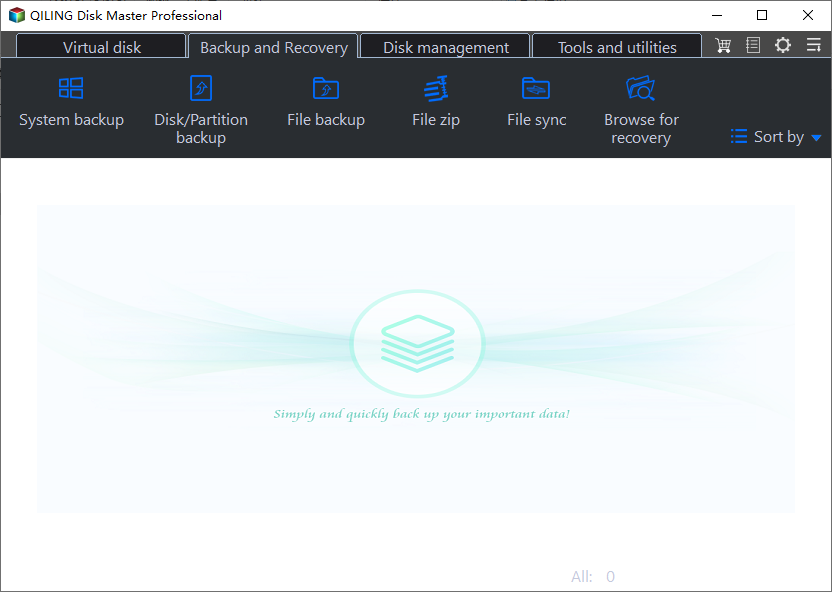
Step 2. Among the four available categories, click System backup.
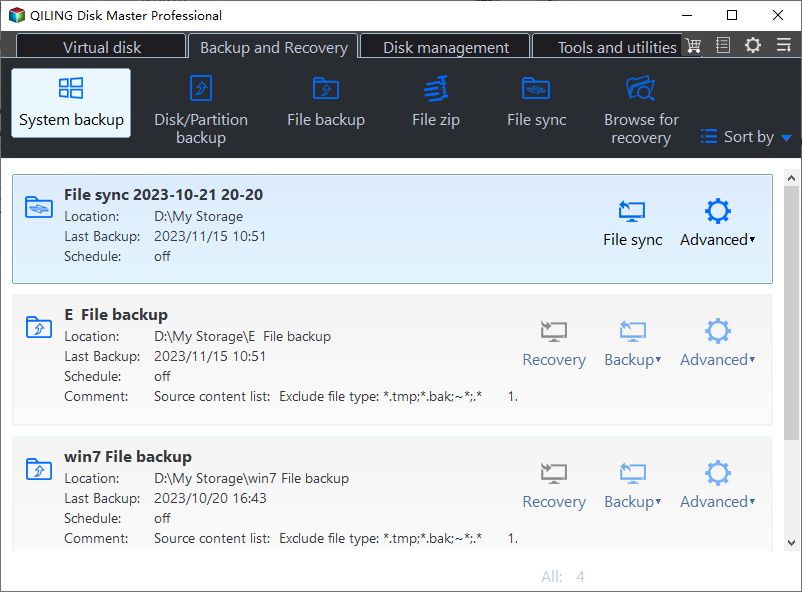
Step 3. Qiling Disk Master will automatically select your system partition, requiring only a selection of the backup destination.

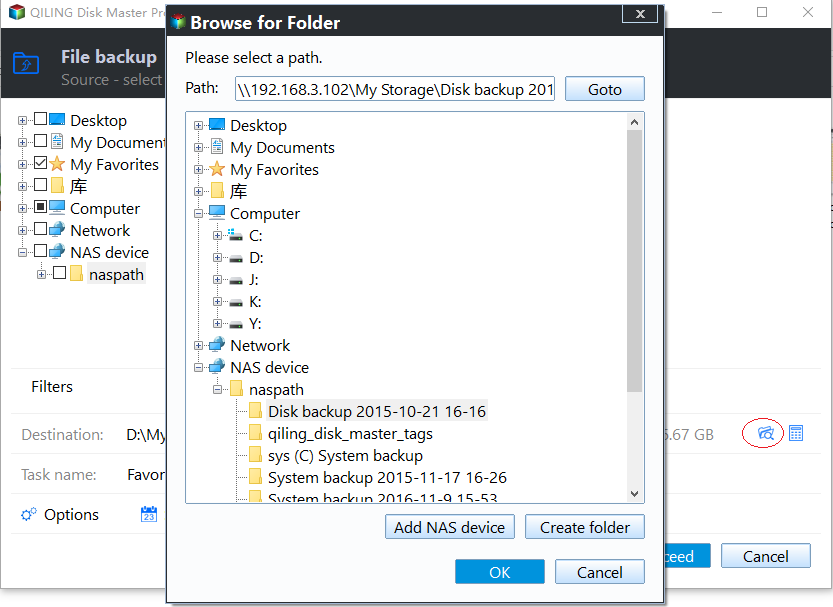
Step 4. You can save the backup file to either your local drive or a network-attached storage (NAS) device for safekeeping.
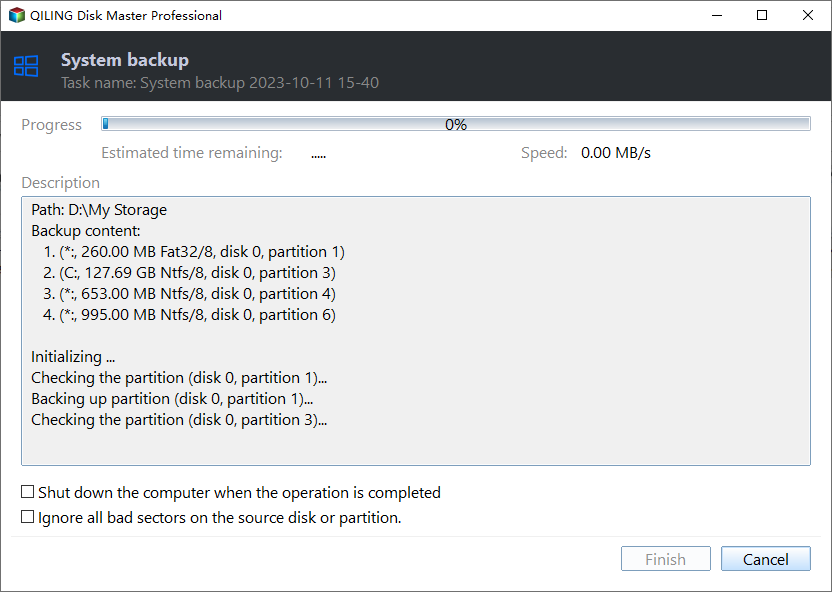
Step 5. After completing the backup process, you can check the backup status, recover, open, or delete the backup by right-clicking on the backup task on the left.
To Wrap Things Up
The Total AV vs Avast comparison has highlighted the key differences between these two top antivirus software. While both offer robust security, Total AV stands out with its more comprehensive feature set and superior scanning capabilities, making it a better choice for those seeking top-notch protection.
To add an extra layer of protection, it's recommended to back up your data using Qiling Disk Master, an efficient backup tool that offers AI smart backup, security zone backup, and system backup & restore, in addition to using antivirus software.
FAQs on Total AV vs Avast
Below are frequently asked questions about Total AV vs Avast.
1. Is Total AV the Same as Avast?
While both Total AV and Avast are top-notch antivirus programs, they are distinct products from different companies. Their primary similarity lies in providing real-time protection against malware attacks on your computer.
2. Is Avast 100% Safe?
The Avast website claims that their antivirus program can guarantee 100% protection, but this may not be entirely true in the ever-evolving digital world, where cyber criminals are constantly developing new and sophisticated malware.
3. Is Total AV Free?
Total AV has both free and premium versions, with the free version lacking access to many antivirus features.
Related Articles
- [Fixed] Windows 11 Virus Protection Keeps Turning Off
- Is Windows 10 Backup Any Good? Check the Answer
- What Is HP Cloud Recovery And How To Use It?
- Windows 11 Ruined My Computer! Slows Down and Crashes a Lot
- How Much Space Does a Windows 10 Backup Take | Find Your Answer Here!
- How to Merge Images to Release Disk Space on Qiling backup Personal Edition
Learn how to merge backup images to release disk space in Qiling Backup Personal Edition. Step-by-step guide on manual and automatic image merging to free up storage and manage backup files efficiently.
Products
Articles & Tutorials
- Data Recovery
- Data Backup
- File Recovery
- File Backup
- System Backup and Restore
- Disk and Partition Clone
- Technical articles
- Mobile articles
- Disk Master Help
- Windows Data Recovery Tutorials
- Windows Secure Delete Tutorials
- Windows Partition Management Tutorials
- Windows File Backup and Restore Tutorials
- Windows System Backup and Restore Tutorials
- Windows Disk Backup and Restore Tutorials
- Windows Clone Tutorials