5 Best Free Hard Disk Backup Software for Windows 11/10/8/7[The Latest]
A hard disk stores your operating system, applications, and personal files, so backing it up is essential for protecting data from drive failure, accidental deletion, malware, and system crashes.
We reviewed multiple hard disk backup software options and selected five practical tools based on performance, reliability, backup speed, ease of use, and compatibility with common HDDs and SSDs.
| ⌨️ Software Quantity we tested | 12 |
| ⏳ Time duration | 3 weeks |
| ? Tested Devices | A Lenovo desktop, an HP laptop |
| ? Hard Disk Types | Samsung SSD, Toshiba hard drive, WD SSD, Sony SSD |
| ⌚ Backup Time | From 15 mins to 4 hours |
| ? OS Compatible | Windows, macOS, Linux |
| ? Price | From $50 - $300 |
Here are five hard disk backup software options:
- Qiling Disk Master(Recommended)
- Paragon Hard Disk Manager
- Acronis Cyber Protect Home Office
- Handy Backup Standard
- Macrium Reflect Free
The Importance of Backing Up Hard Disk
Many people assume that their computer will always be available to them, but in reality, computer crashes can occur at any time, resulting in the loss of important data.
Hard disk drives are a crucial component of any computer, storing essential data and files. It's vital to have a reliable backup strategy in place to protect your valuable information.
Hard disk backup software is a tool that helps create backups of your hard drive, allowing you to restore your data if your hard drive fails. This software can be a lifesaver in case of a hard drive failure, enabling you to recover your important files and get back to work quickly.
Hard disk backup software creates backups of your computer's hard drive, allowing you to restore data in case of a crash or malware attack.
How to Choose Hard Disk Backup Software
Choosing the right hard disk backup software can be a daunting task, as there are many options available, each with its own strengths and weaknesses. It's essential to select a program that suits your specific needs, as not all programs are created equal and may not be suitable for every situation.
When selecting a hard disk backup software program, consider factors such as the type of data being backed up, the size of the data, and the level of security required. Additionally, think about the compatibility of the software with your operating system and any specific requirements you may have, such as automatic backups or encryption.
- The level of backup protection that is offered. Some programs only back up data files, while others also back up disk, partition, or create a system image.
- The type of backup media that is supported. Some programs back up data to optical discs, removable storage devices, Cloud, or network locations like NAS.
- Supported types of backup. Some programs only support full backups, while others also support differential and incremental backups.
- Compatibility. Before choosing a program, make sure it is compatible with your computer's hard drive and operating system. Some programs may only work with specific types of hard drives or operating systems, so it's essential to check compatibility before making a purchase or download.
- The ease of use. Some programs are easy to use, while others are more complex and require technical knowledge to operate.
- Security and Reliability. When selecting a backup program, it's crucial to choose a reliable one that ensures the security of your backup data. This will give you peace of mind knowing that your important files and information are safe and can be easily restored in case of a disaster.
📖Read also: Top 10 Offline Backup Software Recommended in 2024
5 Best Hard Disk Backup Software for Windows 11/10/8/7
1. Qiling Disk Master
Compatibility: Windows 11/10/8/7
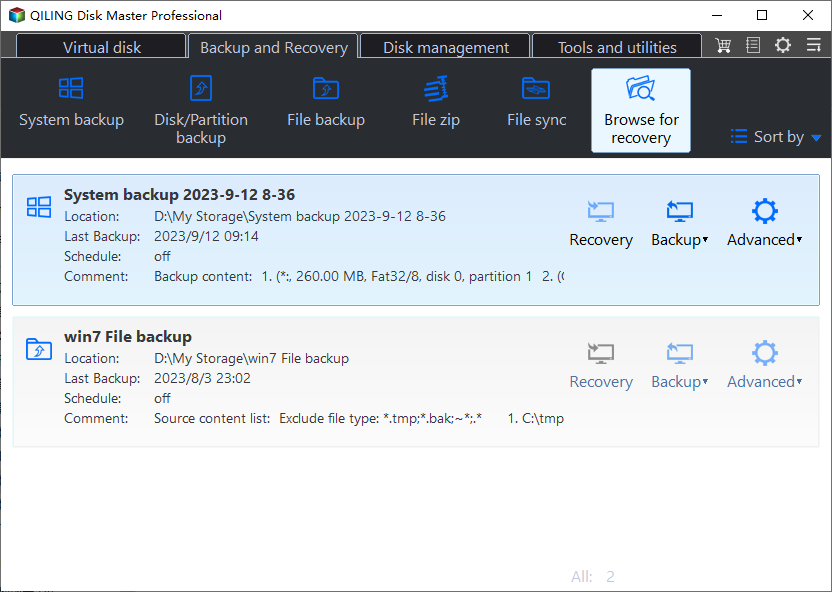
Qiling Disk Master Free DiskGenius offers a complete solution for hard disk backup and recovery, supporting various types of backup, including full and incremental backups, and a wide range of backup media, such as internal hard drives, removable storage devices, Cloud, and network locations, as well as different hard drive types, including IDE, SATA, SCSI, and SSD hard drives.
Main Features:
- File and folder backup allows you to back up specific files, folders, or file types, including documents, photos, music, and email, among other types of data.
- Backing up a disk or partition involves creating a copy of an entire hard drive or a specific partition, allowing you to restore it in case of data loss or system failure.
- Backing up the system involves saving the operating system, installed programs, and settings to prevent data loss in case of a system failure or hardware malfunction.
- Incremental and differential backups only save changed files since the last backup, reducing backup time and storage needs.
- Set up automatic backups to run on a schedule, ensuring your data is safely backed up at regular intervals.
- Pre-OS mode: Restore your system if it won't boot.
- Free Cloud Storage offers users 250GB of free space to save backup files, with options to store them on services like Qiling Cloud, Google Drive, and OneDrive, making it a future-proof backup trend.
Pros:
- Easy backup management
- User-friendly interface
- Multi-path backup storage
- Secured password-protect backups
- Email notification
- Fast backup speed
Cons:
- Need email account to sign in
2. Paragon Hard Disk Manager
Compatibility: Windows 11/10/8/8.1/7 SP1
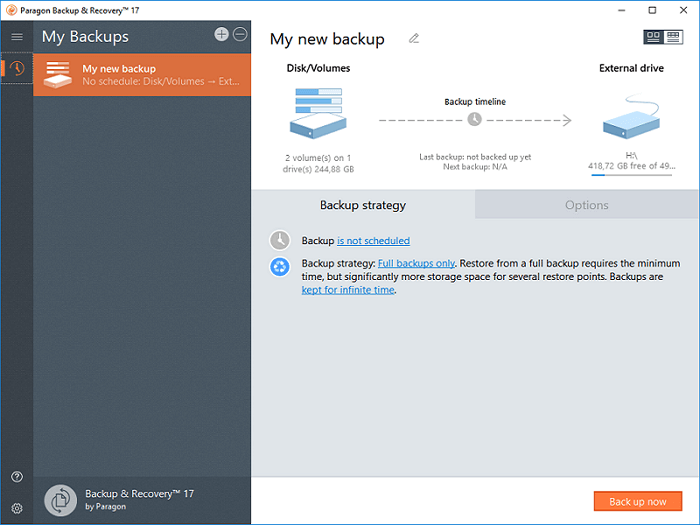
Paragon Hard Disk Backup softwareParagon Hard Disk Manager (HDM) is a complete disk management solution that offers various features such as backup, restore, partition, and formatting, as well as wiping hard drives. Its backup feature is free, but other features incur a charge.
This all-A single utility that eliminates the need to download multiple software is a good option, especially for those familiar with backup processes, as its interface can be somewhat complex.
Main Features:
- Data backup and recovery involves creating copies of important files and data, such as hard drives, partitions, files, and folders, to ensure their safe storage and easy retrieval in case of data loss or system failure.
- Disk and partition management involves various tasks such as creating, resizing, formatting, converting, deleting, and hiding partitions.
- System management involves installing an operating system from a USB drive or DVD. This process allows you to set up a new operating system on a computer, replacing any existing one. By using a USB drive or DVD, you can install the operating system without the need for a separate installation media.
- Disk Wiper is a tool that simplifies the process of wiping HDD or SSDs, regardless of their size. It allows users to clean unused spaces and securely dispose of hard disks.
Pros:
- All-in-one hard drive manager
- Flexible backup and restore options
- Full UEFI support and VM support
- Stable performance and capacity
- Safe and reliable to use
Cons:
- The interface can be overwhelming for those who are not familiar with it, making it difficult for beginners to navigate.
- No Cloud backup is supported
3. Acronis Cyber Protect Home Office
Compatibility: Windows, Mac, Android and iOS
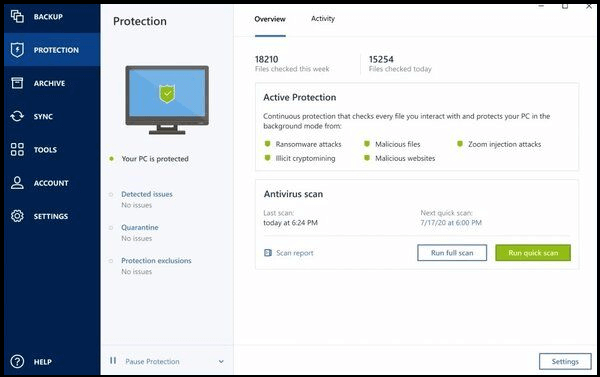
Acronis Cyber Protect Home Office, formerly known as Acronis True Image, is a reliable data protection tool that offers backup and recovery, file sync and sharing, cloud storage, and cybersecurity features.
This computer management program is excellent for backing up all data from your computer, including files, photos, apps, hard disks, and systems.
Its backup feature is free to use. However, to access more features, you need to pay for them.
Main Features:
- Data backup and recovery involves creating copies of important files, folders, and system data to ensure safe storage in case of data loss or system failure. This includes backing up entire hard drives, partitions, and individual files, as well as the entire system, to prevent data loss and minimize downtime.
- A full image backup includes all data on your hard drive, such as the operating system, installed applications, settings, and personal files.
- Incremental and differential backups allow for faster and more efficient backup processes by only storing changes made since the last backup, reducing the time and storage space required.
- Sync files across devices and share them with others using file sync and share features.
- 1 TB of free cloud storage space is offered by Acronis Cloud.
Pros:
- Easy to use
- Flexible backup options
- Offers comprehensive cybersecurity solutions
- Real-time backup
- Quick backup, clone and
Cons:
- No emails notification or chat support for the free version
4. Handy Backup Standard
Compatibility: Windows 11, 10, 8.1, 8, 7, Vista of all editions
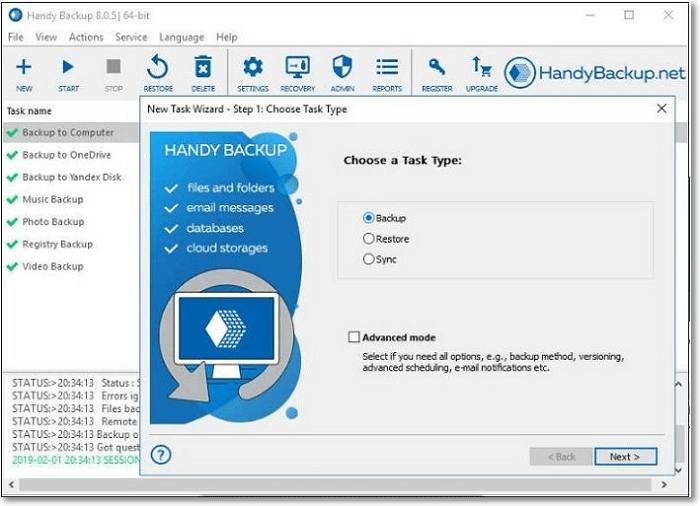
Handy Backup StandardHandyBackup Standard is a popular hard disk backup software that offers an easy-to-use interface and a range of features, allowing users to quickly and easily back up and restore hard drives, files, folders, apps, and other data, including Outlook emails.
Main Features:
- Multi-This device can backup various types of data, including hard drives, partitions, files, folders, emails, documents, videos, and music.
- You can back up your data to various locations, including your local device, an external hard drive, a network storage device, an FTP/SFTP server, a cloud storage service, or a NAS device that uses the WebDAV protocol.
- With flexible scheduled backup, you have the option to run backups at a frequency that suits you, whether it's daily, weekly, monthly, or only as needed.
Pros:
- Ease of use
- Flexible backup options
- Offers encrypted and safe backups protection
- stable performance
Cons:
- Customer support can be spotty
- The system sometimes duplicates efforts and leaves the same task to be repeated multiple times, rather than completing it once and being done with it.
5. Macrium Reflect Free
Compatibility: Windows
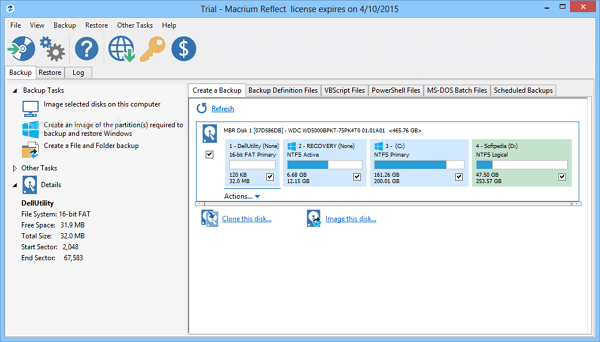
Macrium Reflect FreeMacrium Reflect Free is a feature-rich and powerful free hard disk backup software that provides comprehensive protection for your hard drives and files, allowing you to clone hard drives and partitions, and create system images to prevent data loss due to hard drive failure or system crashes.
Main Features:
- Clone and backup your hard drives and partitions with ease to protect your valuable data.
- Restore non-To resolve booting issues, you can try restoring your system to a previous state when it was working fine. This can be done by reverting to a system restore point, which captures the system's state at a specific point in time.
- Direct disk cloning involves copying the contents of one hard drive directly to another, including the operating system, applications, and settings, resulting in a complete and identical replica of the original drive.
Pros:
- Intuitive interface
- Provide free cloning function
- Flexible backup options
- Offers reliable hard drive protection
- Creates bootable rescue media
- Scalable and navigable log view interface
Cons:
- The backup speed is a little slower than other alternatives
3 Best Scheduled Disk Cloning Software for Windows
With scheduled cloning software, you can easily create backups of your hard drive and protect your data by creating a cloned hard drive that can be used to replace the original in case of a failure. This process eliminates the need for data restoration steps.
Sum Up
The hard disk is a crucial part of a computer that stores all data and information. To prevent data loss, having reliable hard disk backup software is essential. The top five free options available for users to consider include Qiling Disk Master. These software solutions offer varying levels of compatibility, features, and advantages, allowing users to choose the most suitable one based on their specific needs.
Qiling Disk Master Free Qiling Disk Master Free is our top choice for comprehensive hard disk backup and recovery, offering free solutions that are easy to use and have flexible backup options, providing reliable hard drive protection and creating bootable rescue media.
Hard Disk Backup Software FAQ
1. How do I backup my entire hard drive?
You can backup your entire hard drive using various methods, including Windows' built-in feature, Backup and Restore, which allows you to create a system image. Alternatively, you can also use Qiling Disk Master to backup the entire hard disk or specific partitions.
2. Which backup tool is best?
Many backup tools are available, including the built-in Backup and Restore program in Windows 7. However, for a more comprehensive solution, we recommend Qiling Disk Master, a professional backup tool that can backup files, folders, disks, and even the entire system.
3. What is full backup software?
A full backup is a comprehensive backup process that copies all data to a disc or tape for storage, providing a complete copy of all data on one media set, which can then be used as a reference for incremental or differential backups based on actual needs.
4. Which software is used for PC image backup?
Most backup software covers hard disk and PC image backup, with Qiling Disk Master being a top option. It allows for backing up and restoring files, folders, disks, partitions, and systems, and also offers scheduled automatic backup and various types of backup. Additionally, it can be used to migrate an OS to another HDD/SSD.
Related Articles
- How to Cloud Backup for Windows 7 | 2024 Detailed Guide
- 3 Working Ways to Backup Contacts from Outlook | 2024 New
- Best Way to Backup Data to Synology NAS (2024 Choice)
- Can Windows Backup Do Incremental Backups? [Full Guide]
- [Full Guide] How to Install Windows 10 from One PC to Another
- How to Backup Entire Computer to OneDrive [Quick & Easy]
- Put Your Windows 10 on Another Computer
You can transfer your Windows 10 to another computer or a portable device using software that allows you to clone or migrate your operating system and applications to a new device, effectively solving the issue of frequent software crashes and.
Products
Articles & Tutorials
- Data Recovery
- Data Backup
- File Recovery
- File Backup
- System Backup and Restore
- Disk and Partition Clone
- Technical articles
- Mobile articles
- Disk Master Help
- Windows Data Recovery Tutorials
- Windows Secure Delete Tutorials
- Windows Partition Management Tutorials
- Windows File Backup and Restore Tutorials
- Windows System Backup and Restore Tutorials
- Windows Disk Backup and Restore Tutorials
- Windows Clone Tutorials