Best Acronis True Image Alternative for Backup & Cloning (2026)
If you are searching for an Acronis True Image alternative, you are not alone. While Acronis Cyber Protect Home Office (formerly Acronis True Image) is a well-known backup suite, many users find it bloated, expensive, and overly complex for simple backup or disk cloning tasks. In 2026, lighter and more affordable alternatives deliver the core features most people actually need.
Whether you want to back up your Windows system, clone your HDD to an SSD, or migrate Windows to a new drive, the right tool can save you time and money. This guide explains why users switch away from Acronis True Image and introduces the best alternative for backup and disk cloning.
PAGE CONTENT
- Why Users Look for an Acronis True Image Alternative
- Quick Comparison: Top Acronis True Image Alternatives
- Best Acronis True Image Alternative — Qiling Backup & Disk Copy
- How to Back Up Windows System with the Acronis Alternative
- Acronis True Image vs Qiling Backup: Side-by-Side
- FAQs About Acronis True Image Alternatives
Why Users Look for an Acronis True Image Alternative
Acronis True Image has been a popular backup solution for years, but its recent direction has left many users seeking alternatives. Here are the main reasons:
1. It Has Become Bloated
Acronis True Image has evolved into "Acronis Cyber Protect Home Office," bundling antivirus, anti-malware, and cybersecurity features alongside backup. For users who only need backup or cloning, these extra features consume system resources, slow down the PC, and complicate the interface. Many people want a focused tool, not an all-in-one security suite.
2. Subscription Pricing Is Expensive
Acronis True Image requires a yearly subscription. The Essential plan starts around $49.99 per year, and the Advanced plan (which includes antivirus) costs even more. If you need backup for multiple devices, the cost adds up quickly. Many users prefer a one-time purchase or a free option.
3. The Interface Can Feel Overwhelming
Because Acronis packs so many features, the interface can be confusing for beginners. Simple tasks like creating a system backup or cloning a disk require navigating through multiple menus and options. A simpler, wizard-based tool is often faster to use.
4. High Resource Usage
Acronis runs background services for real-time protection and continuous backup. On older or lower-spec PCs, this can noticeably slow down performance, especially during active backups. Users with modest hardware often look for lighter alternatives.
Quick Comparison: Top Acronis True Image Alternatives
Here is a quick overview of the best alternatives to Acronis True Image for backup and disk cloning in 2026:
| Software | Free Version | Resource Usage | Best For | Key Features |
|---|---|---|---|---|
| Qiling Backup & Disk Copy | Yes (free trial) | Low | Backup + cloning | System backup, disk clone, SSD migration, WinPE |
| EaseUS Todo Backup | Yes (limited) | Moderate | Home backup | Full/incremental backup, cloning |
| AOMEI Backupper | Yes (limited) | Low | Backup + cloning | System, disk, partition, file backup |
| Macrium Reflect | No (free discontinued) | Moderate | Disk imaging | Image-based backup, cloning |
| Hasleo Backup Suite | Yes (free) | Low | Free backup | Backup, restore, cloning |
| Veeam Agent | Yes (free for home) | Moderate | Endpoint backup | Image backup, bare-metal recovery |
For users who want a fast, lightweight tool that handles both backup and disk cloning without extra bloat, Qiling Backup & Disk Copy is the best Acronis True Image alternative.
Best Acronis True Image Alternative — Qiling Backup & Disk Copy
Qiling offers two complementary tools that together cover everything Acronis True Image does—without the bloat: Qiling Backup for system/file backup and Qiling Disk Copy for disk cloning and OS migration. Both run on Windows 11/10/8/7 and share a clean, beginner-friendly interface.
Why Qiling Is the Best Acronis True Image Alternative
- System Backup & Restore: Create a complete system image of your Windows OS, applications, and settings. Restore the entire system in minutes after a crash or ransomware attack.
- File & Folder Backup: Back up specific files, folders, or file types to an external drive, NAS, or cloud storage. Supports full, incremental, and differential backups.
- Disk Clone & OS Migration: Clone an entire disk or migrate Windows to a new SSD/HDD without reinstalling. One-click system clone with automatic boot configuration.
- SSD Optimization: 4K partition alignment during cloning ensures maximum SSD performance and lifespan.
- WinPE Bootable Media: Create a bootable USB or CD/DVD to back up, restore, or clone a disk even when Windows cannot boot.
- Lightweight & Fast: Minimal background resource usage. Backups run quickly without slowing down your PC.
- One-Time License: Unlike Acronis, Qiling offers affordable perpetual licenses—no recurring subscription required.
How to Back Up Windows System with the Acronis Alternative
Creating a system backup with Qiling Backup is straightforward and takes only a few minutes. Follow these steps to protect your Windows installation:
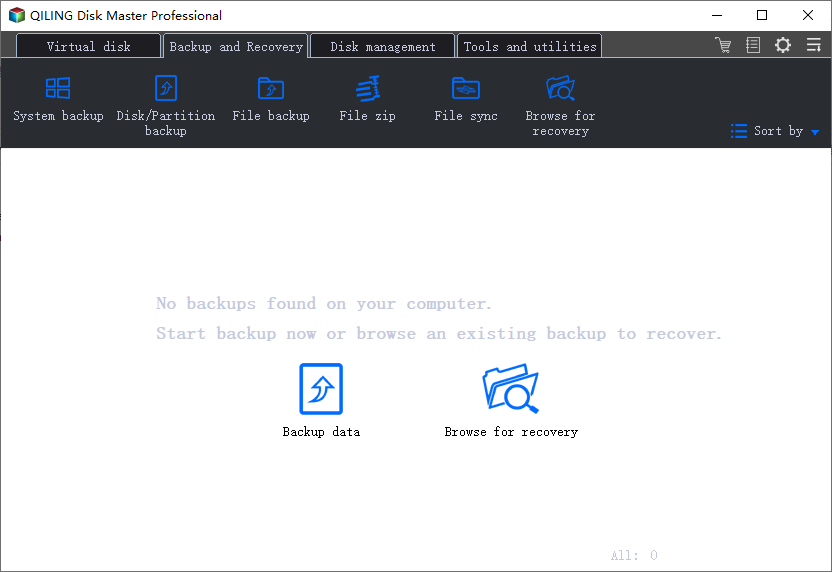
Step 1. Download, install, and launch Qiling Backup. Click "System Backup" on the backup page.
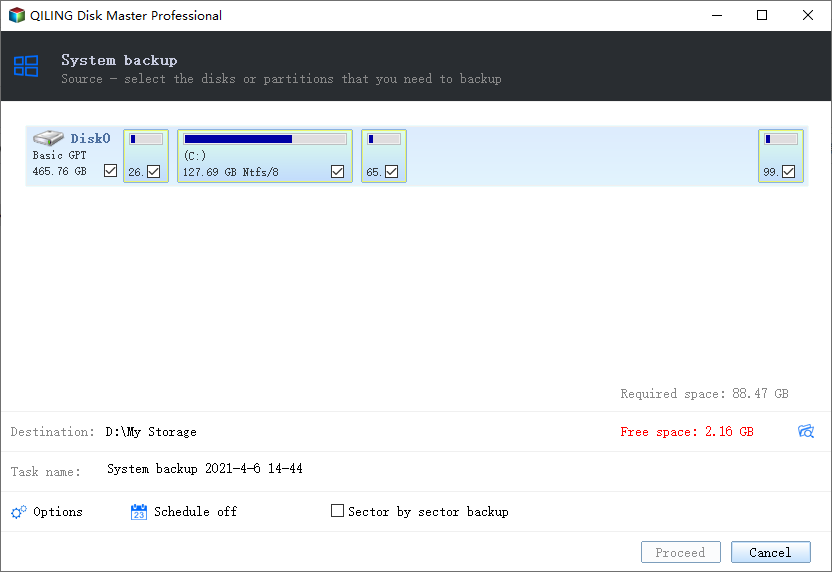
Step 2. Your Windows system partition and boot-related partitions are selected automatically. Choose a destination to save the backup image (external drive, NAS, or cloud).
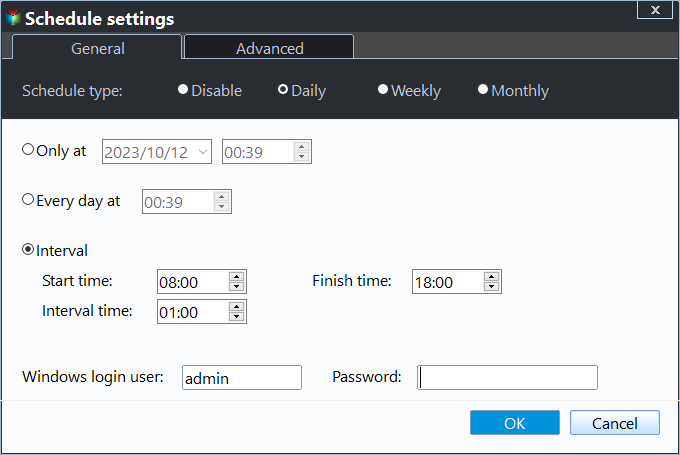
Step 3. (Optional) Click "Schedule" to set automatic backups on a daily, weekly, or monthly basis, or choose incremental/differential backup to save space.
Step 4. Click "Proceed" to start the system backup. Wait for the process to complete.
Step 5. To restore, open Qiling Backup, click "Browse for Recovery," select your backup image, choose the target disk, and click "Proceed." You can also restore from the WinPE bootable media if Windows cannot start.
Acronis True Image vs Qiling Backup: Side-by-Side
| Feature | Acronis True Image | Qiling Backup & Disk Copy |
|---|---|---|
| Antivirus / anti-malware | Yes (bundled) | No (focused on backup) |
| System backup | Yes | Yes |
| File & folder backup | Yes | Yes |
| Incremental / differential backup | Yes | Yes |
| Disk cloning / OS migration | Yes | Yes (one-click) |
| SSD 4K alignment | Yes | Yes |
| WinPE bootable media | Yes | Yes |
| Resource usage | High (bundled security) | Low (lightweight) |
| Licensing | Yearly subscription | One-time license |
| Best for | Users who want backup + security suite | Users who want focused backup & cloning |
If you need a combined backup and antivirus suite, Acronis True Image may still be a fit. But if you want a fast, lightweight, and affordable tool focused on backup and disk cloning, Qiling Backup & Disk Copy is the better choice—no bloat, no recurring fees.
FAQs About Acronis True Image Alternatives
Is there a free alternative to Acronis True Image?
Yes. Qiling Backup offers a free trial, and tools like AOMEI Backupper Standard and Hasleo Backup Suite Free provide free versions with basic backup features. For cloning, Qiling Disk Copy's free trial lets you test the full cloning workflow before purchasing.
What is the best Acronis True Image alternative for cloning?
Qiling Disk Copy is the best alternative for disk cloning and OS migration. It offers one-click system clone, SSD alignment, and support for NVMe/M.2 drives, all with a simpler interface than Acronis.
Can I use Qiling to back up to the cloud?
Yes. Qiling Backup supports saving backup images to Qiling's own cloud storage as well as third-party cloud drives like Google Drive and OneDrive.
Does Qiling support incremental and differential backups?
Yes. Qiling Backup supports full, incremental, and differential backup modes, allowing you to save storage space and reduce backup time after the initial full backup.
Will Qiling slow down my computer like Acronis?
No. Qiling Backup is lightweight and does not bundle antivirus or real-time protection services, so it uses minimal system resources and runs quietly in the background.
Conclusion
Acronis True Image remains a powerful all-in-one suite, but its bundled security features, high resource usage, and recurring subscription pricing make it less ideal for users who only need backup and cloning. If you want a reliable Acronis True Image alternative that is fast, lightweight, and affordable, Qiling Backup & Disk Copy is the best choice.
Download Qiling today and protect your system with a focused, no-bloat backup and cloning solution.
For a task-by-task comparison before choosing a backup or cloning tool, read Acronis True Image vs Qiling for Windows backup and cloning.
Related Articles
- Best Macrium Reflect Alternative for Free Disk Cloning (2026)
- Best Free SSD Cloning Software of 2026: Top 6 Picks
- How to Clone HDD to SSD in Windows 11 Without Reinstalling
- How to Create a Windows 10 System Backup Image
- Best Windows 11 Backup Software (Free & Paid)
Looking for the best Windows 11 backup software? Compare Qiling Backup with top alternatives for system image, file backup, and disaster recovery. - Incremental vs Differential Backup: What's the Difference?
Understand the difference between incremental and differential backups, how each saves space, and which backup type is best for your Windows system.
Products
Articles & Tutorials
- Data Recovery
- Data Backup
- File Recovery
- File Backup
- System Backup and Restore
- Disk and Partition Clone
- Technical articles
- Mobile articles
- Disk Master Help
- Windows Data Recovery Tutorials
- Windows Secure Delete Tutorials
- Windows Partition Management Tutorials
- Windows File Backup and Restore Tutorials
- Windows System Backup and Restore Tutorials
- Windows Disk Backup and Restore Tutorials
- Windows Clone Tutorials