Clone vs Clean Install: Which Suites You Better
When replacing a computer's hard drive (HDD) or solid-state drive (SSD), one decision to make is whether to perform a clone or clean install. A new hard drive typically only serves as a personal storage option unless an operating system is installed, making this choice crucial for getting the computer up and running again.
There are two ways to put the Windows operating system on your hard drive, each with its own advantages. You can either choose to install Windows, which would depend on personal preference, or decide on a different option.
- Clone the current hard drive and move OS to another drive without reinstallation.
- Format the hard drive and clean install from a bootable USB drive.
Making a decision between cloning and clean installing an operating system can be a daunting task, with various methods and suggestions available. This article aims to clarify the process and provide guidance on choosing the best approach. It will also recommend a user-friendly hard disk installation tool to make the process easier.
To create a bootable clone of your Windows 10/8/7 disk to a new HDD/SSD, first, you'll need to back up your data and ensure the new drive is compatible. Next, use a cloning software like Qiling Backup to create an exact copy of your old disk to the new one.
To clone a bootable hard drive for Windows 10, you can choose to clone the entire disk or clone the partition(s) which contain the operating system and related boot files, depending on your specific needs and requirements.
What's Disk/Partition Clone?
Disk/partition cloning is the process of duplicating the entire contents of a hard drive, including the Windows OS, system updates, installed programs, personal files, games, and data, onto another storage medium.
The process of cloning a computer system is faster and many people prefer it over a clean install, as it includes hidden files that might be missed during manual copying.
The storage medium can be either a removable media or another computer's hard drive, ensuring it has enough memory space to take the full content of the source drive, including unwanted files and junk folders. This method, known as disk or partition clone, is the go-to option only when planning to transfer the old drive's entire content to the new one.
To clone a Windows installation, both the source and target drives must be connected to the same computer, either internally or via SATA-to-USB connectors for external drives. Since there's no official Microsoft cloning software, a trusted third-party application is necessary, with Qiling Disk Copy being a recommended option.
The software would require permission to format the target drive before the cloning process begins. A successful clone is achieved when both the source and target drives have the same layout and partition structure after the cloning process is complete.
What's Windows Clean Install?
A Windows clean install involves formatting your current hard drive and installing a new Windows operating system using the Windows installation media, essentially starting from a blank slate and giving your computer a completely fresh start.
Although it is the more time-A clean install of Windows is often preferred over a clone or disk image, especially when dealing with computer memory issues, performance problems, or malware infections. This method essentially gives the computer a "new" feel, effectively solving previously encountered problems. By wiping the slate clean, a clean install can breathe new life into a sluggish system, making it a recommended solution for those seeking to revitalize their computer's performance.
The hard drive is completely wiped, erasing all data, programs, and essentials. This means all files, settings, and applications on the Windows OS version will be lost.
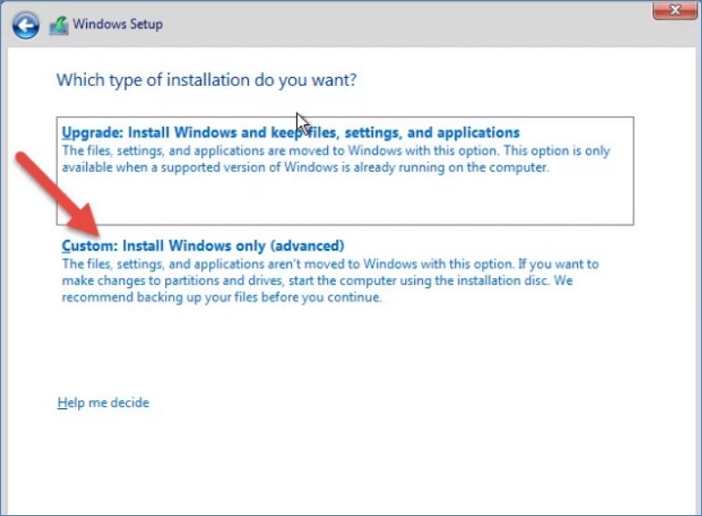
It's recommended to create a backup before starting the clean install process or OS upgrade to prevent data loss, and save it to an external drive or another computer system.
Clone vs Clean Install: Which Suites You Better?
When buying a new HDD or SSD, you have the option to either clone your existing drive or do a clean install of Windows. Cloning is ideal for upgrading your storage capacity or switching to a faster drive, as it preserves your existing settings, files, and installed programs. On the other hand, a clean install is recommended when you're experiencing issues with your current system, want to start fresh with a new installation, or are upgrading to a new Windows version. Ultimately, the choice between cloning and a clean install depends on your specific needs and goals.
Use a disk/partition clone method when:
- You want to replicate the exact configurations of a PC on another computer.
- Installing the same system OS and configurations on multiple computers at once.
- Restoring an existing hard drive to its original settings and setup involves resetting the drive to its factory default configuration, effectively erasing all data and programs installed on it. This process, often referred to as a "factory reset," typically involves accessing the drive's built-in recovery mode, which can usually be accessed by pressing a specific key combination during the boot process.
- Migrating important data and hard drive contents to a new disk involves transferring all necessary files, programs, and settings from the old disk to the new one, ensuring a seamless transition and minimizing downtime. This process typically includes backing up data, reinstalling the operating system and applications, and restoring the backed-up data to the new disk, while also updating any necessary drivers and settings.
Use a Windows Clean Install when:
- Troubleshooting problems with the current computer's operating system.
- Eliminating malware and other security threats.
- To upgrade to a new Windows OS version without any side problems, it's essential to create a backup of your data and files, and to check for any compatibility issues with your existing hardware and software. This can be done by running the Windows Upgrade Advisor, which scans your system for any potential problems.
- You experience low-performance challenges even after uninstalling some programs.
If You Want to Clone a System or Disk, Choose Qiling Disk Copy
The clean install option can be stressful due to the need to manually backup data and files, but it's recommended when there's a hard drive issue, offering similar results to cloning.
Cloning a system is a more efficient option than reinstalling it. The cloning process creates an exact copy of the system, including data and configuration, which can serve as a restore point or duplicate another computer system. This eliminates the need for manual installation, saving time and effort.
There is no official cloning software from Microsoft, so you need to use a third-party solution like Qiling Disk Copy, which can effectively replace your hard drive, upgrade the disk, and migrate the OS version, all without the need for a time-consuming reinstallation process.
Why Qiling Disk Copy?
- The cloning option is reliable and has a user-friendly interface that makes it accessible to anyone, even those without technical expertise.
- Effectively creates a 100% copy of your Windows OS version.
- When transferring data and configuration settings to another SSD or HDD, this solution guarantees zero file loss, ensuring a seamless and secure transition.
How to use Qiling Disk Copy?
Step 1. Download, install and run Qiling Disk Copy on your PC.
To copy or clone a hard drive, select the hard drive you want to copy or clone by clicking "Disk Mode" and choosing the drive from the list. Then, click "Next" to proceed.
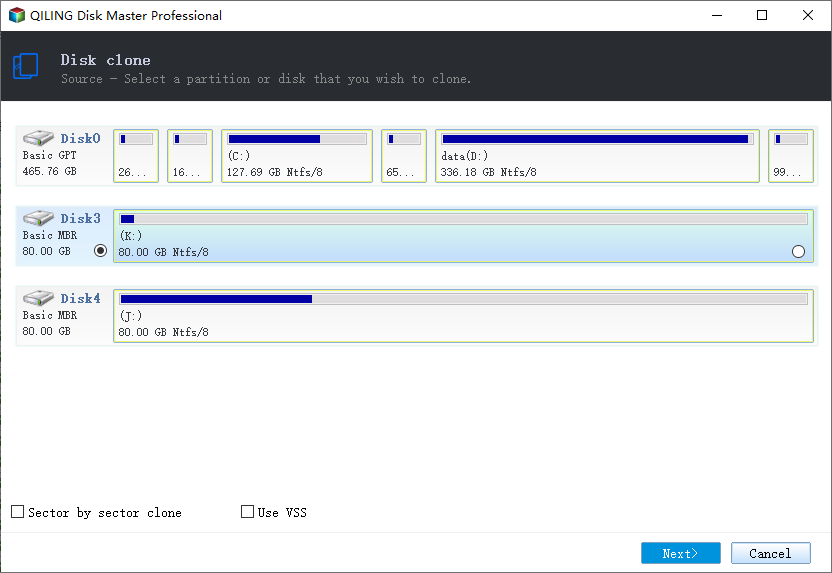
Step 2. Select the destination disk.
Note: To successfully copy or clone a hard disk, ensure that the destination disk is at least as large as, or preferably larger than, the source disk. This is to accommodate any data that may be present on the source disk.
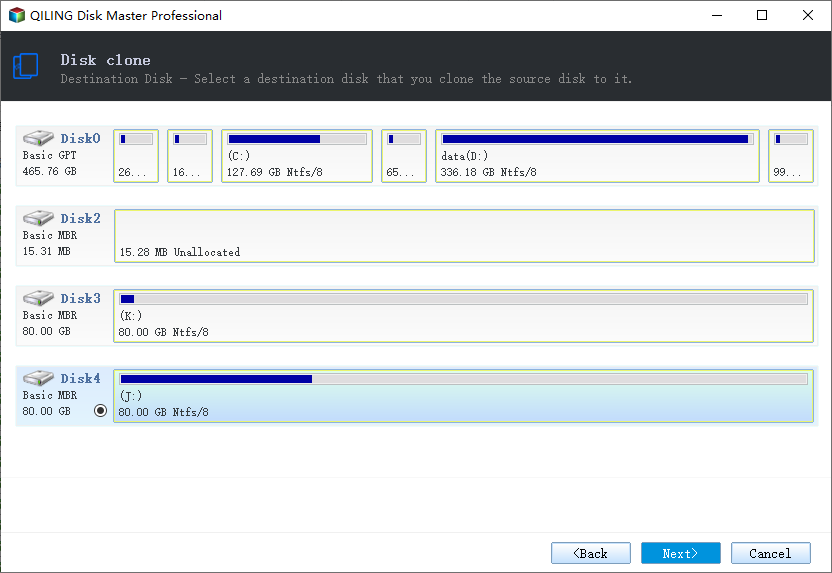
Step 3. The program will ask to confirm erasing data on the destination disk, prompting the user to click "OK" to proceed with the operation.
Step 4. Check and edit the disk layout.
If your destination disk is an SSD drive, make sure to check the option to optimize for SSD.
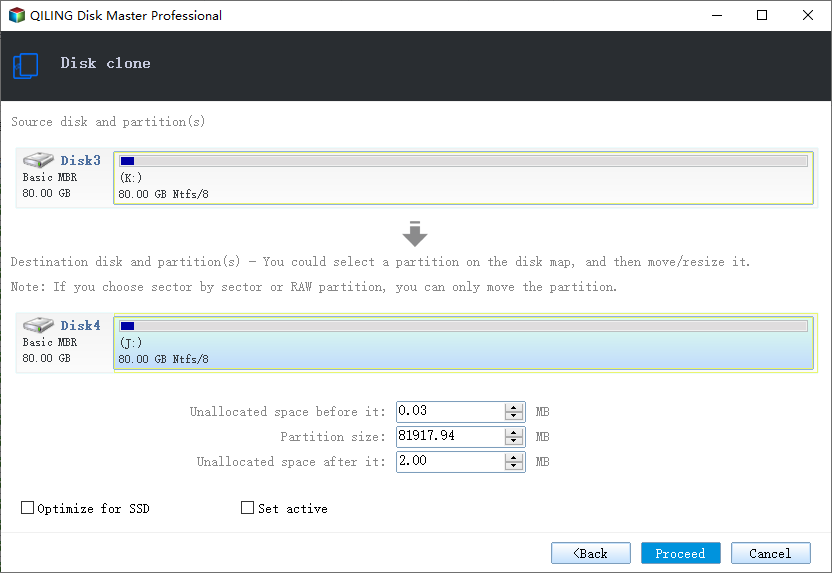
Step 5. Click "Proceed" to start the hard drive cloning process.
Conclusion
Deciding between cloning and clean install depends on your computer's system. If your Windows OS and hard drive are functioning well, cloning software is sufficient. However, if you're experiencing issues with the OS and hard disk performance, a Windows Clean Install is the better option.
The Qiling Disk Copy is a software that can perfectly clone your computer system and provide backup support for a clean install, making it the best solution to the clone vs clean install question, and it's easy to use.
For choosing between a disk clone and a disk image, read Disk Cloning vs. Disk Imaging: Which Should You Use?
Related Articles
- How to Clone Laptop Hard Drive and Operating System
- How to Upgrade to M.2 SSD without Reinstalling Windows
- Find Macrium Reflect Alternative to Clone HDD and SSD or Migrate OS
- (2022) Top 2 Silicon Power Cloning Software
- Windows Server 2016 Repaired with Command Prompt (Attached Tutorial)
Do you get stuck in Windows Server 2016 boot failure and desire to figure out how to repair it? Learn how to repair Server 2016 with Command Prompt and a powerful backup and restore tool from this page. - [Solved] Windows Server Backup 2012 (R2) Not Showing
If you are experiencing the Windows Server Backup 2012 not showing error, please continue to read this article and learn how to fix them easily and quickly.
Products
Articles & Tutorials
- Data Recovery
- Data Backup
- File Recovery
- File Backup
- System Backup and Restore
- Disk and Partition Clone
- Technical articles
- Mobile articles
- Disk Master Help
- Windows Data Recovery Tutorials
- Windows Secure Delete Tutorials
- Windows Partition Management Tutorials
- Windows File Backup and Restore Tutorials
- Windows System Backup and Restore Tutorials
- Windows Disk Backup and Restore Tutorials
- Windows Clone Tutorials