[2022 Featured Pick] 5 Best Backup Software for Small Business
Backup software is a necessary essential for any small business. So, which one is the best for them?
Backup software is a crucial tool for businesses and individuals to protect their data from loss, ensuring that important documents, images, and other files are safely secured in case of unexpected events or system failures.
In the event of a disaster, businesses need a reliable solution to ensure their critical data is safe. Given the importance of securing files on an enterprise level, backup software emerges as the most viable option. It provides a reliable way to safeguard data, making it a crucial investment for companies that require a high level of data protection.

For small business owners, creating a reliable data backup system is crucial. To achieve this, consider implementing a robust backup software that can safeguard your business's vital information. By doing so, you can ensure that your data is secure and can be easily recovered in case of any unexpected events or system failures.
Data backup is the process of creating copies of electronic data to be restored in case of data loss or other problems, requiring periodic repetition to ensure data safety.
The frequency of backups should depend on the importance and size of the data, as well as how often they are accessed. To address these concerns, small businesses and computer users employ data backup software, which helps ensure that critical information is safely stored and easily recoverable in case of data loss or system failure.
These essential tools and utilities enable small businesses to create hassle-free backups, securing their valuable data and providing peace of mind about their important documents and files.
So, let's keep digging to find out which tools are the best in 2022.
You may be interested:
Features to Consider while Choosing Backup Software for Small Business
When searching for backup software, don't settle for the first option that comes up - it's often a bad deal. Instead, take the time to explore your options and choose the best one that meets your needs.
When choosing the best backup software, some features to look for include tools that have features such as automatic backups, data compression, and encryption, as well as the ability to backup to multiple destinations, such as local drives, cloud services, or external hard drives. This can help make the process easier and ensure that your data is protected.
- The ideal price for your business needs is one that balances cost with performance. Consider the price-to-performance ratio, where the best value is achieved when the cost is proportionate to the benefits provided. This ensures you're getting the most out of your investment.
- When choosing a backup tool, compatibility is a crucial factor to consider. Many outdated backup tools may not work well on modern operating systems like Windows 10 or 11, so it's essential to select software that is compatible with your system.
- For personal users, some backup tools may be sufficient, but for businesses, they often fall short. These tools are typically only good for backing up small amounts of data, such as a few gigabytes, and may not provide the adequate storage needed for a larger-scale operation. In contrast, a tool that offers robust Cloud storage capabilities is ideal for businesses, providing the scalability and reliability needed to back up and protect large amounts of data.
- To summarize, when choosing a backup tool, prioritize ease of use and simplicity to avoid any hassle during the backup process.
When selecting backup software, consider the following key features to ensure you make an informed decision. Look for software that offers robust data protection, including automatic backups, versioning, and encryption. Ensure it supports multiple file types and platforms, such as Windows, macOS, and mobile devices.
Featured 5 Best Backup Software for Small Business
Here are the top 5 backup software that you need in today's world:
1. Qiling Backup Enterprise
Qiling Backup for Enterprise is one of the leading software tools that small businesses can utilize, offering a range of efficient options that provide swift backup capabilities.

This Windows backup software supports all versions from 7 to 11 and offers a 30-day money-back guarantee, providing a risk-free solution for users. With its excellent rating on Trustpilot, it's highly unlikely that users will want to return it, making it the top choice for small businesses today.
Price Plans:
- Workstation – $49 per year
- Server – $199 per year
- Advanced Server – $299 per year
Pros
- Supports backup SQL databases and exchange emails
- Creates a centralized backup point
- Very affordable in terms of features and price
- MySQL Automatic backup
- Automatic cloning of your work hard drive, systems, files, emails
- Offers a free trial
- Auto clone hard drive
Cons
- You need to use the email account to sign in
2. Acronis Cyber Backup
Acronis Cyber Protect (formerly Acronis Cyber Backup) is a comprehensive data protection solution designed for small businesses, combining backup with advanced cybersecurity features.
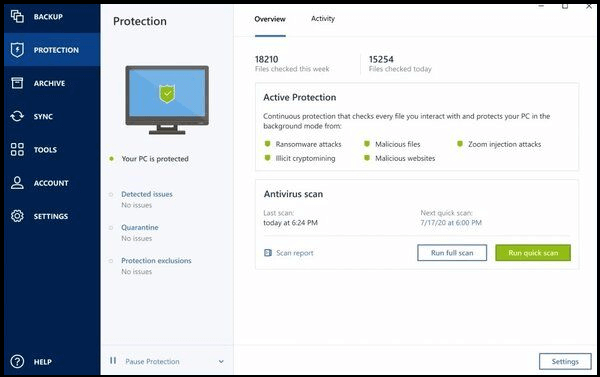
This tool allows you to create file and disk-image backups, which can be stored on external devices, NAS servers, or cloud storage, making it a reliable option for safeguarding important data.
Price Plans:
- Essentials – $65
- Standard – $85
- Advanced – $129
- Backup Advanced – $109
Pros
- Supports up to 20 platforms
- Very quick in recovery
- Effective ransomware protection
- Malware blockage
Cons
- Difficult to configure
- Backup isn't the leading utility
- Cloud dashboard can act up sometimes
3. Altaro VM Backup
Altaro VM Backup is a software solution that provides thorough backup and recovery control for VMware-based virtual machines, as well as replication for Hyper-V environments. It offers a simple design and intuitive dashboard to create and manage backups efficiently.
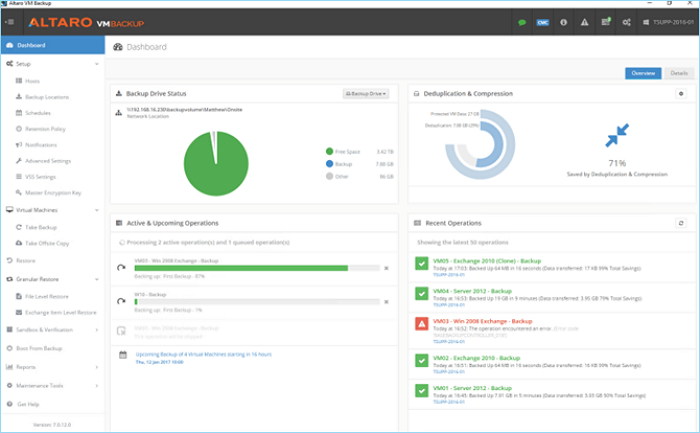
The tool provides easy backup options and integrates with Boot VM, allowing you to boot from any device if the primary data drive fails, ensuring your small business can continue operating even in hardware failure.
Price Plans:
- Free version
- Standard – $595 per host
- Unlimited – $695 per host
- Unlimited Plus – $875 per host (Unlimited VMs per host)
Pros
- High-quality VM control
- An ideal dashboard to control everything
- Boot from backup
Cons
- Very difficult to use for a beginner
- A bit on the expensive side
4. Macrium Reflect 8 Workstation
Macrium Reflect Workstation is another solid option for small businesses, offering a balance of security and features. While it may be considered overkill for some, it is ideal for those prioritizing data security over price or ease of use.
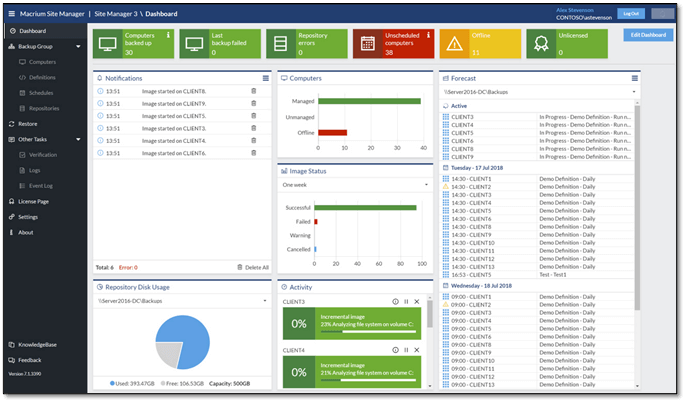
This program allows users to create incremental and differential backups, providing a safeguard against data loss. Additionally, it enables virtual booting from images, which can be particularly useful in scenarios where the operating system or hardware is compromised. This feature can be a valuable asset for businesses seeking to mitigate potential disruptions.
Price Plans:
- Workstation – $75 per year
- Server – $299 per year
- Server Plus – $599 per year
Pros
- Very strong data security
- Rapid boot recovery
- Creates physical and virtual partitions for backup
Cons
- Extremely difficult to use
- Lack of cloud storage
5. Carbonite Backup for Small Businesses
Carbonite is one of the leading names in the backup business, trusted by small businesses worldwide for its reliable cloud backup services.
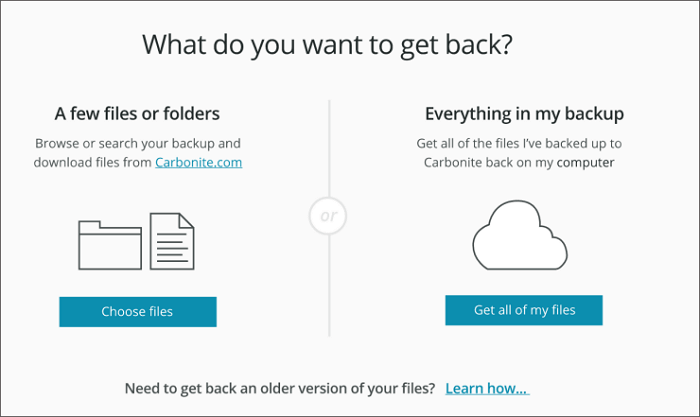
This solution provides comprehensive protection for all devices within a small enterprise, including laptops, desktops, servers, and external storage, making it a convenient and reliable option for small businesses worldwide.
Price Plans:
- One-Three Computers – $6 per month
- Over 25 Computers – $24 per month
- Computers and Servers – $50 per month
Pros
- Simple to use
- Easy to create backups
- Offers backup for up to 25 PCs at a time
- Ransomware protection
Cons
- The dashboard is not very thorough
- The recovery process can be simplified a bit further
The Bottom Line
For small businesses, the following are some of the most dependable and viable backup software options available today, each meeting the criteria of ease of use, reliability, and affordability, making them suitable choices for businesses of all sizes.
Qiling Backup Enterprise stands out as the most reliable, affordable, and best option for small businesses today, hitting the sweet spot in terms of its value proposition.
FAQ on Small Business Backup Software
This section will address your further questions and queries.
1. What is the best backup solution for a small business?
Qiling Backup Enterprise stands out as the top choice for small businesses today, as per the standard we discussed.
2. What is the 3-2-1 backup rule?
The 3-2-1 data backup rule means keeping at least three copies of your data, stored on two different types of media, with one copy stored offsite. This strategy ensures you can recover your data even if one backup fails or is destroyed.
Related Articles
- 6 Best Free VM Backup Software Examples
- How to Back Up Windows Server 2016 [Step by Step]
- A Complete Guide to Windows Server Backup and Restore [2022 Update]
- How to Stop Windows Server Backup (WSB) in 2 Ways
- [Newly Updated] How to Download and Backup Facebook Photos
We will teach you how to back up Facebook photos in two ways on this page. You can manually download photos from Facebook and back them up, or you can use professional file backup software to keep Facebook photos automatically. - Which One is Better: Backup or Copy Files
This article examines two approaches to backup your PC: Backup or Copy Files.
Products
Articles & Tutorials
- Data Recovery
- Data Backup
- File Recovery
- File Backup
- System Backup and Restore
- Disk and Partition Clone
- Technical articles
- Mobile articles
- Disk Master Help
- Windows Data Recovery Tutorials
- Windows Secure Delete Tutorials
- Windows Partition Management Tutorials
- Windows File Backup and Restore Tutorials
- Windows System Backup and Restore Tutorials
- Windows Disk Backup and Restore Tutorials
- Windows Clone Tutorials